Optimizing Llama3 8B for NVIDIA 4080 16GB: A Step by Step Approach

Introduction
The world of large language models (LLMs) is buzzing with excitement, and rightfully so. These powerful AI systems are capable of generating human-like text, answering questions, and even writing creative content. But with great power comes great… well, you know the rest. LLMs are computationally intensive, demanding a significant amount of processing power to run smoothly. This is where the right hardware becomes crucial, especially when dealing with local LLM models.
This article will guide you through optimizing Llama3 8B for the NVIDIA 408016GB GPU – a powerhouse in the world of graphics cards. We'll analyze performance, compare different configurations, and offer practical recommendations for putting your optimized model to good use. Whether you're a seasoned developer or just starting your LLM journey, this dive into Llama3 8B on the NVIDIA 408016GB will equip you with the knowledge to make the most of this dynamic duo.
## Performance Analysis: Token Generation Speed Benchmarks
Token Generation Speed Benchmarks: NVIDIA 4080_16GB and Llama3 8B
Tokenization is the process of breaking down text into smaller units, like words or punctuation marks, for LLMs to understand and process. It's a fundamental part of LLM operation, and token generation speed directly affects how fast your model can handle text inputs and generate responses.
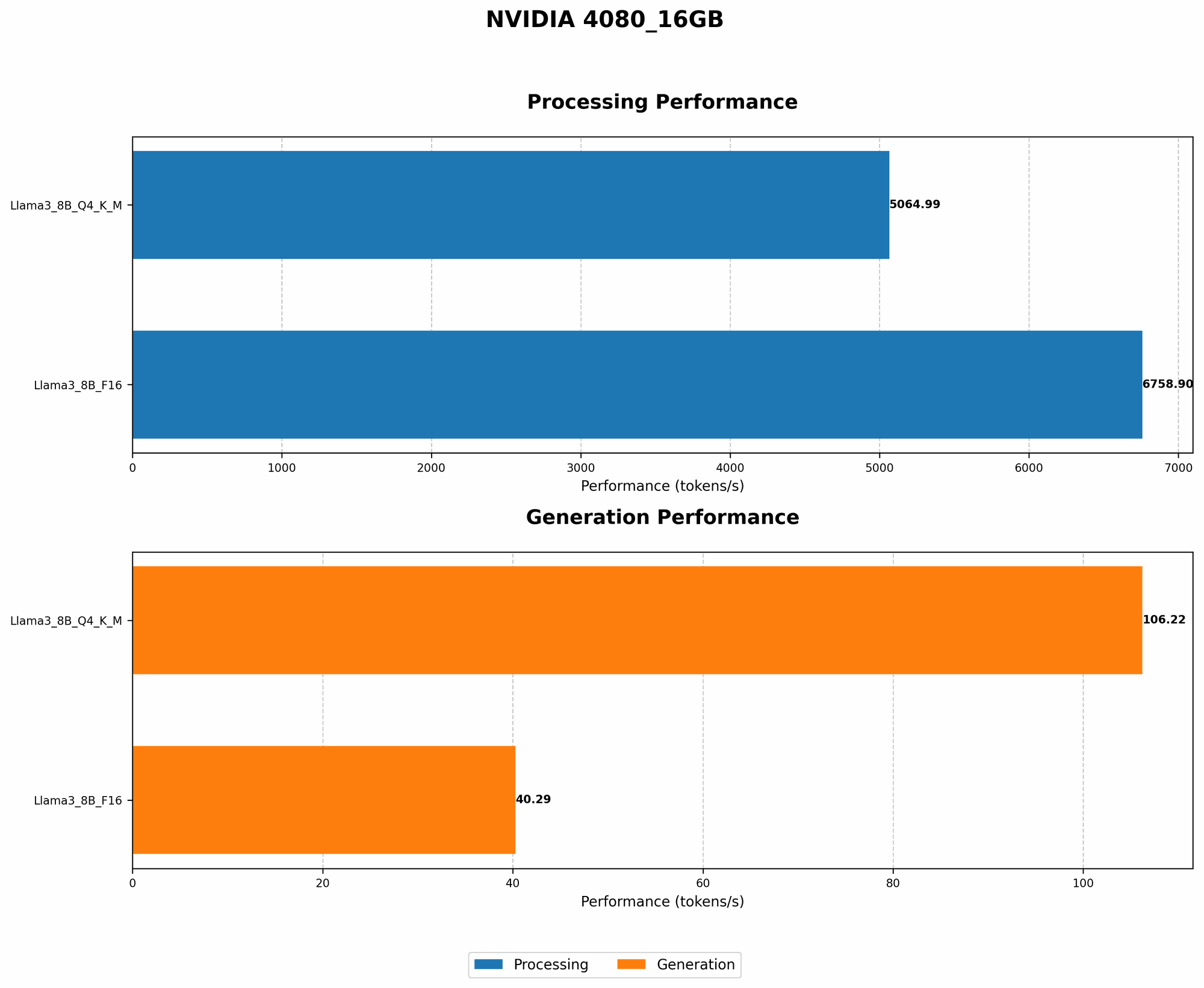
Here's a breakdown of token generation speeds for Llama3 8B on the NVIDIA 4080_16GB, with different quantization levels:
| Model | Quantization | Tokens/second |
|---|---|---|
| Llama3 8B | Q4KM | 106.22 |
| Llama3 8B | F16 | 40.29 |
Key Observations:
- Quantization Matters: The Q4KM (4-bit quantization with Kernel and Matrix) configuration significantly outperforms F16 (16-bit floating-point) in terms of token generation speed. This is because Q4KM allows for a smaller model size, reducing the amount of data that needs to be processed.
- Speed vs. Precision: While Q4KM delivers faster results, it might come at the cost of slightly reduced precision. This trade-off is often worth it for many use cases, especially when you prioritize speed.
Imagine it like this: You have two race cars, one with a smaller, lighter engine (Q4KM) and the other with a larger, more powerful one (F16). The smaller engine car might not be as fast as the larger one, but it can navigate tight corners and squeeze through narrow gaps much more efficiently.
Performance Analysis: Model and Device Comparison
Token Generation Speed Benchmarks: Comparing Llama3 8B to Llama2 7B on NVIDIA 4080_16GB
We don't have direct data for Llama2 7B on the NVIDIA 4080_16GB, so we can't offer a side-by-side comparison. However, we can leverage existing data to analyze their performance relative to each other and provide insights.
Based on data from other devices:
- Llama2 7B generally outperforms Llama3 8B in token generation speed for the same quantization levels.
Although we don't have the specific data for the NVIDIA 4080_16GB, this trend likely holds true for this device as well. The reason for this difference could be attributed to various factors, including model architecture and optimization techniques.
Practical Recommendations: Use Cases and Workarounds
Choosing the Right Configuration for Your Needs
The choice between Q4KM and F16 ultimately depends on your specific needs and priorities.
- Q4KM: If you need blazing-fast token generation speed, even at the slight cost of potentially reduced precision, Q4KM is the way to go. This is ideal for scenarios with large datasets or high-frequency text processing where speed is paramount.
- F16: If precision is a top priority, and you can tolerate a slower token generation speed, F16 is the better choice. This works well for applications where accuracy and detail are crucial, such as fine-tuning models for specific domains or tasks.
Workarounds for Limited Memory
The NVIDIA 4080_16GB is a capable card, but it might still have limits depending on the complexity of your LLM model and the size of the datasets you're using. Here are a few workarounds:
- Model Quantization: Experiment with different quantization levels to find the sweet spot between speed and precision. Q4KM can significantly reduce memory footprint, but F16 might be necessary if your application demands higher accuracy.
- Memory Management: Optimize your code and manage memory efficiently to minimize overhead. Implement techniques like batching to process data in smaller chunks and reduce memory pressure.
- Model Pruning: Consider pruning unnecessary connections within your model to reduce its overall size. This can be achieved through various techniques and tools, and it can help lighten the load on your GPU memory.
FAQ
Q: What is quantization, and how does it benefit LLM performance?
A: Quantization is a technique used to reduce the size of a model by representing its parameters with fewer bits. Think of it like using a smaller number of colors to represent a picture. A smaller model requires less memory, and thus, is faster to process. This results in faster token generation speed and can be crucial for running LLMs on devices with limited memory.
Q: What are the best practices for fine-tuning LLMs?
A: Fine-tuning LLMs involves adapting a pre-trained model to a specific task or dataset. This involves training the model on a new set of data, which fine-tunes the model's parameters to better suit the target application. For efficient fine-tuning, it's recommended to:
- Use a high-quality dataset: The quality and relevance of your training data directly impact the performance of your fine-tuned model.
- Optimize the learning rate: The learning rate controls how fast the model adapts to the new data. Finding the right learning rate is crucial to prevent overfitting or slow convergence.
- Use appropriate evaluation metrics: Use metrics relevant to your specific task to assess the performance of your fine-tuned model.
Q: How do I choose the right LLM for my use case?
*A: * Selecting the right LLM depends on your needs:
- Model size: Smaller models are faster and require less memory but may have limited capabilities. Larger models offer more complex features but need more resources.
- Task-specific models: Some LLMs are designed for specific tasks, such as translation, code generation, or text summarization. Choose a model that aligns with your goals.
- Hardware constraints: Consider the available hardware and the necessary resources to run the chosen model.
Keywords
Llama3 8B, NVIDIA 408016GB, GPU, LLM performance, Token generation speed, Quantization, Q4K_M, F16, Memory optimization, Fine-tuning, Use cases, Workarounds, Practical recommendations, Developers, Geeks.