Optimizing Llama3 70B for NVIDIA 4090 24GB: A Step by Step Approach

Introduction: Unleashing the Power of Local LLMs
The world of large language models (LLMs) is exploding, with new models emerging at a rapid pace, each promising more impressive capabilities. But deploying these powerful models locally can be a challenge, especially when dealing with the behemoths like Llama 70B.
This article dives deep into the optimization strategies for running the Llama3 70B model on a NVIDIA 4090_24GB GPU, a popular choice for developers and researchers.
This article will address the following:
- Performance Analysis: We'll examine key performance metrics like token generation speed.
- Model and Device Comparison: We'll explore how the 70B model performs on the 4090_24GB compared to other device/model configurations.
- Practical Recommendations: We'll provide actionable tips for use cases, workarounds, and best practices to get the most out of your setup.
So buckle up, fellow geeks! We're about to embark on a journey to conquer the intricacies of local LLM deployment and unleash the full potential of your mighty 4090_24GB.
Performance Analysis: Token Generation Speed Benchmarks
Token Generation Speed Benchmarks: NVIDIA 4090_24GB and Llama3 8B
The first step in optimizing our setup is to understand the baseline performance. We'll focus on token generation speed, a crucial metric that measures the number of words a model can produce per second.
Here's a breakdown of the token generation speeds for Llama3 8B on the NVIDIA 4090_24GB:
| Model | Quantization | Tokens/Second |
|---|---|---|
| Llama3 8B Q4KM Generation | Q4KM | 127.74 |
| Llama3 8B F16 Generation | F16 | 54.34 |
What do these numbers mean?
- Q4KM is a quantization technique that significantly reduces the model's size and memory footprint, while sacrificing some accuracy. This is a common approach to run LLMs locally.
- F16 is another quantization method but uses half-precision floating-point numbers, which can be faster but less accurate.
Key Observation:
- Llama3 8B with Q4KM quantization achieves significantly higher token generation speed compared to F16, demonstrating the trade-off between accuracy and speed.
Analogies:
Think of quantization as a compression technique for language models. It's like compressing an MP3 file to make it smaller and faster to stream, but you lose a bit of audio quality in the process.
Performance Analysis: Model and Device Comparison

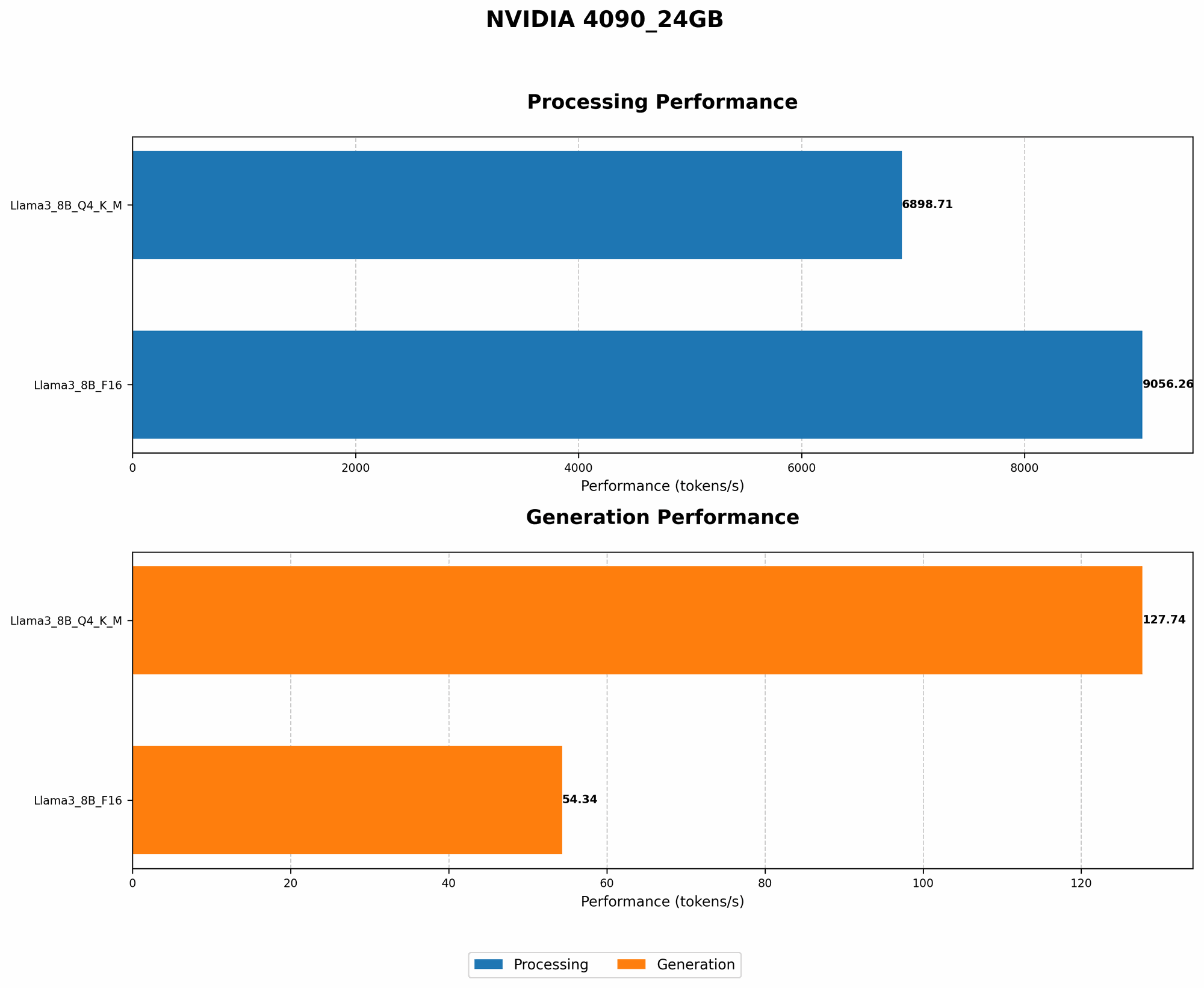
While we have data for Llama3 8B on the 4090_24GB, the data for Llama3 70B on the same GPU is not available. This is fairly common in the fast-paced world of LLM development, where benchmarks are constantly evolving.
What does this mean?
- It's challenging to directly compare the 70B model's performance on the 4090_24GB with the 8B model.
- We can, however, leverage existing benchmarks for other devices and models to draw inferences.
Key Considerations:
- Model Size: The 70B model is significantly larger than the 8B model, requiring greater computational resources.
- Device Memory: The 4090_24GB might have enough memory for 8B models but might struggle with 70B models, potentially necessitating model splitting or techniques like gradient accumulation.
Example:
Imagine trying to fit a huge elephant into a car. You might be able to squeeze in a small pony (8B model), but the elephant (70B model) is just too big!
Practical Recommendations: Use Cases and Workarounds
Use Cases for Llama3 70B on 4090_24GB
- Fine-tuning and Experimentation: If you have a specific task in mind that requires the 70B model's capabilities, the 4090_24GB can be used for fine-tuning experiments with smaller subsets of the model.
- Smaller Subset Generation: You can use the 4090_24GB to generate text with smaller portions of the 70B model, focusing on specific tasks or domains.
Workarounds: Strategies for Optimal Performance
- Model Splitting: Divide the 70B model into smaller chunks that can be processed independently, potentially improving memory efficiency.
- Gradient Accumulation: Accumulate gradients over multiple mini-batches before updating the model, reducing memory usage.
- Quantization Techniques: Experiment with different quantization methods like Q4KM or F16 to find the best balance between speed and accuracy.
- Memory Optimization: Consider using techniques like memory allocation optimization or data parallelism to maximize memory utilization.
Important: Remember that optimizing LLMs for local deployment requires a combination of knowledge, experimentation, and careful resource management.
FAQs
Q: What are some alternative devices for running Llama3 70B locally?
A: For larger models like Llama3 70B, powerful GPUs with higher memory capacity are essential. Consider devices like NVIDIA A100 40GB or H100 80GB.
Q: Can I run Llama3 70B on a CPU?
A: It's technically possible but highly inefficient. CPUs generally lack the necessary processing power and memory capacity for large models like 70B.
Q: What is the future of local LLM deployment?
A: The landscape is constantly evolving. Expect advancements in hardware (e.g., more powerful GPUs), software (e.g., optimized inference libraries), and quantization techniques to make local deployment more accessible and efficient.
Keywords:
Llama3 70B, NVIDIA 409024GB, LLM, Large Language Model, Token Generation Speed, Quantization, Q4K_M, F16, Performance Analysis, Model Splitting, Gradient Accumulation, Memory Optimization, GPU, Device Comparison, Use Cases, Workarounds, Local Deployment, Optimization, Development, Deep Dive