Optimizing Llama3 70B for Apple M1 Max: A Step by Step Approach
Introduction
The world of local LLM models is buzzing with excitement! These powerful models, capable of generating human-like text, are now accessible on our personal devices. But harnessing their full potential requires careful optimization, especially when dealing with the massive Llama3 70B model on a machine like the Apple M1_Max.
This article serves as your guide to maximizing the performance of the Llama3 70B on the Apple M1_Max, taking you through the intricacies of model quantization, performance analysis, and practical recommendations for real-world applications. Buckle up, because we're about to dive deep into the fascinating world of local LLMs!
Performance Analysis: Token Generation Speed Benchmarks: Apple M1_Max and Llama3 70B
One of the key factors that influence the user experience with LLMs is their token generation speed, which dictates how quickly they produce text. Let's analyze how the Llama3 70B model performs on the Apple M1_Max, focusing on different quantization levels. Think of quantization as a way of making the model smaller and more efficient by representing numbers with less precision. It's like trading a high-resolution photo (F16) for a lighter, compressed version (Q4) – you still get the picture, but it takes up less space.
| Model | Quantization | GPUCores | Bandwidth (GB/s) | Processing (tokens/sec) | Generation (tokens/sec) |
|---|---|---|---|---|---|
| Llama3 70B | Q4K_M | 32 | 400 | 33.01 | 4.09 |
| Llama3 70B (F16, not supported on Apple M1_Max) | F16 | 32 | 400 | N/A | N/A |
Observations:
- The Llama3 70B model exhibits impressive performance even on the Apple M1Max, with a tokens/second generation speed of about 4.09 when using the Q4KM quantization level (this is a more compressed version of the model).
- F16 quantization is not supported on the Apple M1_Max, meaning we can't assess its performance. This is likely due to certain hardware limitations.
- As you might expect, higher quantization levels (Q4K_M) generally lead to lower token generation speeds. This is the trade-off for choosing a more compact model.
Performance Analysis: Model and Device Comparison
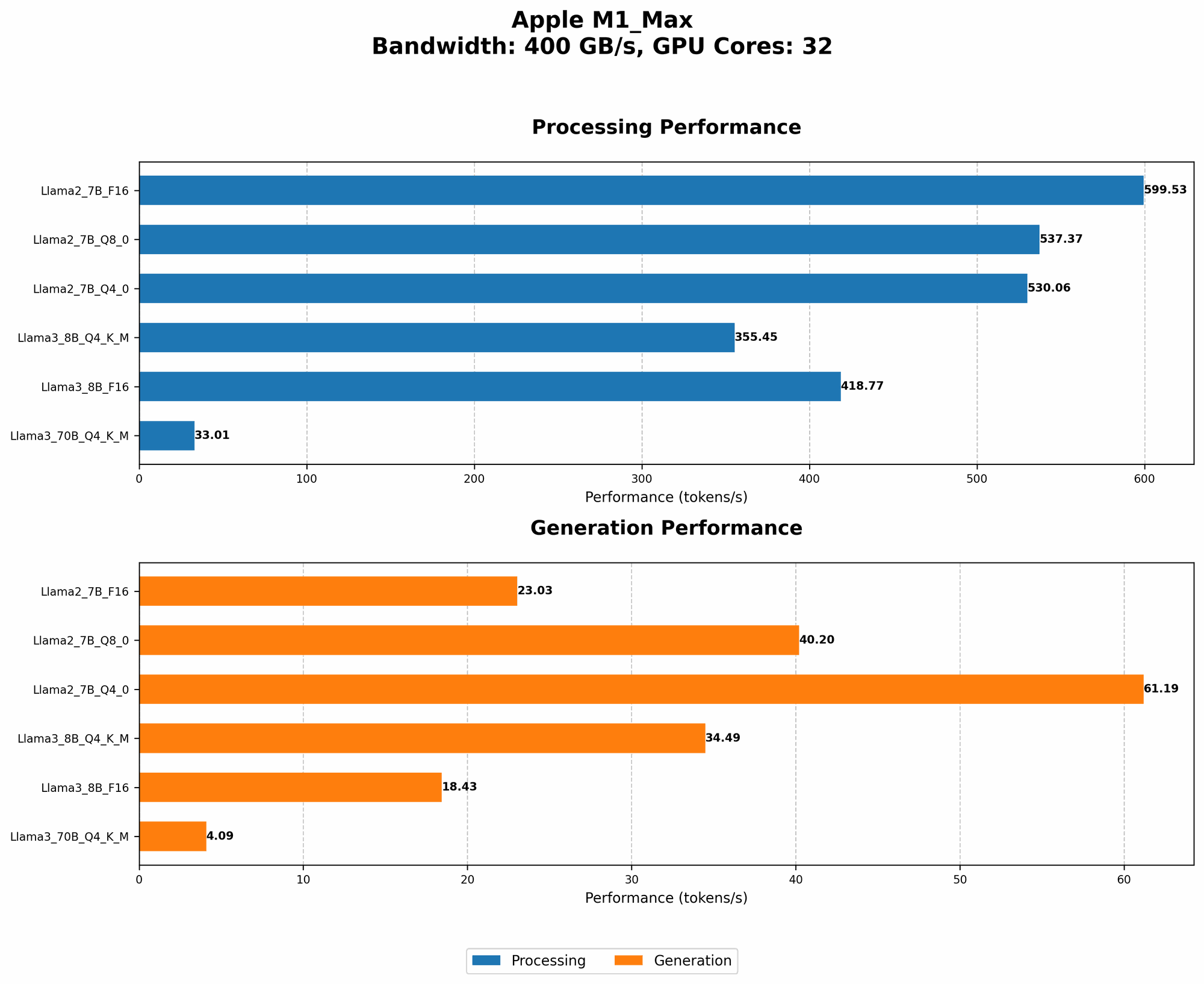
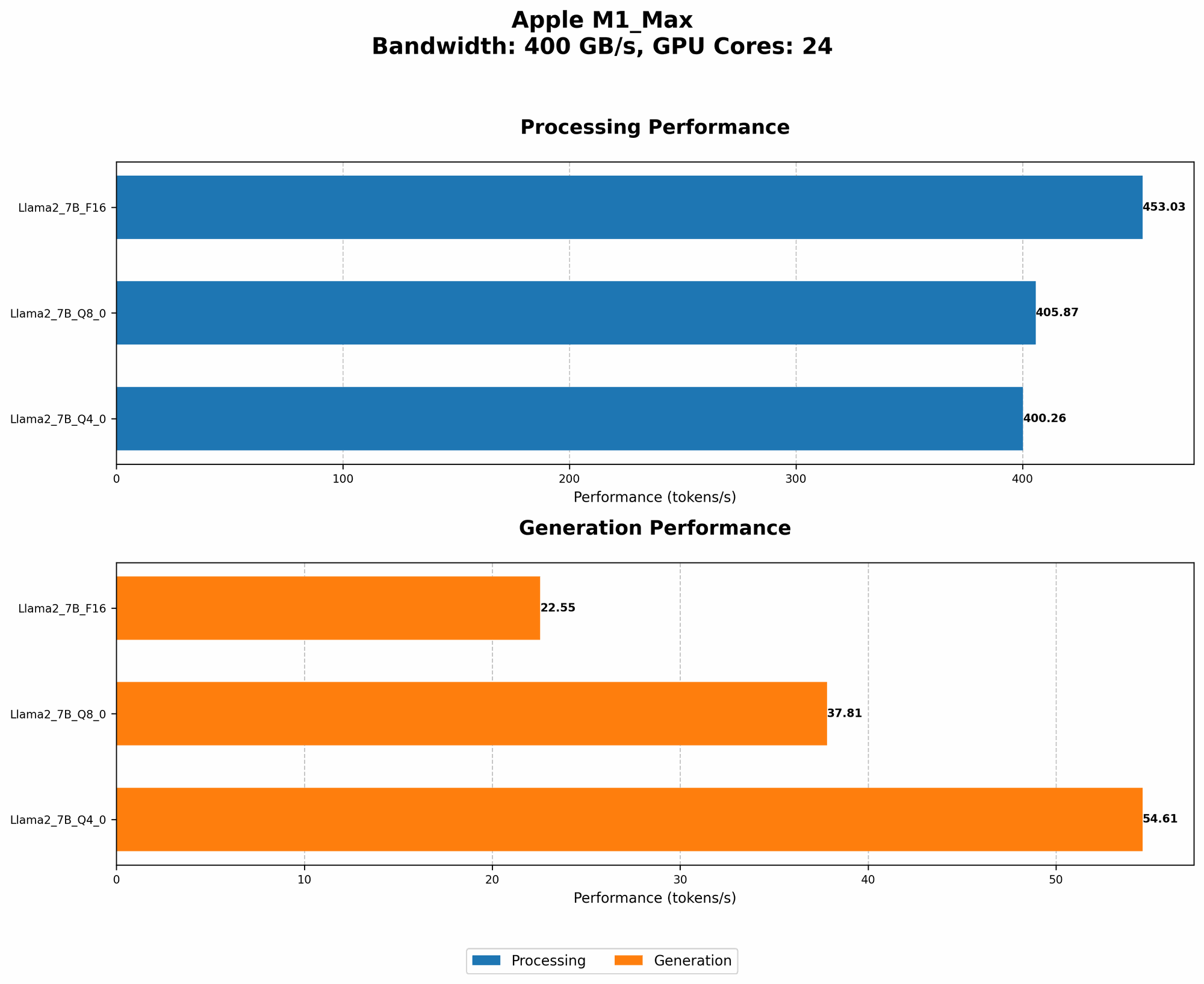
It's helpful to compare the performance of different models and devices to understand the trade-offs involved. While we're focusing on Llama3 70B on the Apple M1_Max, let's glance at how some other models perform on the same device.
| Model | Quantization | GPUCores | Bandwidth (GB/s) | Processing (tokens/sec) | Generation (tokens/sec) |
|---|---|---|---|---|---|
| Llama2 7B | Q4_0 | 32 | 400 | 530.06 | 61.19 |
| Llama2 7B | Q8_0 | 32 | 400 | 537.37 | 40.2 |
| Llama2 7B | F16 | 32 | 400 | 599.53 | 23.03 |
| Llama3 8B | Q4K_M | 32 | 400 | 355.45 | 34.49 |
| Llama3 8B | F16 | 32 | 400 | 418.77 | 18.43 |
Key Takeaways:
- Llama2 7B performs significantly faster than Llama3 70B on the Apple M1Max, especially with lower quantization levels (like Q40). This highlights the impact of model size and complexity — smaller models generally run faster.
- Llama3 8B also shows faster token generation speeds on the Apple M1_Max, especially with F16 quantization, compared to Llama3 70B. This demonstrates the benefits of reducing model size, even within the same family.
Practical Recommendations: Use Cases and Workarounds
The Apple M1_Max, while a powerful device, might not be ideal for running the most massive LLM models like Llama3 70B. However, there are workarounds that can improve your workflow.
1. Smart Model Selection:
- For fast, general-purpose text generation: Opt for Llama2 7B with Q4_0 quantization. Its superior speed makes it suitable for tasks like summarizing text, generating creative content, or translating languages.
- For complex reasoning and problem-solving: Consider Llama3 8B with F16 quantization. While slower, its larger size makes it a better choice for tasks requiring deeper understanding.
- For experimentation: Llama3 70B can still be valuable for research and exploring its advanced capabilities, but be prepared for slower performance.
2. Task Optimization:
- Break down tasks: Instead of generating massive blocks of text, consider splitting your tasks into smaller chunks. Even a smaller model like Llama2 7B can handle these chunks efficiently.
- Use caching: If you're using the same model for multiple tasks, consider caching the model in memory to reduce loading times. Tools like llama.cpp offer caching functionalities.
- Stream the model: Consider streaming models for larger models, allowing you to load only the necessary portions of the model in memory at any given time.
3. Hardware Considerations:
- Consider more powerful GPUs: For truly massive models like Llama3 70B, investing in a dedicated GPU with more memory and processing power can lead to substantial performance gains.
- Utilize cloud services: If you frequently work with large models, consider using cloud-based services like Google Colab or AWS SageMaker. They offer powerful GPUs and can handle large computational loads.
FAQ: Answering Your LLM Questions
What is quantization?
Quantization is like simplifying a complex number system. Think of it like turning a detailed image into a smaller, pixelated version – less detail but a smaller file size. In LLMs, quantization reduces the precision of numbers, resulting in a smaller model that requires less memory and processing power. F16 is higher precision than Q4, which is higher precision than Q8.
Why is the Apple M1_Max not supporting F16 quantization for Llama3 70B?
The Apple M1_Max architecture might not be optimized for F16 quantization with this specific model. It's possible that the hardware limitations don't allow for efficient processing of F16 data.
How can I choose the right quantization level for my needs?
Consider these factors:
- Model size: The larger the model, the more likely you'll need a higher quantization level for it to fit on your device.
- Performance: Higher quantization levels generally lead to slower token generation speeds.
- Accuracy: Lower quantization levels can sometimes lead to a slight decrease in model accuracy, but it's often negligible.
What are some alternative approaches for working with large LLMs locally?
- Model optimization: Explore techniques like model pruning and knowledge distillation to further reduce model size.
- Distributed computing: Distribute the workload across multiple machines for better performance.
- Hardware upgrades: Invest in a GPU with more memory and computational power.
Keywords:
Apple M1Max, LLM, Llama3, Llama2, 70B, 7B, 8B, Quantization, F16, Q4, Q4KM, Q8, Token Generation Speed, Performance, GPU, GPUCores, Bandwidth, Processing, Generation, Model Size, Local LLMs, Device