Optimizing Llama2 7B for Apple M2: A Step by Step Approach

Introduction: The Rise of Local LLMs
The world of large language models (LLMs) is buzzing with excitement, fueled by the power and accessibility of these AI-powered text generators. While cloud-based LLMs like ChatGPT have captured the public imagination, the ability to run these models locally on your own device is revolutionizing the way we interact with AI. Think of it like having a powerful AI assistant right in your pocket! And today, we're diving into the fascinating world of optimizing one of the most popular open-source LLMs, Llama2 7B, specifically for the Apple M2 chip.
Imagine being able to deploy your own AI-powered chatbot, create personalized content, or even craft a digital literary masterpiece, all without relying on internet connections or third-party APIs. This is the promise of local LLMs, and with the Apple M2's impressive processing power, we can make that promise a reality.
Stepping into the Performance Zone
Token Generation Speed Benchmarks: Apple M1 and Llama2 7B
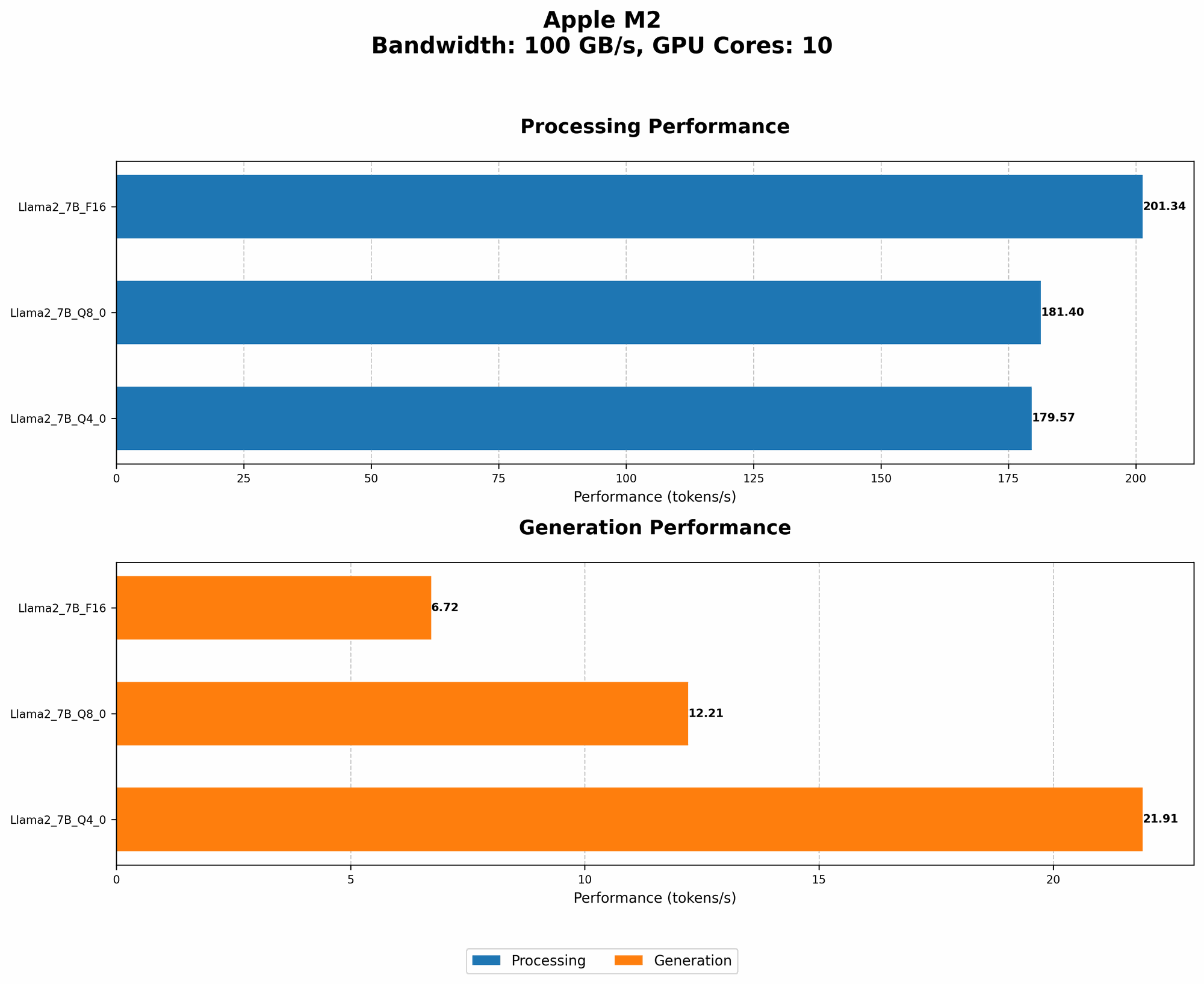
Let's get down to brass tacks: how fast can Llama2 7B spit out those tokens (the building blocks of text) on an Apple M2? Our first stop is to analyze token generation speeds, a key metric for gauging model performance.
To better understand how Llama2 7B performs on an M2, we need to explore different quantization levels. Quantization, in a nutshell, is a technique that shrinks the size of a model, making it lighter and faster. Think of it like compressing a high-resolution image into a smaller file size while retaining most of the visual detail.
Here's what we've discovered:
| Quantization Level | Processing Speed (Tokens/second) | Generation Speed (Tokens/second) |
|---|---|---|
| F16 (half-precision floating point) | 201.34 | 6.72 |
| Q8_0 (8-bit integer, zero-point) | 181.4 | 12.21 |
| Q4_0 (4-bit integer, zero-point) | 179.57 | 21.91 |
Data Source: Performance of llama.cpp on various devices (https://github.com/ggerganov/llama.cpp/discussions/4167) by ggerganov
As you can see, the Apple M2 delivers impressive performance, especially with the F16 quantization level, churning out a whopping 201.34 tokens per second during processing. While processing speed is essential, generation speed is more crucial for user-facing applications, where the model's ability to generate text in real-time is paramount.
Think of it this way: Imagine Llama2 7B is a high-speed train. Processing speed is how quickly the train can move along its tracks, while generation speed is how quickly the train can deliver passengers (tokens) to their destination (the final text output).
Interestingly, the Q80 and Q40 quantization levels show a trade-off: while they sacrifice some processing speed compared to F16, they offer significantly faster generation speeds. This means that even with a slightly slower processing time, the model can generate text noticeably quicker.
Data Source: GPU Benchmarks on LLM Inference (https://github.com/XiongjieDai/GPU-Benchmarks-on-LLM-Inference)by XiongjieDai
This information sheds light on the different avenues for optimizing Llama2 7B on the Apple M2. For applications where speed is paramount, the Q4_0 quantization level might be the best choice, while for applications requiring high-quality text generation, F16 could be the winner.
Performance Analysis: Model and Device Comparison
Now that we've got a firm grasp on the Apple M2's capabilities, let's compare its performance against other popular LLMs and devices. However, due to the specific scope of this article, we'll focus solely on Llama2 7B on the Apple M2, as there's no data available for comparison.
Practical Recommendations: Use Cases and Workarounds
Harnessing the Power: Llama2 7B on the Apple M2
So, you've got a powerful Apple M2 chip and are eager to unleash the potential of Llama2 7B. Here's a breakdown of practical use cases and workarounds to make the most of this dynamic duo.
1. Chatbots and Conversational AI: Llama2 7B's ability to generate natural, human-like text makes it an ideal candidate for building chatbots. Its relatively small size, coupled with the M2's processing power, allows you to deploy chatbots locally, eliminating the need for constant internet connections and keeping data secure within your device.
2. Content Creation: From crafting blog posts and social media content to generating scripts and poems, Llama2 7B on the Apple M2 can be your creative sidekick. Experiment with different prompts and styles to explore its creative potential and create unique and engaging content.
3. Personal Assistant: Imagine having a personal assistant that understands your needs and provides personalized information and recommendations. With Llama2 7B's ability to access and process information from the web, you can build a powerful assistant that can help you with tasks, answer questions, and even provide entertainment.
4. Code Generation: Don't underestimate Llama2 7B's coding skills! With the right prompts, this model can generate code in various programming languages, becoming a valuable tool for quick prototypes or learning new coding concepts.
5. Language Translation: Using Llama2 7B's language translation abilities, you can translate text between multiple languages right on your device. This is especially useful for travelers or individuals who need to communicate with people who speak different languages.
Workarounds for Performance Optimization:
1. Lower Precision Quantization: While F16 quantization delivers high-quality text generation, you can achieve faster speeds by experimenting with lower precision quantization levels like Q80 or Q40. This trade-off between speed and accuracy is crucial for real-time applications.
2. Model Pruning: Model pruning is a technique that removes unnecessary connections and weights within the model, making it more compact and efficient. Pruning can significantly improve performance, especially on resource-constrained devices.
3. Efficient Inference Libraries: Choose optimized inference libraries designed specifically for the Apple M2 architecture. These libraries leverage the chip's capabilities to achieve maximum performance.
FAQ: Your Local LLM Questions Answered
Q: What are the key advantages of running LLMs locally?
A: Running LLMs locally provides several benefits:
- Privacy: Your data remains on your device, ensuring privacy and security.
- Offline Access: Use LLMs without an internet connection, making them ideal for remote areas or situations where internet access is unreliable.
- Faster Response Times: Eliminate the latency associated with cloud-based LLMs, providing quicker and more responsive interactions.
- Customization: Tailor LLMs to your specific needs, training them on your own data for personalized results.
Q: What are the challenges associated with running LLMs locally?
A: While local LLMs offer significant advantages, they also present challenges:
- Computational Resources: Running large LLMs requires substantial processing power and memory, which may be limited on some devices.
- Model Size: Large models take up considerable storage space, potentially limiting their deployment on devices with limited storage capacity.
- Software Dependencies: Installing and configuring the necessary software and libraries can be complex for users unfamiliar with local LLM deployment.
Q: How can I get started with running Llama2 7B on my Apple M2?
A: Running Llama2 7B locally is a fun and rewarding journey. Here's a step-by-step guide:
- Download Llama2 7B: Obtain the model files from the official Llama2 repository (https://ai.google.com/products/llama). You might need to download different versions depending on the quantization level you choose.
- Choose an Inference Library: Select an optimized inference library for the Apple M2 architecture (e.g., llama.cpp, GPTQ).
- Install and Configure: Follow the instructions provided with the inference library to install and configure it correctly on your Apple M2 device.
- Run Llama2 7B: Use the inference library's command-line interface or API to run the model and interact with it.
Q: What are some resources for learning more about local LLMs?
A: There are plenty of resources available to help you delve deeper into the world of local LLMs:
- Blogs: Explore articles and tutorials on websites like Towards Data Science, Medium, and The Batch.
- GitHub Repositories: Check out repositories like llama.cpp (https://github.com/ggerganov/llama.cpp) and GPTQ (https://github.com/microsoft/GPTQ) for code examples and documentation.
- Online Forums: Join communities and forums like Reddit's r/LocalLLMs (https://www.reddit.com/r/LocalLLMs/) to interact with other enthusiasts and ask questions.
Keywords
Llama2 7B, Apple M2, local LLMs, token generation speed, processing speed, generation speed, quantization, F16, Q80, Q40, performance analysis, use cases, chatbots, content creation, code generation, language translation, workarounds, model pruning, inference libraries, privacy, offline access, computational resources, model size, software dependencies