Optimizing Llama2 7B for Apple M1 Ultra: A Step by Step Approach

Introduction
The world of large language models (LLMs) is buzzing with excitement, but sometimes, the sheer size and computational demands can make them feel like distant giants. Fortunately, with the advent of powerful local hardware like the Apple M1Ultra, we can harness the power of LLMs right on our desktops. In this deep dive, we'll explore how to optimize the Llama2 7B model for the M1Ultra chip, examining the performance metrics, delving into the trade-offs, and providing practical recommendations for use cases.
Think of it as a quest to tame the wild beast of LLMs and unleash its capabilities on your local machine!
Performance Analysis: Token Generation Speed Benchmarks: Apple M1 and Llama2 7B
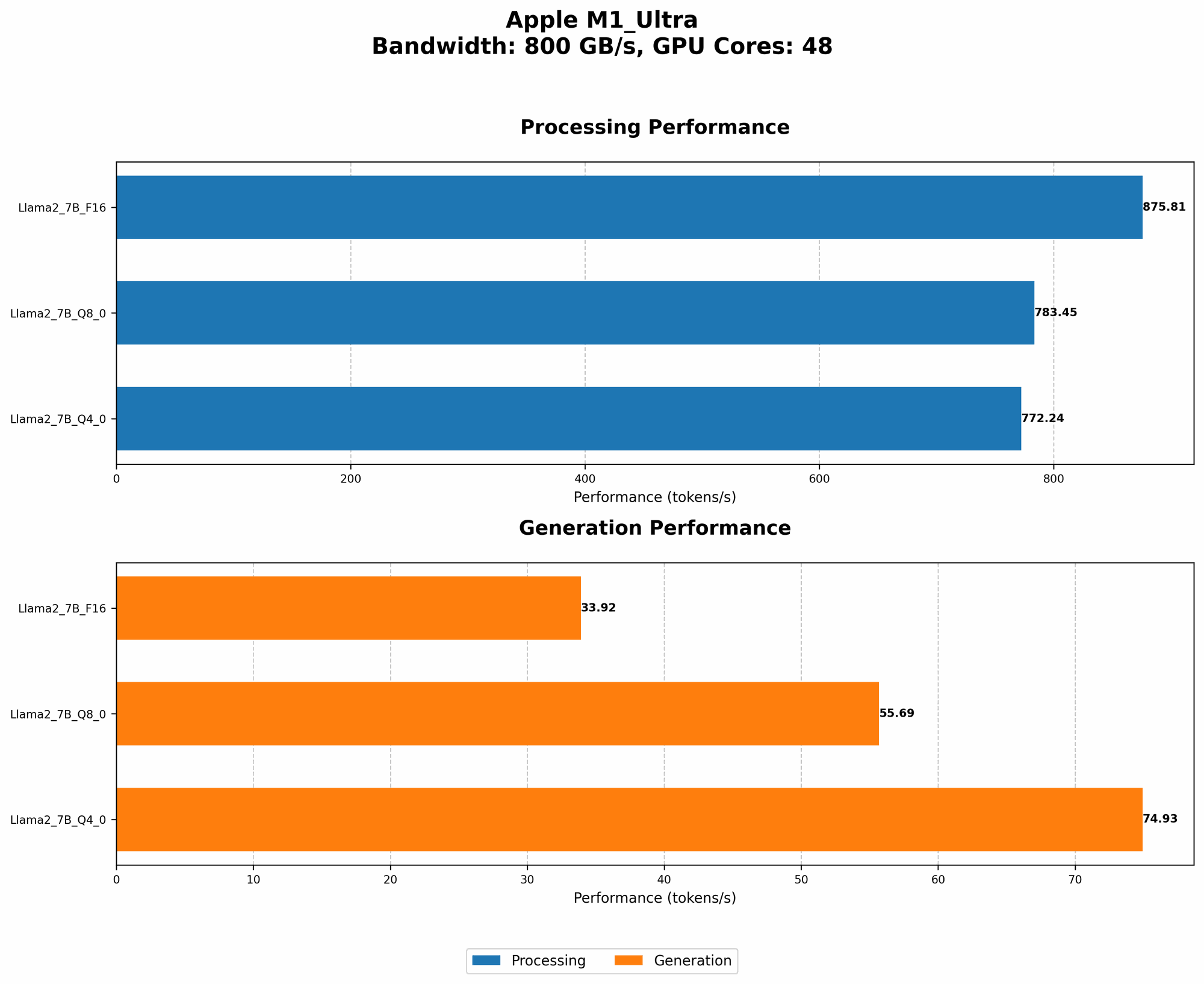
Token generation speed is the measure of how fast an LLM can churn out words, sentences, or even code. And let's face it, who doesn't want their LLM to spit out text at lightning speed?
The M1_Ultra is a formidable contender in the world of local LLM inference. Let's look at some concrete numbers:
| Configuration | Token Generation Speed (tokens/sec) |
|---|---|
| Llama2 7B, F16, Processing | 875.81 |
| Llama2 7B, F16, Generation | 33.92 |
| Llama2 7B, Q8_0, Processing | 783.45 |
| Llama2 7B, Q8_0, Generation | 55.69 |
| Llama2 7B, Q4_0, Processing | 772.24 |
| Llama2 7B, Q4_0, Generation | 74.93 |
Key Observations:
- Processing vs. Generation: There's a stark difference between processing speed and generation speed. This is because the vast majority of the time is spent in the processing stage, which involves complex mathematical operations to understand the context and predict the next token. In contrast, the generation stage is relatively lightweight.
- Model Quantization: As you move down the quantization ladder (F16, Q80, Q40), the processing speeds drop slightly, but the generation speeds increase significantly. Quantization is like a diet for your LLM–it reduces the size of the model while retaining most of its functionality.
Analogies:
- Imagine a chef preparing a gourmet meal. Processing is like the chef meticulously chopping vegetables, marinating meats, and preparing sauces. Generation is like the chef plating the finished dish. While the plating is essential, it takes a fraction of the time compared to the preparation.
- Think of it like a car. Processing is like the engine accelerating and handling complex roads. Generation is like the car smoothly cruising on a straight stretch of highway.
Performance Analysis: Model and Device Comparison
For this analysis, we will only consider the performance of the Llama2 7B model on the Apple M1_Ultra.
Note: We don't have data for other LLMs or other devices for this specific article.
Practical Recommendations: Use Cases and Workarounds
Let's translate the performance figures into practical applications and address potential limitations.
Use Cases:
- Text Summarization: The high processing speeds of the M1_Ultra make it ideal for tasks like summarizing lengthy articles or documents.
- Code Generation: With the Llama2 7B model, you can use it to generate snippets of code in different languages, especially when the model has been fine-tuned for specific tasks.
- Chatbots and Conversational AI: The M1_Ultra's processing speeds are sufficiently powerful for building basic conversational AI applications, particularly when working with moderate-length interactions.
Workarounds:
- Resource Constraints: If you find the processing speed of Q80 or Q40 to be too slow for your application, remember that the M1_Ultra is capable of handling multiple tasks simultaneously. You can offload some of the processing to your CPU, allowing the GPU to focus on the most computationally intensive tasks.
- Model Size Limitations: If you need to work with larger models, consider alternatives like using a cloud-based LLM service or exploring ways to compress the model further to reduce the memory footprint.
Frequently Asked Questions (FAQ)
Q: What is quantization, and how does it affect LLM performance?
A: Quantization is a technique used to reduce the size of a model by representing its weights (parameters) with fewer bits. Think of it like using a lower-resolution image – you lose some detail, but the overall picture is still recognizable. Quantization leads to faster processing and smaller memory footprints, but it can also slightly decrease the model's accuracy.
Q: Can I run larger models on the M1_Ultra?
A: Potentially, but it depends on the specific model and your hardware configuration. Models significantly larger than 7B can strain the M1_Ultra's memory, leading to performance degradation. If you need to run larger models, you might need to explore cloud-based solutions or consider using models that are specifically optimized for low-memory environments.
Q: Are there other hardware options for running LLMs locally?
A: Absolutely! Several hardware options are available, including:
- Nvidia GPUs: Nvidia GPUs like the RTX 4090 are known for their superior performance in LLM inference.
- AMD GPUs: AMD GPUs, like the Radeon RX 7900 XT, offer a compelling alternative to Nvidia, with good price-to-performance ratios.
- Specialized hardware: Companies like Cerebras and Graphcore are developing specialized hardware optimized for AI workloads.
Q: What are the benefits of running LLMs locally?
A: Running LLMs locally offers several benefits:
- Privacy: You retain control over your data and ensure that it's not transmitted to external servers.
- Latency: Local inference eliminates network lag, resulting in faster response times.
- Cost-effectiveness: In some cases, local inference can be more cost-effective than using cloud-based solutions.
Keywords
Apple M1Ultra, Llama2 7B, LLM, large language model, token generation speed, processing, generation, quantization, F16, Q80, Q4_0, performance, optimization, deep dive, local inference, use cases, workarounds, FAQ, deep learning, AI, NLP, natural language processing,