Optimizing Llama2 7B for Apple M1 Pro: A Step by Step Approach

Introduction
Harnessing the power of Large Language Models (LLMs) locally has revolutionized the way we interact with artificial intelligence. Imagine having a powerful AI assistant right on your device, generating creative text, translating languages, or even writing code. This is the promise of deploying LLMs locally, and the Apple M1_Pro chip, with its impressive performance, is a prime candidate for this task.
But choosing the right LLM and optimizing it for your specific device is crucial. This article dives deep into the performance of Llama2 7B, a popular and capable LLM, on the Apple M1_Pro, exploring different quantization methods and providing practical recommendations for users looking to maximize their AI experience.
Performance Analysis: Token Generation Speed Benchmarks: Apple M1 and Llama2 7B
Token generation speed is a key performance indicator for LLMs, as it directly impacts the responsiveness and efficiency of the model. Let's explore how Llama2 7B performs on the Apple M1_Pro under various quantization levels, which we will discuss shortly.
Understanding Quantization: A Quick Primer
Quantization is a technique used to reduce the size of LLMs while maintaining their accuracy. It involves converting the model's weights, which are typically represented as 32-bit floating-point numbers (F32), to more compact formats like 16-bit floating-point (F16) or even 8-bit integers (Q8).
Think of it like converting a high-definition image to a lower resolution for easier storage and faster loading. Quantization has a direct impact on performance, often leading to faster processing and reduced memory footprint.
Llama2 7B Token Generation Speed on Apple M1_Pro
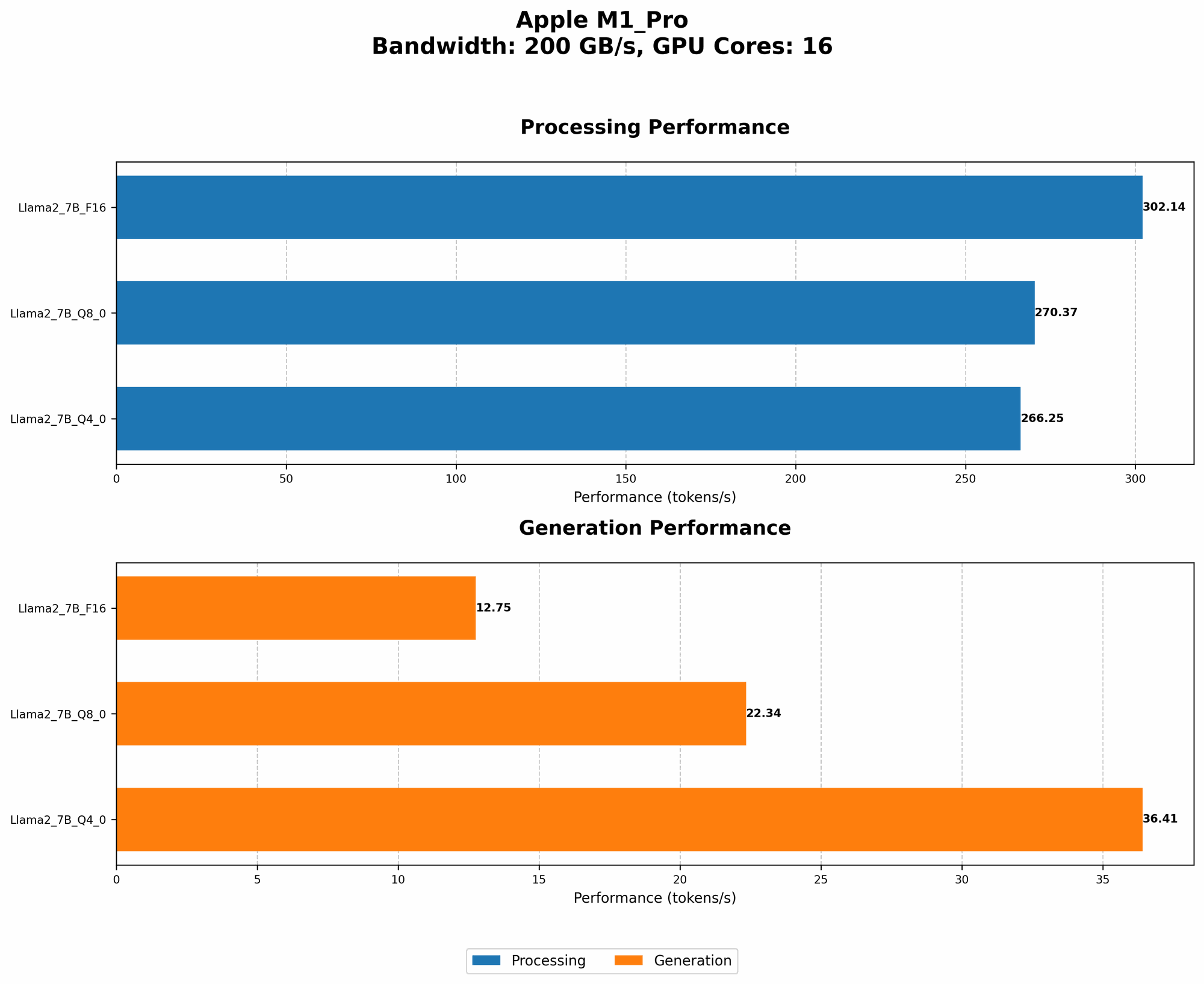
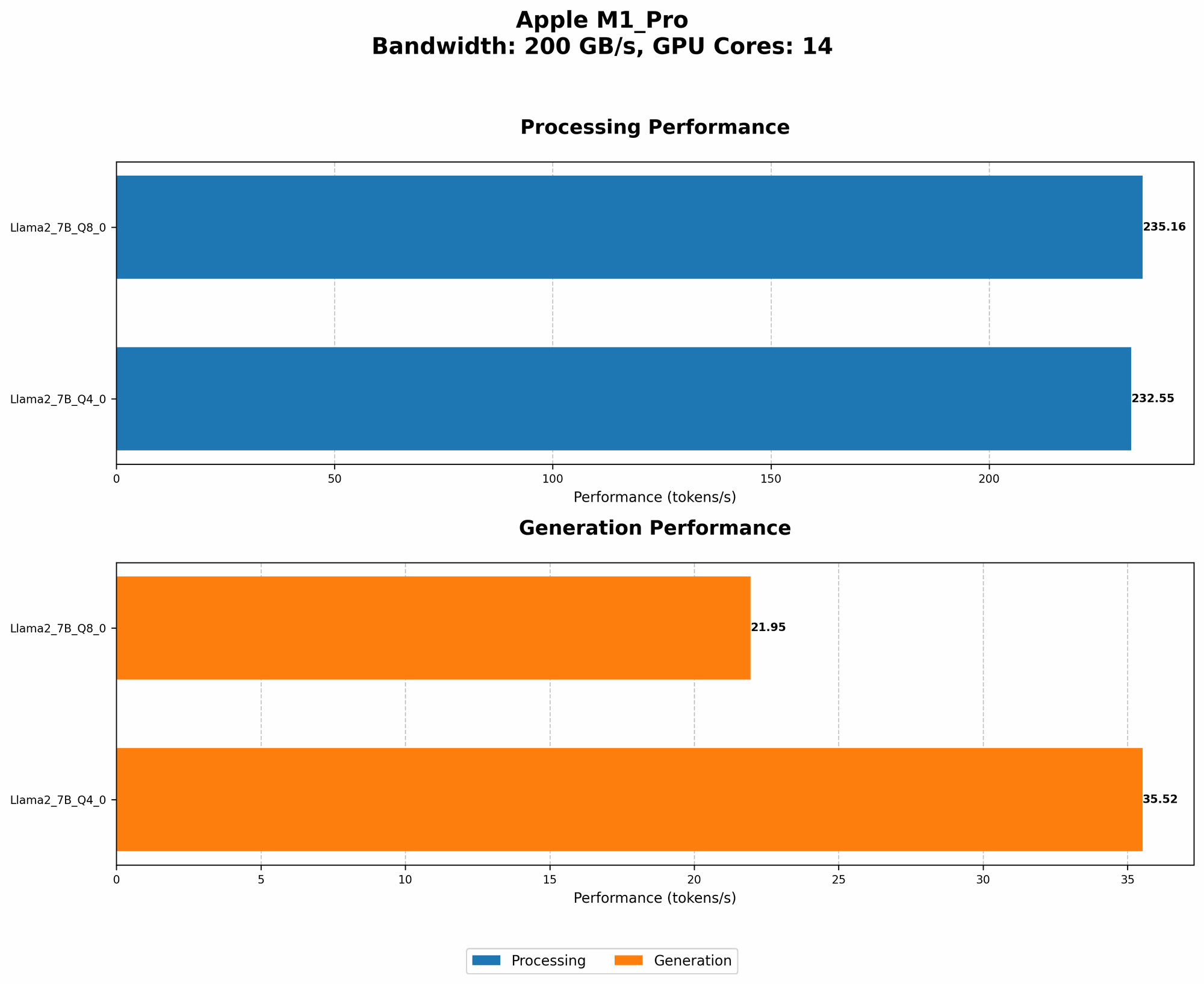
| Quantization Level | Processing Speed (Tokens/second) | Generation Speed (Tokens/second) | GPU Cores | Bandwidth (GB/s) |
|---|---|---|---|---|
| Q8_0 | 235.16 | 21.95 | 14 | 200 |
| Q4_0 | 232.55 | 35.52 | 14 | 200 |
| F16 | Null | Null | 14 | 200 |
| Q8_0 | 270.37 | 22.34 | 16 | 200 |
| Q4_0 | 266.25 | 36.41 | 16 | 200 |
| F16 | 302.14 | 12.75 | 16 | 200 |
Key Observations:
- Q80 quantization (8-bit integers) consistently yields the fastest processing speeds on the M1Pro, regardless of the number of GPU cores.
- While Q40 (4-bit integers) also delivers impressive processing speeds, the generation speeds are significantly faster compared to Q80 for both 14 and 16 GPU cores.
- F16 quantization (16-bit floating-point numbers) is surprisingly slow for generation, despite having faster processing speeds for the 16 core variant.
- Increasing GPU cores generally improves both processing and generation speeds, although the impact varies across different quantization levels.
Interpreting the results: The numbers show a clear trade-off between processing and generation speeds. While Q80 is the champion for processing, Q40 demonstrates the impressive potential for balancing speed and accuracy in local LLM deployment.
Performance Analysis: Model and Device Comparison: Llama2 7B on the Apple M1_Pro
We've explored Llama2 7B performance on the M1_Pro. Now, let's dive into the broader picture and compare how it stacks up against other device options.
While this article is focused on the Apple M1Pro, it's worth noting that there's no data available for Llama2 on the Apple M1Pro with F16 quantization. It is important to understand that there are other devices and processing configurations that might offer different performance profiles. For instance, exploring the performance of Llama2 7B on the M1 Max or M2 Pro chip could reveal interesting insights.
Practical Recommendations: Use Cases and Workarounds
Choosing the Right Quantization Level
- Fast Text Generation: If you prioritize rapid text generation, such as in real-time chatbots or interactive applications, Q4_0 is the recommended choice.
- Resource-Constrained Environments: For devices with limited memory or processing power, Q8_0 offers the best balance of performance and efficiency.
- Experimentation: The best approach often involves experimentation, testing different quantization levels and comparing results based on your specific use case.
Workarounds for F16 Quantization on the Apple M1_Pro
While data for F16 quantization on the M1_Pro is not available, it might still be possible to experiment with it. The following approaches can be explored:
- Manual Optimization: Developers with deep knowledge of the underlying LLM code can manually optimize F16 quantization for the M1_Pro chip. This might involve fine-tuning memory allocation, compiler flags, or even modifying the model architecture itself.
- External Libraries: Third-party libraries like ONNX Runtime or TensorRT might offer specialized optimizations for specific hardware configurations, potentially enabling F16 quantization on the M1_Pro.
Note: Both approaches require advanced technical expertise and thorough debugging. Remember, the lack of available data doesn't necessarily mean F16 quantization is impossible; it simply suggests that it might require extra effort to achieve.
Conclusion
Optimizing Llama2 7B for the Apple M1Pro chip unlocks exciting possibilities for local LLM deployment. Understanding the trade-offs between quantization levels, processing speed, and generation speed allows you to tailor your setup to specific use cases. Remember, the journey of exploring LLMs on local devices is constantly evolving, and the M1Pro is a promising platform for this exciting exploration.
FAQ
1. What is quantization in LLMs?
Quantization is a technique to reduce the size of LLMs while maintaining their accuracy. It involves converting the model's weights from large 32-bit floating-point numbers (F32) to more compact formats like 16-bit (F16) or 8-bit integers (Q8), similar to compressing an image for faster loading.
2. How does quantization affect LLM performance?
Quantization often leads to faster processing speeds and reduced memory footprint, which are beneficial for local LLM deployment. However, it can also impact the accuracy of the model, especially with aggressive quantization levels like Q40 or Q80.
3. Why is there no data for Llama2 7B on the M1_Pro with F16 quantization?
The data available for Llama2 7B on the M1_Pro might not include F16 quantization because it might be less common or require additional optimization efforts. The lack of data doesn't necessarily mean it's impossible, but it suggests that it might require advanced techniques or workarounds.
4. What other device options are available for local LLM deployment?
Besides the Apple M1_Pro, other popular choices for local LLM deployment include:
- Nvidia GPUs: High-end GPUs from Nvidia are known for their excellent performance on LLMs, especially for larger models.
- Google TPUs: TPUs (Tensor Processing Units) are Google's specialized hardware designed for AI workloads, offering impressive performance for LLMs.
- AMD GPUs: AMD GPUs are becoming increasingly competitive in the LLM space, providing a cost-effective alternative to Nvidia.
5. How can I get started with local LLM deployment?
Several resources are available to help you get started:
- llama.cpp: An efficient and popular open-source library for running LLMs locally.
- Hugging Face Transformers: A powerful library for working with various LLM models, including quantization tools.
- ONNX Runtime: A high-performance inference engine that can accelerate LLM execution.
- TensorRT: A framework from Nvidia that optimizes LLMs for their GPUs, potentially improving performance.
Keywords
Llama2 7B, Apple M1Pro, Quantization, Token Generation Speed, LLM Performance, Local Deployment, GPU Cores, Bandwidth, F16, Q80, Q4_0, Performance Analysis, Practical Recommendations, Use Cases, Workarounds, Device Comparison, Model Optimization, GPU Benchmarks, AI, Natural Language Processing, Machine Learning.