NVIDIA RTX 4000 Ada 20GB vs. NVIDIA 4090 24GB x2 for LLMs: Which is Faster in Token Generation Speed? Benchmark Analysis
Introduction
The world of large language models (LLMs) is buzzing with excitement, and for good reason. These AI marvels can generate realistic text, translate languages, write different kinds of creative content, and answer your questions in an informative way. However, running these models locally requires powerful hardware, and choosing the right device can significantly impact performance.
This article delves into the performance comparison of two popular GPUs for running LLMs: the NVIDIA RTX 4000 Ada 20GB and two NVIDIA 4090 24GB cards in a multi-GPU setup. We'll focus on the token generation speed, a crucial metric for evaluating the efficiency of an LLM. In layman's terms, this refers to how fast the model can churn out words, or "tokens", in response to your prompts. This article will be a great resource for developers and enthusiasts looking to understand the best GPU for their LLM endeavors.
Comparison of NVIDIA RTX 4000 Ada 20GB and NVIDIA 4090 24GB x2 for Token Generation Speed
Let's dive into the performance numbers and compare the performance of these GPUs in terms of token generation speed:
Token Generation Speed with Llama 3 8B Model
Quantization:
- Q4KM: This is a quantization technique that reduces the size of the model, making it faster. It reduces precision but is still a good trade-off for speed.
- F16: A lower precision quantization than Q4KM, leading to even faster speed but with slightly less accuracy.
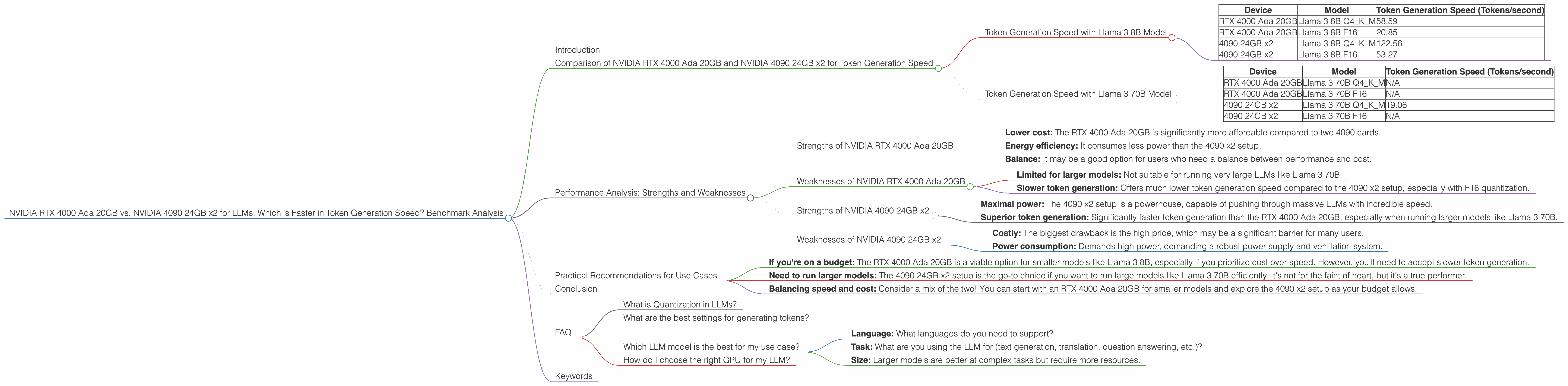
| Device | Model | Token Generation Speed (Tokens/second) |
|---|---|---|
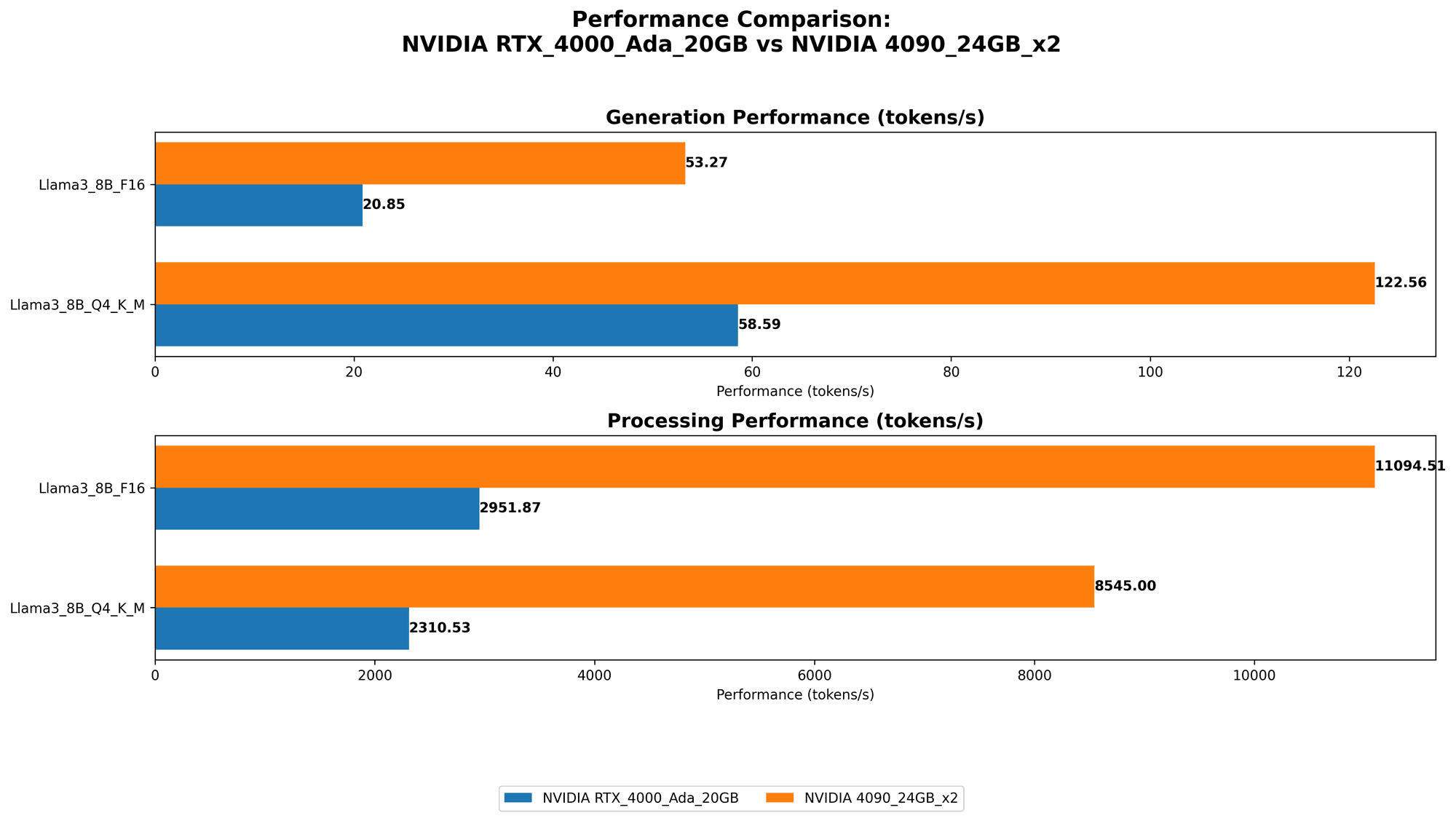
| RTX 4000 Ada 20GB | Llama 3 8B Q4KM | 58.59 |
| RTX 4000 Ada 20GB | Llama 3 8B F16 | 20.85 |
| 4090 24GB x2 | Llama 3 8B Q4KM | 122.56 |
| 4090 24GB x2 | Llama 3 8B F16 | 53.27 |
Analysis:
- The 4090 24GB x2 setup offers more than double the token generation speed compared to the single RTX 4000 Ada 20GB for both Q4KM and F16 quantization.
- This is expected considering the 4090 is a more powerful card, and the dual setup further amplifies performance. Think of it like having two super-fast cars versus a single fast car.
- The 4090's advantage is even more pronounced with the F16 quantization. In other words, if you prioritize speed over absolute accuracy, the 4090 x2 setup truly shines.
Token Generation Speed with Llama 3 70B Model
| Device | Model | Token Generation Speed (Tokens/second) |
|---|---|---|
| RTX 4000 Ada 20GB | Llama 3 70B Q4KM | N/A |
| RTX 4000 Ada 20GB | Llama 3 70B F16 | N/A |
| 4090 24GB x2 | Llama 3 70B Q4KM | 19.06 |
| 4090 24GB x2 | Llama 3 70B F16 | N/A |
Analysis:
- We lack data for the RTX 4000 Ada 20GB with the Llama 3 70B model. This suggests that it may not be capable of running such a large and demanding model.
- The 4090 24GB x2 setup achieves a token speed of 19.06 tokens per second for the Llama 3 70B Q4KM model.
- This demonstrates the capability of the 4090 x2 setup to handle larger LLM models effectively.
Performance Analysis: Strengths and Weaknesses
Strengths of NVIDIA RTX 4000 Ada 20GB
- Lower cost: The RTX 4000 Ada 20GB is significantly more affordable compared to two 4090 cards.
- Energy efficiency: It consumes less power than the 4090 x2 setup.
- Balance: It may be a good option for users who need a balance between performance and cost.
Weaknesses of NVIDIA RTX 4000 Ada 20GB
- Limited for larger models: Not suitable for running very large LLMs like Llama 3 70B.
- Slower token generation: Offers much lower token generation speed compared to the 4090 x2 setup, especially with F16 quantization.
Strengths of NVIDIA 4090 24GB x2
- Maximal power: The 4090 x2 setup is a powerhouse, capable of pushing through massive LLMs with incredible speed.
- Superior token generation: Significantly faster token generation than the RTX 4000 Ada 20GB, especially when running larger models like Llama 3 70B.
Weaknesses of NVIDIA 4090 24GB x2
- Costly: The biggest drawback is the high price, which may be a significant barrier for many users.
- Power consumption: Demands high power, demanding a robust power supply and ventilation system.
Practical Recommendations for Use Cases
- If you're on a budget: The RTX 4000 Ada 20GB is a viable option for smaller models like Llama 3 8B, especially if you prioritize cost over speed. However, you'll need to accept slower token generation.
- Need to run larger models: The 4090 24GB x2 setup is the go-to choice if you want to run large models like Llama 3 70B efficiently. It's not for the faint of heart, but it's a true performer.
- Balancing speed and cost: Consider a mix of the two! You can start with an RTX 4000 Ada 20GB for smaller models and explore the 4090 x2 setup as your budget allows.
Conclusion
The choice between the NVIDIA RTX 4000 Ada 20GB and the NVIDIA 4090 24GB x2 setup for running LLMs hinges on your individual needs and constraints. If you prioritize affordability and energy efficiency, the RTX 4000 Ada 20GB can be a good choice for smaller models. However, if you need the ultimate performance for larger models, the 4090 24GB x2 setup is the clear winner, despite its hefty price tag.
FAQ
What is Quantization in LLMs?
Quantization is a technique to reduce the size of LLMs, making them faster and more efficient. It works by representing the model's weights and activations using fewer bits, sacrificing some accuracy for a significant speed boost. You can think of it like compressing a high-resolution image into a smaller file size; you lose some detail but gain faster loading times.
What are the best settings for generating tokens?
The optimal settings for token generation depend on various factors, including the LLM model, the task, and your hardware. Experimenting with different settings is the key to finding the best balance between speed and accuracy.
Which LLM model is the best for my use case?
There is no one-size-fits-all answer! The best LLM depends on your specific needs. Consider the following factors:
- Language: What languages do you need to support?
- Task: What are you using the LLM for (text generation, translation, question answering, etc.)?
- Size: Larger models are better at complex tasks but require more resources.
How do I choose the right GPU for my LLM?
The best GPU for your LLM depends on your budget, desired performance, and the size of the model you plan to run. If you're running smaller models, a mid-range GPU like the RTX 4000 Ada 20GB can be sufficient. However, for larger models, a powerful GPU like the 4090 or a multi-GPU setup is recommended.
Keywords
LLM, large language model, token generation speed, NVIDIA, RTX 4000 Ada, 4090, GPU, benchmark, performance, quantization, Llama 3, 8B, 70B, cost, power consumption, efficiency, use cases.