NVIDIA A100 PCIe 80GB for LLM Inference: Performance and Value

Introduction
The world of large language models (LLMs) is exploding, and with it, the demand for powerful hardware to run these complex models. LLMs are the brains behind AI-powered applications like chatbots, text generators, and even code completion tools. They can process vast amounts of information and respond in ways that seem remarkably human.
But running these models locally can be a challenge. They require significant computing power and memory, which is why many turn to cloud services. However, for developers and enthusiasts seeking more control and potentially lower costs, powerful GPUs like the NVIDIA A100PCIe80GB offer a compelling alternative.
This article dives deep into the A100's performance for running LLM inference, specifically focusing on the popular Llama 3 family of models. We'll explore how the A100 handles various model sizes and quantization techniques, and provide insights into the overall value proposition of this powerful GPU.
A100PCIe80GB: A Powerful Workhorse for LLM Inference
Let's start with the basics. The NVIDIA A100PCIe80GB is a high-end GPU designed for demanding workloads like AI and machine learning. It boasts a massive 80GB of HBM2e memory, making it ideal for handling the memory-intensive operations required for LLM inference.
The A100 packs a punch with its 5,120 CUDA cores and a peak performance of 19.5 TFLOPS for FP16 and 10 TFLOPS for FP32 operations. That's a lot of power for crunching numbers!
A100PCIe80GB: Performance Analysis with Llama 3 Models
Now, let's get into the heart of the matter: how does the A100 perform with our favorite Llama 3 models? We'll focus on two key performance metrics:
- Token Generation Speed (Tokens/second): This measures how quickly the A100 can produce new text tokens, critical for generating coherent outputs, like responses in chatbots or text in code completions.
- Processing Speed (Tokens/second): This metric reflects how rapidly the A100 processes input tokens, which is essential for overall model efficiency.
Note: The data used for this analysis comes from two sources, both reputable repositories for LLM performance benchmarks:
- Performance of llama.cpp on various devices by ggerganov
- GPU Benchmarks on LLM Inference by XiongjieDai
Llama 3 Model Performance: A Detailed Look
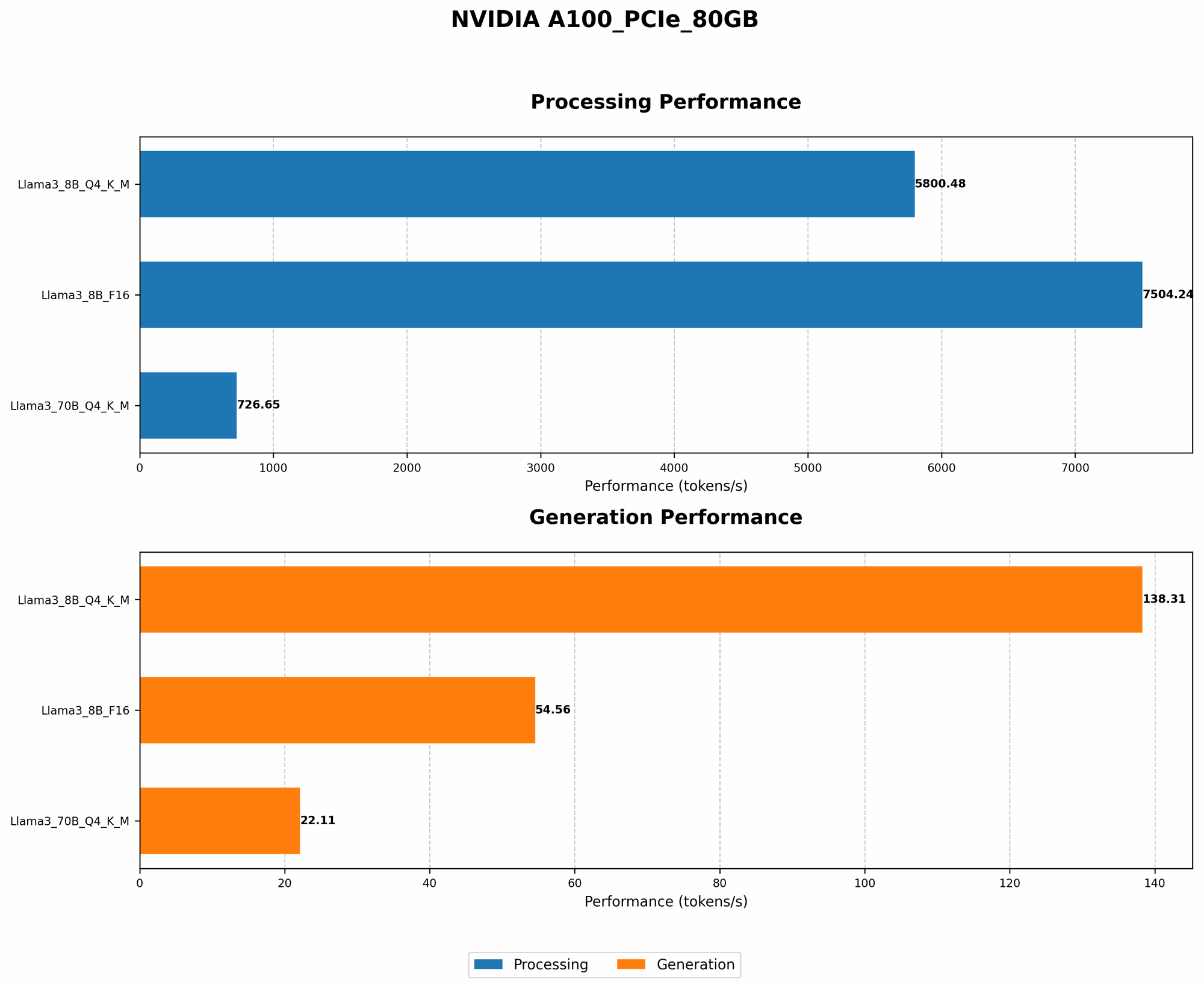
Table 1: A100PCIe80GB Performance with Llama 3 Models
| Model | Quantization | Token Generation (Tokens/second) | Processing Speed (Tokens/second) |
|---|---|---|---|
| Llama 3 8B (Q4KM) | Q4KM | 138.31 | 5800.48 |
| Llama 3 8B (F16) | F16 | 54.56 | 7504.24 |
| Llama 3 70B (Q4KM) | Q4KM | 22.11 | 726.65 |
| Llama 3 70B (F16) | F16 | N/A | N/A |
Key Takeaways:
- The A100 shines with the smaller Llama 3 8B model: It achieves impressive token generation speeds, especially with the Q4KM quantization, pushing out over 138 tokens per second.
- Quantization makes a significant difference: Q4KM, a technique that significantly reduces the model's size and memory footprint, leads to much faster token generation for both the 8B and 70B models.
- Processing speed is consistently strong: The A100 delivers high processing speeds, even for the larger Llama 3 70B model. This demonstrates its ability to handle the demanding computational tasks involved in LLM inference.
- Performance decreases with larger models: As expected, the larger 70B model experiences slower token generation compared to the 8B version. This is mainly due to the increased number of parameters and computations required to handle the larger model.
A100PCIe80GB: The Value Proposition
The A100 is a high-end GPU, and that comes with a price tag. However, considering its performance and capabilities, it presents compelling value for LLM enthusiasts and developers:
- Cost-effective for running smaller LLMs locally: If you are working with smaller models like Llama 3 8B, the A100 can be a cost-effective solution for setting up a local inference environment.
- High-performance computing for complex models: The A100 is a powerful engine for handling large models like Llama 3 70B. While the token generation speed may be lower compared to smaller models, the A100 still provides significant performance gains over cheaper alternatives.
- Scalability and future-proofing: The A100 offers excellent scalability. You can combine multiple A100s to exponentially enhance performance for even the largest models. Plus, this investment future-proofs your setup, enabling you to handle even more demanding LLMs as they evolve.
Fine-tuning for Optimal Performance
While the A100 is a powerful hardware platform, optimizing your LLM inference setup is essential. Fine-tuning the following aspects can significantly enhance performance:
- Quantization: Utilizing quantization techniques like Q4KM can significantly improve token generation speed. Think of it as compressing the model to make it lighter and faster.
- Model size: Smaller models generally run faster due to fewer parameters and computations. Consider the trade-off between model size and performance when choosing an LLM.
- Hardware configuration: Ensure proper cooling for sustained high performance. Consider tweaking memory settings and other hardware parameters for optimal performance.
Beyond A100: Exploring Different Options
The A100 is a compelling choice for LLM inference, but it is not the only option. Other high-end GPUs like the NVIDIA RTX 4090 are also capable of powering local LLM inference. However, the A100 stands out due to its massive memory capacity and outstanding performance for large, complex models.
A100PCIe80GB: A Quick Comparison
Table 2: A100PCIe80GB Compared to Other GPU Options
| Feature | A100PCIe80GB | RTX 4090 |
|---|---|---|
| Memory | 80GB HBM2e | 24GB GDDR6X |
| CUDA Cores | 5,120 | 16,384 |
| FP16 Performance | 19.5 TFLOPS | 45 TFLOPS |
| FP32 Performance | 10 TFLOPS | 22.5 TFLOPS |
| Price | High | High |
Key Differences:
- Memory: The A100 boasts significantly more memory than the RTX 4090, making it a better choice for handling larger models.
- FP16 Performance: The RTX 4090 offers significantly higher FP16 performance due to its newer architecture.
- FP32 Performance: Similar to FP16, the RTX 4090 outperforms the A100 in FP32.
So, which GPU is right for you? It depends on your specific needs. For large models, the A100's ample memory is a clear advantage. The RTX 4090 might be a better choice for those prioritizing performance and targeting smaller-sized models.
FAQ: LLM Inference and the A100
Q: What exactly are quantization techniques?
A: Quantization is like reducing a high-resolution image to a smaller, compressed version. It involves representing the model's parameters using fewer bits, making the model more efficient and faster. Q4KM is a powerful quantization technique optimized for LLM inference.
Q: How do I choose the right LLM for my project?
A: The ideal LLM depends on your use case. For simpler tasks, smaller models like Llama 3 8B may be sufficient. For more complex applications, larger models like Llama 3 70B offer greater capabilities. Consider the trade-off between model size, performance, and memory requirements for your project.
Q: Can I run an LLM on my laptop GPU?
A: It's possible, but it's unlikely to be efficient, especially for larger models. Laptop GPUs generally have less memory and processing power compared to dedicated GPUs like the A100.
Q: What are the advantages of using the A100 for LLM inference?
A: The A100 excels in LLM inference due to its massive memory, powerful processing capabilities, and optimized architecture for AI workloads.