NVIDIA 4070 Ti 12GB vs. NVIDIA 4080 16GB for LLMs: Which is Faster in Token Generation Speed? Benchmark Analysis

Introduction
The world of large language models (LLMs) is rapidly evolving, with new models and applications emerging every day. To harness the full power of these LLMs, developers rely on powerful GPUs, like the NVIDIA 4070 Ti 12GB and NVIDIA 4080 16GB, to handle the massive computational demands of token generation and processing. This article dives deep into a benchmark analysis comparing the performance of these two GPUs in the context of running LLMs locally, focusing on their token generation speed for different model sizes and quantization levels. We will examine the strengths and weaknesses of each card and provide recommendations based on your project's specific needs.
Why Token Generation Speed Matters
Think of token generation like a conversation with a super smart AI. Each word, punctuation mark, or even emoji you type is a "token" that the LLM processes. The faster the GPU can generate these tokens, the faster and more fluid your interaction with the LLM will be. This is especially crucial when running LLMs locally, as the processing happens directly on your device.
NVIDIA 4070 Ti 12GB vs. NVIDIA 4080 16GB Comparison: A Deep Dive
Comparison of NVIDIA 4070 Ti 12GB and NVIDIA 4080 16GB for Llama 3 8B
Let's kick things off with the Llama 3 8B model, a popular choice for those looking for a good balance of size and performance. We'll be looking at token generation speed in two scenarios:
- Q4KM (Quantization): A technique to reduce model size and memory usage, making LLMs more efficient. Think of it like compressing a large file to save space. The trade-off is that a slightly smaller model might be less accurate.
- F16 (Float16): A standard data format commonly used in machine learning.
Token Generation Speed for Llama 3 8B - Generation
| GPU | Llama 3 8B Q4KM Generation (Tokens/Second) | Llama 3 8B F16 Generation (Tokens/Second) |
|---|---|---|
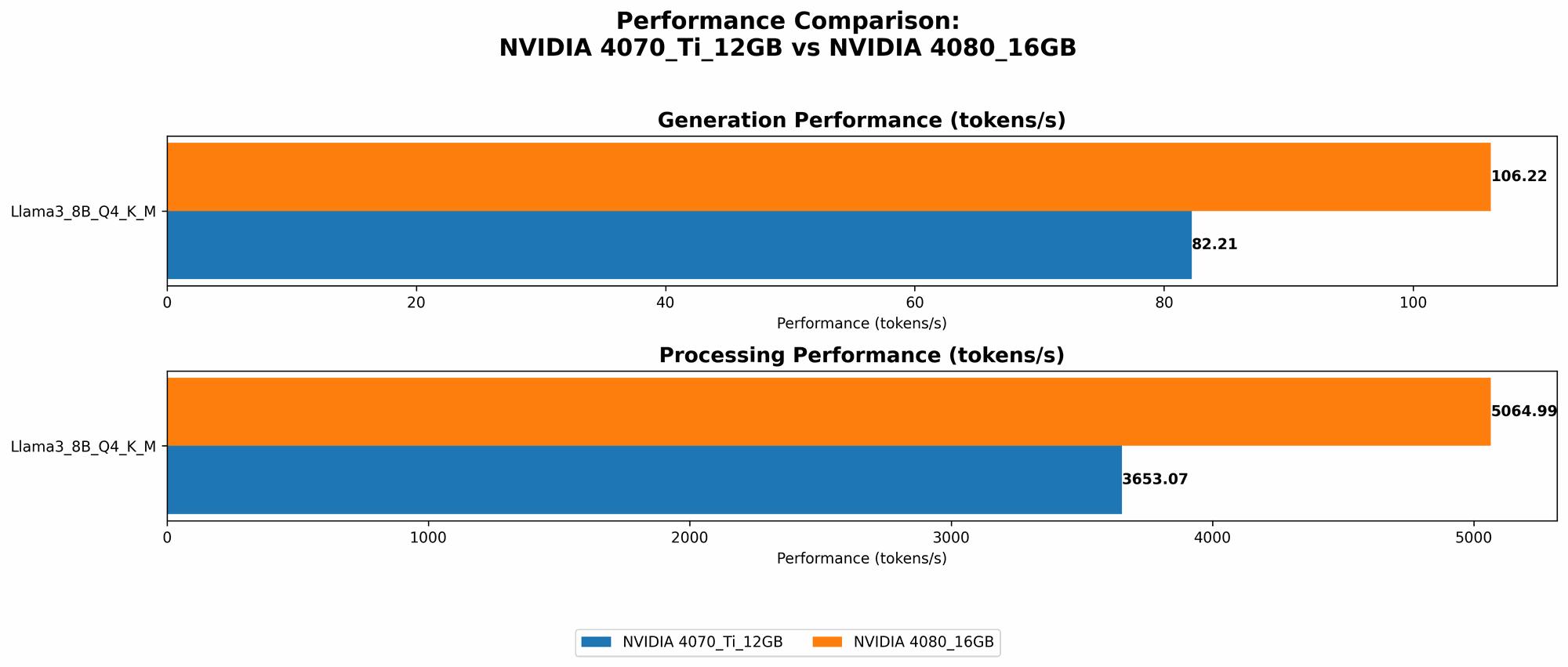
| NVIDIA 4070 Ti 12GB | 82.21 | NULL |
| NVIDIA 4080 16GB | 106.22 | 40.29 |
- Observations: The 4080 16GB outperforms the 4070 Ti 12GB in both Q4KM and F16 configurations, with a noticeable margin. Interestingly, the 4080 shines in F16, offering faster generation than the 4070 Ti in Q4KM.
Token Generation Speed for Llama 3 8B - Processing
| GPU | Llama 3 8B Q4KM Processing (Tokens/Second) | Llama 3 8B F16 Processing (Tokens/Second) |
|---|---|---|
| NVIDIA 4070 Ti 12GB | 3653.07 | NULL |
| NVIDIA 4080 16GB | 5064.99 | 6758.9 |
- Observations: Similar to generation, the 4080 16GB surpasses the 4070 Ti 12GB in both Q4KM and F16 processing speeds. In F16, the 4080 shows a significant advantage, indicating its ability to handle the increased memory bandwidth demands of this data format.
Comparison of NVIDIA 4070 Ti 12GB and NVIDIA 4080 16GB for Llama 3 70B
Unfortunately, the available data doesn't have token generation speed for the Llama 3 70B model on the 4070 Ti 12GB or the 4080 16GB. This is because running a larger LLM like Llama 3 70B on a GPU with limited VRAM (like the 4070 Ti) might require significant optimization or specialized techniques to make it work efficiently.
Performance Analysis: Strengths and Weaknesses
NVIDIA 4070 Ti 12GB: Strengths and Weaknesses
Strengths:
- Affordable: The 4070 Ti is often more budget-friendly than the 4080, especially considering the price tag of top-tier GPUs.
- Decent Performance: For smaller LLMs like Llama 3 8B, the 4070 Ti performs well, especially in Q4KM configuration.
Weaknesses:
- Limited VRAM: The 12GB VRAM can be a bottleneck for larger LLMs. If you plan to work with very large models, this card might not be the best choice.
- Performance limitations with Larger Models: The 4070 Ti might struggle to handle the memory demands of models like Llama 3 70B without optimization.
NVIDIA 4080 16GB: Strengths and Weaknesses
Strengths:
- Powerful Performance: The 4080 delivers impressive performance, particularly in F16 configuration, making it ideal for running larger LLMs.
- Ample VRAM: With 16GB of VRAM, the 4080 can handle larger models without excessive resource strain.
Weaknesses:
- Higher Price: The 4080 comes with a premium price tag, which might not be feasible for all budgets.
Practical Recommendations: Which Card is Right for You?
- For running Llama 3 8B and smaller models: The 4070 Ti is a very good choice. It offers a balance of performance and affordability. However, consider the Q4KM configuration (due to the limited VRAM) for better efficiency.
- For running Llama 3 70B and similar-sized models: The 4080 16GB is the way to go. Its ample VRAM and powerful performance make it ideal for handling the demands of these larger LLMs.
- For budget-conscious users: Look at the 4070 Ti, but be mindful of its limitations with larger models.
- For users who prioritize performance: The 4080 16GB provides the best performance for both generation and processing.
Using the Right Tools: Optimizing for Performance
To maximize your GPU performance, you can use tools like llama.cpp and GPU-Benchmarks-on-LLM-Inference. These tools provide pre-trained model configurations and benchmarks, helping you fine-tune your setup for optimal efficiency.
Examples:
- llama.cpp: This popular open-source library allows you to run LLMs directly from your local machine. It supports various models and provides options for quantization.
- GPU-Benchmarks-on-LLM-Inference: This repository offers comprehensive benchmarks for various GPU models and LLM configurations. It provides valuable insights to choose the most suitable setup for your needs.
FAQ: Common Questions
Q: What is quantization and how does it affect speed?
Quantization is a technique that reduces the precision of model weights, effectively shrinking the size of your LLM while decreasing memory usage. This can lead to faster processing, but there might be a slight drop in accuracy. Imagine you're holding a blueprint with a lot of details—quantization is like simplifying some of those details to make the blueprint smaller and lighter.
Q: What is the difference between F16 and Q4KM?
F16 (Float16) is a common data format for machine learning. It uses a fixed-point representation for numbers, meaning it represents numbers with less precision than the standard F32 (Float32). Q4KM is a more specialized quantization technique that involves further reducing the precision of the model's weights. F16 generally provides a good balance between speed and accuracy, while Q4KM pushes for higher speed but might impact accuracy.
Q: Should I always choose the highest performing GPU?
Not necessarily. If you're working with small LLMs and your budget is limited, a less powerful GPU might be sufficient. Consider the specific models you'll be using and your project's requirements before making a decision.
Q: What other factors should I consider besides token generation speed?
Other important factors include power consumption, noise levels, and the availability of drivers and software support.
Keywords:
NVIDIA 4070 Ti 12GB, NVIDIA 4080 16GB, LLM, large language models, token generation speed, benchmark analysis, Llama 3, Llama 3 8B, Llama 3 70B, Q4KM, Quantization, F16, Float16, GPU, performance, VRAM, processing, generation, recommendations, budget, tools, llama.cpp, GPU-Benchmarks-on-LLM-Inference.