NVIDIA 4070 Ti 12GB vs. NVIDIA 3090 24GB for LLMs: Which is Faster in Token Generation Speed? Benchmark Analysis

Introduction
The world of large language models (LLMs) is abuzz with excitement, and for good reason! These powerful AI models can generate human-quality text, translate languages, write different kinds of creative content, and answer your questions in an informative way. However, running these models locally can be resource-intensive, requiring powerful hardware like GPUs.
This article delves into the performance comparison of two popular NVIDIA GPUs, the NVIDIA 4070 Ti 12GB and the NVIDIA 3090 24GB, for running LLMs, particularly in terms of their token generation speed. We'll explore the key factors influencing performance, analyze the benchmark results, and provide practical recommendations for choosing the right GPU for your needs.
Benchmark Analysis: NVIDIA 4070 Ti 12GB vs. NVIDIA 3090 24GB
To kick things off, let's dive into the token generation speed of the selected GPUs using the Llama.cpp framework for various LLM models. We'll focus on the following LLM models:
- Llama 3 8B: A relatively lightweight LLM, perfect for experimenting and exploring the capabilities of LLMs.
- Llama 3 70B: A significantly larger and more powerful LLM, offering improved performance in complex language tasks.
Comparison of NVIDIA 4070 Ti 12GB and NVIDIA 3090 24GB for Llama 3 8B
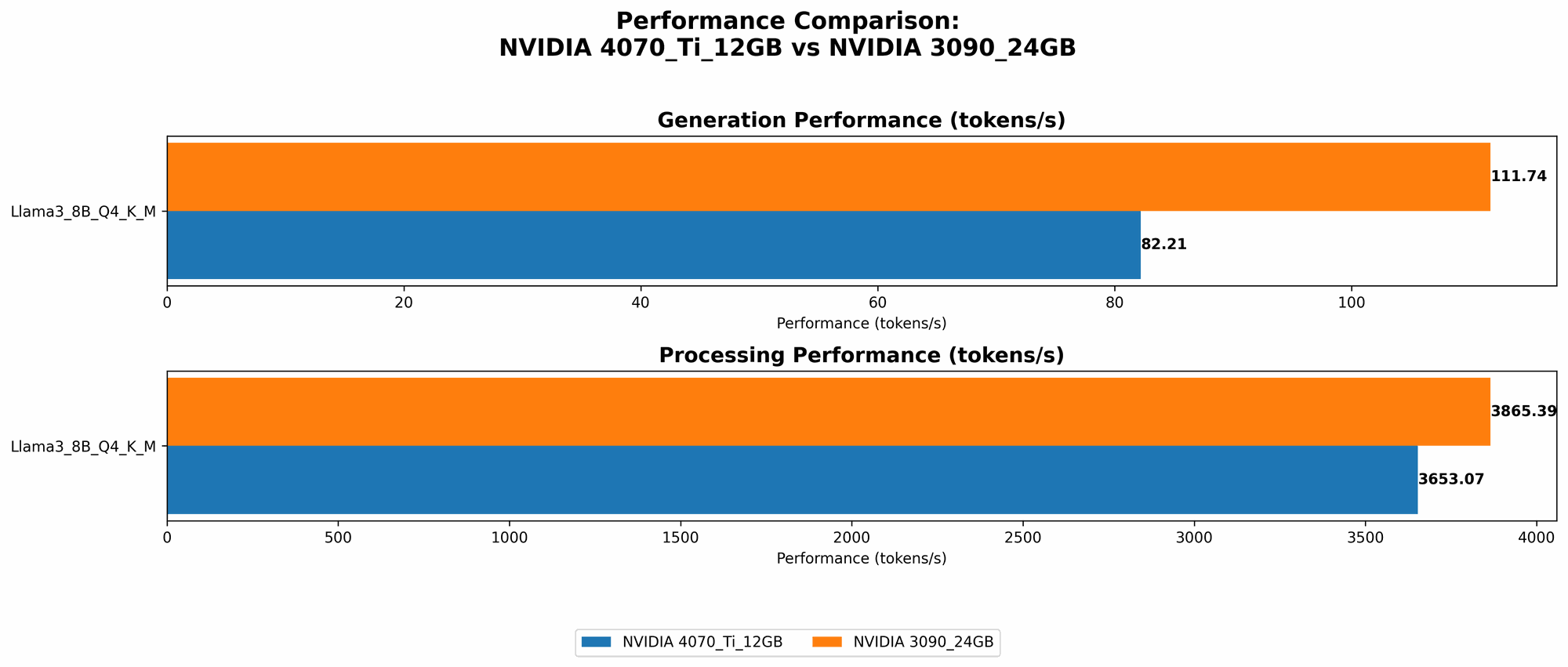
| Model / GPU | Token Generation Speed (tokens/second) |
|---|---|
| Llama 3 8B (Q4KM) / 4070 Ti 12GB | 82.21 |
| Llama 3 8B (Q4KM) / 3090 24GB | 111.74 |
| Llama 3 8B (F16) / 3090 24GB | 46.51 |
Let's break down the results:
- Llama 3 8B (Q4KM): The 3090 24GB outperforms the 4070 Ti 12GB by approximately 35% in token generation speed for the quantized model. This is likely due to the 3090's larger memory capacity and overall higher performance capabilities.
- Llama 3 8B (F16): While the 3090 24GB is capable of running the full-precision (F16) model, the 4070 Ti 12GB doesn't have data available for this configuration.
Comparison of NVIDIA 4070 Ti 12GB and NVIDIA 3090 24GB for Llama 3 70B
Unfortunately, benchmark data is currently unavailable for the Llama 3 70B model on both GPUs. We'll keep this section updated as soon as more data becomes available.
Performance Analysis: Key Factors and Considerations
Now that we've seen the benchmark results, let's discuss the factors contributing to the performance differences:
- GPU Memory: The size of the GPU's memory directly affects the ability to load and run larger LLM models. The 3090's 24GB of memory gives it a clear advantage when handling LLMs like Llama 3 70B, which require more memory.
- GPU Compute Performance: The overall compute power of the GPU impacts the speed of token generation and inference. The 3090 24GB, with its 24GB of GDDR6X memory and robust compute capabilities, outperforms the 4070 Ti 12GB in this area.
- Quantization: Quantizing the LLM model (reducing its size by representing weights with smaller data types) can significantly improve inference speed, especially for smaller GPUs. The 4070 Ti 12GB with Q4KM quantization performs well for the Llama 3 8B model.
Choosing the Right GPU: Practical Recommendations
Here's a simplified breakdown to help you choose the right GPU based on your use cases:
NVIDIA 4070 Ti 12GB:
- Ideal for: Experimenting with smaller LLMs (like Llama 3 8B), utilizing quantization techniques, or if your budget is more constrained.
- Limitations: May not be suitable for running larger LLMs like Llama 3 70B without utilizing quantization techniques.
NVIDIA 3090 24GB:
- Ideal for: Running large LLMs (like Llama 3 70B) with full precision (F16), achieving high token generation speeds, or if you need maximum performance.
- Limitations: More expensive than the 4070 Ti 12GB, and its enormous memory capacity might be overkill for smaller LLMs.
Beyond Token Generation Speed: A Holistic Perspective
While token generation speed is a crucial metric, it's not the only factor when evaluating GPU performance for LLMs. Here are some additional considerations:
- Memory Bandwidth: The amount of data that can be transferred between the GPU and memory in a given time is crucial for efficient model loading and processing.
- GPU Architecture: The specific GPU architecture (e.g., Ampere, Ada Lovelace) impacts performance metrics like tensor cores and memory bandwidth.
- Software and Libraries: The choice of software framework and libraries plays a significant role in optimizing LLM inference. For instance, llama.cpp is known for its efficiency in running LLMs on various platforms.
Quantization: A Simple Explanation for Non-Technical Readers
Imagine you have a massive encyclopedia filled with knowledge. To access it, you need to search through the entire volume. Now, imagine you have the same encyclopedia but it's been summarized into a smaller, more concise version (quantized). This smaller version allows you to find information much faster, even though it might be slightly less detailed. Quantization works similarly with LLMs – it reduces the model's size by representing its weights with smaller data types, leading to quicker inference and less memory consumption.
FAQ (Frequently Asked Questions)
Here are some common questions about LLMs, GPUs, and running LLMs locally:
What is an LLM?
An LLM (Large Language Model) is a type of AI model trained on massive amounts of text data to understand and generate human-like text. Imagine a super intelligent chatbot that can write stories, translate languages, and even answer your questions like a knowledgeable expert. LLMs are rapidly evolving, and their capabilities are constantly expanding.
What is Token Generation Speed?
Think of token generation speed as the rate at which an LLM can "understand" and "generate" text. Each word or punctuation mark is considered a token. Higher token generation speeds mean the LLM processes and outputs text faster.
Why do I need a GPU to run LLMs?
LLMs require a lot of computational power to process and generate text. GPUs are specialized processors designed for parallel computations, making them incredibly effective for handling the complex calculations involved in running LLMs.
Can I run LLMs on my CPU?
Yes, you technically can run LLMs on a CPU, but it will be much slower than using a GPU. For optimal performance, a dedicated GPU is recommended, especially for larger LLMs.
How do I choose the best GPU for running LLMs?
Consider the size of the LLM you want to run, your budget, and the performance requirements. Smaller LLMs might not require the most powerful GPU, while larger models may benefit from a high-end GPU with ample memory.
What are other options for running LLMs locally?
Besides NVIDIA GPUs, other options include:
- AMD GPUs: AMD offers powerful GPUs that can also run LLMs.
- Apple Silicon: Apple's M1 and M2 chips provide impressive performance for AI workloads, including LLMs.
- Cloud Services: Cloud services like Google Colab, Amazon SageMaker, and Microsoft Azure offer remote access to powerful GPUs for running LLMs without needing to invest in local hardware.
Keywords
NVIDIA 4070 Ti 12GB, NVIDIA 3090 24GB, LLM, Large Language Model, Token Generation Speed, Benchmark Analysis, GPU, Performance Comparison, Llama 3 8B, Llama 3 70B, Quantization, F16, Q4KM, Memory Bandwidth, GPU Architecture, Software and Libraries, llama.cpp, GPU Benchmarks, LLM Inference, AI, Machine Learning, Deep Learning, Tokenization, Text Generation, Natural Language Processing, NLP, Computer Science, Technology, Artificial Intelligence, AI Models, AI Applications, AI Research, AI Development