NVIDIA 3070 8GB vs. NVIDIA 4090 24GB for LLMs: Which is Faster in Token Generation Speed? Benchmark Analysis

Introduction
The world of large language models (LLMs) is exploding, with new models like Llama 3 being released constantly. To run these models locally, you need a powerful GPU. But with so many options available, it can be difficult to decide which GPU is right for you. In this article, we'll dive deep into the performance of two popular NVIDIA GPUs: the 3070 8GB and the 4090 24GB, to see which one reigns supreme in the battle for token generation speed.
Imagine you want to create your own AI-powered chatbot. You need a GPU to process the language model, like Llama 3, and generate responses. This is where the 3070 and 4090 come in. They are like turbocharged engines for your AI projects. But which one is better suited for the job?
Performance Analysis: NVIDIA 3070 8GB vs. NVIDIA 4090 24GB
We'll analyze the performance of both GPUs with Llama 3 models, specifically focusing on their token generation speed, which is a crucial metric for a smooth and responsive user experience.
Comparison of NVIDIA 3070 8GB and NVIDIA 4090 24GB for Llama 3 8B
Let's start with the 8B (8 billion parameters) version of Llama 3. These models are already quite powerful and can be used for a variety of tasks, from simple chatbots to more complex applications.
| Model & Quantization | NVIDIA 3070 8GB (Tokens/Second) | NVIDIA 4090 24GB (Tokens/Second) |
|---|---|---|
| Llama 3 8B, Q4KM | 70.94 | 127.74 |
| Llama 3 8B, F16 | N/A | 54.34 |
Analysis:
- Q4KM Quantization: The NVIDIA 4090 24GB clearly outperforms the 3070 8GB, generating tokens at almost twice the speed. This means that with the 4090, you'll get faster responses from your LLM, leading to a better user experience, especially for real-time conversations.
- F16 Quantization: The 4090 24GB also performs significantly better with F16 quantization, which is a technique to reduce memory usage by storing numbers with half precision. Interestingly, the 3070 8GB doesn't have data available for F16. This could be due to memory limitations, as F16 might require more memory to store the model.
Comparison of NVIDIA 3070 8GB and NVIDIA 4090 24GB for Llama 3 70B
Unfortunately, we don't have any data on the 70B version of Llama 3 for either the 3070 8GB or the 4090 24GB. This is because the 70B model is extremely resource-intensive, and even the 4090 24GB might struggle to load it fully, especially in its full-precision format.
The NVIDIA 4090 24GB: A Powerhouse for Massive LLMs
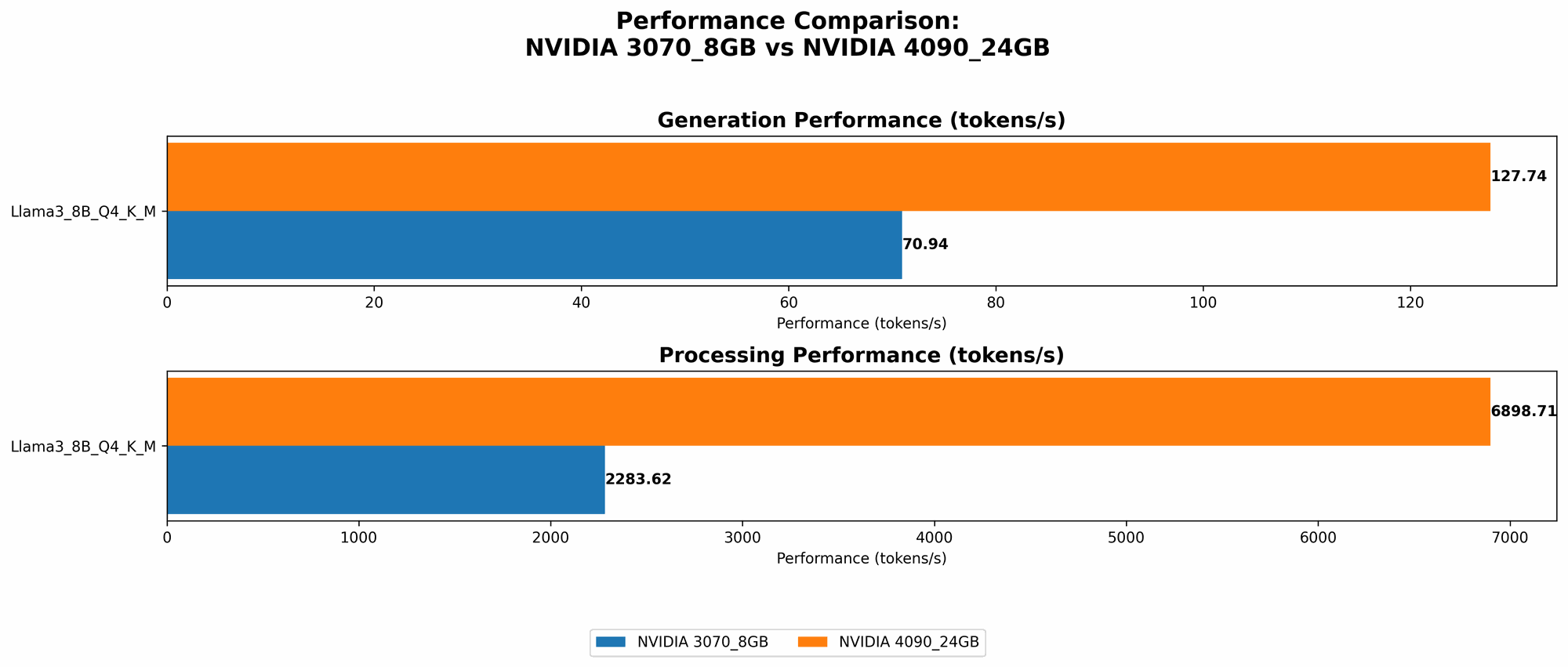
The 4090 24GB is a beast when it comes to handling large models. Its 24GB of VRAM allows it to handle larger and more complex models, and its raw processing power allows it to generate tokens much faster, even with F16 quantization, which can be advantageous for memory-constrained scenarios. You can confidently use this GPU with advanced models without sacrificing response speed.
Choosing the Right GPU: Practical Recommendations
So, which GPU should you choose?
If you're working with smaller models like Llama 3 8B:
- NVIDIA 3070 8GB: This is a solid choice if you're on a budget. It's still capable of running these models smoothly, especially with Q4KM quantization.
- NVIDIA 4090 24GB: If you prioritize speed and want the best possible performance, the 4090 is the way to go. It will give you a noticeable improvement in token generation speed, even with F16 quantization, and it's ready for future upgrades to even larger models.
If you're planning to work with larger models like Llama 3 70B or beyond:
- NVIDIA 4090 24GB: This is the clear winner. The 4090 has the VRAM and processing power to handle these massive models. Other GPUs, including the 3070, are likely insufficient.
The Importance of Quantization
Quantization is a crucial aspect of running LLMs efficiently, especially on GPUs with limited VRAM. You can think of it like compressing a video file to make it smaller while maintaining quality. In the realm of LLMs, quantization reduces the size of the model by storing numbers with fewer bits, which translates to less memory usage.
Here's a simple analogy:
Imagine you're trying to store a photo of a sunset using only black and white pixels. You have two options:
- Full Precision: Use all the possible shades of black and white, like a high-quality photo. This requires a lot of storage space.
- Quantization: Use a limited number of shades of black and white, like a low-resolution photo. This requires less storage space but might not be as detailed.
Quantization in LLMs is similar. By using fewer bits to represent numbers, we can reduce memory usage, making it possible to run larger models on GPUs with limited VRAM.
Common Quantization Methods
- Q4KM: This method uses 4 bits to store numbers. It's a good balance between performance and memory efficiency.
- F16: This method uses 16 bits to store numbers, which is considered half-precision compared to the full precision used by the original model.
The choice of quantization method depends on the specific model and the hardware you're using. If you have a powerful GPU with plenty of VRAM, you might be able to use F16 quantization for faster performance. However, if you have a limited VRAM GPU, Q4KM or even lower precision quantization might be necessary to fit the model.
FAQs
What are the benefits of running an LLM locally?
Running an LLM locally gives you more control over your data and privacy, and it also allows for faster performance in specific applications, like personal or offline AI assistants. You don't need to rely on a cloud service or internet connection for every interaction.
What are the drawbacks of running an LLM locally?
Running an LLM locally requires a powerful GPU, which can be expensive. Additionally, you might need to invest time and effort in setting up your local environment.
Can I use the NVIDIA 3070 8GB with Llama 3 70B?
It's highly unlikely that the 3070 8GB will be able to handle Llama 3 70B without running into memory issues.
What other factors should I consider when choosing a GPU for LLMs?
Besides token generation speed and VRAM, other factors to consider include:
- Power consumption: Consider the power draw of the GPU and your power supply capabilities.
- Cooling: Make sure your system has adequate cooling to prevent overheating.
- Price: GPUs can range in price significantly, so factor that into your decision.
Keywords
LLMs, Large Language Models, NVIDIA 3070, NVIDIA 4090, token generation speed, GPU, VRAM, quantization, Q4KM, F16, Llama 3, 8B, 70B, performance analysis, benchmark, AI, chatbot, local running, data privacy, power consumption, cooling, price.