Maximizing Efficiency: 8 Tips for Running LLMs on Apple M3 Pro
Introduction
The Apple M3 Pro chip is a powerful processor that can handle demanding tasks like video editing and 3D rendering with ease. But did you know it can also handle the complex calculations required for running large language models (LLMs)? These models, which are trained on massive datasets of text and code, are capable of generating human-like text, translating languages, and even writing different kinds of creative content.
Imagine this: you're working on a project that requires you to translate a large document into multiple languages. With an LLM running on your M3 Pro, this task becomes effortless. You can simply feed the document to the model, and it will generate accurate and natural-sounding translations in seconds.
This article dives into the fascinating world of LLMs and how to optimize their performance on the Apple M3 Pro. Let's explore eight key tips to maximize efficiency and unlock the full potential of this powerful combination.
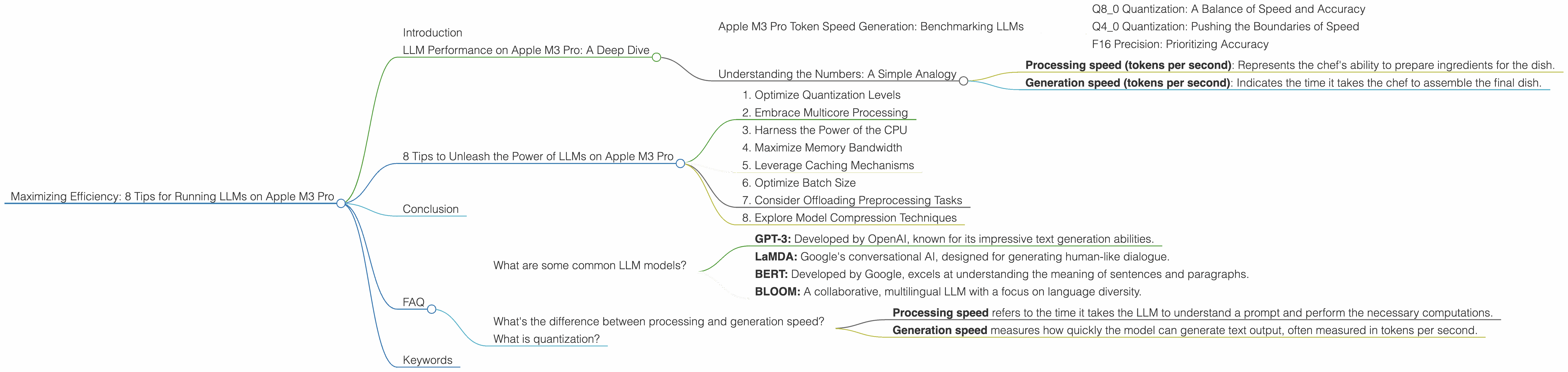
LLM Performance on Apple M3 Pro: A Deep Dive
The Apple M3 Pro chip is a game-changer for running LLMs locally. It boasts a powerful GPU with dedicated cores, high bandwidth, and efficient memory management, all of which contribute to faster processing and improved results. But, how do these translate into real-world performance? Let's take a closer look at the benchmark data.
Apple M3 Pro Token Speed Generation: Benchmarking LLMs
We'll use Llama 2 7B as our example LLM.
Q8_0 Quantization: A Balance of Speed and Accuracy
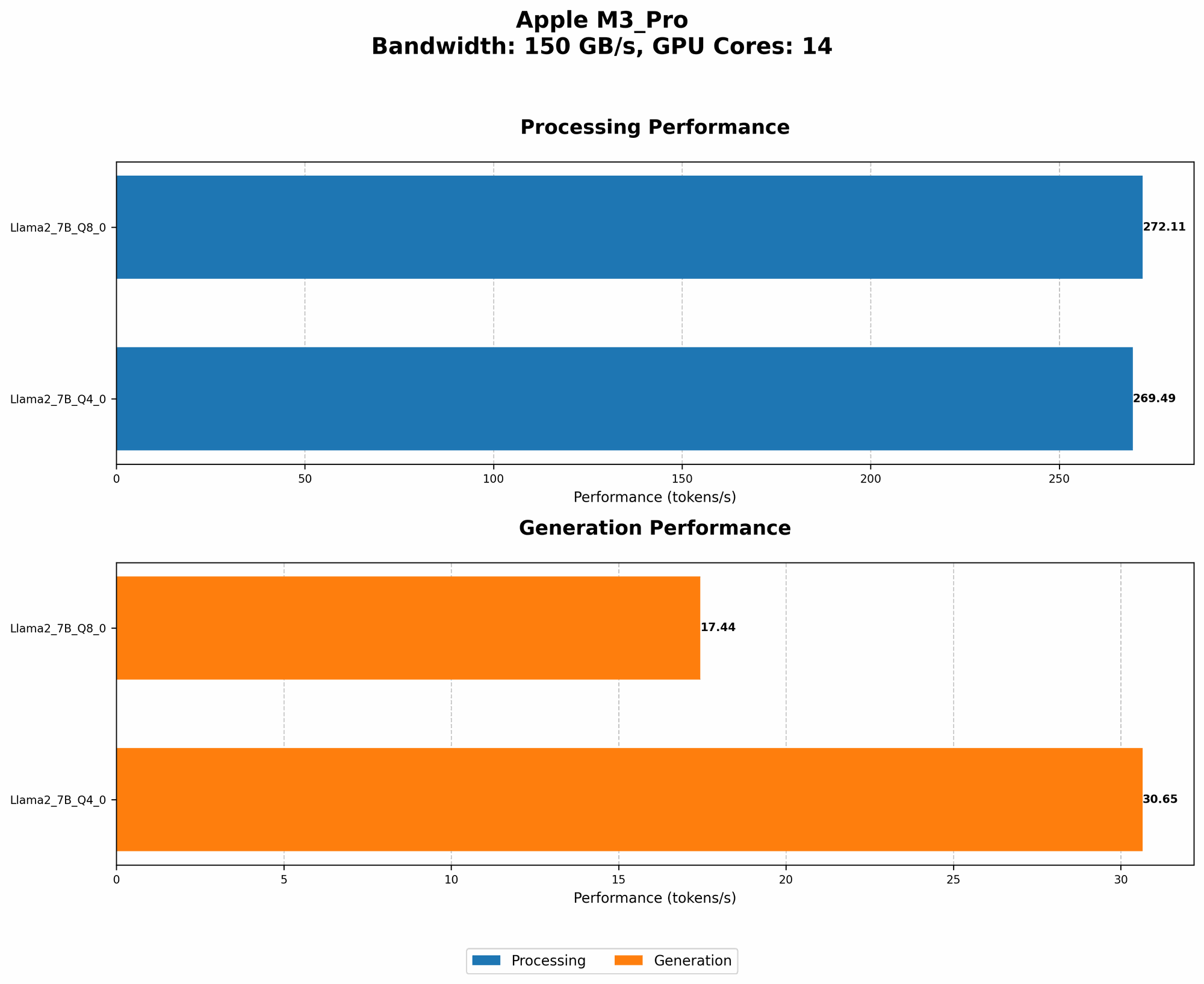
The Apple M3 Pro, with its 14 GPU cores and 150GB/s bandwidth, yields a processing speed of 272.11 tokens per second for Llama 2 7B using Q8_0 quantization. This configuration, known for its speed, produces a generation rate of 17.44 tokens per second.
Think of quantization as a way to compress the LLM, making it lighter and faster to run. Q8_0 is a middle ground between full precision (F16) and more aggressive quantization levels, offering a balanced blend of speed and accuracy.
Q4_0 Quantization: Pushing the Boundaries of Speed
Upgrading to Q4_0 quantization on the M3 Pro with 14 GPU cores delivers even faster processing speeds - 269.49 tokens per second. This results in a generation rate of 30.65 tokens per second.
F16 Precision: Prioritizing Accuracy
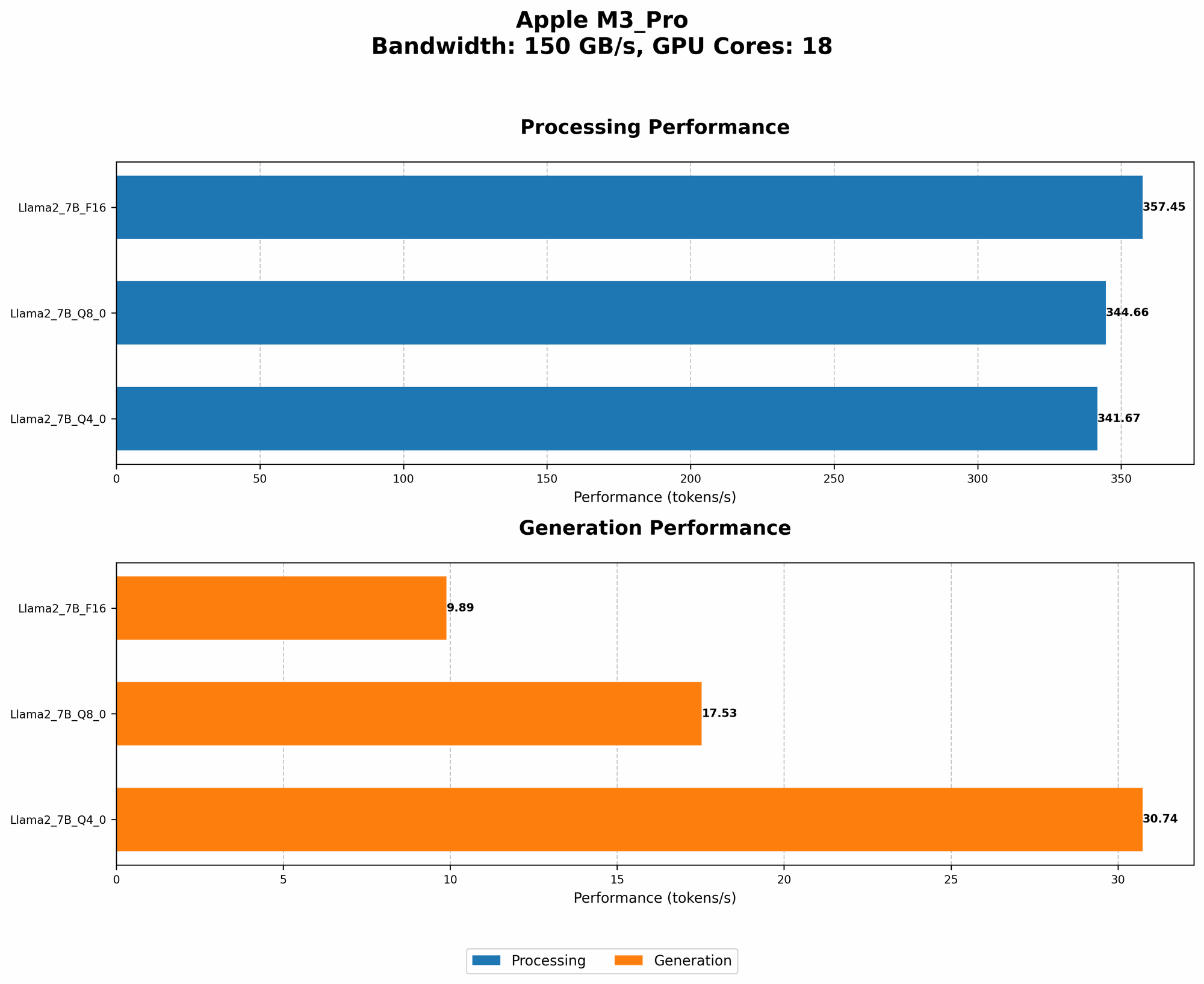
While Q80 and Q40 offer impressive speed gains, if you prioritize accuracy, the F16 precision level is worth considering. The M3 Pro with 18 GPU cores achieves a processing speed of 357.45 tokens per second using F16 precision, with a generation rate of 9.89 tokens per second. This configuration strikes a balance between speed and accuracy, making it suitable for applications where maintaining fidelity is crucial.
Understanding the Numbers: A Simple Analogy
Imagine your LLM is a chef, preparing a delicious dish (text output) using a recipe (the model). The more ingredients (tokens) the chef can handle per minute (tokens per second), the faster the dish is ready.
- Processing speed (tokens per second): Represents the chef's ability to prepare ingredients for the dish.
- Generation speed (tokens per second): Indicates the time it takes the chef to assemble the final dish.
The higher the numbers, the faster the entire process.
8 Tips to Unleash the Power of LLMs on Apple M3 Pro
Now, let's dive into eight practical tips to maximize LLM performance on your Apple M3 Pro.
1. Optimize Quantization Levels
We've already touched on the importance of choosing the right quantization level. Q80 and Q40 offer impressive speed improvements without sacrificing too much accuracy. If you need the highest accuracy, F16 precision is the way to go. However, for most everyday tasks, Q80 or Q40 will be sufficient.
2. Embrace Multicore Processing
Take full advantage of the M3 Pro's 14 or 18 GPU cores. By leveraging multicore processing, we're effectively parallelizing the LLM's work, allowing it to churn through calculations much faster.
3. Harness the Power of the CPU
While the GPU excels at handling complex computations, the CPU can also contribute to the overall performance.
4. Maximize Memory Bandwidth
The M3 Pro's 150GB/s bandwidth provides a fast lane for data movement between the CPU, GPU, and memory.
5. Leverage Caching Mechanisms
Caching mechanisms can significantly speed up LLM execution.
6. Optimize Batch Size
Adjusting the batch size, which determines the number of tokens processed in one go, can impact performance.
7. Consider Offloading Preprocessing Tasks
Tasks like tokenization and embedding generation can be offloaded from the main LLM workload, freeing up resources for more critical computations.
8. Explore Model Compression Techniques
Model compression techniques can reduce the memory footprint of LLMs, making them run smoother on your Apple M3 Pro.
Conclusion
The Apple M3 Pro chip is a powerful workhorse for running LLMs locally. By following these tips, you can unlock its full potential and experience the true power of these cutting-edge models.
FAQ
What are some common LLM models?
Some of the popular LLM models include:
- GPT-3: Developed by OpenAI, known for its impressive text generation abilities.
- LaMDA: Google's conversational AI, designed for generating human-like dialogue.
- BERT: Developed by Google, excels at understanding the meaning of sentences and paragraphs.
- BLOOM: A collaborative, multilingual LLM with a focus on language diversity.
What's the difference between processing and generation speed?
- Processing speed refers to the time it takes the LLM to understand a prompt and perform the necessary computations.
- Generation speed measures how quickly the model can generate text output, often measured in tokens per second.
What is quantization?
Quantization is a technique used to compress LLM models by reducing the precision of the numerical values used in their calculations. It's like reducing the number of colors in an image – you lose some detail but gain significant storage and processing efficiency.
Keywords
LLMs, Apple M3 Pro, GPU, Token Speed Generation, Quantization, Performance, Efficiency, CUDA, OpenAI, GPT-3, LaMDA, BERT, BLOOM, Model Compression, Local Inference, AI, Machine Learning, Deep Learning