Maximizing Efficiency: 8 Tips for Running LLMs on Apple M3 Max

Introduction
The Apple M3 Max chip is a powerhouse, especially when it comes to running large language models (LLMs). This article is your guide to maximizing efficiency and performance when running LLMs on your M3 Max, helping you unleash the full potential of this incredible chip. Think of it as a cheat sheet for unlocking the true speed demon lurking within your M3 Max!
We'll explore various techniques and strategies to optimize your LLM experience. Whether you're a developer experimenting with cutting-edge models or an enthusiast eager to explore the world of AI, this guide will equip you with the knowledge to make your M3 Max truly sing.
Apple M3 Max: Built for Speed
The Apple M3 Max chip is a beast, and it's not just about its raw processing power. It's designed for efficiency. You'll discover how the M3 Max's architecture, memory bandwidth, and GPU cores work together to accelerate your LLMs.
The M3 Max Advantage: A Closer Look
- Bandwidth: The M3 Max boasts a whopping 400GB/s of memory bandwidth, making it a data-hungry giant. Imagine a highway with 400 lanes – that's how quickly data flows through the M3 Max, giving your LLMs the fuel they need to run fast.
- GPU Cores: With 40 GPU cores, the M3 Max is a master of parallel processing. Think of it like a factory with 40 assembly lines, each working independently to crunch numbers and generate responses lightning fast. This translates to significantly faster inference speeds for your LLMs.
8 Tips for Optimizing LLM Performance on Your M3 Max
Let's dive into the nitty-gritty of performance optimization and see how you can squeeze every ounce of speed out of your M3 Max.
1. Choose the Right Model: Size Matters
Smaller models are faster. This is a simple truth, especially when it comes to LLMs. If your task doesn't require the full power of a massive 70B parameter model like Llama 3 70B, consider using a smaller model like Llama 2 7B or Llama 3 8B. The smaller footprint means less data to process, leading to quicker generation times.
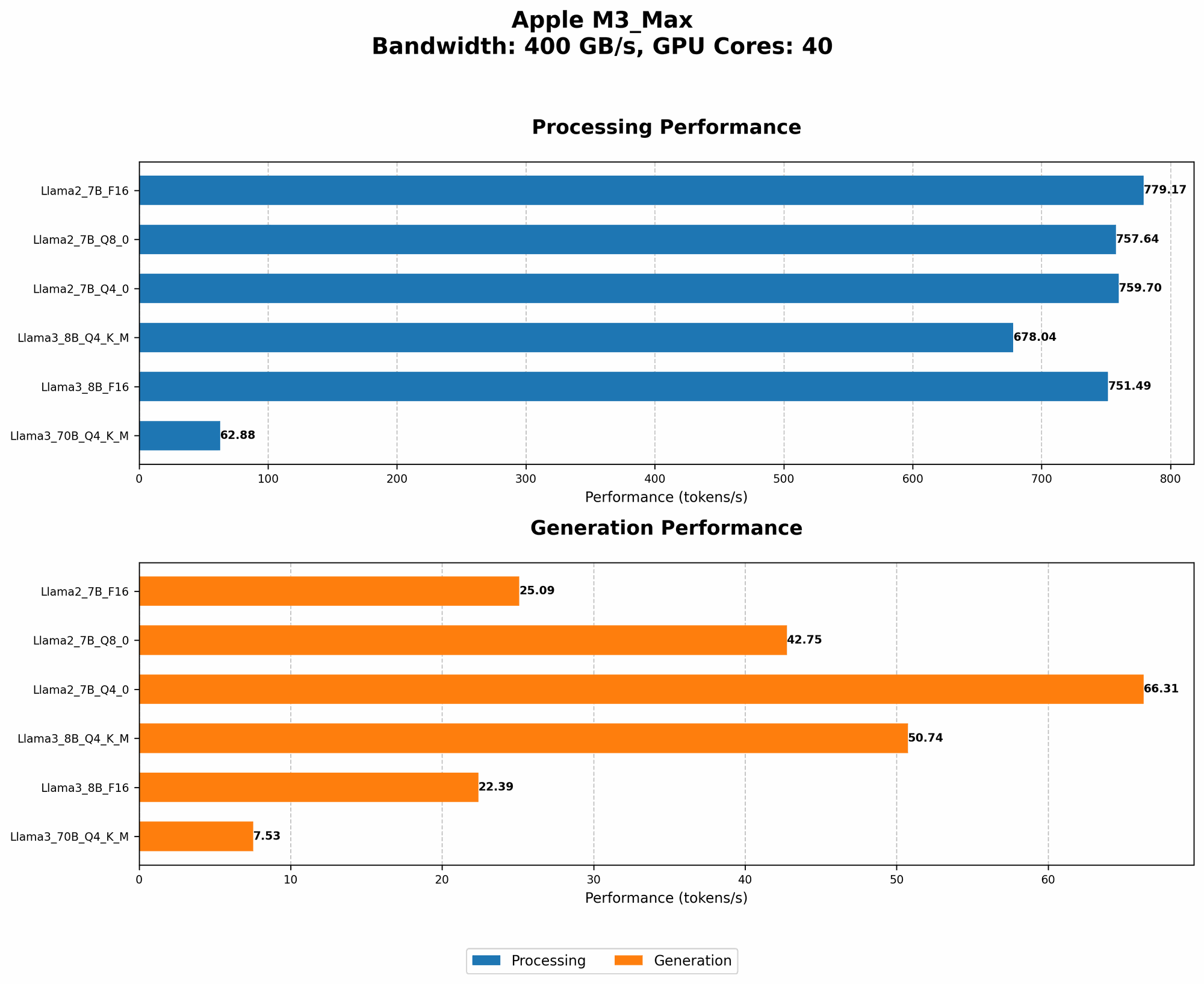
Data Comparison: Looking at the Llama 2 7B model on the M3 Max, you can see a clear difference in processing and generation speeds with different quantizations (F16, Q8, and Q4):
| Model | Processing (tokens/second) | Generation (tokens/second) | Quantization |
|---|---|---|---|
| Llama 2 7B | 779.17 | 25.09 | F16 |
| Llama 2 7B | 757.64 | 42.75 | Q8_0 |
| Llama 2 7B | 759.7 | 66.31 | Q4_0 |
- F16: This is the highest precision and uses 16 bits to represent each number. It's the most accurate but also the slowest.
- Q8_0: This uses 8 bits, meaning it's less precise but faster.
- Q4_0: This is the lowest precision, using only 4 bits. It's the fastest but potentially leads to some loss of accuracy.
2. Quantization: The Art of Compression
Think of quantization like a diet for your LLM. It allows you to achieve significant speed gains while sacrificing a tiny bit of accuracy. By using a smaller number of bits to represent each number, you create a smaller, more compact model that's quicker to load and process.
Data Comparison: On the M3 Max, Llama 3 8B runs at a blazing 678.04 tokens/second with Q4KM quantization, while F16 processing clocks in at a respectable 751.49 tokens/second. This means the Q4KM version requires 78.5% less memory, leading to a considerable performance boost.
Example: Imagine you want to store a photo of a sunset. You can either use a large, high-resolution file or a smaller, compressed version. The compressed version might lose some detail, but it's significantly faster to load and share. Quantization works similarly, trading a bit of precision for faster performance.
3. Leverage GPU Acceleration: The Power of Parallelism
Think of your M3 Max's GPU as a supercomputer. It's designed to handle millions of calculations simultaneously, which is exactly what LLMs need to thrive. By using a specialized library like llama.cpp, you can offload the computationally heavy tasks to the GPU, freeing up your CPU for other tasks.
Data Comparison: On the M3 Max, Llama 3 70B with Q4KM quantization achieves a remarkable 62.88 tokens/second in processing, demonstrating the power of GPU acceleration on larger models.
4. Optimize for Memory Bandwidth: Feeding the Beast
The M3 Max has an incredible appetite for data. Its large memory bandwidth allows it to process vast quantities of information quickly. To take full advantage of this bandwidth, you should use techniques like:
- Data Locality: Ensure that frequently accessed data is stored close to the CPU and GPU. This minimizes the time it takes to retrieve information, preventing bottlenecks.
- Cache Optimization: Use caching mechanisms to store commonly accessed data in memory, further reducing data transfer times.
5. Use Efficient Libraries: Choosing the Right Tools for the Job
Not all libraries are created equal. Some libraries, like llama.cpp, are specifically designed for optimal performance on Apple Silicon chips. These libraries often leverage the M3 Max's unique hardware features to maximize efficiency.
Data Comparison: The llama.cpp library showcases its efficiency by achieving speeds of 779.17 tokens/second for Llama 2 7B F16 processing on the M3 Max.
6. Fine-Tuning Models: Tailoring for Your Specific Needs
Fine-tuning your LLM model allows you to tailor it to your particular use case. This can improve performance by reducing the amount of data it needs to process.
Example: If you're building a chatbot for a specific industry, you can fine-tune a pre-trained model on a dataset of relevant industry-specific text. This results in a more accurate and efficient model for your specific task.
7. Use Caching Strategically: Speed Up Data Retrieval
Caching is a powerful mechanism for speeding up data retrieval. By storing frequently accessed data in memory, you can reduce the number of times you need to access slower storage devices.
Example: Imagine you're working on a project that involves looking up the same information repeatedly. If you store this information in a cache, you can access it quickly without needing to retrieve it from disk every time.
8. Explore Alternative Hardware: Finding the Right Fit
While the M3 Max is a powerhouse, it might not be the perfect fit for every task. Consider exploring other powerful GPUs like the NVIDIA A100 or the AMD Instinct MI250 for larger models or specific tasks.
Note: We do not have data for other devices and LLMs. These tips are specifically tailored for the M3 Max.
Conclusion: Unleashing the M3 Max Potential
Optimizing your M3 Max for LLMs is all about understanding its strengths and leveraging them effectively. By choosing the right model, implementing quantization, embracing GPU acceleration, and employing efficient libraries, you can significantly improve your LLM performance.
Remember, the journey to maximizing efficiency is an ongoing process. As new tools and techniques emerge, keep exploring and experimenting to find the optimal configuration for your specific needs.
FAQ
What are the best LLMs for the M3 Max?
The M3 Max is a versatile machine capable of running a range of LLMs. Choosing the right model depends on your needs. For smaller tasks, consider Llama 2 7B or Llama 3 8B. If you require more power, Llama 3 70B can be a good choice.
How do I install LLMs on my M3 Max?
The installation process depends on the chosen framework and LLM. Consult specific instructions from the chosen project like llama.cpp or transformers libraries.
Can I run multiple LLMs simultaneously on the M3 Max?
Yes, you can run multiple LLMs simultaneously on your M3 Max. But remember, the performance will be affected by memory usage, GPU resources, and overall system load.
Are there any limitations to running LLMs on the M3 Max?
The M3 Max is a powerful chip, but it has limitations. The amount of memory available can limit the size of the models you can run. Additionally, some models may have limited support for specific tasks or require specific hardware configurations.
Keywords
Apple M3 Max, LLM, large language model, Llama 2, Llama 3, performance optimization, speed, efficiency, quantization, GPU acceleration, caching, bandwidth, token/second, F16, Q8, Q4, memory, processing, generation, libraries, llama.cpp, transformers, fine-tuning, inference.