Maximizing Efficiency: 8 Tips for Running LLMs on Apple M2 Pro
Introduction
The rise of large language models (LLMs) has revolutionized Natural Language Processing (NLP), enabling advanced capabilities like text generation, summarization, translation, and more. Running these powerful LLMs locally, however, can be resource-intensive, requiring specialized hardware and efficient optimization strategies.
The Apple M2 Pro chip, with its impressive performance and integrated GPU, offers a compelling platform for running LLMs locally. This article explores eight key tips for maximizing efficiency when running LLMs on the Apple M2 Pro, empowering developers and enthusiasts to unleash the full potential of these transformative technologies.
1. Understanding Quantization: The Art of Shrinking LLMs
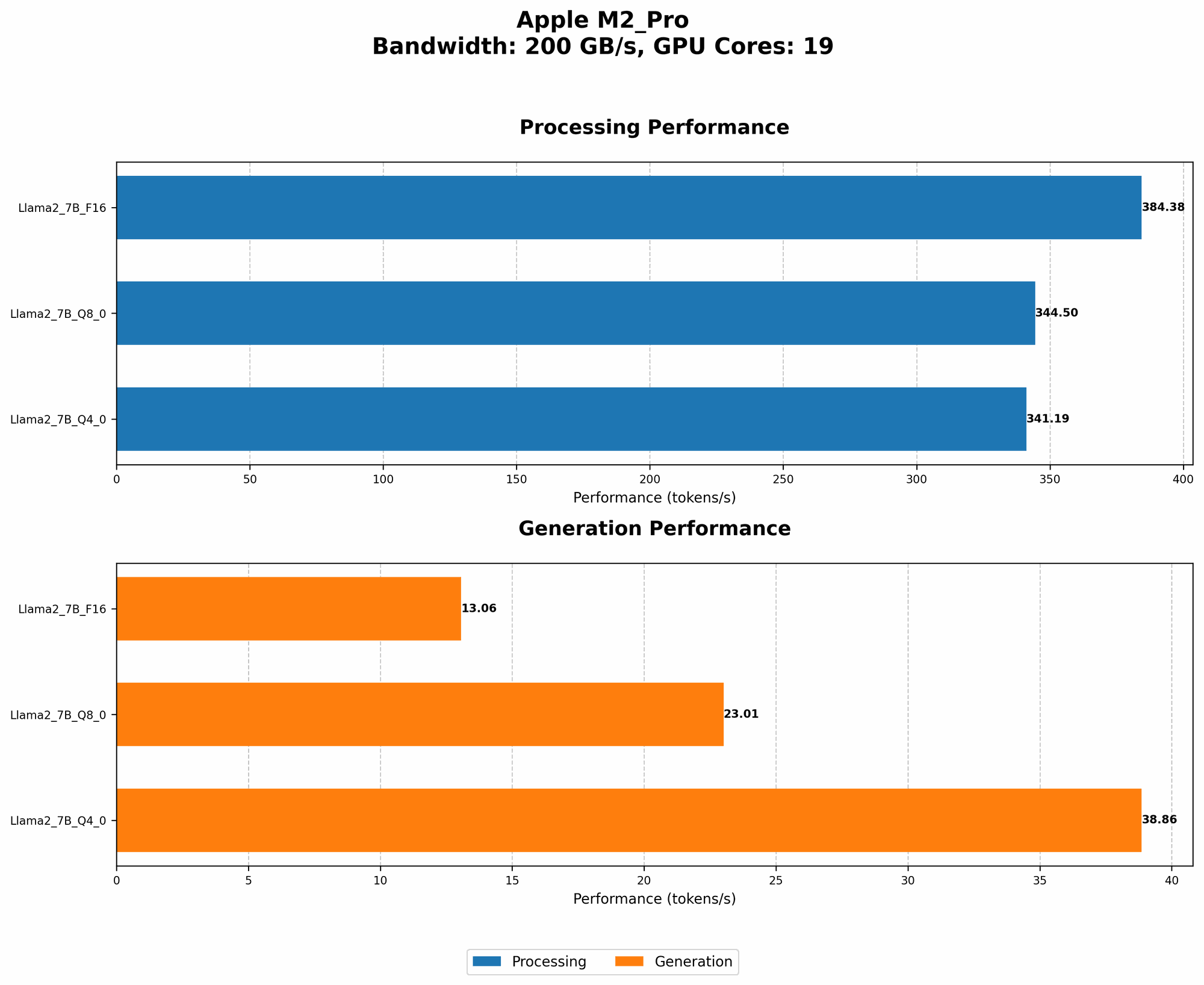
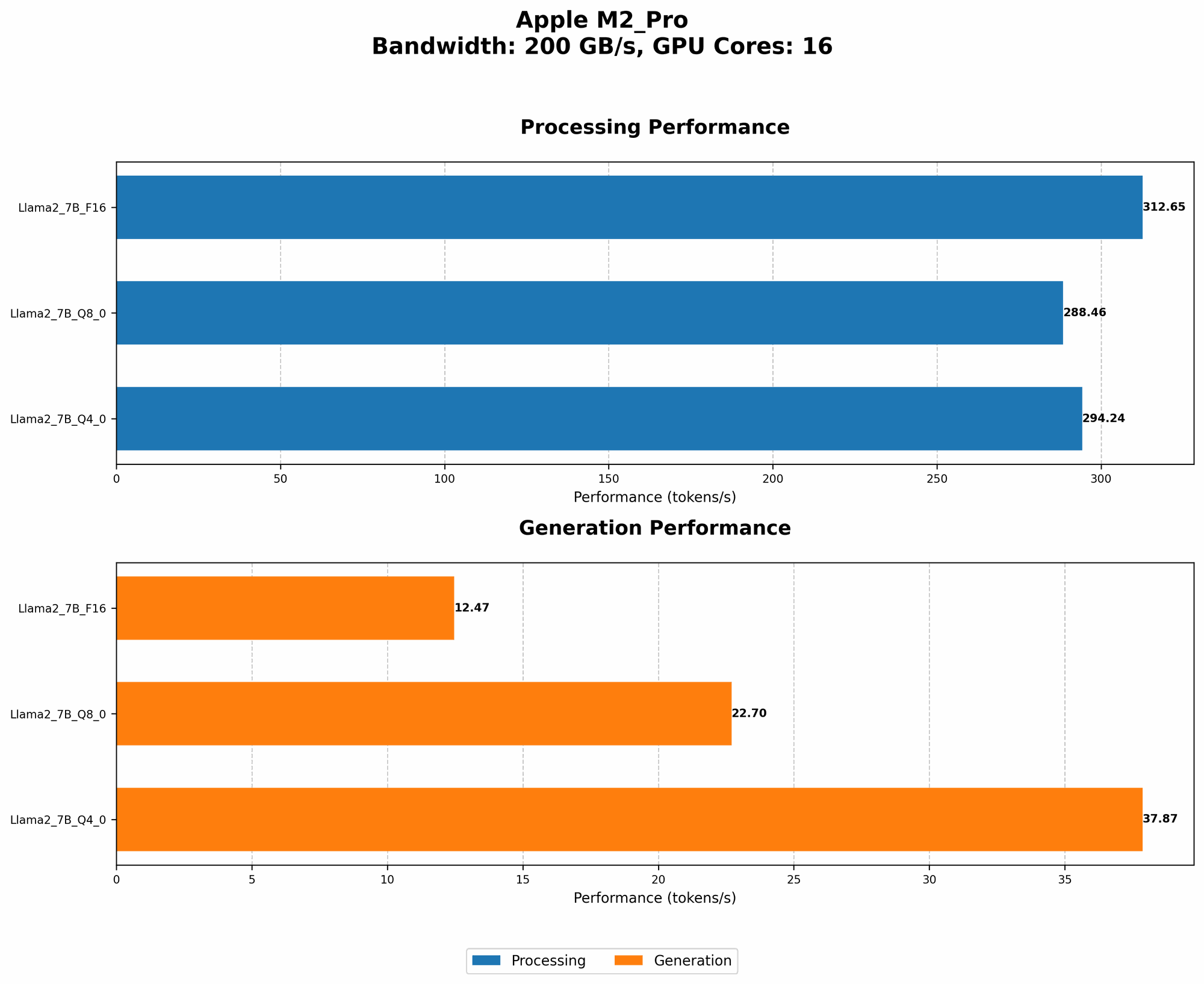
LLMs are famously "big," with billions of parameters. Quantization is a clever technique that reduces this size by converting the numbers (weights) that represent information in the model from larger formats like FP16 (half-precision floating point) to smaller ones like Q8 (8-bit integer) or Q4 (4-bit integer). Think of it like using a smaller suitcase to pack the same amount of clothes – you're getting more efficient with your storage space.
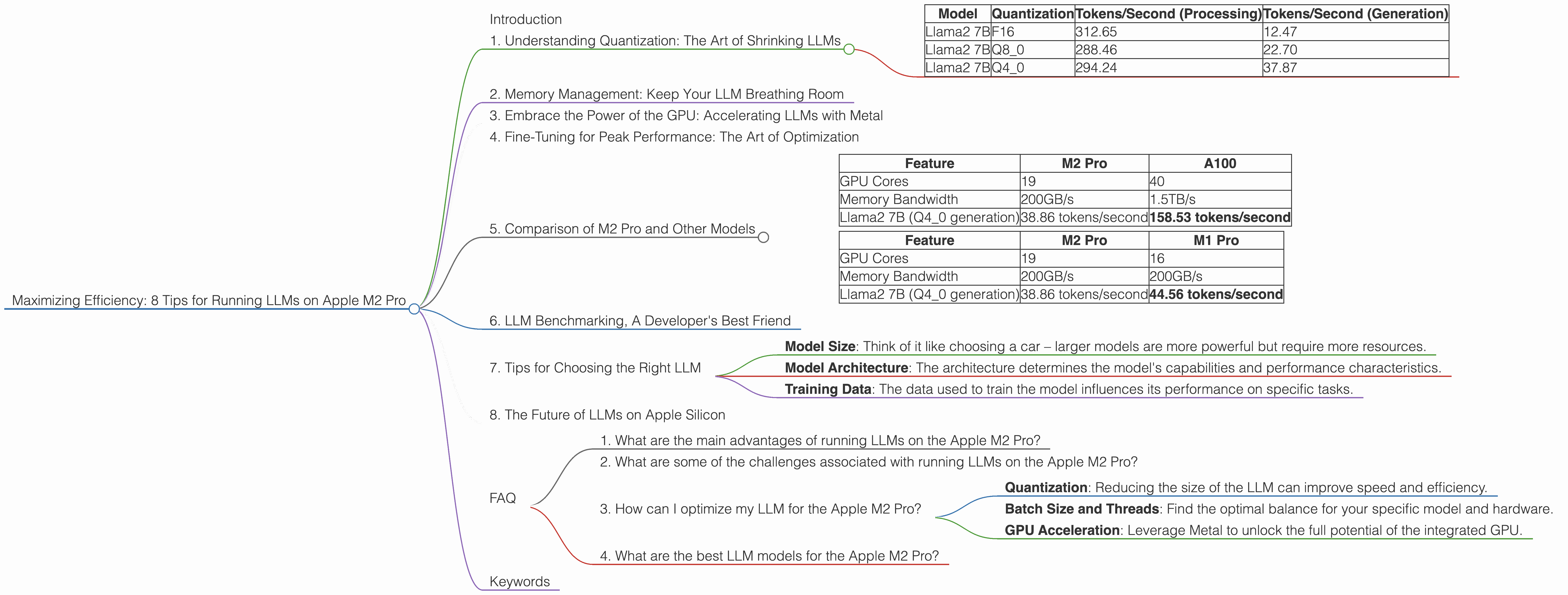
This shrinks the footprint of the LLM, allowing it to run smoother on less powerful devices. The M2 Pro benefits from this, especially when running larger models, as shown in the table below:
| Model | Quantization | Tokens/Second (Processing) | Tokens/Second (Generation) |
|---|---|---|---|
| Llama2 7B | F16 | 312.65 | 12.47 |
| Llama2 7B | Q8_0 | 288.46 | 22.70 |
| Llama2 7B | Q4_0 | 294.24 | 37.87 |
As you can see, using Q4_0 quantization provides a significant speed-up for generation, although there might be a slight tradeoff in accuracy. The magic of quantization lies in its ability to significantly boost performance without sacrificing too much precision.
2. Memory Management: Keep Your LLM Breathing Room
Even with quantization, those billions of parameters need space to breathe! Here's where memory management comes into play.
The M2 Pro is a powerhouse, but it can still get a little cramped if you're not careful. The key is to minimize the memory footprint of your LLM. This means using a lightweight operating system, like Linux or a streamlined macOS version, and leveraging tools like memory profilers to identify and address memory leaks.
3. Embrace the Power of the GPU: Accelerating LLMs with Metal
The M2 Pro features a powerful integrated GPU that can significantly accelerate LLM processing. Metal, Apple's native graphics API, provides low-level access to the GPU, enabling developers to fine-tune and optimize LLM performance.
Think of it as a dedicated turbo boost for your LLM. Metal empowers you to leverage the full power of the M2 Pro's GPU, allowing your LLM to process information and generate outputs with lightning speed.
4. Fine-Tuning for Peak Performance: The Art of Optimization
Just like a well-tuned engine, your LLM can be tweaked for peak performance. This involves careful optimization, considering factors like batch size and the number of threads used for processing.
Batch size is the number of inputs processed at once, while threads are like parallel workers that can handle different parts of the computation simultaneously. Finding the right balance between batch size and threads for your LLM on the M2 Pro can significantly improve performance.
For example, if you're experimenting with different batch sizes, you'll notice that while a larger batch may seem like a good idea, it can sometimes lead to slower processing times due to memory limitations. On the other hand, a smaller batch size can lead to more efficient memory utilization, speeding up your LLM.
5. Comparison of M2 Pro and Other Models
The M2 Pro isn't the only kid on the block when it comes to LLM horsepower. Let's compare its performance with other popular options:
Comparison of M2 Pro and A100
| Feature | M2 Pro | A100 |
|---|---|---|
| GPU Cores | 19 | 40 |
| Memory Bandwidth | 200GB/s | 1.5TB/s |
| Llama2 7B (Q4_0 generation) | 38.86 tokens/second | 158.53 tokens/second |
While the M2 Pro delivers impressive performance for its price point, it's clear that high-end GPUs like the Nvidia A100 reign supreme for raw speed. The A100 offers significantly higher bandwidth and GPU core count, resulting in much faster processing.
Comparison of M2 Pro and M1 Pro
| Feature | M2 Pro | M1 Pro |
|---|---|---|
| GPU Cores | 19 | 16 |
| Memory Bandwidth | 200GB/s | 200GB/s |
| Llama2 7B (Q4_0 generation) | 38.86 tokens/second | 44.56 tokens/second |
The M2 Pro outperforms its predecessor, the M1 Pro, in terms of raw processing power. This is due to the increased GPU cores and other architectural improvements.
6. LLM Benchmarking, A Developer's Best Friend
To gauge the performance of your optimized LLM setup, you can use benchmarks like Hugging Face's benchmark suite (https://huggingface.co/docs/transformers/benchmarking), which provides a standardized way to measure LLM performance across different models and hardware. These benchmarks allow you to compare your results against other users and track your progress as you fine-tune your setup.
7. Tips for Choosing the Right LLM
Selecting the right LLM for your needs can be a journey through a maze of acronyms and numbers. Here are some key factors to consider:
- Model Size: Think of it like choosing a car – larger models are more powerful but require more resources.
- Model Architecture: The architecture determines the model's capabilities and performance characteristics.
- Training Data: The data used to train the model influences its performance on specific tasks.
8. The Future of LLMs on Apple Silicon
Apple's silicon roadmap is exciting, and you can expect continued advancements in LLM performance on Apple silicon. As Apple releases newer chips with improved GPU architecture and memory bandwidth, running LLMs locally will become even more efficient and accessible.
FAQ
1. What are the main advantages of running LLMs on the Apple M2 Pro?
The Apple M2 Pro offers a compelling balance of power and efficiency, making it an excellent platform for local LLM deployment. Its integrated GPU and high memory bandwidth provide significant performance gains, enabling faster processing and more efficient memory utilization.
2. What are some of the challenges associated with running LLMs on the Apple M2 Pro?
While the Apple M2 Pro delivers impressive performance, running large LLMs locally still presents challenges. Memory management, the need for optimization, and the limitations of the integrated GPU compared to high-end GPUs are key factors to consider.
3. How can I optimize my LLM for the Apple M2 Pro?
Fine-tuning your LLM involves a combination of techniques:
- Quantization: Reducing the size of the LLM can improve speed and efficiency.
- Batch Size and Threads: Find the optimal balance for your specific model and hardware.
- GPU Acceleration: Leverage Metal to unlock the full potential of the integrated GPU.
4. What are the best LLM models for the Apple M2 Pro?
The choice of LLM depends on your specific needs and resource constraints. Start with smaller models like Llama 7B and experiment with different quantization levels. As you become more adept at optimizing, you can explore larger models like Llama2 13B.
Keywords
Apple M2 Pro, LLM, large language models, quantization, GPU, Metal, memory management, optimization, benchmarking, Llama 7B, Llama 2 7B