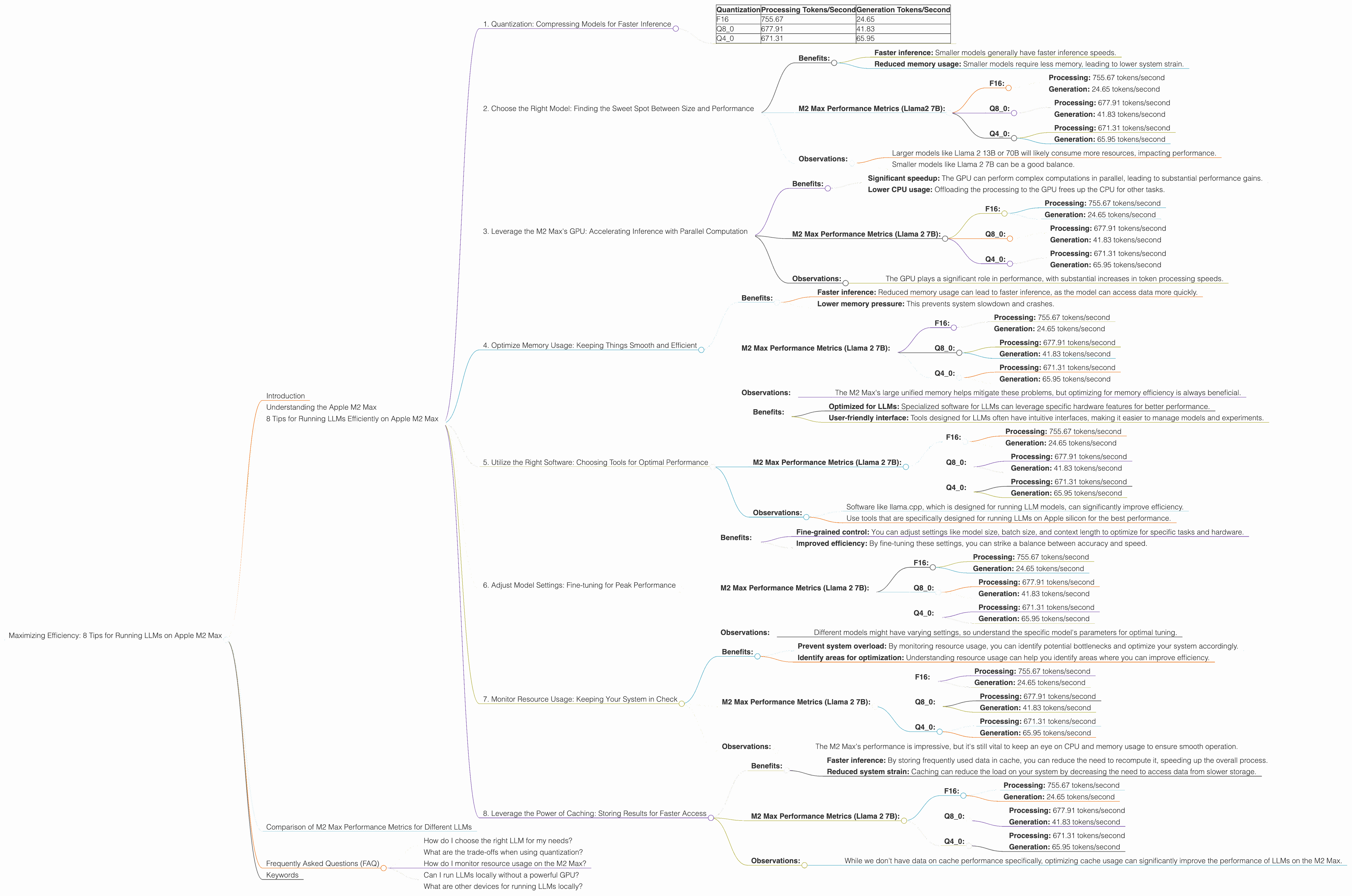
Maximizing Efficiency: 8 Tips for Running LLMs on Apple M2 Max
Introduction
The world of large language models (LLMs) is evolving rapidly, with new models and applications emerging every day. But running these powerful models can be resource-intensive, especially on personal computers. If you're a developer or enthusiast keen on exploring LLMs locally, optimizing performance is crucial. This article will guide you through eight practical tips for maximizing efficiency when running LLMs on an Apple M2 Max chip, a powerful processor designed for demanding tasks.
Understanding the Apple M2 Max
The Apple M2 Max chip is a powerhouse, boasting an impressive 38-core GPU and a substantial 96GB of unified memory. This combination makes it a perfect candidate for running LLMs locally, but it’s not just about throwing hardware at the problem. We need to understand how LLMs work and how we can leverage the M2 Max's unique features for optimal performance.
8 Tips for Running LLMs Efficiently on Apple M2 Max
1. Quantization: Compressing Models for Faster Inference
Think of quantization as model compression on a diet. It shrinks the size of your LLM while retaining most of its capabilities. Imagine a massive library filled with millions of books. This library (your LLM) might take a long time to search through. Quantization is like putting all the books into smaller folders - it streamlines the process, making it faster to find the right book (generate the right text).
Benefits:
- Reduced memory footprint: This means you can run larger models without running into memory constraints.
- Faster inference: Quantization can significantly speed up the model's inference time, resulting in quicker text generation.
M2 Max Performance Metrics:
- Llama 2 7B:
- F16: This is the default precision, representing 16 bits per value.
- Q80: This is an 8-bit quantization scheme with zero-point (a value that adjusts for the range of values) and a slight accuracy penalty.
- Q40: This is a 4-bit quantization scheme with a zero-point, resulting in greater compression but even more potential accuracy loss.
- Llama 2 7B:
Data:
| Quantization | Processing Tokens/Second | Generation Tokens/Second |
|---|---|---|
| F16 | 755.67 | 24.65 |
| Q8_0 | 677.91 | 41.83 |
| Q4_0 | 671.31 | 65.95 |
Observations:
- F16 provides the highest processing speed but slower generation. It's a good balance if speed is crucial.
- Q8_0 offers a slight reduction in processing speed but a significant boost in generation speed.
- Q4_0 significantly increases generation speed, but there's likely a bigger accuracy loss.
2. Choose the Right Model: Finding the Sweet Spot Between Size and Performance
Picking the right LLM is like choosing the right tool for the job. A small hammer might be enough for small nails, but you'll need a bigger hammer for bigger nails. Large models are powerful, but they come with a steep performance cost. Smaller models, while less powerful, might be enough for your task and run much more efficiently.
Benefits:
- Faster inference: Smaller models generally have faster inference speeds.
- Reduced memory usage: Smaller models require less memory, leading to lower system strain.
M2 Max Performance Metrics (Llama2 7B):
- F16:
- Processing: 755.67 tokens/second
- Generation: 24.65 tokens/second
- Q8_0:
- Processing: 677.91 tokens/second
- Generation: 41.83 tokens/second
- Q4_0:
- Processing: 671.31 tokens/second
- Generation: 65.95 tokens/second
- F16:
Observations:
- Larger models like Llama 2 13B or 70B will likely consume more resources, impacting performance.
- Smaller models like Llama 2 7B can be a good balance.
3. Leverage the M2 Max's GPU: Accelerating Inference with Parallel Computation
Imagine a large group of people working on a puzzle. Each person focuses on a small part, and the puzzle is assembled much faster. The M2 Max's GPU works similarly, distributing the computational load across its powerful cores to speed up the process of analyzing and generating text.
Benefits:
- Significant speedup: The GPU can perform complex computations in parallel, leading to substantial performance gains.
- Lower CPU usage: Offloading the processing to the GPU frees up the CPU for other tasks.
M2 Max Performance Metrics (Llama 2 7B):
- F16:
- Processing: 755.67 tokens/second
- Generation: 24.65 tokens/second
- Q8_0:
- Processing: 677.91 tokens/second
- Generation: 41.83 tokens/second
- Q4_0:
- Processing: 671.31 tokens/second
- Generation: 65.95 tokens/second
- F16:
Observations:
- The GPU plays a significant role in performance, with substantial increases in token processing speeds.
4. Optimize Memory Usage: Keeping Things Smooth and Efficient
Imagine trying to fit a large box into a small car. It might be possible, but it will be a tight squeeze and the car will struggle to move. Optimizing memory usage for your LLM is like making sure you have enough space in your virtual "car" to handle the model smoothly.
Benefits:
- Faster inference: Reduced memory usage can lead to faster inference, as the model can access data more quickly.
- Lower memory pressure: This prevents system slowdown and crashes.
M2 Max Performance Metrics (Llama 2 7B):
- F16:
- Processing: 755.67 tokens/second
- Generation: 24.65 tokens/second
- Q8_0:
- Processing: 677.91 tokens/second
- Generation: 41.83 tokens/second
- Q4_0:
- Processing: 671.31 tokens/second
- Generation: 65.95 tokens/second
- F16:
Observations:
- The M2 Max's large unified memory helps mitigate these problems, but optimizing for memory efficiency is always beneficial.
5. Utilize the Right Software: Choosing Tools for Optimal Performance
Imagine using a screwdriver to hammer a nail. It might work, but it's not the most efficient tool. Choosing suitable software for your LLM is like having the right tool for the job, enabling you to maximize performance with minimal effort.
Benefits:
- Optimized for LLMs: Specialized software for LLMs can leverage specific hardware features for better performance.
- User-friendly interface: Tools designed for LLMs often have intuitive interfaces, making it easier to manage models and experiments.
M2 Max Performance Metrics (Llama 2 7B):
- F16:
- Processing: 755.67 tokens/second
- Generation: 24.65 tokens/second
- Q8_0:
- Processing: 677.91 tokens/second
- Generation: 41.83 tokens/second
- Q4_0:
- Processing: 671.31 tokens/second
- Generation: 65.95 tokens/second
- F16:
Observations:
- Software like llama.cpp, which is designed for running LLM models, can significantly improve efficiency.
- Use tools that are specifically designed for running LLMs on Apple silicon for the best performance.
6. Adjust Model Settings: Fine-tuning for Peak Performance
Imagine wanting to build a house. You can choose to build a small cottage or a large mansion. The size of your house will determine the amount of time, resources, and effort needed for construction. Similarly, adjusting the LLM's settings is like customizing the size and complexity of your model, affecting its performance.
Benefits:
- Fine-grained control: You can adjust settings like model size, batch size, and context length to optimize for specific tasks and hardware.
- Improved efficiency: By fine-tuning these settings, you can strike a balance between accuracy and speed.
M2 Max Performance Metrics (Llama 2 7B):
- F16:
- Processing: 755.67 tokens/second
- Generation: 24.65 tokens/second
- Q8_0:
- Processing: 677.91 tokens/second
- Generation: 41.83 tokens/second
- Q4_0:
- Processing: 671.31 tokens/second
- Generation: 65.95 tokens/second
- F16:
Observations:
- Different models might have varying settings, so understand the specific model's parameters for optimal tuning.
7. Monitor Resource Usage: Keeping Your System in Check
Imagine driving a car without looking at the fuel gauge. You might run out of gas before reaching your destination. Monitoring resource usage for your LLM is like keeping an eye on your virtual fuel gauge, ensuring your system has enough resources to run smoothly.
Benefits:
- Prevent system overload: By monitoring resource usage, you can identify potential bottlenecks and optimize your system accordingly.
- Identify areas for optimization: Understanding resource usage can help you identify areas where you can improve efficiency.
M2 Max Performance Metrics (Llama 2 7B):
- F16:
- Processing: 755.67 tokens/second
- Generation: 24.65 tokens/second
- Q8_0:
- Processing: 677.91 tokens/second
- Generation: 41.83 tokens/second
- Q4_0:
- Processing: 671.31 tokens/second
- Generation: 65.95 tokens/second
- F16:
Observations:
- The M2 Max's performance is impressive, but it's still vital to keep an eye on CPU and memory usage to ensure smooth operation.
8. Leverage the Power of Caching: Storing Results for Faster Access
Imagine having to look for the same information in a large library every time you need it. It would be tedious and time-consuming. Caching is like creating a shortcut, storing information in a readily accessible location so you can access it quickly the next time you need it.
Benefits:
- Faster inference: By storing frequently used data in cache, you can reduce the need to recompute it, speeding up the overall process.
- Reduced system strain: Caching can reduce the load on your system by decreasing the need to access data from slower storage.
M2 Max Performance Metrics (Llama 2 7B):
- F16:
- Processing: 755.67 tokens/second
- Generation: 24.65 tokens/second
- Q8_0:
- Processing: 677.91 tokens/second
- Generation: 41.83 tokens/second
- Q4_0:
- Processing: 671.31 tokens/second
- Generation: 65.95 tokens/second
- F16:
Observations:
- While we don't have data on cache performance specifically, optimizing cache usage can significantly improve the performance of LLMs on the M2 Max.
Comparison of M2 Max Performance Metrics for Different LLMs
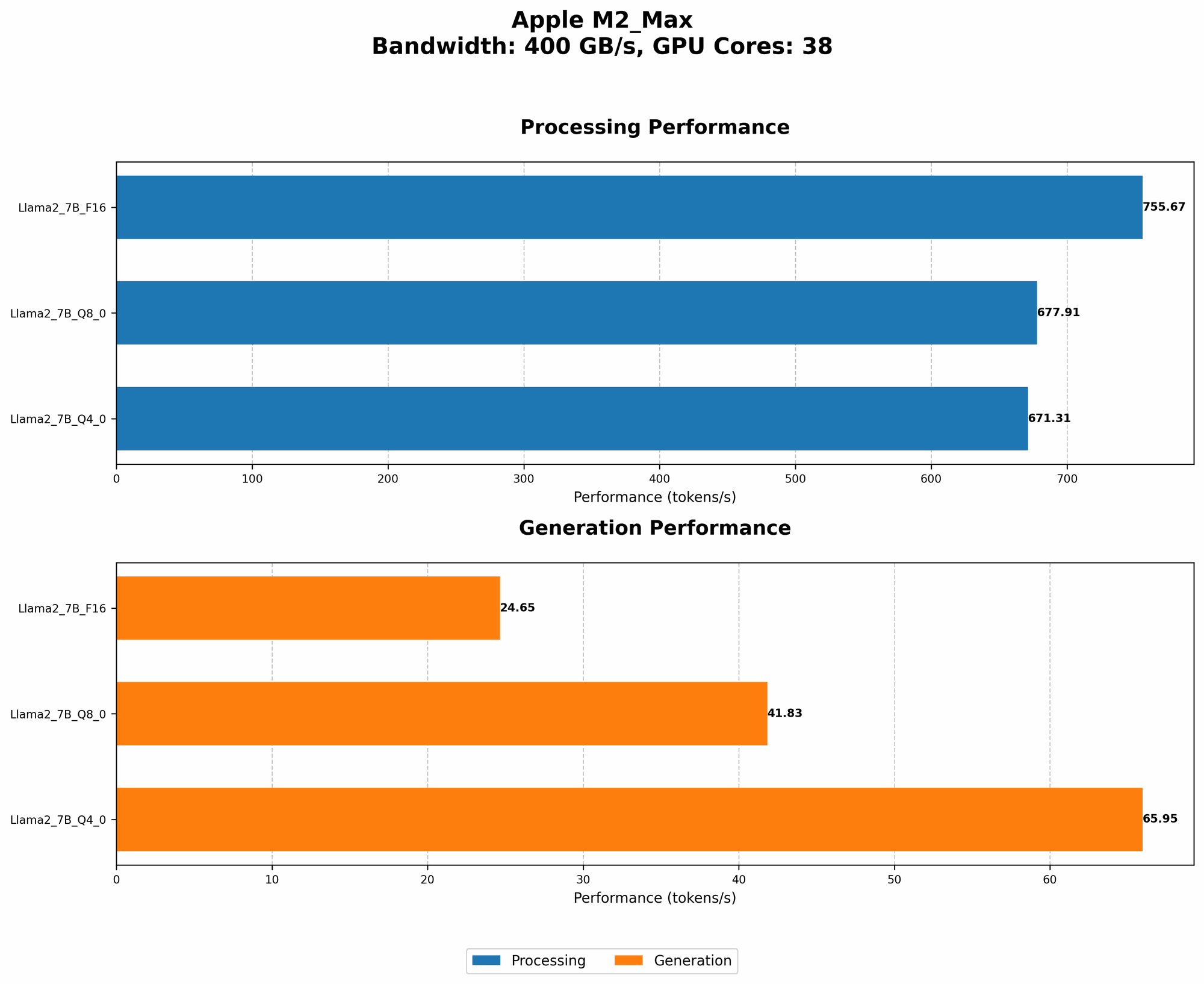
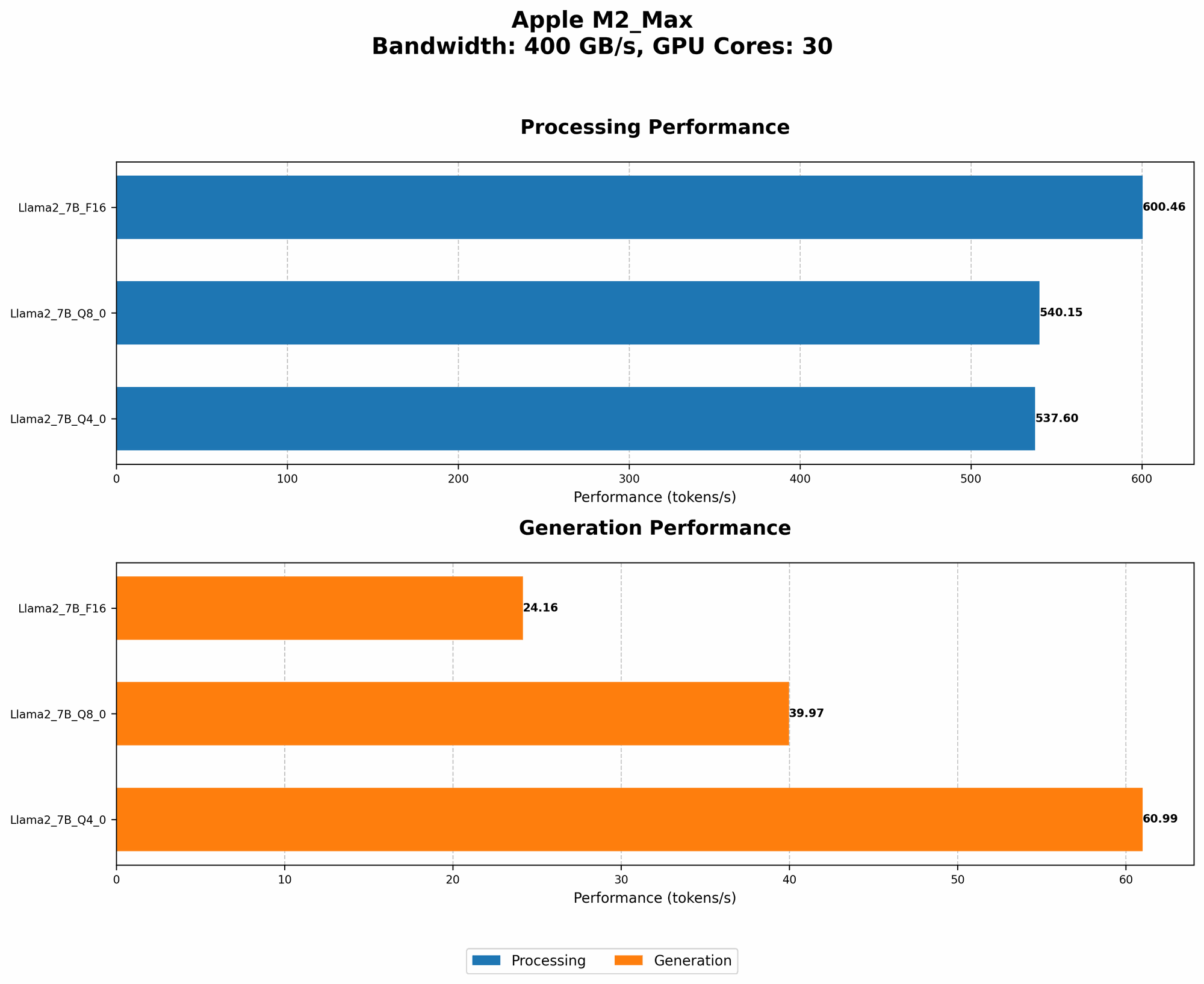
It's important to note that we only have data for Llama2 7B. We do not have performance data for other models on the Apple M2 Max.
Frequently Asked Questions (FAQ)
How do I choose the right LLM for my needs?
Choosing the right LLM depends on your specific task and hardware resources. Consider factors like model size, accuracy, and performance for your chosen device. If you're working on a memory-constrained machine, you might choose a smaller model. For tasks requiring high accuracy, a larger model might be necessary.
What are the trade-offs when using quantization?
Quantization offers a balance between accuracy and performance. While it can significantly speed up inference and reduce memory usage, it might also lead to a slight decrease in accuracy. The extent of accuracy loss depends on the chosen quantization level.
How do I monitor resource usage on the M2 Max?
Apple's Activity Monitor provides detailed information about CPU, memory, and disk usage. You can use it to monitor your system's performance and identify potential bottlenecks.
Can I run LLMs locally without a powerful GPU?
Yes, you can run smaller LLMs on less powerful hardware. However, performance will likely be slower, and larger models might be more challenging.
What are other devices for running LLMs locally?
Beyond Apple M2 Max, you can find other options like NVIDIA GPUs, AMD CPUs, and Google's TPUs. Each device has its strengths and weaknesses, so choose the one that best suits your needs and budget.
Keywords
Apple M2 Max, LLM, large language model, performance, optimization, quantization, Llama 2 7B, GPU, memory, software, settings, caching, inference, token/second, efficiency, resource usage.