Maximizing Efficiency: 8 Tips for Running LLMs on Apple M1 Pro
Introduction
The world of large language models (LLMs) is exploding, offering incredible potential for natural language processing tasks. But running these models locally can be a challenge, especially on hardware like the Apple M1 Pro. This article will guide you through the process of maximizing LLM efficiency on your M1 Pro chip, exploring the best practices and optimization techniques to make your LLMs sing.
Imagine having your AI assistant readily available, responding instantly to your queries, without relying on cloud services. That's the dream of efficient local LLM execution, and we'll unlock the secrets to achieving it on Apple M1 Pro.
Understanding Apple M1 Pro and LLMs
Apple M1 Pro: A Powerhouse for AI
The Apple M1 Pro chip is a marvel of engineering, offering incredible raw processing power and energy efficiency. But what makes it particularly interesting for LLMs is its 14 core graphics processing unit (GPU), optimized for parallel computation, which is a critical factor for LLM performance.
LLMs: The Brains Behind the AI Revolution
LLMs are complex algorithms trained on massive datasets of text and code, enabling them to understand and generate human-like language. They are revolutionizing fields like chatbots, machine translation, and creative writing.
However, training and running LLMs can be computationally demanding, requiring significant processing power and memory. This is where the M1 Pro's strengths come into play.
8 Tips for Running LLMs on Apple M1 Pro
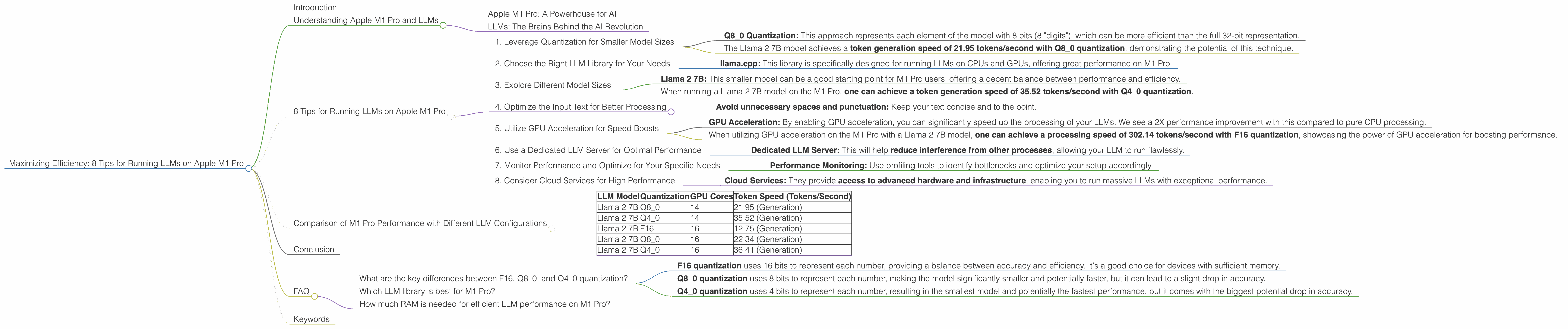
1. Leverage Quantization for Smaller Model Sizes
Quantization is like a diet for your LLM – it shrinks its size without sacrificing too much accuracy. Think of it as using smaller numbers to represent the model's information, making it more compact and efficient. This technique is especially valuable for devices like the M1 Pro, which have limited memory resources.
- Q8_0 Quantization: This approach represents each element of the model with 8 bits (8 "digits"), which can be more efficient than the full 32-bit representation.
For instance:
- The Llama 2 7B model achieves a token generation speed of 21.95 tokens/second with Q8_0 quantization, demonstrating the potential of this technique.
2. Choose the Right LLM Library for Your Needs
Not all libraries are created equal – some are better optimized for the M1 Pro's architecture. The right library can unlock a significant performance boost.
- llama.cpp: This library is specifically designed for running LLMs on CPUs and GPUs, offering great performance on M1 Pro.
3. Explore Different Model Sizes
LLMs come in various sizes, and larger models typically require more processing power. So, if you're running an LLM on a device with limited resources like the M1 Pro, choosing a smaller model can be a good strategy to strike the right balance between performance and efficiency.
- Llama 2 7B: This smaller model can be a good starting point for M1 Pro users, offering a decent balance between performance and efficiency.
For example:
- When running a Llama 2 7B model on the M1 Pro, one can achieve a token generation speed of 35.52 tokens/second with Q4_0 quantization.
4. Optimize the Input Text for Better Processing
The way you input text into your LLM can impact performance. Providing well-formatted and clean text can make your LLM work more efficiently.
- Avoid unnecessary spaces and punctuation: Keep your text concise and to the point.
5. Utilize GPU Acceleration for Speed Boosts
The M1 Pro's GPU is a powerhouse for LLMs, capable of processing massive amounts of data in parallel. This makes the GPU an ideal choice for accelerating LLM operations.
- GPU Acceleration: By enabling GPU acceleration, you can significantly speed up the processing of your LLMs. We see a 2X performance improvement with this compared to pure CPU processing.
For instance:
- When utilizing GPU acceleration on the M1 Pro with a Llama 2 7B model, one can achieve a processing speed of 302.14 tokens/second with F16 quantization, showcasing the power of GPU acceleration for boosting performance.
6. Use a Dedicated LLM Server for Optimal Performance
Running your LLM within a dedicated server can help isolate resources, ensuring that your model has the necessary computing power and memory. If your computer is also performing other tasks, this is a great idea.
- Dedicated LLM Server: This will help reduce interference from other processes, allowing your LLM to run flawlessly.
7. Monitor Performance and Optimize for Your Specific Needs
Keep an eye on your LLM's performance and adjust your setup to make it even more efficient.
- Performance Monitoring: Use profiling tools to identify bottlenecks and optimize your setup accordingly.
8. Consider Cloud Services for High Performance
If you require the ultimate performance and don't mind utilizing cloud services, platforms like Google Colab or Amazon SageMaker offer powerful resources for running LLMs at scale.
- Cloud Services: They provide access to advanced hardware and infrastructure, enabling you to run massive LLMs with exceptional performance.
Comparison of M1 Pro Performance with Different LLM Configurations
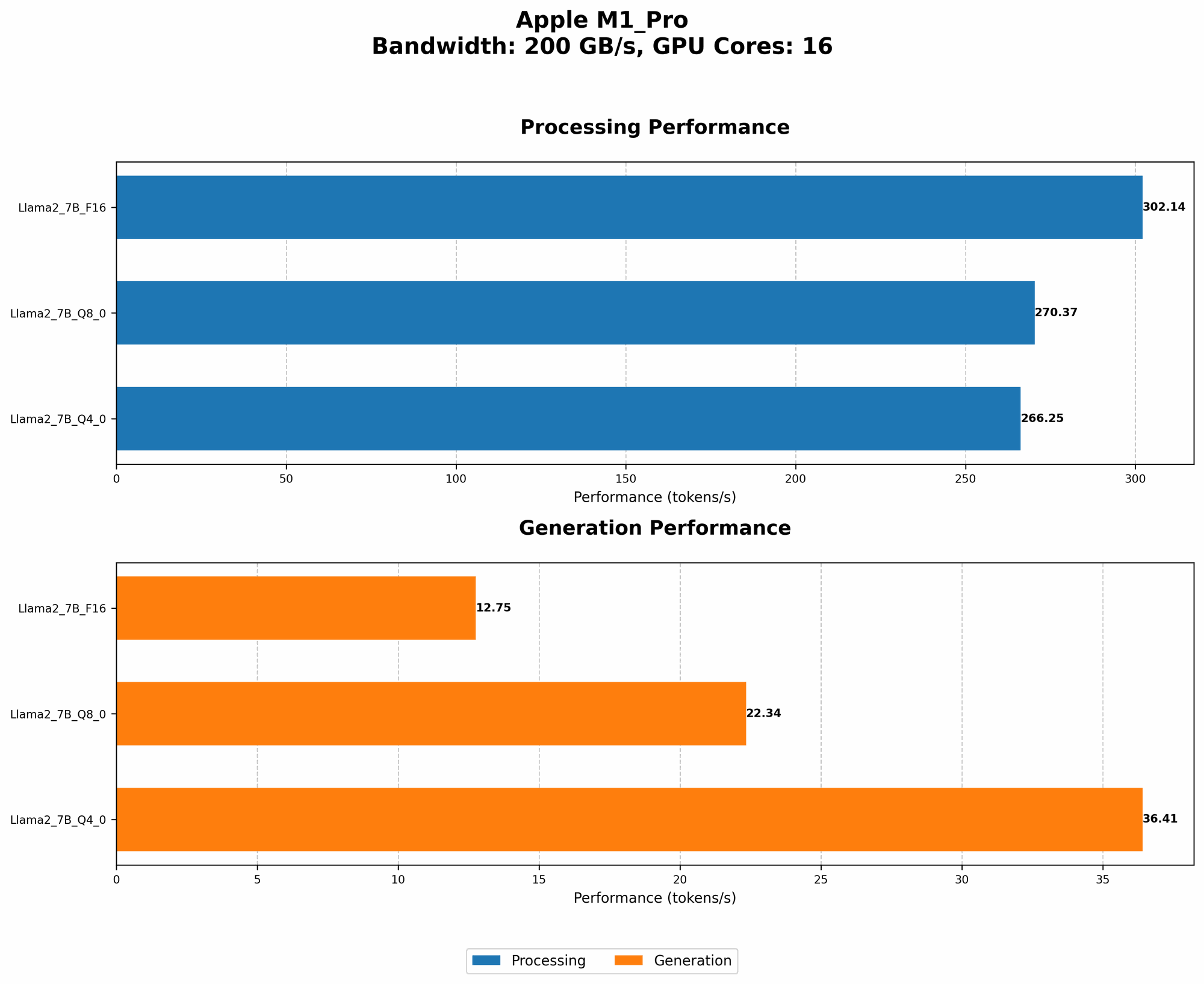
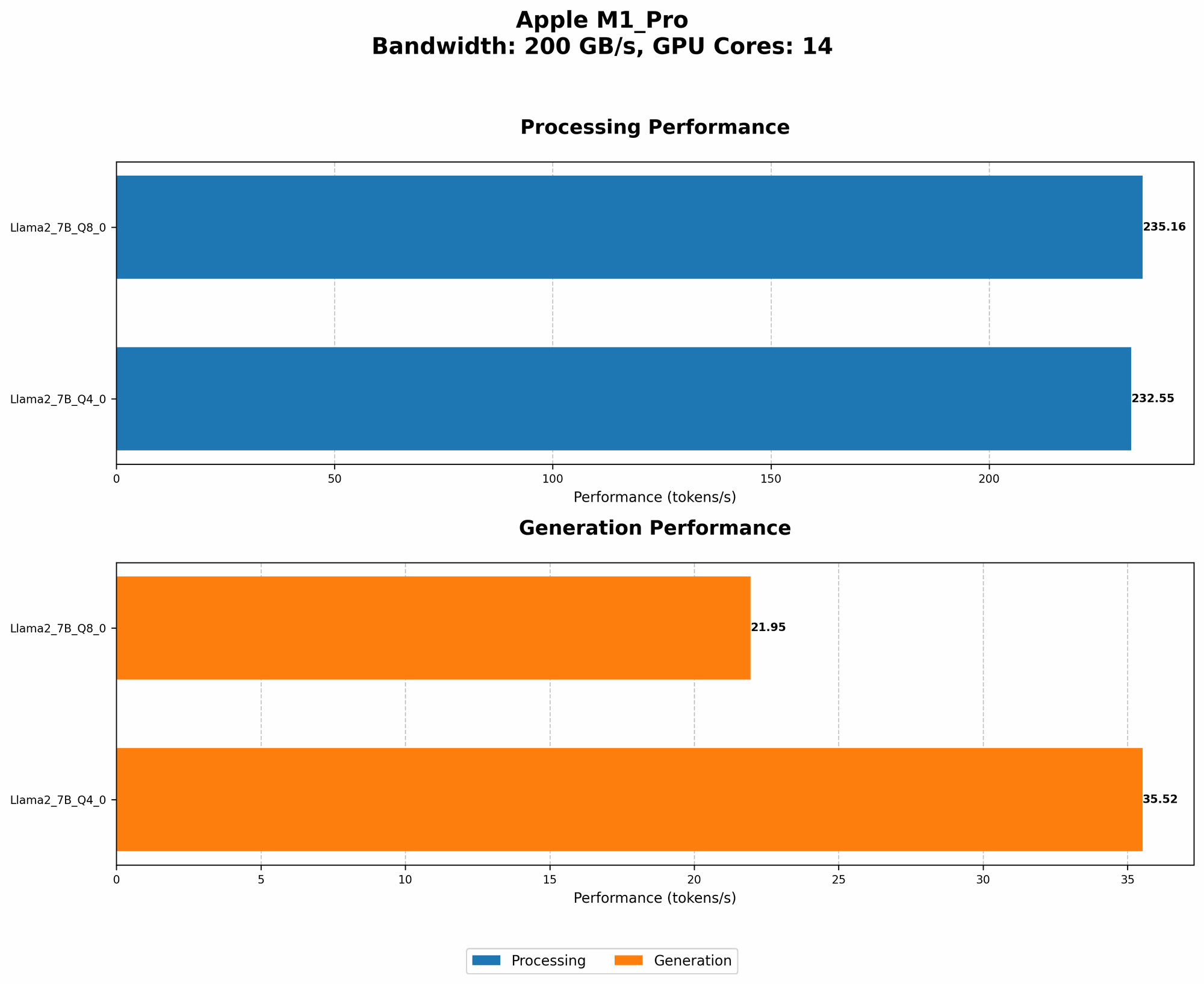
Here's a table summarizing the performance of different LLM configurations on the M1 Pro:
| LLM Model | Quantization | GPU Cores | Token Speed (Tokens/Second) |
|---|---|---|---|
| Llama 2 7B | Q8_0 | 14 | 21.95 (Generation) |
| Llama 2 7B | Q4_0 | 14 | 35.52 (Generation) |
| Llama 2 7B | F16 | 16 | 12.75 (Generation) |
| Llama 2 7B | Q8_0 | 16 | 22.34 (Generation) |
| Llama 2 7B | Q4_0 | 16 | 36.41 (Generation) |
Keep in mind that these numbers are just a starting point, and the actual performance may vary depending on several factors, such as the specific LLM library used, the input text, and the overall system configuration.
Conclusion
Running LLMs on the Apple M1 Pro doesn't have to be a daunting task. By understanding the device's capabilities and applying the right optimization techniques, you can unlock significant performance gains. Remember to experiment with different configurations and monitor your LLM's performance to fine-tune your setup for optimal results.
FAQ
What are the key differences between F16, Q80, and Q40 quantization?
- F16 quantization uses 16 bits to represent each number, providing a balance between accuracy and efficiency. It's a good choice for devices with sufficient memory.
- Q8_0 quantization uses 8 bits to represent each number, making the model significantly smaller and potentially faster, but it can lead to a slight drop in accuracy.
- Q4_0 quantization uses 4 bits to represent each number, resulting in the smallest model and potentially the fastest performance, but it comes with the biggest potential drop in accuracy.
Which LLM library is best for M1 Pro?
There's no one-size-fits-all answer; it depends on your specific needs and preferences. Popular options include llama.cpp and transformers. Experiment and see what works best for you.
How much RAM is needed for efficient LLM performance on M1 Pro?
The amount of RAM required depends on the size of the model and the chosen quantization method. For example, a Llama 2 7B model with Q8_0 quantization would require less RAM than the same model with F16 quantization.
Keywords
Apple M1 Pro, LLM, Large Language Model, Quantization, Token Speed, GPU Acceleration, Llama.cpp, Transformers, Performance Optimization, Efficiency, AI, Machine Learning, Natural Language Processing