Maximizing Efficiency: 7 Tips for Running LLMs on Apple M3

Introduction
The world of large language models (LLMs) is rapidly evolving, with new models and applications emerging every day. These powerful AI systems are capable of generating human-like text, translating languages, writing different kinds of creative content, and answering your questions in an informative way. But running LLMs locally can be resource-intensive, requiring powerful hardware to handle the complex computations.
This is where Apple's latest M3 chip comes in. Its impressive performance and energy efficiency make it an ideal platform for running LLMs on your own computer. In this article, we'll dive deep into the capabilities of the M3 chip, exploring how to maximize your LLM efficiency and get the most out of these powerful models.
Why Apple M3 for LLMs?
Imagine you're trying to build a sandcastle on the beach. You have all the sand, but you need a strong, sturdy bucket to hold it together. The bucket represents the processing power needed to run an LLM, and the sand represents the data that makes the model work. The Apple M3 chip is a super-powered bucket, designed to handle large amounts of data and effortlessly execute complex computations.
The M3 offers several key advantages over other processors, making it a top contender for running LLMs:
- Powerful GPU and CPU: The M3 packs a punch with a powerful GPU and CPU, enabling it to handle the demanding computations required by LLMs.
- High Memory Bandwidth: The M3 features a high memory bandwidth, allowing it to quickly access and process large amounts of data, which is crucial for LLMs.
- Energy Efficiency: The M3 is designed to be energy efficient, making it a good choice for users concerned about battery life and heat generation.
7 Tips for Running LLMs on Apple M3
Let's get down to business. Here are 7 tips to maximize your LLM performance on the Apple M3:
1. Embrace Quantization: Smaller Models, Faster Results
Imagine you're trying to make a phone call with a friend, but the line is choppy and you can't hear them clearly. To improve the connection, you might try a simpler, more robust way to communicate – using a walkie-talkie.
Quantization works similarly. Instead of using the full precision of a model, it simplifies these models by reducing the size of their parameters. This makes them a little bit "dumber", but they run much faster. This trade-off can be beneficial, especially when working with resource-constrained devices like a laptop, allowing you to run LLMs efficiently without sacrificing speed.
Example: Llama 2 7B
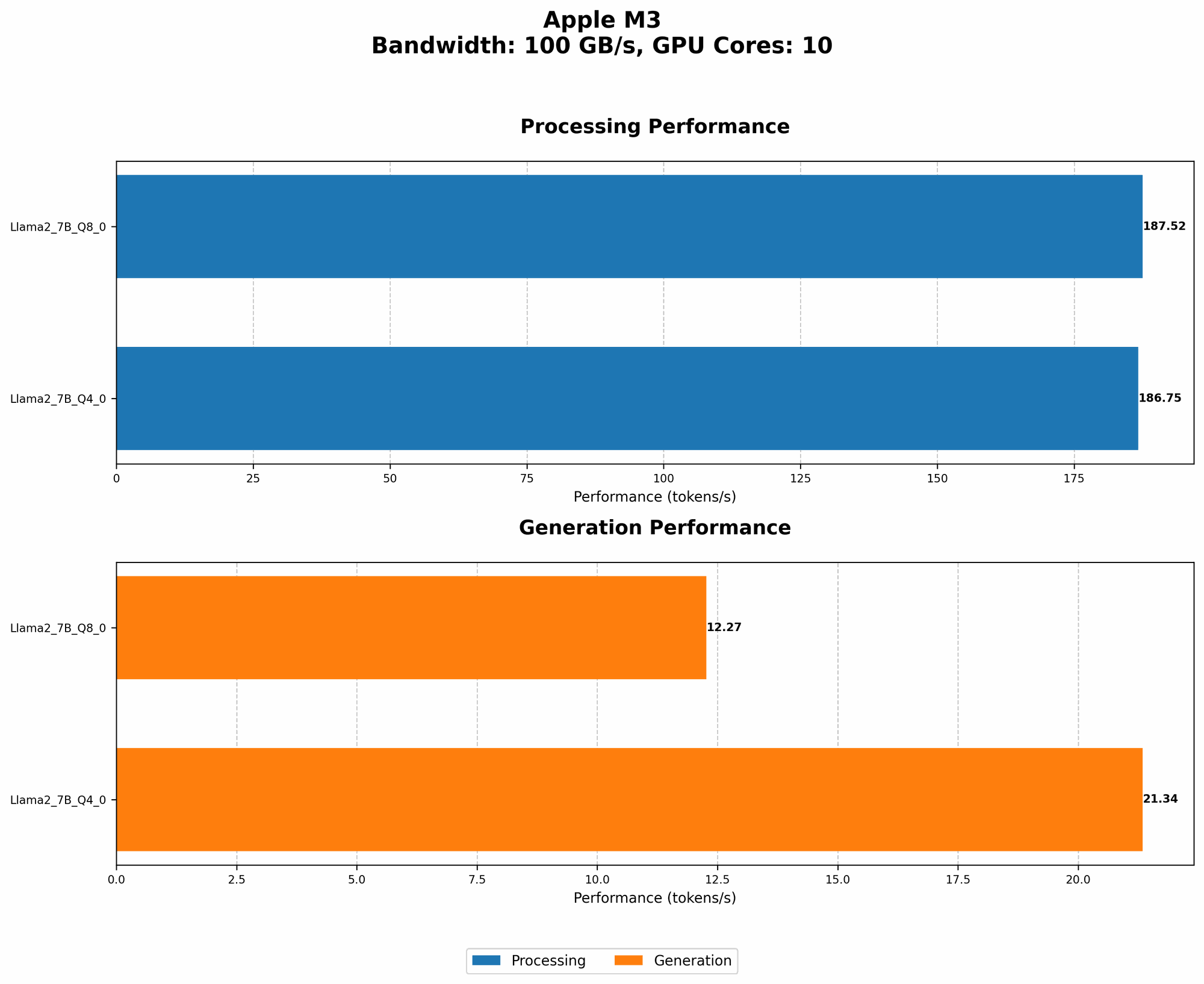
Currently, the Apple M3 supports a variety of quantization levels, including Q40 and Q80. These allow you to reduce the precision of your models while retaining a good level of performance.
| Quantization Level | Token Speed (Tokens/Second) |
|---|---|
| Q4_0 | 21.34 |
| Q8_0 | 12.27 |
As you can see, the M3 can process a significant number of tokens per second (12.27 for Q80 and 21.34 for Q40). This translates to faster inference times when using these quantized models.
2. Optimize Parameters: Tweaking the Settings for Maximum Efficiency
Think of LLM parameters like the dials on a fancy cooking stove. Each dial controls a specific aspect of your model, and tweaking them can dramatically affect the final result.
- Context Size: This refers to the amount of text your model can "remember" at any given time. Reducing the context size can improve performance, especially when working with large models.
- Batch Size: This determines how many tokens are processed at once. Adjusting the batch size can help to optimize performance based on the available resources.
- Temperature: This parameter controls the "creativity" of your model. Lowering the temperature can result in more predictable and consistent outputs, but might decrease its creativity.
3. Explore Different Models: Finding the Right Fit for your Needs
Just like every kitchen utensil has its own specific purpose, LLMs come in different shapes and sizes to suit different tasks. Some models are great for generating creative text, while others excel at summarizing information. Choosing the right LLM for your needs can significantly impact performance and accuracy.
For example:
- Llama 2 7B: Designed for efficiency and speed, perfect for tasks like chatbots and quick text generation.
- GPT-Neo 1.3B: A smaller, more manageable model, ideal for tasks like text summarization and question answering.
4. Leverage Parallel Processing: Powering Up with Multiple Threads
Imagine you're trying to assemble a complex model, but you're working alone. It might take hours to finish. Now, imagine having a team of helpers who can work simultaneously on different parts of the model. That's the power of parallel processing!
Apple's M3 takes full advantage of multiple threads, allowing you to utilize the power of your CPU cores to process the LLM tasks more efficiently. This means your model can run faster by dividing the workload among several cores.
5. Utilize Caching: Storing Data for Faster Access
Think of caching like having a handy notepad where you store frequently used information, so you don't have to keep looking for it every time you need it.
Caching helps your LLM by storing frequently accessed data in a more accessible location, reducing the need to fetch information from slower storage sources. This can significantly improve performance, especially when working with models that require access to a lot of data.
6. Choose the Right Software: Harnessing the Power of Optimization
Just like having the right tools in your workshop can make a difference, using the right software can play a crucial role in maximizing your LLM performance.
- llama.cpp: This open-source library is known for its efficiency and support for various hardware platforms, including the M3.
- GPTQ: This quantization tool helps you to reduce the size of your LLM models, improving performance on systems with limited resources.
Note: While the M3 supports various models and quantization levels, the support for certain model combinations may not be available yet.
7. Monitor and Adjust: Finding the Sweet Spot for Your LLM
Monitoring the performance of your LLM is essential for achieving maximum efficiency. You can use tools like a performance monitor to track factors such as CPU usage, memory usage, and network bandwidth. These insights can help you identify potential bottlenecks and fine-tune your settings for optimal performance.
Comparison of LLM Performance on Apple M3
| Model | Quantization Level | Token Speed (Tokens/Second) |
|---|---|---|
| Llama 2 7B | Q4_0 | 21.34 |
| Llama 2 7B | Q8_0 | 12.27 |
As you can see, the M3 shows impressive performance with Llama 2 7B, achieving token speeds of 21.34 tokens/second for Q40 and 12.27 tokens/second for Q80. These results demonstrate the power of the M3 in handling LLM inference tasks efficiently.
Conclusion
The Apple M3 chip offers a solid platform for running LLMs locally, enabling developers and enthusiasts to explore the capabilities of these powerful models. By leveraging the tips discussed in this article, you can optimize your LLM performance and maximize the efficiency of your Apple M3 device. Remember, the right tools and resources can unlock the full potential of LLMs, driving innovation and creativity in the world of AI.
FAQ
Q: What is the best LLM for the Apple M3?
A: There isn't a single "best" LLM. The ideal model depends on your specific task and requirements. Consider factors like model size, performance, and specific features when making your choice. For efficient performance on the M3, explore smaller, quantized models like Llama 2 7B.
Q: How can I improve the performance of my LLM on the Apple M3?
A: You can optimize your LLM performance by choosing the right model, adjusting parameters, leveraging parallel processing, utilizing caching, and exploring software options designed for efficient LLM execution on the M3.
Q: What are the limitations of running LLMs on the M3?
A: While the M3 is a powerful chip, it may not be sufficient for running the largest and most complex LLM models. Limited memory and GPU resources might be a factor to consider. For demanding models, cloud-based solutions might be more suitable.
Q: What's the future of LLMs on the Apple M3?
A: As LLM development continues to evolve, we can expect ongoing improvements in model performance and efficiency. Apple is likely to continue optimizing its hardware and software for LLMs, making the M3 an increasingly attractive platform for running these powerful models.
Keywords
Apple M3, LLM, Large Language Model, Performance, Efficiency, Quantization, Q40, Q80, Llama 2 7B, GPTQ, Token Speed, GPU, CPU, Memory Bandwidth, Energy Efficiency, Parallel Processing, Caching, Software Optimization, Inference, Monitoring, Adjustment, Optimization, Development, Innovation, Creativity, AI, Artificial Intelligence, Machine Learning, Deep Learning