Maximizing Efficiency: 6 Tips for Running LLMs on Apple M2 Ultra
Introduction
The world of large language models (LLMs) is evolving rapidly, with new and more powerful models emerging all the time. But running these models locally can be a challenge, especially if you're using a standard CPU. That's where dedicated hardware like the Apple M2 Ultra comes in. With its powerful GPU and impressive memory bandwidth, the M2 Ultra can handle even the largest LLMs with remarkable efficiency.
This article delves into the exciting world of running LLMs on the Apple M2 Ultra, exploring six key tips for achieving optimal performance. It's a guide for developers and anyone curious about harnessing the power of the M2 Ultra to unlock the potential of LLMs. We'll be looking at how different quantization methods can impact performance and how to choose the right settings for your specific needs. So, fasten your seatbelts and get ready to explore the exciting landscape of LLMs on the M2 Ultra!
1. Quantization: The Art of Tiny Models
Imagine trying to fit a huge elephant into a small car. It just won't work! That's kind of like running a large LLM on a standard CPU. You'll need a powerful engine (GPU) and a big enough car (memory) to handle the load.
This is where quantization comes in. Quantization is like shrinking the elephant by squeezing its data into smaller boxes, making it easier to handle. It's a technique for reducing the size of a model without sacrificing too much accuracy. You can think of it as making the model "slim" and "fast" - perfect for your M2 Ultra!
Quantization Levels and Their Impact
Here's how different quantization levels can affect your LLM's performance on the M2 Ultra:
- FP16 (Half-Precision Floating Point): This is the default setting for many models and offers a good balance between accuracy and performance.
- Q8_0 (Quantized 8-bit with Zero Point): This quantization level further reduces the size of the model, leading to significant performance gains. However, it can slightly reduce accuracy.
- Q4_0 (Quantized 4-bit with Zero Point): This level pushes the limits of quantization, resulting in even smaller models and even faster performance. But be prepared for some potential accuracy loss.
2. Fine-Tuning for Optimality: Shaping Your Model for M2 Ultra
Imagine you're buying clothes. You wouldn't wear a huge, heavy winter coat in the summer, right? Similarly, fine-tuning your LLM for the M2 Ultra can significantly boost performance.
The M2 Ultra, with its powerful GPU, can handle large LLMs with ease. But to get the best results, you might need to fine-tune your model. This involves making small adjustments to the model's parameters to make it run smoother on the M2 Ultra.
Fine-Tuning: Tailor-Made for the M2 Ultra
Think of fine-tuning as a tailor making a custom suit for your LLM. You're adjusting the model's parameters so it fits perfectly on the M2 Ultra. This can lead to significant performance improvements, especially for tasks like text generation.
3. Memory Bandwidth: Feeding the Data Beast
Imagine if you wanted to build a huge skyscraper. You'd need a strong foundation to support its weight. Similarly, when running an LLM on the M2 Ultra, you need enough memory bandwidth to handle the data flow.
The M2 Ultra boasts impressive memory bandwidth, allowing it to quickly move data between the CPU, GPU, and memory. This is crucial for LLMs, which require large amounts of data to process.
How Memory Bandwidth Impacts Performance
Think of memory bandwidth as the speed at which you can fill a bucket. The higher the bandwidth, the faster you can fill the bucket. In the world of LLMs, faster memory bandwidth means the model can access the data it needs more quickly, resulting in faster processing.
4. GPU Cores: The Muscle of M2 Ultra
Imagine having a team of workers building a house. The more workers you have, the faster the house gets built. Similarly, the M2 Ultra has a multitude of GPU cores, which are like the "workers" that process your LLM's data.
More GPU cores mean more "workers" on the job, resulting in faster processing times. The M2 Ultra's impressive number of GPU cores gives it the power to handle even the most demanding LLMs.
GPU Cores: The Powerhouse of LLMs
GPU cores are a bit like powerful engines, capable of performing trillions of calculations per second. For LLMs, the more GPU cores you have, the more calculations you can perform concurrently, leading to faster processing speeds.
5. Llama 2: The New Kid on the Block
Think of Llama 2 as the latest smartphone model. It's packed with new features and improved performance compared to its predecessors. And just like a new phone, Llama 2 can leverage the power of the M2 Ultra to deliver incredible performance.
Llama 2: A Performance Powerhouse
Llama 2 is designed to be efficient and fast, and its impressive performance on the M2 Ultra shows just how powerful it can be.
6. Llama 3: The Next Generation of LLMs
Think of Llama 3 as the sequel to a hit movie. It takes everything that was great about Llama 2 and makes it even better!
Llama 3: Evolving with the M2 Ultra
Llama 3 is designed to be even more efficient than Llama 2 and has been shown to deliver impressive performance on the M2 Ultra, even with larger models.
Comparison of Performance: M2 Ultra in Action
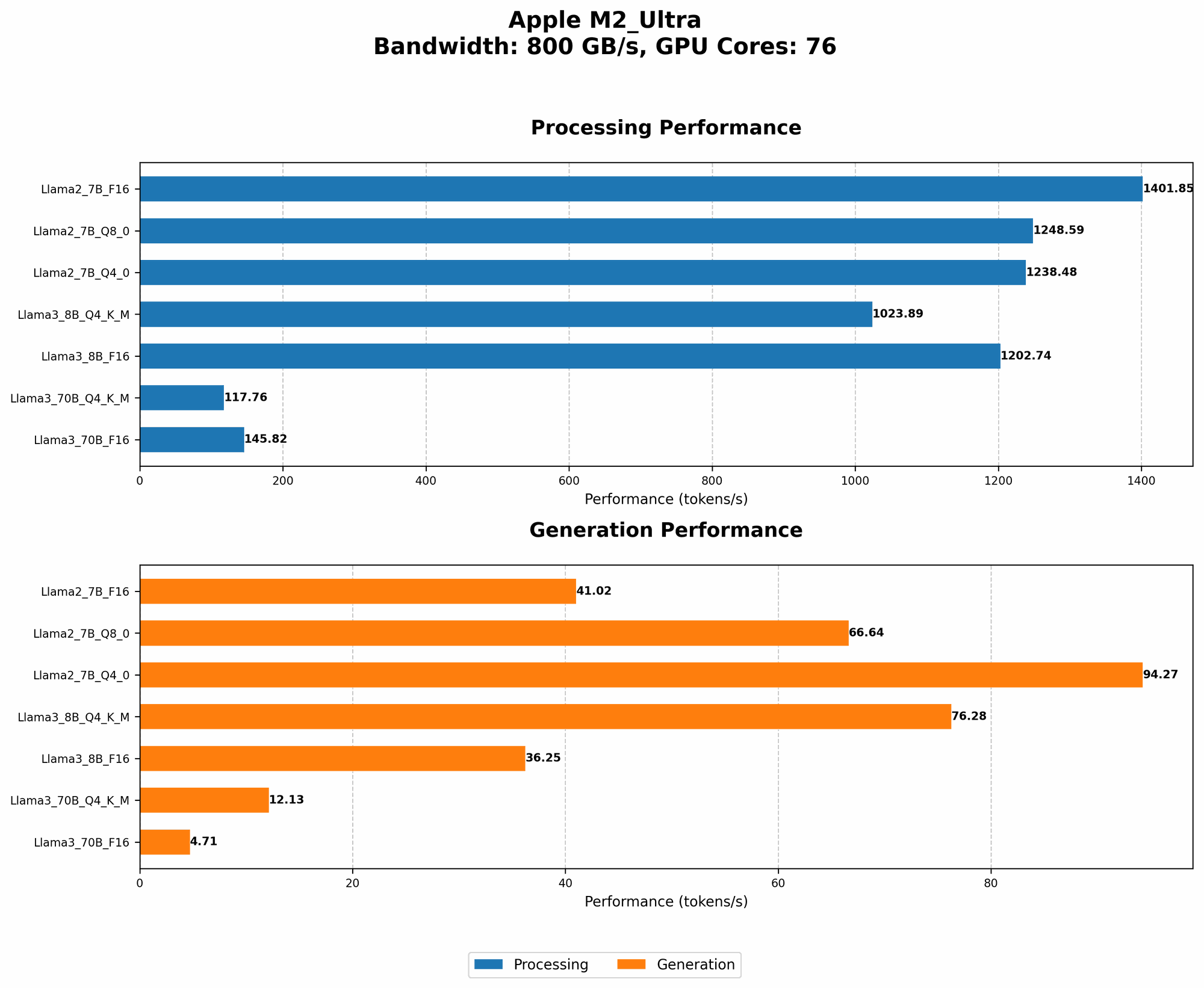
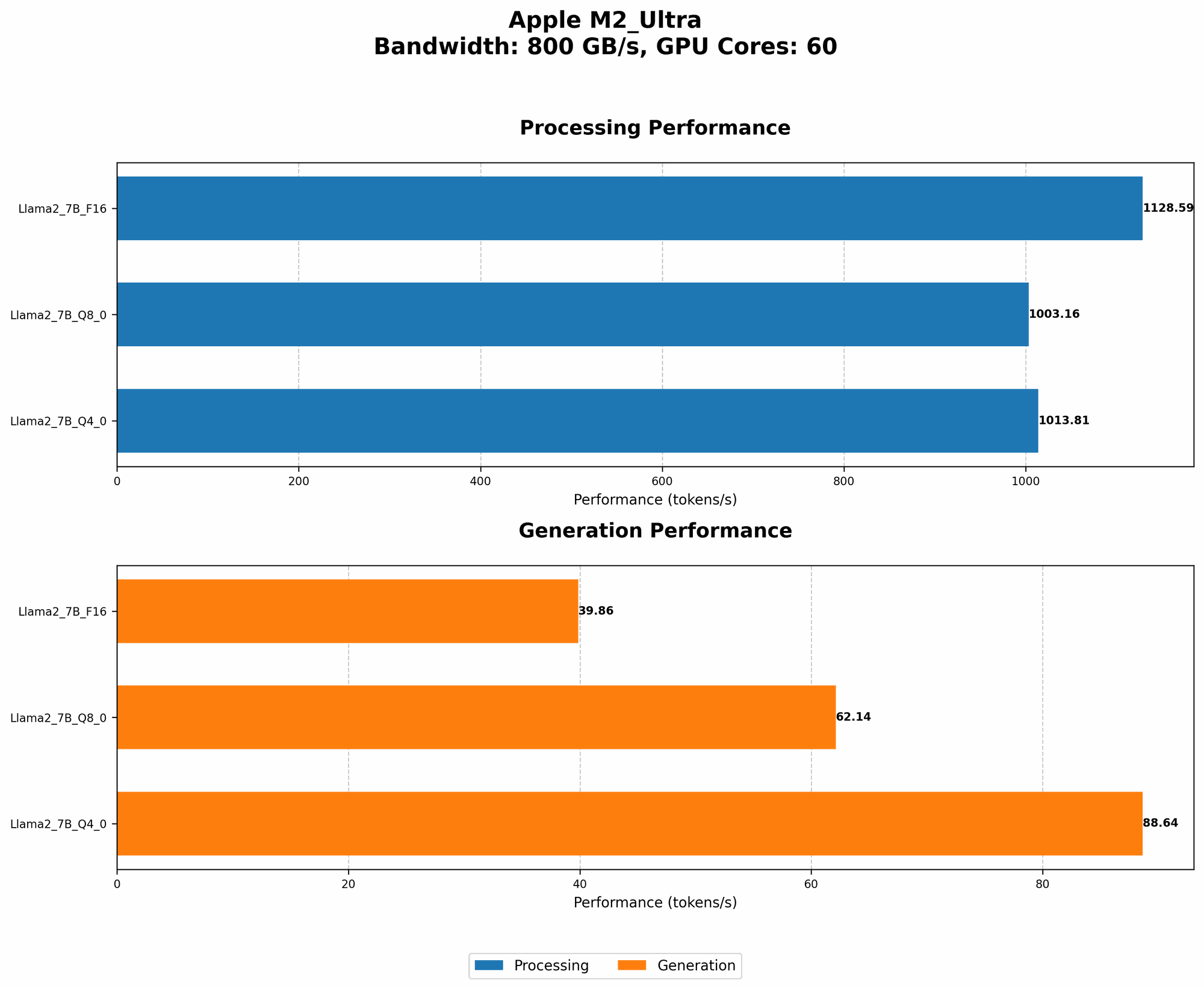
Here's a breakdown of token speed generation for different LLM models and quantization levels on the M2 Ultra. Keep in mind, these numbers are for reference purposes only and may vary depending on the specific configuration and workload.
| Model | Quantization Level | Tokens per Second (Processing) | Tokens per Second (Generation) |
|---|---|---|---|
| Llama 2 7B | F16 | 1128.59 | 39.86 |
| Llama 2 7B | Q8_0 | 1003.16 | 62.14 |
| Llama 2 7B | Q4_0 | 1013.81 | 88.64 |
| Llama 3 8B | Q4KM | 1023.89 | 76.28 |
| Llama 3 8B | F16 | 1202.74 | 36.25 |
| Llama 3 70B | Q4KM | 117.76 | 12.13 |
| Llama 3 70B | F16 | 145.82 | 4.71 |
Note: Data for Llama 3 (70B) with Q80 and Q40 quantization levels is not available.
Conclusion
The Apple M2 Ultra is a powerful platform for running LLMs locally, offering significant performance gains through its impressive GPU cores, high memory bandwidth, and support for advanced quantization techniques. By understanding the impact of different quantization levels, fine-tuning your models for the M2 Ultra, and effectively managing memory bandwidth, you can maximize the efficiency of your LLM workflow. The M2 Ultra opens up a world of possibilities for developers and enthusiasts who want to explore the potential of LLMs on their own machines.
FAQ
What are LLMs?
LLMs are a type of artificial intelligence that can understand and generate human-like text. They are trained on massive datasets of text and can be used for a wide range of tasks, including text summarization, translation, and question answering.
What is quantization?
Quantization is a technique used to reduce the size of a model by representing its parameters with fewer bits. This can lead to significant performance gains, especially on devices with limited memory or processing power.
How does the M2 Ultra compare to other devices for running LLM models?
The M2 Ultra offers impressive performance for running LLMs locally, particularly compared to standard CPUs. However, it's essential to consider the specific LLM model and the desired performance level when comparing devices.
What are the benefits of running LLMs locally?
Running LLMs locally offers several advantages, including:
- Faster processing: You avoid the latency associated with sending data to a cloud server.
- Privacy: Your data stays on your device, enhancing security and privacy.
- Offline access: You can access your LLMs even without an internet connection.
What are some popular LLM models?
Some popular LLM models include:
- GPT-3: Developed by OpenAI, known for its impressive language generation capabilities.
- LaMDA: Developed by Google, used in Google's Bard conversational AI.
- BLOOM: Created by a consortium of researchers, focusing on multilingual capabilities.
Keywords
LLM, Apple M2 Ultra, GPU Cores, memory bandwidth, quantization, FP16, Q80, Q40, Llama 2, Llama 3, fine-tuning, token speed, processing, generation, performance optimization, local inference, model training, developer tools