Maximizing Efficiency: 5 Tips for Running LLMs on Apple M2

Harnessing the power of large language models (LLMs) on your own machine is a thrilling prospect, opening up a world of possibilities for creative writing, code generation, and more. But getting these behemoths to hum along smoothly can be a challenge. That's where Apple's M2 chip comes in, offering a potent combination of performance and energy efficiency – perfect for making the most of your local LLM experience.
This guide explores 5 key strategies for maximizing efficiency when running LLMs on your Apple M2, with a focus on practical tips and real-world results. We'll dive into the intricacies of quantization, explore the performance gains you can achieve with different model sizes, and uncover the power of fine-tuning.
Understanding the Power of Apple M2
Think of the Apple M2 as a high-performance engine for your LLM adventures. It's not just raw speed that matters, but also its ability to balance performance with power consumption. This means you can run larger and more demanding models without draining your battery or melting your laptop.
5 Tips for Unleashing LLM Efficiency on Apple M2
1. Embrace the Power of Quantization: Smaller Models, Bigger Performance
Remember that "quantization" is like a diet for your LLM. It helps squeeze down the model's size without sacrificing too much accuracy. Imagine taking a massive text file and compressing it down to a more manageable size – that's essentially what quantization does. This process allows you to run your LLM on less powerful hardware, including devices with less memory (like the Apple M2).
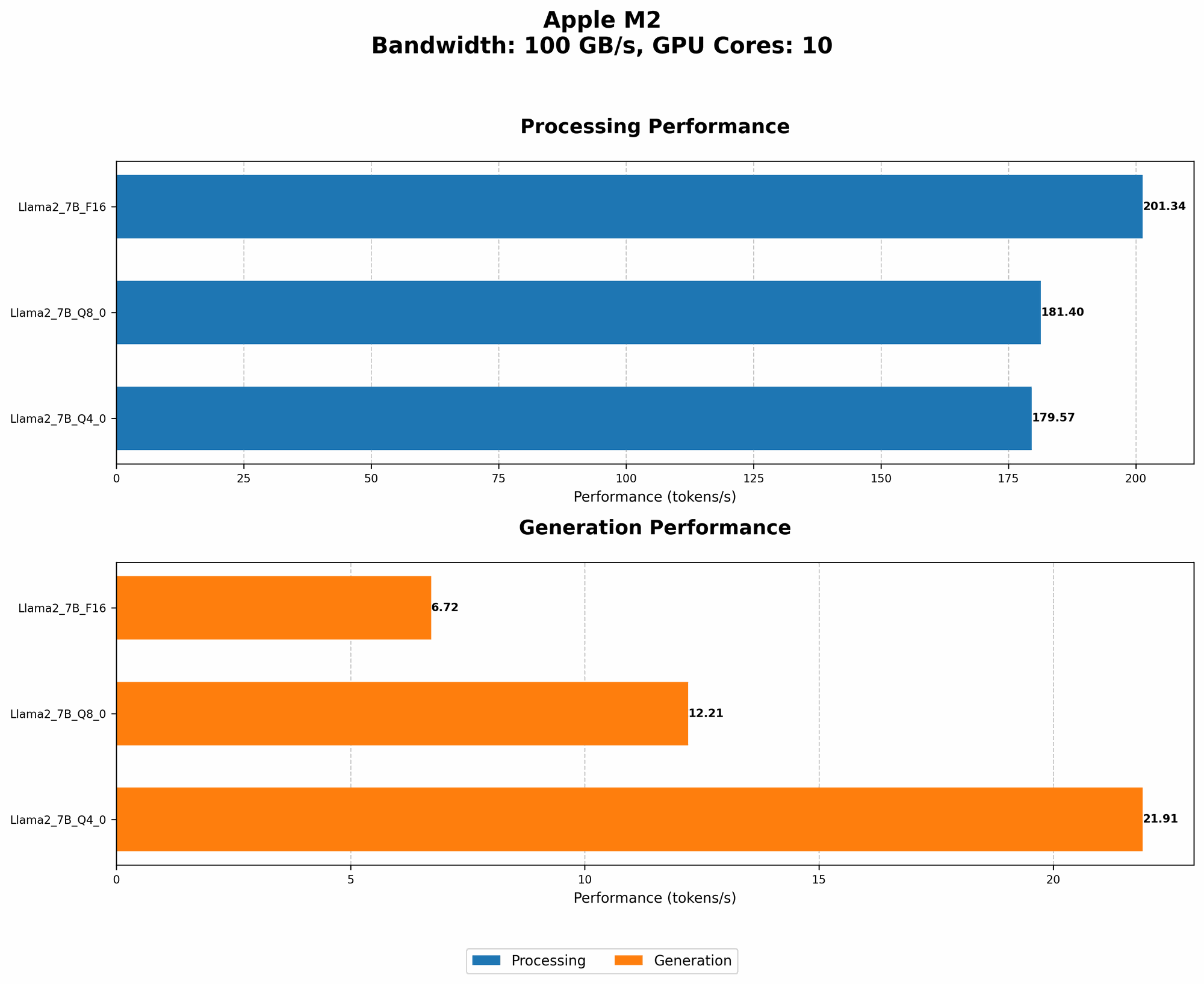
Let's look at some numbers:
| Model | Quantization | Tokens/Second |
|---|---|---|
| Llama 2 7B | F16 | 201.34 |
| Llama 2 7B | Q8_0 | 181.4 |
| Llama 2 7B | Q4_0 | 179.57 |
As you can see, even with quantization, the Apple M2 can still churn through tokens at impressive speeds.
Here's the takeaway:
- By switching to quantized models, you can often gain significant performance boosts without noticeable accuracy drops. This is a valuable trick for running more complex LLMs on the Apple M2 without bogging things down.
2. Choose the Right Model Size: Striking the Perfect Balance
Choosing the right LLM model size is crucial for maximizing the efficiency of your Apple M2. It's like choosing the right car for your needs – a tiny city car is great for navigating tight streets, but a powerful SUV is needed for towing a trailer.
Let's consider these factors:
- Model Size: Smaller models are generally faster and require less memory, making them ideal for devices like the Apple M2.
- Complexity: Larger models can handle more complex tasks, but they come with a higher computational cost.
- Accuracy: Generally, larger models tend to be more accurate.
Here's the bottom line:
- Start with a smaller model and experiment to find the right balance between speed, complexity, and accuracy. If you need the extra firepower, consider a larger model, but be prepared for a potential performance hit.
Important Consideration: There is no data for Llama 70B (or larger models) for the Apple M2 in our current data. It may be difficult to run such a model effectively on the Apple M2.
3. Fine-Tuning for Task-Specific Mastery: Tailoring Your LLM
Imagine training your dog to perform specific tricks. Fine-tuning your LLM is like taking your dog to obedience school! It involves customizing the model to excel at particular tasks. This process helps your LLM become incredibly efficient at handling those specific tasks by focusing its attention on the most relevant information.
Let's look at some examples:
- Code Generation: Fine-tuning on a dataset of code can dramatically improve your LLM's ability to write code with specific programming languages.
- Translation: By fine-tuning on a large set of parallel texts (like English and French), you can significantly boost your LLM's translation accuracy.
Here's the key takeaway:
- Fine-tuning is a powerful technique for boosting efficiency by allowing your LLM to focus its processing power on the tasks that matter most.
4. Optimize Your Code: Smooth Your LLM's Workflow
Just as you meticulously organize your workspace to improve productivity, optimizing your code can help your LLM operate at peak efficiency. This involves simplifying the code, removing unnecessary calculations, and using efficient data structures.
Here's what to consider:
- Streamlining Code: Write concise and efficient code to reduce "CPU cycles" – like cutting out unnecessary steps on a production line.
- Utilizing Libraries: Leverage specialized libraries to perform complex operations more efficiently.
Here's the valuable takeaway:
- Pay attention to your code's performance and identify optimization opportunities. Just like a well-organized workspace, a clean and efficient code base can dramatically impact your LLM's performance.
5. Experiment and Explore: The Joy of Discovery
The world of LLM development is as exciting as it is ever-changing. Don't shy away from experimenting with different techniques to maximize efficiency on your Apple M2. There are a myriad of tools and techniques available for those who dare to explore!
Here's what to keep in mind:
- Community Resources: Engage with the LLM community, participate in forums, and use open-source libraries.
- New Technologies: Stay updated on the latest advancements in LLM technologies.
FAQ: The Apple M2 and LLMs
What are LLMs?
LLMs are large language models, essentially computer programs trained on massive amounts of text data. They can perform various tasks like generating text, translating languages, and even writing code. Imagine a superintelligent assistant that can understand and generate human-like language.
Is the Apple M2 good for running LLMs?
Absolutely! The Apple M2 processor is powerful enough to handle many LLMs efficiently, especially when you prioritize accuracy and speed using techniques such as quantization and fine-tuning. It offers a great balance of performance and energy efficiency, making it an excellent choice for local LLM development.
How do I get started with LLMs on my Apple M2?
There are various tools and frameworks available for running LLMs on your M2. You can explore options like llama.cpp, which is a C++ implementation of LLMs specifically designed for local execution.
Keywords
LLMs, Apple M2, Quantization, Model Size, Fine-tuning, Code Optimization, Efficiency, Performance, Token Speed, Generation, Processing, Llama 2 7B, GPU, CPU,