Maximizing Efficiency: 5 Tips for Running LLMs on Apple M1 Max
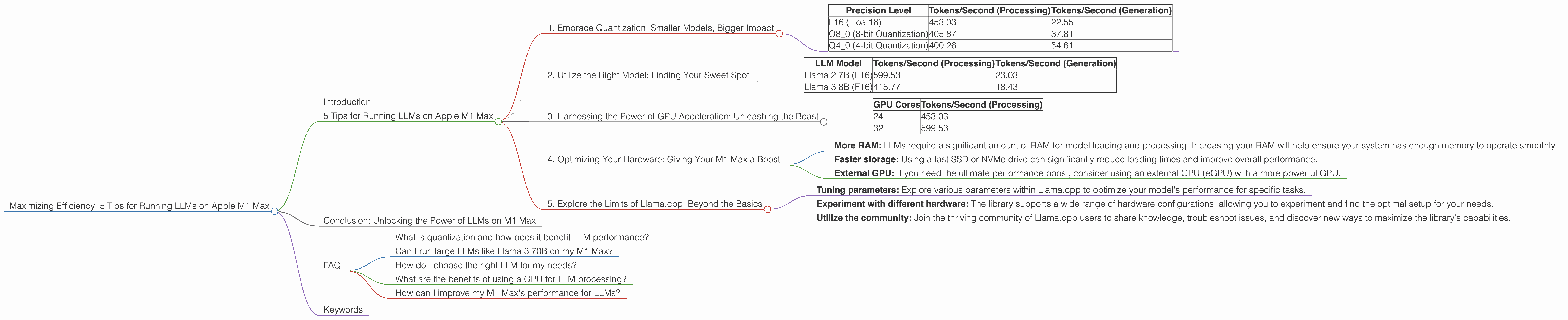
Introduction
The world of Large Language Models (LLMs) is on fire! From generating creative content to translating languages, these powerful AI models are transforming how we interact with technology. But running LLMs locally can be a resource-intensive task, especially with bigger models that require significant processing power. This is where the Apple M1 Max chip comes in. With its powerful GPU and impressive memory bandwidth, the M1 Max can handle even the most demanding LLMs with surprising efficiency.
In this article, we'll dive into the exciting world of LLMs and explore how to maximize performance on the Apple M1 Max. We'll cover five key tips for optimizing your LLM setup, analyze real-world results using the Llama.cpp library, and provide a clear explanation of the underlying concepts. So, whether you are a seasoned developer or just getting started with LLMs, this guide will equip you with the knowledge to unleash the full potential of your M1 Max. Buckle up for a thrilling journey into the world of local LLM deployment!
5 Tips for Running LLMs on Apple M1 Max
Here are five essential tips to unleash the full performance potential of your M1 Max when running LLMs:
1. Embrace Quantization: Smaller Models, Bigger Impact
Imagine trying to fit a massive elephant into a small car - it's simply not going to work. Similarly, running large LLM models directly on a device can be a daunting task due to their sheer size. This is where quantization comes in. Imagine shrinking the elephant down to the size of a mouse! Quantization is the process of reducing the precision of the model's weights, effectively making it smaller and lighter while maintaining its performance, much like shrinking our elephant.
Quantization in action: Imagine your LLM model as a giant puzzle with millions of pieces (weights). Each piece represents a number with a specific level of precision. By reducing the precision of these numbers, we effectively reduce the size of each piece. While we may lose some detail in the process, the overall picture remains clear.
Here's how quantization can benefit you:
- Reduced memory usage: Smaller models require less memory, enabling you to run them on devices with limited resources like the M1 Max.
- Faster loading times: Loading a smaller model takes less time, making your applications more responsive.
- Increased processing speed: With less data to process, the M1 Max can work faster and deliver results quicker.
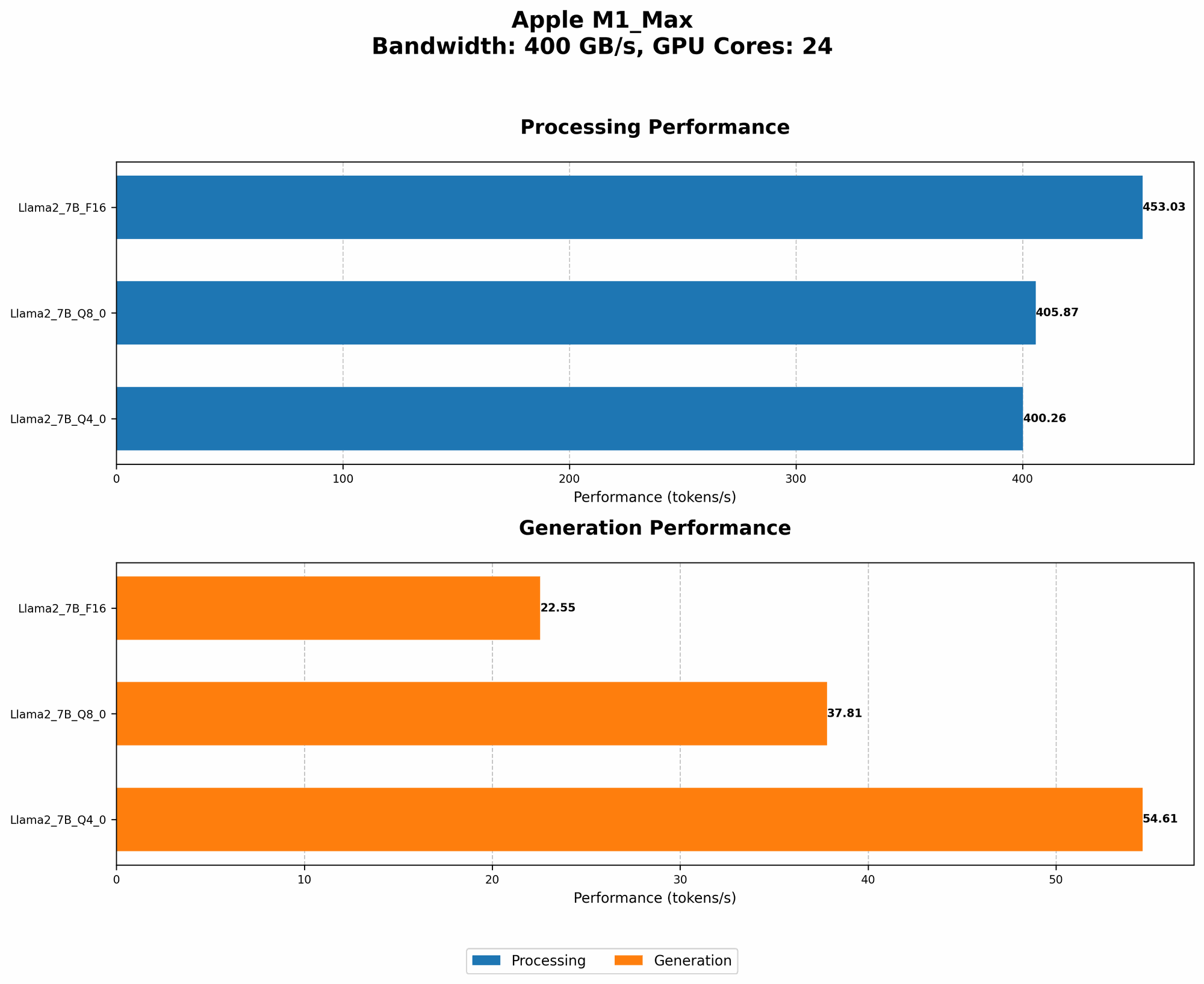
Let's look at the impact of quantization on the Llama 2 7B model using different precision levels:
| Precision Level | Tokens/Second (Processing) | Tokens/Second (Generation) |
|---|---|---|
| F16 (Float16) | 453.03 | 22.55 |
| Q8_0 (8-bit Quantization) | 405.87 | 37.81 |
| Q4_0 (4-bit Quantization) | 400.26 | 54.61 |
As you can see, using Q80 and Q40 quantization significantly improves the performance of the Llama 2 7B model on the M1 Max, offering a compelling trade-off between accuracy and efficiency.
2. Utilize the Right Model: Finding Your Sweet Spot
As with any tool, choosing the right LLM for the task at hand is crucial. Not all models are created equal, and picking the right model can significantly impact your application's performance and efficiency.
Consider these factors when selecting your LLM:
- Model size: Larger models offer more capabilities but come with higher processing demands.
- Model architecture: Different model architectures have different strengths and weaknesses. Some are better suited for text generation, while others excel at summarization or translation.
- Your specific use case: Clearly define what you want to achieve with your LLM. This will help you narrow down the options and pick the best model for your needs.
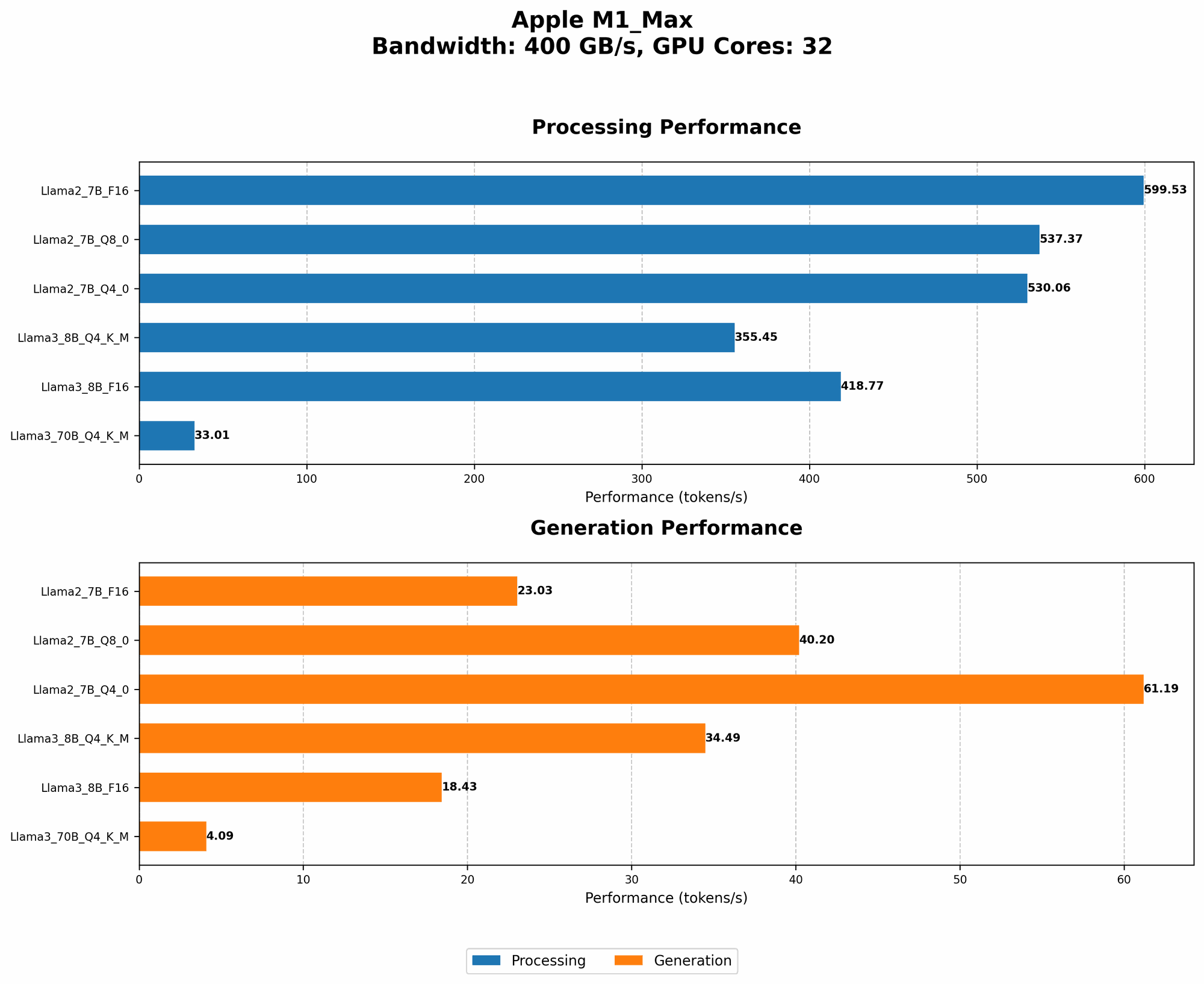
Let's compare the performance of two different LLMs on an M1 Max with 32 GPU cores:
| LLM Model | Tokens/Second (Processing) | Tokens/Second (Generation) |
|---|---|---|
| Llama 2 7B (F16) | 599.53 | 23.03 |
| Llama 3 8B (F16) | 418.77 | 18.43 |
The Llama 2 7B model outperforms the Llama 3 8B model in terms of token processing and generation speed, despite being slightly smaller. This highlights the importance of choosing a model that aligns with your application's requirements and performance goals.
3. Harnessing the Power of GPU Acceleration: Unleashing the Beast
Harness the power of GPUs to accelerate your LLM processing. GPUs, like the one in the M1 Max, are designed to handle parallel computations, making them ideal for the computationally intensive nature of LLM tasks.
Here's how GPUs can speed up your LLM execution:
- Parallel processing: GPUs can perform many operations simultaneously, making them perfect for processing massive amounts of data.
- Specialized architecture: GPUs are built with specialized hardware designed for high-performance computing, making them significantly faster than traditional CPUs.
Here's a glimpse into the token processing speed of the Llama 2 7B model on an M1 Max with 24 and 32 GPU cores:
| GPU Cores | Tokens/Second (Processing) |
|---|---|
| 24 | 453.03 |
| 32 | 599.53 |
Increasing the number of GPU cores from 24 to 32 leads to a significant increase in processing speed, showcasing the power of GPU acceleration for LLMs.
4. Optimizing Your Hardware: Giving Your M1 Max a Boost
Just like a race car needs a well-tuned engine to perform at its peak, your M1 Max needs the right hardware setup to handle LLMs efficiently. These hardware upgrades can further enhance your M1 Max's performance:
- More RAM: LLMs require a significant amount of RAM for model loading and processing. Increasing your RAM will help ensure your system has enough memory to operate smoothly.
- Faster storage: Using a fast SSD or NVMe drive can significantly reduce loading times and improve overall performance.
- External GPU: If you need the ultimate performance boost, consider using an external GPU (eGPU) with a more powerful GPU.
Remember, optimizing your hardware is like giving your M1 Max a performance booster, allowing it to handle even the most demanding tasks with ease.
5. Explore the Limits of Llama.cpp: Beyond the Basics
The Llama.cpp library is a phenomenal tool for running LLMs locally on your M1 Max. Its efficient implementation and support for various hardware configurations make it a popular choice among developers.
Dive deeper into Llama.cpp:
- Tuning parameters: Explore various parameters within Llama.cpp to optimize your model's performance for specific tasks.
- Experiment with different hardware: The library supports a wide range of hardware configurations, allowing you to experiment and find the optimal setup for your needs.
- Utilize the community: Join the thriving community of Llama.cpp users to share knowledge, troubleshoot issues, and discover new ways to maximize the library's capabilities.
By staying up-to-date with the latest developments and engaging with the community, you can constantly push the boundaries of what's possible with Llama.cpp on your M1 Max.
Conclusion: Unlocking the Power of LLMs on M1 Max
The M1 Max chip is a game-changer for running LLMs locally. By following these five tips, you can optimize your setup and unlock the full potential of your M1 Max to handle even the most demanding LLM models with ease.
From utilizing quantization to harnessing the power of GPU acceleration, we have explored a range of strategies that can significantly enhance your LLM experience. Remember, the journey to maximizing LLM performance is an ongoing adventure. By staying curious, exploring new techniques, and pushing the limits of your M1 Max, you can unlock a world of possibilities with LLMs.
FAQ
What is quantization and how does it benefit LLM performance?
Quantization is the process of reducing the precision of a model's weights, making it smaller and faster. This translates to lower memory usage, quicker loading times, and improved processing speeds.
Can I run large LLMs like Llama 3 70B on my M1 Max?
While the M1 Max is a powerful chip, running large LLMs like Llama 3 70B may require significant resources. However, you can experiment with quantization techniques to optimize performance.
How do I choose the right LLM for my needs?
Consider factors like model size, architecture, and your specific use case. Smaller models may offer better performance on the M1 Max.
What are the benefits of using a GPU for LLM processing?
GPUs excel at parallel processing, allowing them to handle the massive computations required for LLMs. This results in significantly faster execution times.
How can I improve my M1 Max's performance for LLMs?
Consider upgrading your RAM, using a faster SSD, or even utilizing an external GPU (eGPU) for optimal performance.
Keywords
LLMs, Apple M1 Max, Llama.cpp, Quantization, F16, Q80, Q40, GPU acceleration, Model size, Model architecture, Performance optimization, Memory usage, Loading times, Processing speed, Hardware upgrades, RAM, SSD, External GPU, Community, Performance tuning, LLM Inference, Token speed, Token generation, Processing speed, Generation speed, Apple Silicon, GPU cores, Bandwidth.