Is NVIDIA A100 PCIe 80GB Powerful Enough for Llama3 70B?

Introduction
The world of Large Language Models (LLMs) is exploding, with new models like Llama 3 70B pushing the boundaries of what's possible with conversational AI. But running these behemoths locally can be a challenge, especially if you don't have a supercomputer in your basement. That's where the NVIDIA A100PCIe80GB comes in, a powerful GPU that can handle the computations required for these complex models.
But the question is: Is the A100PCIe80GB powerful enough to handle the demands of Llama3 70B? This article will delve into the performance of Llama3 70B on the A100PCIe80GB, analyzing token generation speed, comparing it to other models and devices, and providing practical recommendations for developers.
Performance Analysis: Token Generation Speed Benchmarks - A100PCIe80GB and Llama3 70B
Let's get down to brass tacks. How fast can we generate tokens from Llama3 70B on the A100PCIe80GB? We'll be looking at the results of benchmarks conducted on this specific hardware and model combination.
Token Generation Speed: A100PCIe80GB with Llama3 70B
| Model Configuration | Token Generation Speed (tokens/second) |
|---|---|
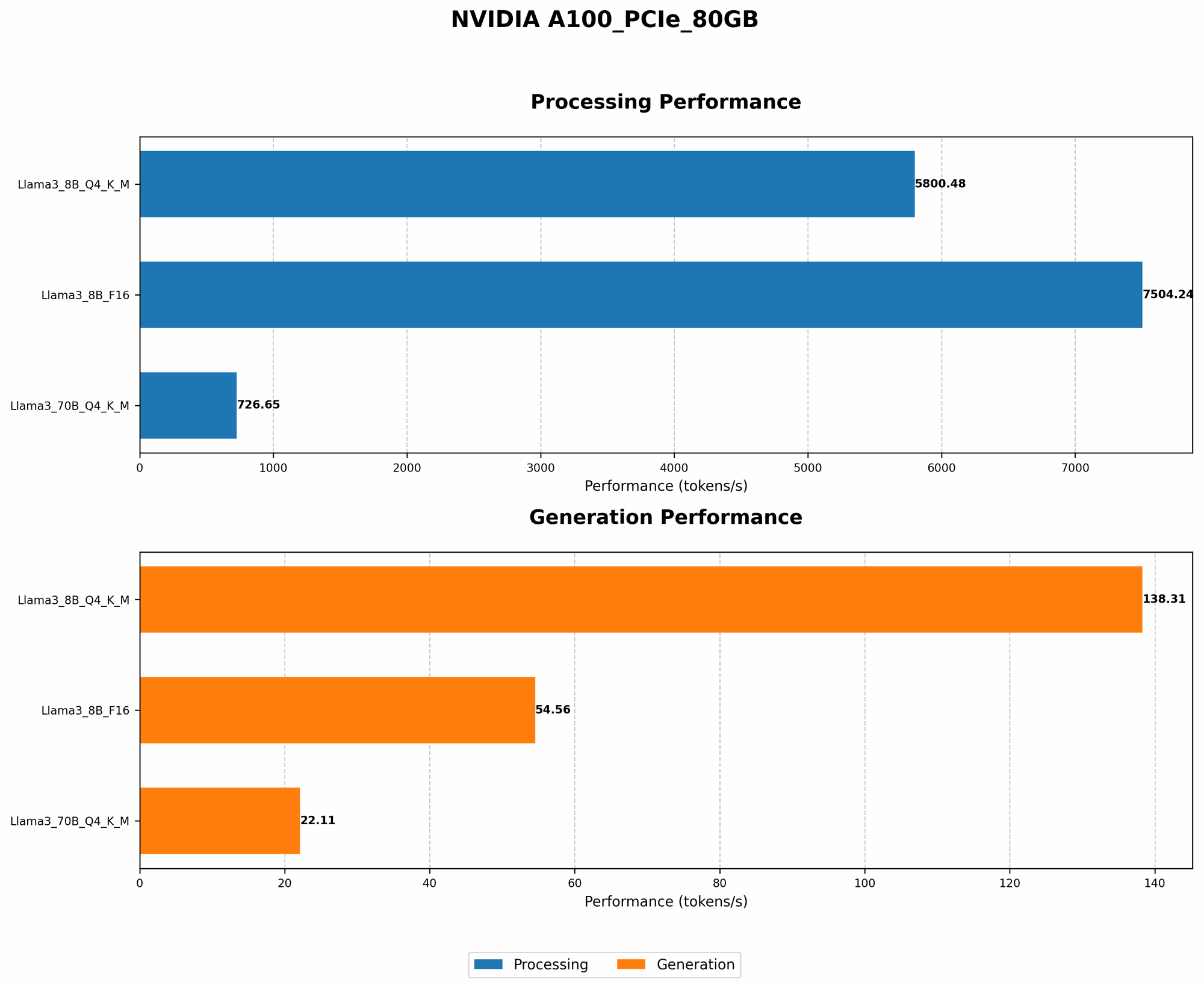
| Llama3 70B Q4KM | 22.11 |
| Llama3 70B F16 | N/A |
Breakdown:
- Q4KM represents the 4-bit quantization with K and M techniques. This is a common way to reduce memory footprint and speed up inference for LLMs.
- F16 refers to using 16-bit floating-point precision, which is a trade-off between accuracy and speed.
Key Observations:
- The A100PCIe80GB can generate 22.11 tokens per second when running Llama3 70B in Q4KM configuration.
- No data is available for Llama3 70B with F16 precision on the A100PCIe80GB. This could be due to limited testing or the model's demanding requirements exceeding the hardware's capabilities.
Performance Analysis: Model and Device Comparison
Now, let's compare the A100PCIe80GB with Llama3 70B against other devices and models.
A100PCIe80GB: Llama3 8B vs Llama3 70B
| Model Configuration | Llama3 8B | Llama3 70B |
|---|---|---|
| Q4KM Generation Speed (tokens/second) | 138.31 | 22.11 |
Observations:
- Significantly slower: The A100PCIe80GB is significantly slower when running Llama3 70B (22.11 tokens/second) compared to Llama3 8B (138.31 tokens/second). This is expected because Llama3 70B is significantly larger and more complex. Think of it like trying to carry a backpack full of bricks compared to a small purse; the larger backpack will take longer to move.
A100PCIe80GB: Llama3 8B with Different Precisions
| Model Configuration | Q4KM | F16 |
|---|---|---|
| Generation Speed (tokens/second) | 138.31 | 54.56 |
| Processing Speed (tokens/second) | 5800.48 | 7504.24 |
Observations:
- Precision trade-off: While the A100PCIe80GB can handle both 4-bit quantization and 16-bit precision, there's a clear trade-off between speed and accuracy:
- Q4KM is significantly faster for generation, achieving 138.31 tokens/second compared to 54.56 tokens/second for F16. However, it sacrifices some accuracy.
- F16 is faster for processing, reaching 7504.24 tokens/second compared to 5800.48 tokens/second for Q4KM. This is crucial for tasks where accuracy is paramount.
Practical Recommendations: Use Cases and Workarounds
So, how can you make the most of the A100PCIe80GB for Llama3 70B?
Use Case: Experimentation and Quick Prototyping
- Smaller tasks: The A100PCIe80GB is still a powerful GPU, and it might be sufficient for smaller tasks with Llama3 70B, like quick testing or experimentation.
- Focused prompts: By keeping your prompts concise and focused, you can reduce the number of tokens generated and potentially achieve reasonable inference speeds.
- Q4KM configuration: Opting for Q4KM quantization will give you a faster generation speed than F16, albeit with some accuracy loss.
Workarounds: Model Optimization and Cloud Alternatives
- Quantization techniques: If you need more speed, consider exploring more aggressive quantization methods like 3-bit or even 2-bit, although this will come with a greater loss of accuracy.
- Model optimization: Look into model optimization techniques such as pruning, which can reduce the size and computational demands of the model, making it faster to run.
- Cloud solutions: For production environments, leverage cloud services like Google Colab or AWS that offer powerful GPUs and optimized LLM platforms.
FAQ
What are the benefits of running LLMs locally?
- Privacy and security: Running LLMs locally keeps your data and conversations private and secure, without sending them to external servers.
- Lower latency: Local inference reduces the round-trip time between your device and a remote server, resulting in faster responses.
- Independent access: You don't have to rely on internet connectivity or external services to use the LLM.
What is quantization, and how does it work?
Quantization is a process of converting a model's parameters from higher-precision floating-point numbers (like 32-bit or 16-bit) to lower-precision numbers (like 8-bit or 4-bit). This reduces the size of the model and makes it faster to run, albeit with some accuracy loss. Imagine you're storing a picture; you can save more space and load the image faster if you use a smaller number of colors (lower precision) to represent it.
What are other GPUs suitable for running LLMs locally?
- NVIDIA A100: This is a powerful GPU designed for AI workloads, offering excellent performance for LLMs.
- NVIDIA RTX 4090: While not as powerful as the A100, the RTX 4090 is still a compelling option for running LLMs locally, especially for smaller models.
- AMD MI250X: This GPU is specifically designed for AI workloads and can handle large language models effectively.
Keywords
NVIDIA A100PCIe80GB, Llama3 70B, LLM, Large Language Model, token generation speed, benchmarks, quantization, Q4KM, F16, model optimization, local inference, GPU, performance, cloud solutions, AI, deep learning, natural language processing