Is NVIDIA 4090 24GB Powerful Enough for Llama3 70B?

Introduction
The Large Language Model (LLM) landscape is evolving at a breakneck pace. Open source models like Llama 2 and Llama 3 are pushing the boundaries of what's possible with AI, leading to innovative applications across various domains. However, running these models locally requires substantial computational power, particularly for the larger models like Llama 3 70B.
This article delves into the question: Can a NVIDIA 4090_24GB handle the demands of Llama 3 70B? We'll analyze performance benchmarks, compare model and device specifications, and provide insights into practical use cases and potential workarounds. This guide aims to equip developers and enthusiasts with the knowledge to make informed decisions about their local LLM setup.
Performance Analysis: Token Generation Speed Benchmarks

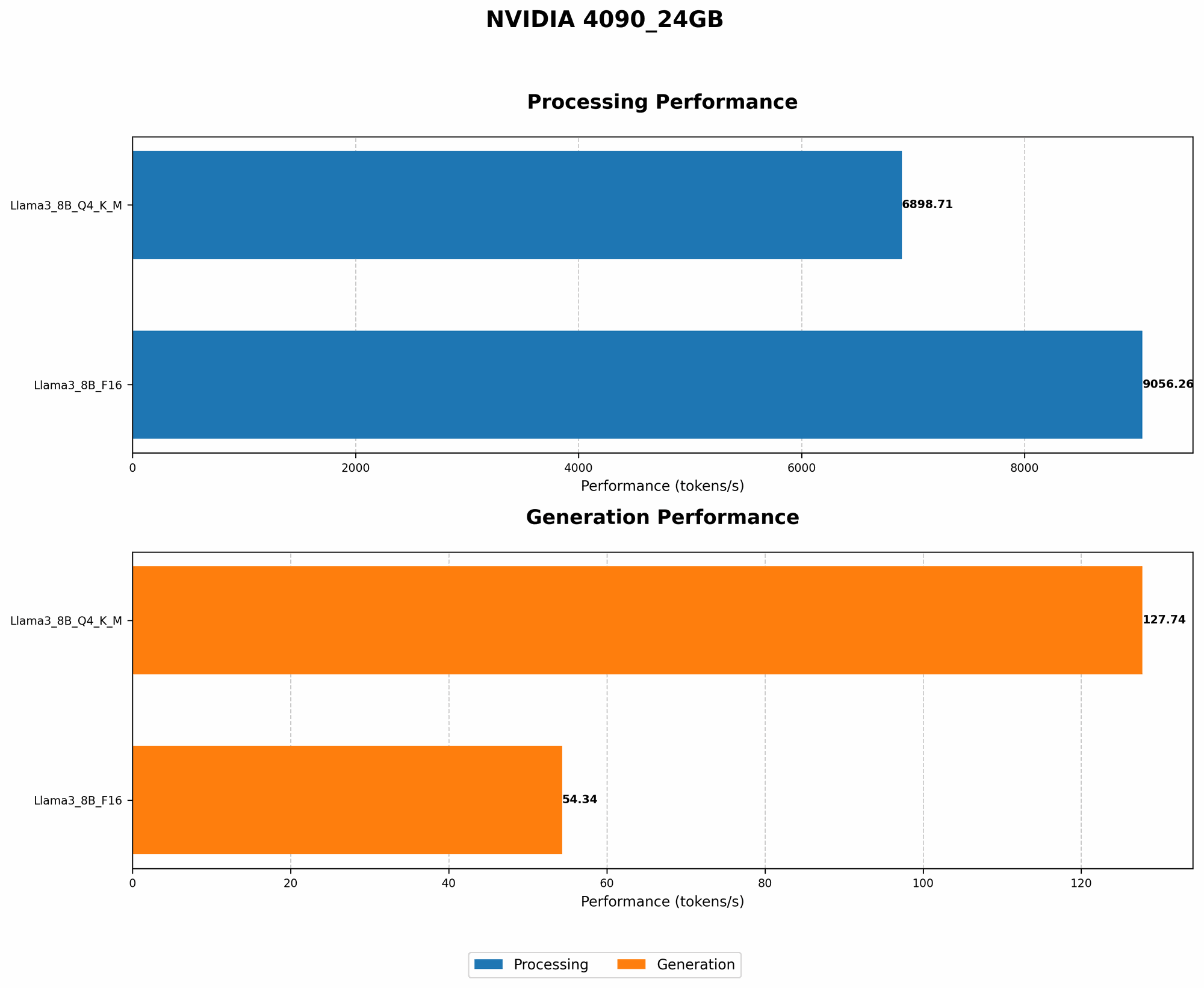
Token Generation Speed Benchmarks: NVIDIA 4090_24GB and Llama3 8B
Our primary focus is Llama 3 70B, but let's start with Llama 3 8B. We'll first analyze how the NVIDIA 4090_24GB performs on this smaller model, as it provides a useful baseline for comparison.
| Model | Quantization | NVIDIA 4090_24GB (Tokens/second) |
|---|---|---|
| Llama3 8B | Q4KM | 127.74 |
| Llama3 8B | F16 | 54.34 |
Key Takeaways:
- The NVIDIA 409024GB delivers impressive token generation speeds for Llama 3 8B across both quantization levels: Q4K_M (4-bit quantization with Kernel and Matrix) and F16 (16-bit floating-point).
- Q4KM quantization significantly boosts performance compared to F16, achieving more than double the speed. This is due to the reduced memory footprint and faster computations with lower precision.
Analogy: Imagine a chef preparing a meal. The GPU is the chef's kitchen, and the model size is the complexity of the dish. A smaller model (Llama 3 8B) is like a simple salad, which the chef can prepare quickly. A larger model (Llama 3 70B) is like a gourmet multi-course meal, requiring more time and resources.
Important Note: Data for Llama 3 70B on the NVIDIA 4090_24GB is currently unavailable. We'll explore workarounds and alternative devices in the following sections.
Performance Analysis: Model and Device Comparison
Model and Device Comparison: Llama 3 70B and NVIDIA 4090_24GB
Unfortunately, we don't have specific performance benchmarks for Llama 3 70B on the NVIDIA 4090_24GB. This is not unusual for newer models and hardware combinations. However, we can draw insights from the existing data and make educated predictions.
Consider these factors:
- Model Size: Llama 3 70B is significantly larger than Llama 3 8B, requiring more memory and computational resources.
- Device Memory: The NVIDIA 4090_24GB boasts ample memory, capable of holding the complete Llama 3 70B model.
- GPU Performance: The NVIDIA 4090_24GB is a powerful GPU, designed for high-performance computing tasks.
Predictions:
- Token Generation Speed: While the NVIDIA 4090_24GB is likely capable of running Llama 3 70B, the token generation speed will likely be lower than with Llama 3 8B.
- Quantization Impact: Q4KM quantization becomes even more crucial for larger models like Llama 3 70B to manage memory and accelerate performance.
- Limited Data: Without specific benchmark data, it's difficult to quantify the exact performance.
Example: Imagine trying to fit a huge jigsaw puzzle on a small tabletop. The puzzle (Llama 3 70B) might fit, but it will be crowded and difficult to work with. A larger tabletop (more powerful device) is needed for a smoother experience.
Practical Recommendations: Use Cases and Workarounds
Use Cases: Llama 3 70B on NVIDIA 4090_24GB
Despite the lack of concrete performance data, the NVIDIA 4090_24GB can be a viable option for running Llama 3 70B in certain use cases.
Suitable Use Cases:
- Research and Development: Experimenting with Llama 3 70B on a dedicated GPU can be valuable for research and development purposes, even if the performance is not optimal for production.
- Limited Usage: If your application involves infrequent or short-duration interactions with the LLM, the performance might be sufficient.
- Fine-Tuning: Using the NVIDIA 4090_24GB for fine-tuning smaller subsets of the Llama 3 70B model can be more feasible.
Important Considerations:
- Performance Variability: The actual performance will depend on the specific tasks, prompt lengths, and other factors.
- Memory Management: Effective memory management is crucial to avoid exceeding the GPU's memory capacity.
- Performance vs. Usability: Balancing performance with usability is a constant trade-off.
Workarounds: Alternate Devices and Strategies
Since we don't have the exact performance data, here are some alternative devices and strategies to consider:
Alternative Devices:
- Higher-End GPUs: Consider exploring other high-end GPUs with even larger memory, such as the NVIDIA H100 or A100. These devices are typically found in data centers and offer significantly more processing power.
- CPU-Based Inference: While not ideal, running Llama 3 70B on a powerful CPU might be a feasible option. This approach will result in slower token generation speeds but might be suitable for specific use cases.
Strategies:
- Model Quantization: Implement aggressive quantization (e.g., 4-bit quantization) to reduce the model's memory footprint and boost performance.
- Model Pruning: Remove unimportant parts of the model to reduce its size and memory requirements.
- GPU Offloading: Use a combination of GPU and CPU resources, offloading specific tasks to the CPU to reduce the load on the GPU.
Example: Imagine a mountain climber facing a challenging route. An experienced climber might be equipped with specialized gear (powerful GPU) to handle the ascent. A less experienced climber might need additional support (alternative devices and strategies) to make the climb successful.
FAQ
Frequently Asked Questions
Q: What are the best devices for running Llama 3 70B locally?
A: While the NVIDIA 4090_24GB is a powerful GPU, it's currently unclear if it's sufficient for optimal Llama 3 70B performance. Explore higher-end GPUs with larger memory, such as the A100 or H100, or consider CPU-based inference.
Q: How does quantization affect model performance?
A: Quantization reduces the precision of model weights, leading to a smaller model size and faster processing. However, it can also impact model accuracy. Think of it like using a smaller ruler to measure something. You get a less precise measurement but gain speed and efficiency.
Q: What are the tradeoffs between GPU and CPU inference for LLMs?
A: GPUs are designed for parallel processing and offer excellent performance for large language models. However, CPUs are more versatile and can be used for other tasks. The ideal approach depends on your specific needs, workload, and budget.
Q: What are some resources for learning more about local LLM deployment?
A: Several resources offer valuable information on local LLM deployment, including:
- Llama.cpp: A popular open-source library for running LLMs locally.
- Hugging Face: A platform for sharing and deploying LLMs, offering tutorials and resources.
- OpenAI: Provides documentation and tutorials on deploying and fine-tuning LLMs.
Keywords
NVIDIA 4090_24GB, Llama 3 70B, Large Language Model, LLM, Token Generation Speed, Quantization, Performance Benchmarks, GPU Inference, CPU Inference, Model Pruning, Model Quantization, Local LLM Deployment, Device Comparison, Use Cases, Workarounds, GPU Memory, Token Generation Speed, Practical Recommendations