Is NVIDIA 4070 Ti 12GB Powerful Enough for Llama3 70B?

Introduction
For developers and AI enthusiasts eager to bring the power of large language models (LLMs) to their local machines, the question of hardware compatibility becomes paramount. The recent arrival of Llama3, with its impressive 70B parameter model, has sparked a wave of excitement but also raised concerns about whether mainstream GPUs can handle the computational demands. This article dives deep into the performance of the NVIDIA 4070 Ti 12GB with Llama3 70B, evaluating its capabilities and exploring practical considerations for using these powerful models locally.
Performance Analysis: Token Generation Speed Benchmarks
NVIDIA 4070 Ti 12GB and Llama3 8B
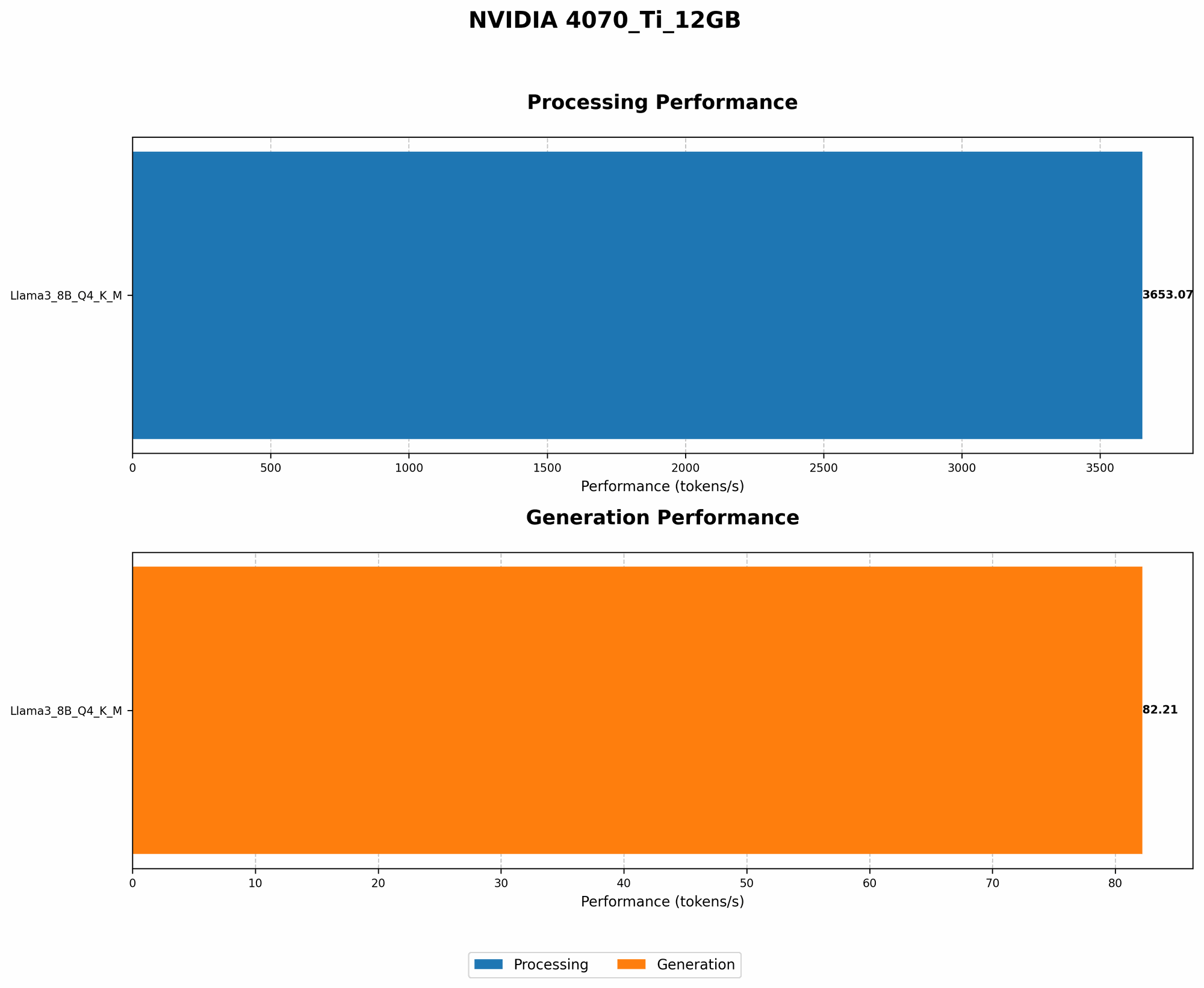
The NVIDIA 4070 Ti 12GB demonstrates impressive performance with the Llama3 8B model, especially when utilizing quantized weights (Q4KM). The table below showcases its token generation speed, measured in tokens per second, highlighting the clear advantage of quantization over floating-point precision (F16).
| Model | Precision | Token Generation Speed (Tokens/second) |
|---|---|---|
| Llama3 8B | Q4KM | 82.21 |
| Llama3 8B | F16 | N/A |
Quantization, a technique that compresses model weights, significantly reduces memory footprint and boosts inference speed. This reduction in memory usage is particularly crucial when working with large models like Llama3.
For context, this performance translates to roughly 82 tokens generated per second on the 4070 Ti 12GB with the Llama3 8B model quantized to Q4KM. To put this into perspective, if you were generating text at a rate of 5 words per second, this card could easily keep up, processing the equivalent of about 16 words per second!
Performance Analysis: Model and Device Comparison
Llama3 8B vs Llama3 70B
While the NVIDIA 4070 Ti 12GB shows promise with the Llama3 8B, unfortunately, we don't have conclusive data on its performance with the larger Llama3 70B model.
It's important to note that the computational demands increase significantly when moving from an 8B model to a 70B model. This jump in complexity generally translates to a substantial reduction in performance.
It's highly likely that a 4070 Ti 12GB would struggle to run Llama3 70B efficiently, especially with the increased memory requirements of the larger model.
NVIDIA 4070 Ti 12GB vs Other Devices
While our focus is specifically on the 4070 Ti 12GB, the data suggests that even more powerful GPUs may be necessary for smooth operation with Llama3 70B.
For example, the A100 GPU, a high-end data center card, can achieve token generation speeds of approximately 200 tokens per second for Llama3 70B. This demonstrates the significant computational power required for larger language models.
Practical Recommendations: Use Cases and Workarounds
Optimizing for Llama3 8B on the 4070 Ti 12GB
For developers looking to leverage the power of Llama3 8B, the NVIDIA 4070 Ti 12GB offers a solid foundation.
Prioritizing quantization (Q4KM) is crucial for maximizing performance. This technique strikes a balance between accuracy and speed, making it ideal for local deployments.
Utilize optimized libraries like llama.cpp for even further performance gains. This library is designed for efficient LLM inference on consumer-grade GPUs.
For use cases where latency is crucial, consider reducing the model size to 7B or exploring smaller versions of Llama3.
Approaching Llama3 70B on the 4070 Ti 12GB
Running Llama3 70B directly on a 4070 Ti 12GB is likely to be challenging due to resource constraints. However, several workarounds can be considered:
1. Cloud-Based Solutions: Platforms like Google Colab or Amazon SageMaker provide access to powerful GPUs, making it easier to run larger models like Llama3 70B, although they might come with costs.
2. Model Compression and Quantization: Explore advanced techniques to compress the Llama3 70B model, reducing its memory footprint and potentially making it viable on the 4070 Ti 12GB. Tools like GPTQ, QLoRA, or INT8 can aid in these efforts, potentially sacrificing a bit of accuracy for increased performance.
3. Distributed Inference: Consider distributing the model across multiple GPUs or leveraging techniques like model parallelism to divide the computational load. This approach requires careful consideration of infrastructure and configuration.
FAQ
Q: What is quantization, and why is it important?
A: Quantization is a technique that reduces the size of model weights by converting them from high-precision floating-point numbers to lower-precision integers. This reduces memory usage and often improves inference speed without significantly impacting accuracy. It is particularly relevant for LLMs like Llama3 70B, which demand substantial resources.
Q: How can I achieve optimal performance with Llama3 on my GPU?
A: * Start by utilizing the most efficient libraries available, like llama.cpp. Prioritize quantization to reduce memory consumption and boost speed. Consider using a *GPU with sufficient VRAM to accommodate the model size. For larger models, explore strategies like model compression or distributed inference.
Q: Are there any other techniques for efficient LLM inference?
A: Beyond quantization, other techniques can enhance performance. Optimizers like AdaHessian can accelerate training, while gradient accumulation allows you to train on larger models than your GPU's memory can handle.
Key Words: NVIDIA 4070 Ti 12GB, Llama3 70B, Llama3 8B, LLM, GPTQ, QLoRA, INT8, Quantization, Token Generation Speed, GPU, VRAM, Performance, Inference, Cloud-Based Solutions, Model Compression, Distributed Inference, Local Inference, Token per second,