Is It Worth Buying Apple M2 Ultra for Machine Learning Projects?

Introduction
Machine learning (ML) has become a hot topic, infiltrating various aspects of our lives. From personalized recommendations on streaming platforms to self-driving cars, ML algorithms are quietly shaping our world. One crucial aspect of ML development is the hardware that powers the computations.
While powerful GPUs are usually the go-to choice for ML, Apple's M2 Ultra chip, with its impressive performance and integrated memory, has piqued the interest of developers seeking a more powerful machine. But is Apple M2 Ultra the right choice for your machine learning projects? This article explores the capabilities of the M2 Ultra for running large language models (LLMs) and helps you decide if it's a worthwhile investment.
Exploring the Apple M2 Ultra's Capabilities for Machine Learning Projects
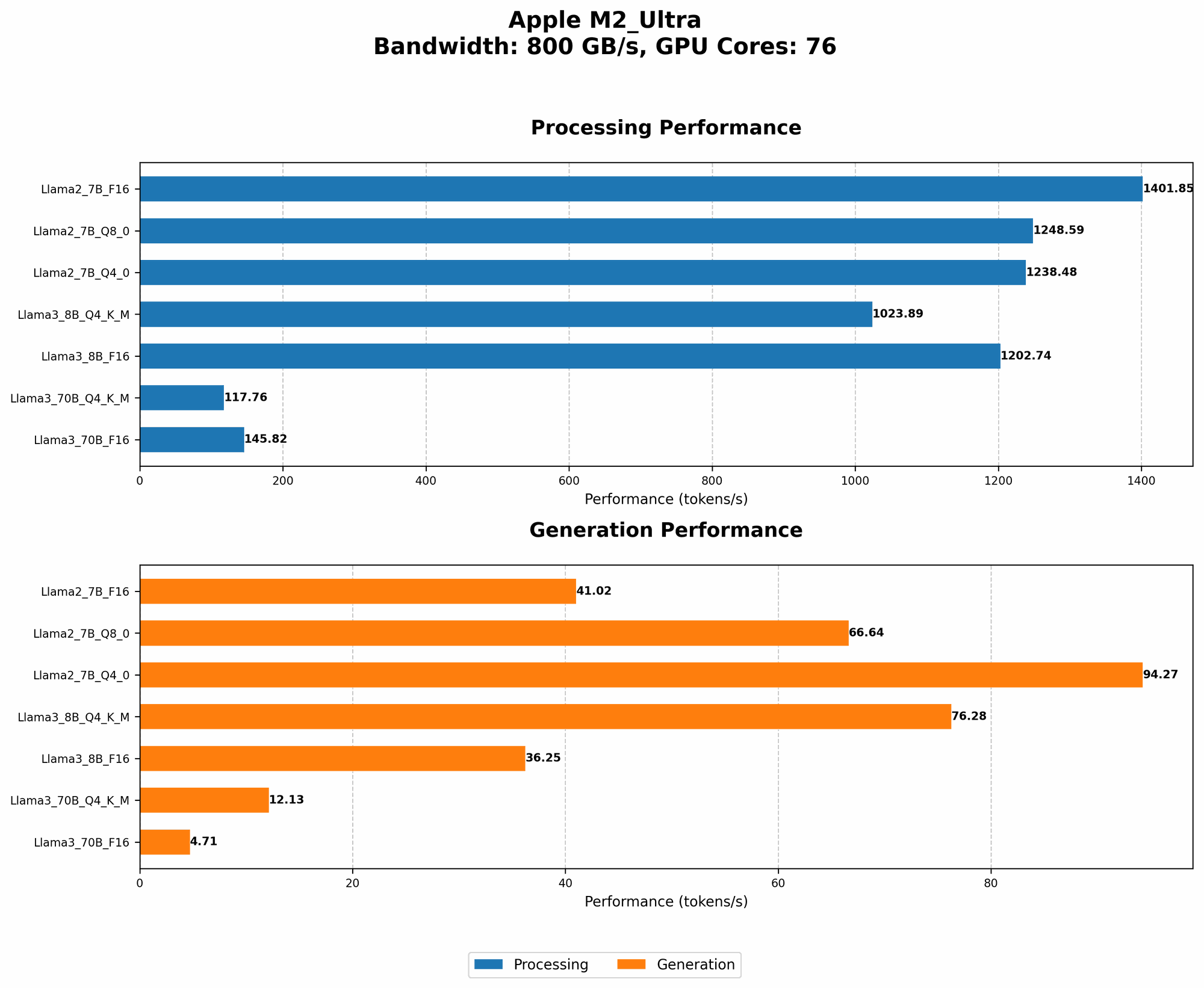
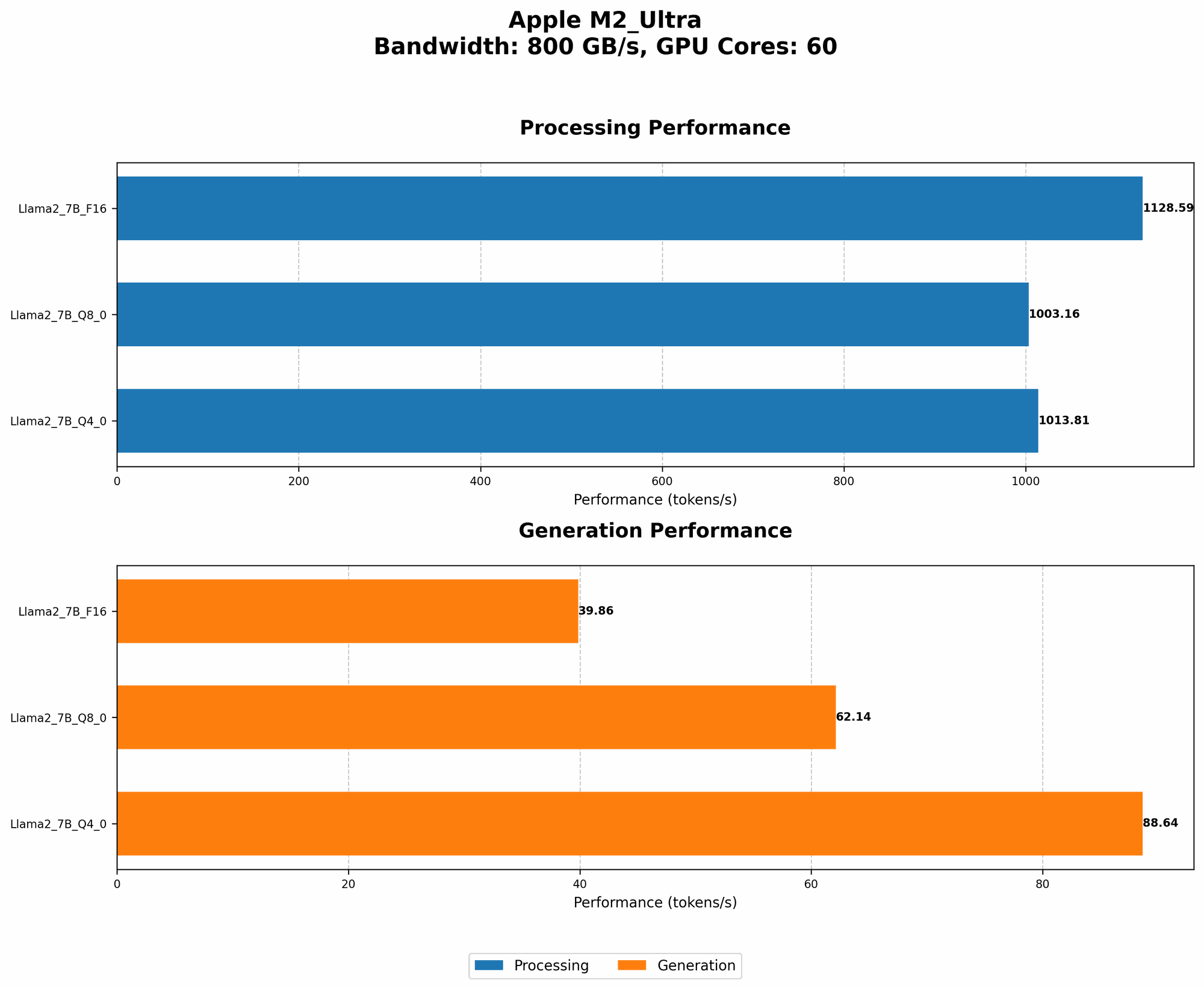
The Apple M2 Ultra chip is a powerhouse boasting 60 or 76 GPU cores, depending on the configuration, and 800 GB/s memory bandwidth. This means it can handle complex calculations and access data quickly, making it attractive for high-performance computing tasks, including machine learning. To assess the M2 Ultra's performance, we'll analyze its capabilities with Llama 2 and Llama 3 LLMs, focusing on token processing and generation speeds.
Understanding Token Processing and Generation Speed
Imagine LLMs as voracious readers who devour information. Each piece of information, be it a word, punctuation, or a special character, is like a token – a small building block of text. Tokenization is the process of breaking down text into these tokens. Think of it as a translator, transforming the raw language into a format LLMs can understand.
Token processing speed measures how quickly an LLM can understand and interpret these tokens. Token generation speed determines how fast an LLM can generate new tokens, forming words and sentences in response to your prompts.
Faster processing and generation speeds are crucial as they translate to faster training and inference times for LLMs.
The M2 Ultra's Performance with Llama 2 and Llama 3
The M2 Ultra's performance for processing and generating tokens with different LLM models is impressive. Here's a breakdown of its capabilities:
Comparison of M2 Ultra with 60 GPU Cores and M2 Ultra with 76 GPU Cores for Llama 2 7B
| M2 Ultra Configuration | BW (GB/s) | GPU Cores | Llama 2 7B F16 Processing (tokens/sec) | Llama 2 7B F16 Generation (tokens/sec) | Llama 2 7B Q8_0 Processing (tokens/sec) | Llama 2 7B Q8_0 Generation (tokens/sec) | Llama 2 7B Q4_0 Processing (tokens/sec) | Llama 2 7B Q4_0 Generation (tokens/sec) |
|---|---|---|---|---|---|---|---|---|
| 60 GPU Cores | 800 | 60 | 1128.59 | 39.86 | 1003.16 | 62.14 | 1013.81 | 88.64 |
| 76 GPU Cores | 800 | 76 | 1401.85 | 41.02 | 1248.59 | 66.64 | 1238.48 | 94.27 |
Observations:
- The M2 Ultra with 76 GPU cores significantly outperforms the 60 GPU cores version, particularly for processing speed.
- The model with 76 GPU cores can process up to 1401.85 tokens per second in F16 mode, making it incredibly efficient for large-scale LLMs.
- Quantization is a way to reduce the size of the LLM by making it more "compact". In the table above, the "Q" values (Q80, Q40) represent different quantization levels. The M2 Ultra performs well across these different quantization levels.
Comparison of M2 Ultra with 76 GPU Cores for Llama 3 8B and 70B
| M2 Ultra Configuration | BW (GB/s) | GPU Cores | Llama 3 8B Q4KM Processing (tokens/sec) | Llama 3 8B Q4KM Generation (tokens/sec) | Llama 3 8B F16 Processing (tokens/sec) | Llama 3 8B F16 Generation (tokens/sec) | Llama 3 70B Q4KM Processing (tokens/sec) | Llama 3 70B Q4KM Generation (tokens/sec) | Llama 3 70B F16 Processing (tokens/sec) | Llama 3 70B F16 Generation (tokens/sec) |
|---|---|---|---|---|---|---|---|---|---|---|
| 76 GPU Cores | 800 | 76 | 1023.89 | 76.28 | 1202.74 | 36.25 | 117.76 | 12.13 | 145.82 | 4.71 |
Observations:
- The M2 Ultra with 76 GPU cores handles the massive 70B parameter Llama 3 model with respectable performance.
- Q4KM represents a more advanced form of quantization, allowing for further compression of the LLM without significant loss in accuracy.
- Even with the 70B model, the M2 Ultra achieves a processing speed of 145.82 tokens per second in F16 mode.
It's important to note that the LLM models mentioned above are not exhaustive and different models may show different performance.
Apple M2 Ultra's Advantages for Machine Learning
- Integrated Memory: The M2 Ultra's unified memory architecture allows for seamless data transfer between the CPU and GPU, eliminating bottlenecks and speeding up processes.
- High Bandwidth: The 800 GB/s memory bandwidth enables rapid data access, crucial for handling large datasets in ML.
- High Processing Speed: With 60 or 76 GPU cores, the M2 Ultra delivers impressive processing power for ML tasks.
- Energy Efficiency: Apple's chips are renowned for their energy efficiency, making the M2 Ultra a good choice for power-conscious ML applications.
Is the M2 Ultra Right for You?
The M2 Ultra is a powerful machine, but its suitability depends on your specific needs. Here are some factors to consider:
- Budget: The M2 Ultra-equipped Macs are expensive. If cost is a major concern, you might find more affordable alternatives.
- Project Scale: For small-scale projects, a lower-end GPU might suffice. However, if you're dealing with massive datasets and complex models, the M2 Ultra's power can be invaluable.
- Software Compatibility: While Apple's ecosystem is robust, certain ML frameworks and libraries may have limited support on macOS.
M2 Ultra vs. Other Options
While the M2 Ultra is a powerful option, it's not the only player in the game. Here are some alternatives to consider:
- Nvidia GPUs: Nvidia GPUs are the industry standard for ML, offering a wide range of options, from budget-friendly cards to high-end solutions.
- AMD GPUs: AMD GPUs provide a compelling alternative to Nvidia, often offering impressive performance at competitive prices.
- Google Tensor Processing Units (TPUs): TPUs are specialized hardware designed for machine learning, offering unparalleled performance for specific tasks.
Ultimately, the best choice will depend on your individual needs, budget, and project requirements.
FAQ
Q: What type of LLM models can the M2 Ultra handle?
A: The M2 Ultra can handle a wide range of LLMs, including popular models like Llama 2, Llama 3, BLOOM, and GPT-3. The specific model and its size will influence performance, so it's important to consider those factors.
Q: Is the M2 Ultra good for training LLMs?
A: While the M2 Ultra offers decent performance for training, it might be overkill for training extremely large models. For complex LLM training, dedicated cloud infrastructure with powerful TPUs or GPUs is typically necessary.
Q: What are the advantages of using the M2 Ultra for LLMs?
A: The M2 Ultra's advantages include its integrated memory architecture, high memory bandwidth, and impressive processing power, translating to faster processing and generation speeds, especially for mid-sized LLMs.
Q: What are the best Mac models that come with the M2 Ultra chip?
A: The latest Mac Studio and Mac Pro models are available with the M2 Ultra chip.
Keywords:
Apple M2 Ultra, Machine Learning, LLM, Large Language Model, Llama 2, Llama 3, Token Processing, Token Generation, Quantization, GPU, GPU Cores, Memory Bandwidth, F16, Q80, Q40, Mac Studio, Mac Pro, GPU Benchmarks, AI, Natural Language Processing, Performance, Speed, Inference, Training, ML, Deep Learning, AI Hardware, AI Development, AI Acceleration, GPU Accelerated Computing, Computer Vision, NLP, Data Science.