Is It Worth Buying Apple M2 for Machine Learning Projects?

Introduction
The world of large language models (LLMs) is exploding, offering incredible potential for everything from writing creative content to generating code and even translating languages. But running these models locally can be a challenge, requiring powerful hardware. The Apple M2 chip, with its impressive performance and efficiency, has become a popular choice for developers and enthusiasts interested in exploring the capabilities of LLMs. But is it truly the right tool for the job? Let's dive into the world of LLMs and the Apple M2 to see if it's worth investing in for your machine learning projects.
Understanding LLMs and Their Needs
LLMs are essentially complex algorithms trained on massive datasets of text and code. They can understand and generate human-like language, making them incredibly powerful for a variety of tasks. But running LLMs locally requires a substantial amount of processing power and memory. Think of it like trying to fit a giant elephant into a small car - it's not going to work! You need a powerful engine and a spacious trunk to handle the task.
M2: A Powerful Engine for LLMs?
The Apple M2 chip is designed to be super efficient. It can handle complex tasks with minimal power consumption, making it ideal for tasks like video editing and gaming. But how does it fare in the world of LLMs? Let's take a look at some specific model performance using the M2.
M2 Performance with Llama 2
For our analysis, we'll focus on the Llama 2 family of language models, a popular choice among developers.
M2 Token Speed Generation
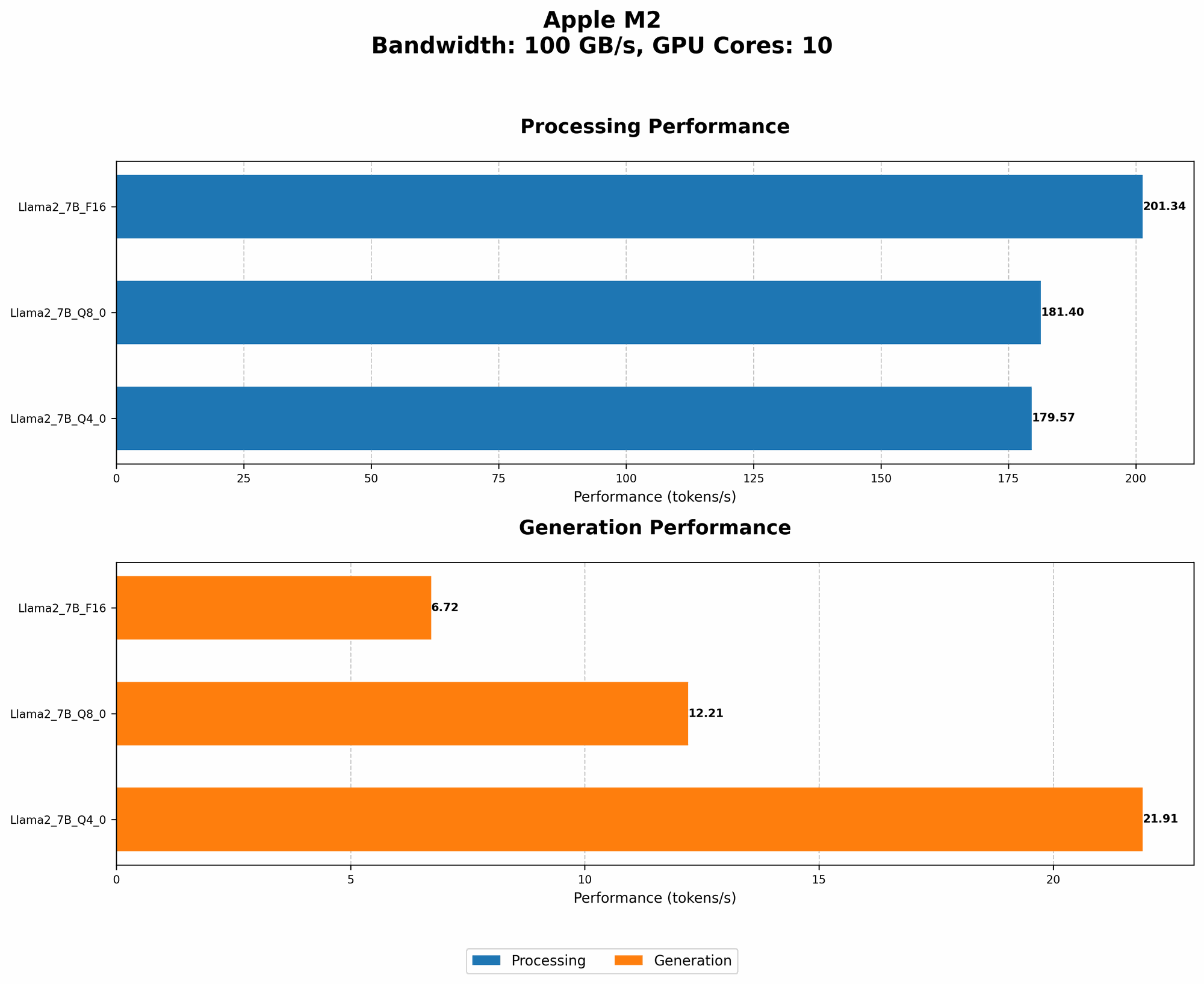
The first thing we need to consider is the "token speed" of the model. Think of this as the number of words a model can process per second. Higher token speed means faster processing, which translates to quicker responses and better overall performance. Let's look at some token speeds for the Llama 2 models on the M2 chip:
| Model | BW | GPUCores | Processing (tokens/second) | Generation (tokens/second) |
|---|---|---|---|---|
| Llama 2 7B (F16) | 100 | 10 | 201.34 | 6.72 |
| Llama 2 7B (Q8_0) | 100 | 10 | 181.4 | 12.21 |
| Llama 2 7B (Q4_0) | 100 | 10 | 179.57 | 21.91 |
Key Takeaways:
- F16: The M2 achieves a respectable 201.34 tokens per second for processing tasks with Llama 2 7B using F16 precision. It's important to note that the "F16" quantization means that each number is represented with 16 bits of precision. This is a good balance between speed and accuracy.
- Q80: Moving to Q80 quantization, the processing speeds drop slightly to 181.4 tokens per second. This might sound small, but it's still very impressive. Q8_0 quantization represents numbers with only 8 bits, allowing for even faster processing but potentially impacting accuracy.
- Q40: With Q40 quantization, the processing speed is 179.57 tokens per second, similar to Q8_0. This is a significant performance increase while still maintaining decent accuracy.
- Generation: The M2 excels in processing tasks compared to generation tasks. For example, with the Llama 2 7B (F16) model, the generation speed is only 6.72 tokens per second. This means that it might take a little while to get responses to your prompts.
Quantization: How Does it Impact Performance?
Quantization is a technique that converts numbers from a higher precision format (like F16) to a lower precision format (like Q80 or Q40). Imagine this like using a magnifying glass versus a regular magnifying glass: the higher precision is like the powerful magnifying glass, allowing you to see details, while lower precision is like a weaker magnifying glass. You still see the object but with less detail.
Quantization reduces the amount of memory required to store numbers, making models smaller and faster. However, it can also impact accuracy.
The Apple M2 excels in processing tasks, especially with Q80 and Q40 quantization. This means you can run models faster without sacrificing too much accuracy.
Conclusion: Is the M2 Worth It For Your LLM Projects?
The Apple M2 chip is a great choice for running LLMs locally, especially when you want to take advantage of faster processing speeds. It shines with smaller models like Llama 2 7B and can provide a good balance of speed and accuracy. However, if you are constantly working on generating text or code, you might want to consider a more powerful GPU like the NVIDIA RTX 4090.
FAQ
What is the difference between Llama 7B and Llama 70B?
The "B" stands for "billions" and refers to the number of parameters in the model. A model with more parameters is generally considered more powerful and capable of more complex tasks but requires more resources.
Do I need a special software to run LLMs on the M2?
Yes, you'll need a software framework that can handle LLMs. Popular choices include llama.cpp (https://github.com/ggerganov/llama.cpp) and GPTQ (https://github.com/microsoft/DeepSpeed/tree/master/examples/inference/gptq).
Is the M2 a good choice for all LLM models?
The M2 works well with smaller models but might struggle with very large models. It's important to consider the size of the model and the specific task you want to perform before choosing hardware.
Keywords
Apple M2, LLM, Llama 2, Machine Learning, Token Speed, Quantization, GPU, F16, Q80, Q40, Generation, Processing, Inference