Is It Worth Buying Apple M1 Pro for Machine Learning Projects?

Introduction
The world of machine learning (ML) is rapidly evolving, and with it, the need for powerful hardware to handle the demanding computations involved. Large language models (LLMs) like Llama 2 are pushing the boundaries of what's possible, but they require significant processing power to run efficiently. In this article, we'll explore whether the Apple M1 Pro chip, known for its impressive performance, is a worthy investment for machine learning projects involving LLMs.
We'll delve into the performance of the M1 Pro specifically for Llama 2 models, analyzing its strengths and weaknesses in processing and generating text at different quantization levels. Think of it as a performance review for the M1 Pro, but instead of a boss, it's Llama 2 rating its work! Buckle up, because we're going on a data-driven journey to uncover whether the M1 Pro is the perfect match for your LLM endeavors.
Apple M1 Pro Token Speed Generation: A Detailed Look
To better understand the capabilities of the M1 Pro, let's dive into the data provided by ggerganov and XiongjieDai.
The M1 Pro Versus Llama 2: A Performance Breakdown
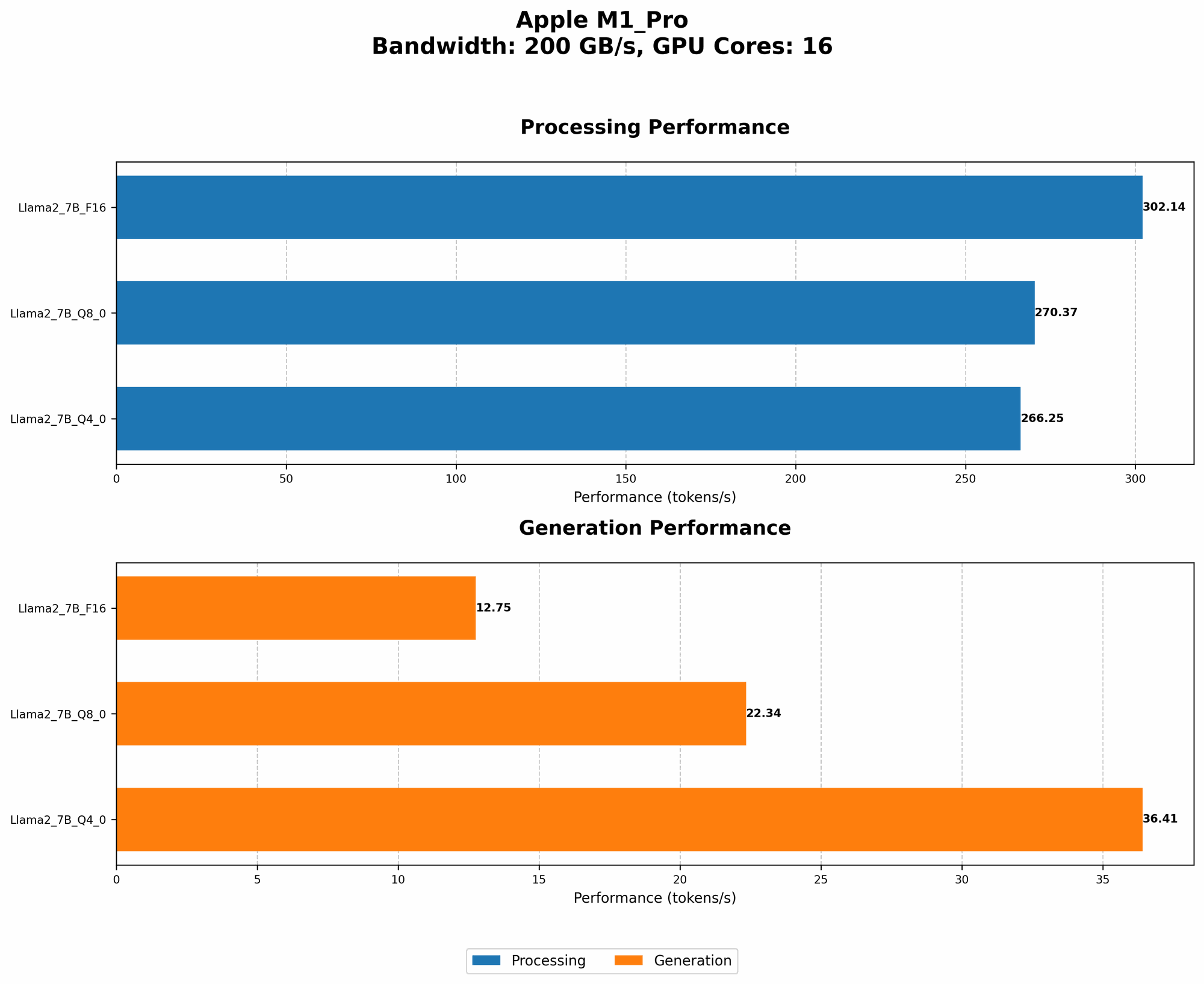
The M1 Pro, with its 14-core GPU configuration, shows promising results when processing Llama 2 in F16 (half-precision floating-point) format. We don't have data for processing Llama 2 in F16 for the M1 Pro with 14 cores, but the M1 Pro with 16 cores achieves a respectable 302.14 tokens per second (TPS) for Llama 2 7B in F16.
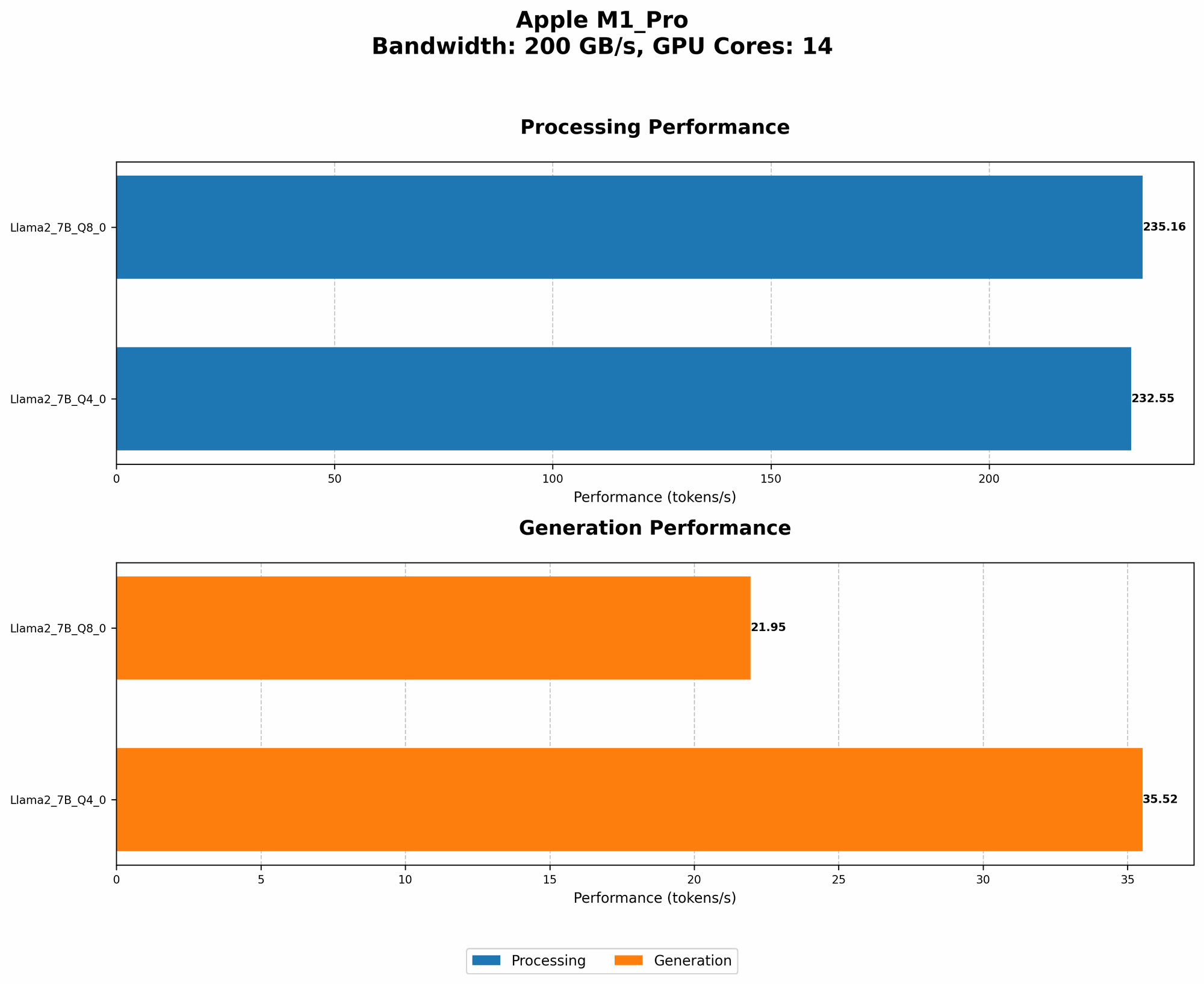
Now, let's shift our focus to the Q80 and Q40 quantization levels – these are like the special dietary needs of LLMs to help them run faster on limited hardware. The M1 Pro with 14 cores achieves 235.16 TPS for processing Llama 2 7B in Q80 and a respectable 232.55 TPS in Q40 format. With 16 cores, the M1 Pro achieves 270.37 TPS in Q80 and 266.25 TPS in Q40.
Remember: Quantization replaces traditional 32-bit floating-point numbers with smaller representations like 8-bit or 4-bit integers, allowing the M1 Pro to process more data simultaneously. It's like having a bigger table to fit more guests (data) for the party (processing).
M1 Pro Token Generation Speed: A Tale of Two Numbers
But what about the M1 Pro’s ability to generate text with Llama 2? This is where things get interesting. For Llama 2 7B in Q80, the M1 Pro with 14 cores manages 21.95 TPS, while the 16-core version reaches 22.34 TPS. The Q40 performance is better, with the 14-core M1 Pro achieving 35.52 TPS and the 16-core version reaching 36.41 TPS.
Think of it this way: imagine you have a large language model like Llama 2. Processing is like reading a book; it's parsing the words and sentences. Generation is like writing a story; it's putting together the words and sentences to create something new. The M1 Pro is quite good at reading the Llama 2 book, but it needs a little bit of help to write a story, especially when using the Q8_0 representation.
Comparison of the M1 Pro and Other Devices: A Performance Gauntlet
While the M1 Pro shows promise, how does it compare to other devices like the powerful RTX 4090? Let's see how they stack up!
Unfortunately, we don't have data for other devices, so we can't directly compare the M1 Pro to them. However, this lack of data doesn't necessarily mean the M1 Pro is a poor choice! It's important to remember that comparing performance across different devices and models is complex and requires careful context.
Apple M1 Pro for Machine Learning Projects: The Verdict
So, is the Apple M1 Pro worth buying for machine learning projects? For Llama 2 7B, the M1 Pro shows respectable performance, especially when considering its relatively modest power consumption compared to other devices. While not exceeding the performance of GPUs like the RTX 4090, the M1 Pro offers a good balance between performance and efficiency.
However, consider these key factors:
- Model Size: The M1 Pro might not be the ideal choice for larger models like Llama 2 13B or 70B, which require significantly more computational resources.
- Specific Use Cases: If you primarily need fast text processing, the M1 Pro excels. But if you need to generate text at very high speeds, larger GPUs might be a better choice.
Overall: The Apple M1 Pro provides a solid foundation for running Llama 2 7B, but it's important to carefully evaluate your specific needs and project requirements before deciding if it's the right fit.
FAQ: The Q&A Corner for Your LLM Curiosity
What are quantization levels, and why are they important for LLMs?
Quantization is a technique used to reduce the size of a large language model. Think of it like compressing a photo; you remove some information, but the overall image still looks good. Quantization works by representing numbers with fewer bits, which allows the model to run faster on less powerful hardware.
What are the benefits of using the M1 Pro for machine learning projects?
The M1 Pro offers advantages such as:
- Impressive performance: The M1 Pro delivers impressive performance for its power consumption, making it a suitable contender for various machine learning tasks.
- Energy efficiency: Compared to dedicated GPUs, the M1 Pro consumes less power, making it a more environmentally friendly choice.
- Integrated solution: The M1 Pro combines CPU and GPU capabilities within a single chip, offering a streamlined and efficient workflow.
Are there any downsides to using the M1 Pro for machine learning projects?
- Limited GPU memory: Compared to powerful GPUs, the M1 Pro has less GPU memory, which can become a bottleneck for large models.
- Software compatibility: While there are ongoing efforts, software compatibility for LLMs on Apple silicon might not be as mature as on other platforms.
Keywords
Apple M1 Pro, Machine Learning, Large Language Models, Llama 2, Token Speed, Quantization, Processing, Generation, GPU, RTX 4090, Performance, Efficiency, Compatibility, LLM Performance, Apple silicon, GPU Memory, LLM Software,