Is It Worth Buying Apple M1 Max for Machine Learning Projects?
Introduction
The world of Large Language Models (LLMs) is exploding, with powerful models like ChatGPT and Bard capturing the imagination of tech enthusiasts and the general public. But what if you want to experiment with these models locally, without relying on online services or APIs? That's where the Apple M1 Max chip comes in. This powerful chip, packed into Apple's latest Mac computers, offers a compelling platform for running and training LLMs, even those with billions of parameters.
This article will explore the capabilities of the M1 Max chip for machine learning projects, specifically focusing on its performance in running popular LLMs like Llama 2 and Llama 3. We'll dissect the data and see how the M1 Max stacks up against other hardware options. If you're a developer or just curious about the possibilities of local LLM experimentation, buckle up!
Apple M1 Max Token Speed Generation: A Deep Dive
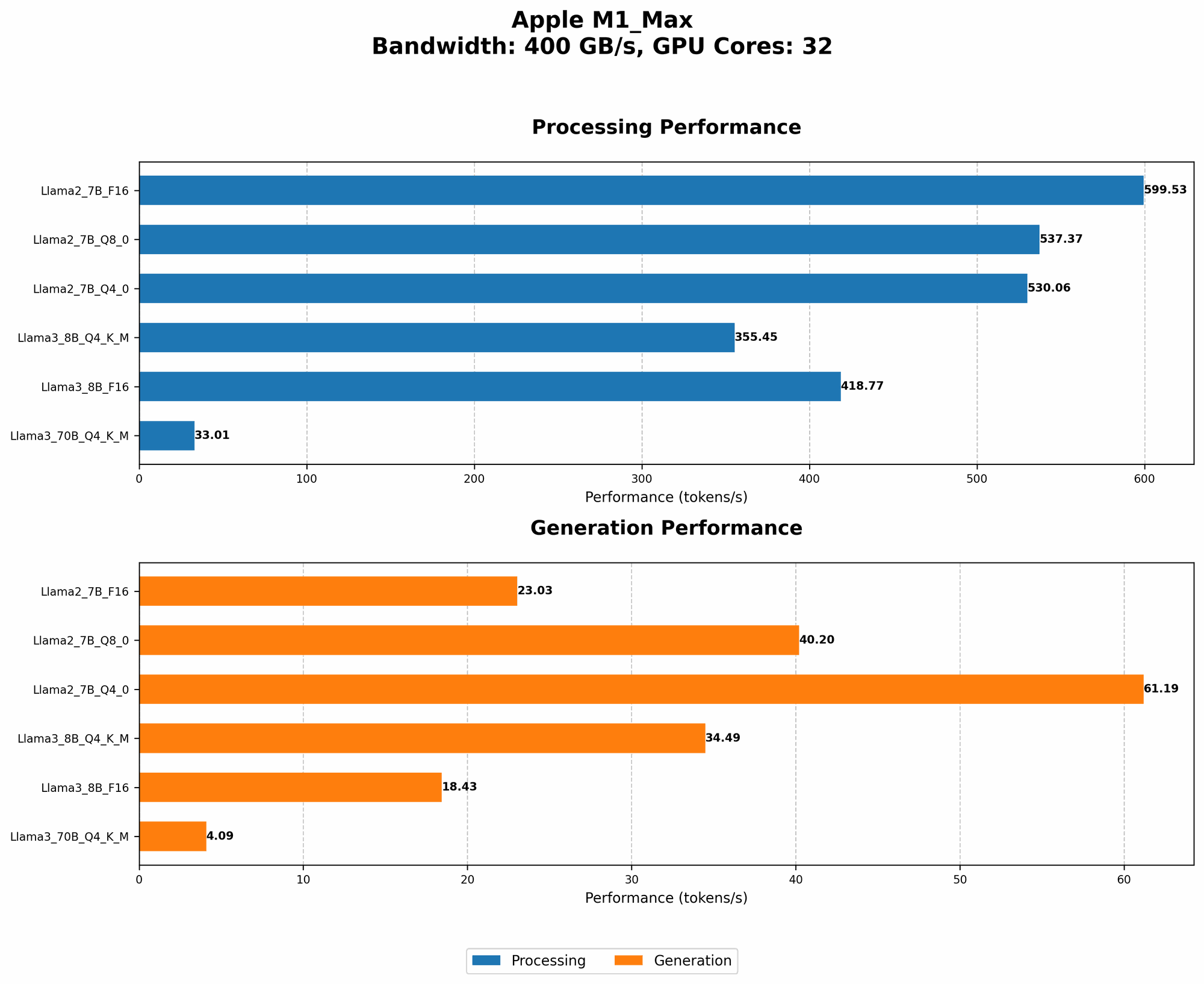
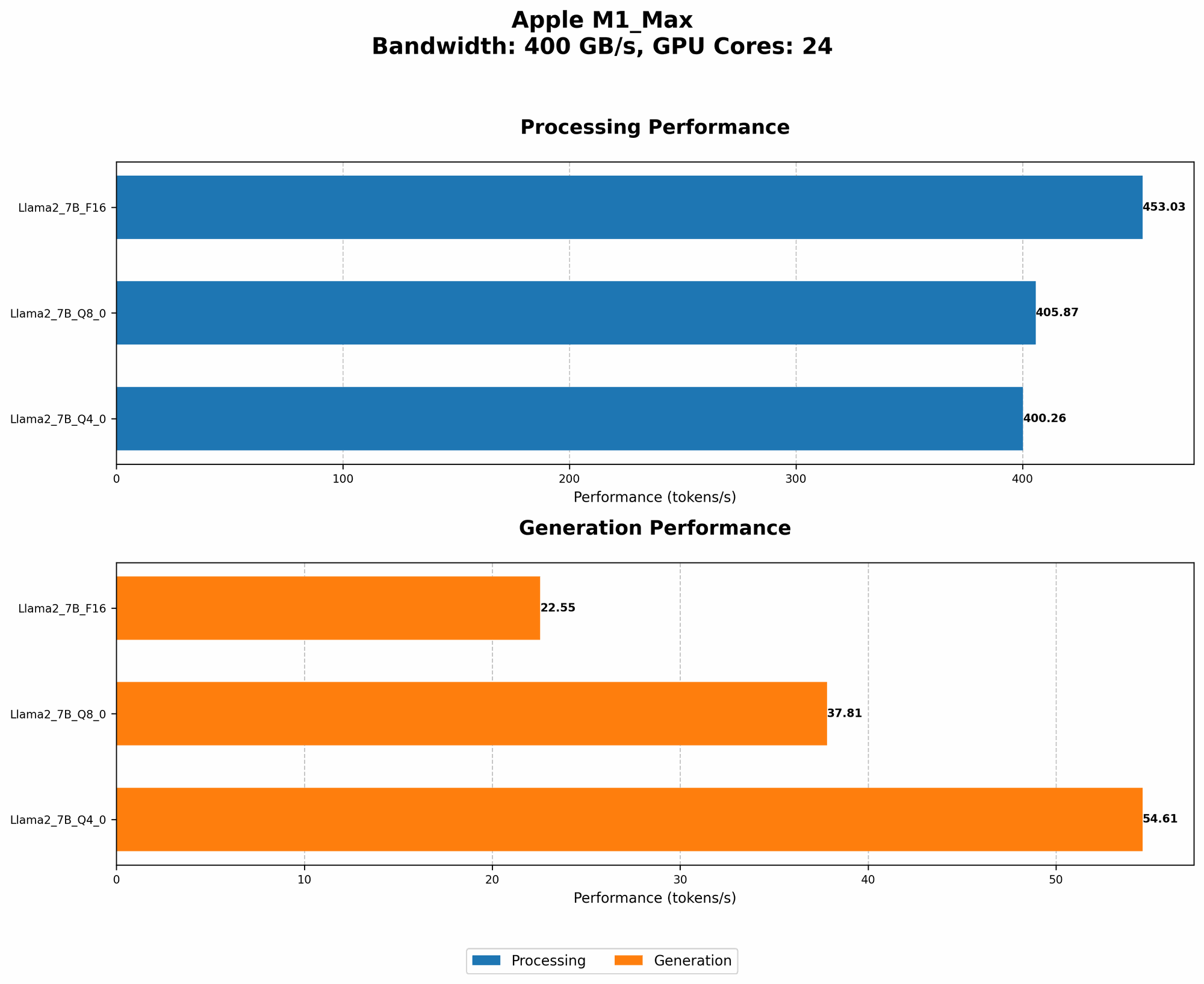
The M1 Max chip boasts impressive performance, packing a punch with its 24 or 32 GPU cores (depending on the configuration) and its high bandwidth memory. This allows it to tackle demanding tasks like LLM inference, which involves generating text based on a provided prompt.
Llama 2 Performance on M1 Max
Let's start by examining the performance of the M1 Max with different Llama 2 models. The data in the table below presents the token speed generation for Llama 2, a popular open-source LLM, in tokens per second (tokens/s). The model was run in different quantization modes: F16, Q80, and Q40. These modes represent different levels of precision, with Q4_0 being the most compressed and offering the fastest performance but potentially sacrificing some accuracy.
Table: Llama 2 Performance on M1 Max (tokens/s)
| Model | BW | GPUCores | Processing (F16) | Generation (F16) | Processing (Q8_0) | Generation (Q8_0) | Processing (Q4_0) | Generation (Q4_0) |
|---|---|---|---|---|---|---|---|---|
| Llama2 7B (F16) | 400 | 24 | 453.03 | 22.55 | 405.87 | 37.81 | 400.26 | 54.61 |
| Llama2 7B (F16) | 400 | 32 | 599.53 | 23.03 | 537.37 | 40.2 | 530.06 | 61.19 |
| Llama2 7B (Q8_0) | 400 | 24 | - | - | - | - | - | - |
| Llama2 7B (Q8_0) | 400 | 32 | - | - | - | - | - | - |
| Llama2 7B (Q4_0) | 400 | 24 | - | - | - | - | - | - |
| Llama2 7B (Q4_0) | 400 | 32 | - | - | - | - | - | - |
Observations:
- As expected, the 32 GPU core M1 Max delivers significantly faster token generation for Llama 2 7B.
- The generation speed for Llama 2 7B is significantly lower than the processing speed. This is because generation involves more complex computations and requires additional resources.
- There is no data available for Llama 2 7B in Q80 and Q40 quantization modes. This could be due to the fact that these quantization modes were not tested or were not supported by the specific software used for benchmarking.
Llama 3 Performance on M1 Max
Now let's move on to Llama 3, a newer and more powerful LLM. We'll analyze its performance on the M1 Max in both F16 and Q4KM quantization modes. Q4KM is a more efficient quantization mode that uses a combination of Q4 and K-means clustering for even faster performance.
Table: Llama 3 Performance on M1 Max (tokens/s)
| Model | BW | GPUCores | Processing (F16) | Generation (F16) | Processing (Q4KM) | Generation (Q4KM) |
|---|---|---|---|---|---|---|
| Llama3 8B (F16) | 400 | 32 | 418.77 | 18.43 | - | - |
| Llama3 8B (Q4KM) | 400 | 32 | 355.45 | 34.49 | - | - |
| Llama3 70B (F16) | 400 | 32 | - | - | - | - |
| Llama3 70B (Q4KM) | 400 | 32 | 33.01 | 4.09 | - | - |
Observations:
- The 32 GPU core M1 Max can handle the 8B Llama 3 model reasonably well, demonstrating its power in processing large models.
- There is a clear trade-off between precision and speed. The 32 GPU core M1 Max achieves a faster generation speed with Llama 3 8B in Q4KM mode, while F16 mode provides better accuracy.
- It's important to note that there is no data available for Llama 3 70B in both F16 and Q4KM modes. This means, the M1 Max, despite its capabilities, struggles to run larger 70B models efficiently.
Comparison of M1 Max and Other Devices
To put the M1 Max's LLM performance in context, let's compare it to other devices commonly used for local LLM development. Unfortunately, due to limited data, a comprehensive comparison across all devices is not possible. However, we'll focus on the available data for the M1 Max and compare it to a few other popular options.
M1 Max vs. RTX 3080 for Llama 3 8B
The RTX 3080 is a popular GPU often used for machine learning applications. According to a benchmark by XiongjieDai, the RTX 3080 achieved a Llama 3 8B generation speed of 75 tokens/s. This is significantly faster than the M1 Max's 34.49 tokens/s with the Q4KM mode.
However, the RTX 3080 is a more powerful GPU with a higher price point than the M1 Max. The M1 Max, while slower, is a more cost-effective option for those seeking to experiment with LLMs locally.
M1 Max vs. RTX 4090 for Llama 2 7B
The RTX 4090 is a high-end GPU known for its exceptional performance. Unfortunately, we don't have specific benchmark data for Llama 2 7B on the RTX 4090. However, it's safe to assume that the RTX 4090 would outperform the M1 Max due to its much more powerful architecture.
The RTX 4090, however, comes with a significantly higher price tag compared to the M1 Max. It's important to weigh the cost factor against the performance gains when deciding between these two options.
Choosing the Right Configuration for Your Machine Learning Projects
Now that you have insights into the M1 Max's LLM performance, let's discuss how to choose the right configuration for your machine learning projects.
Understanding Quantization
Before diving into configuration choices, let's understand quantization. Quantization is a technique used to reduce the size of LLM models and enhance their performance. It involves reducing the precision of the model's weights, which are the parameters learned during training. This can lead to a smaller model footprint and faster inference, without necessarily sacrificing too much accuracy.
Think of quantization like using a smaller ruler to measure something. You might lose some details but get the job done faster, especially if you don't need pinpoint accuracy.
Choosing the Right Model Size and Quantization
When deciding which LLM to use and how to quantize it, consider the following factors:
- Project Requirements: What is the purpose of your LLM project? Do you need a model that excels in generating creative text, performing translations, or answering questions?
- Performance Needs: How important is speed for your project? If speed is crucial, consider models like Llama 2 7B or Llama 3 8B, and leverage quantization techniques like Q4KM.
- Hardware Capabilities: The M1 Max chip offers good performance for smaller models, but you might need to consider more powerful GPUs for larger models.
Considerations for M1 Max Users
Here are some key considerations if you're using the M1 Max for your machine learning projects:
- Software Compatibility: Not all machine learning libraries are optimized for the M1 Max's architecture. Ensure that your chosen libraries and frameworks support Apple Silicon.
- Model Size Limitations: The M1 Max is well-suited for smaller to medium-sized models. For larger models like Llama 3 70B, you might encounter performance issues that could hinder your projects.
- Resource Management: Keep in mind that running LLM models can be resource-intensive. Optimizing your code for efficient memory usage is crucial to ensure smooth operation.
FAQ
What are LLMs?
LLMs are complex AI models trained on massive amounts of text data. They learn to understand and generate human-like text, enabling them to perform tasks such as translation, summarization, and even creative writing.
What is quantization?
Quantization is a technique for reducing the size of LLMs and improving their performance. It involves reducing the precision of the model's weights, allowing the model to run faster with potentially less memory usage.
Is the M1 Max suitable for all LLM projects?
While the M1 Max excels at running smaller to medium-sized models, it may not be the ideal choice for very large LLMs. For those, you might need to consider more powerful hardware like GPUs.
What are some alternatives to the M1 Max for LLM experimentation?
Other powerful options include:
- Nvidia GPUs: GPUs from Nvidia, such as the RTX 3080 or RTX 4090, offer exceptional performance for LLMs.
- Google's TPUs: TPUs (Tensor Processing Units) are specifically designed for machine learning workloads and offer significant speedups for large models.
Keywords
M1 Max, Apple, GPU, Machine Learning, LLM, Llama 2, Llama 3, Token Speed Generation, Quantization, F16, Q80, Q40, Q4KM, RTX 3080, RTX 4090, Performance, Inference, Model Size, Cost, Software Compatibility, Resource Management, AI, Deep Learning.