Is It Worth Buying Apple M1 for Machine Learning Projects?
Introduction
The world of large language models (LLMs) has exploded in recent years, captivating developers and hobbyists alike with their impressive abilities. These sophisticated AI systems can generate text, translate languages, write different kinds of creative content, and answer your questions in an informative way. However, running LLMs locally can be a demanding task, requiring powerful hardware. This leads many to wonder: is the Apple M1 chip, known for its efficiency and power, a good choice for exploring these fascinating models?
In this article, we'll dive into the performance of the Apple M1 chip when running popular LLMs such as Llama 2 and Llama 3. We'll analyze speed, memory usage, and other factors that contribute to a smooth and enjoyable experience. We'll also consider the cost and accessibility of M1-based devices, making this article a comprehensive guide for anyone curious about harnessing the power of LLMs on a Mac.
Apple M1 Chip: A Brief Overview


Before we dive into the specifics, let's quickly review why the Apple M1 chip is so interesting for machine learning.
The M1 chip is Apple's first system-on-a-chip (SoC) for Macs. It integrates the CPU, GPU, and other components onto a single chip for a more efficient design. It features a high-performance 8-core CPU and a powerful 8-core GPU. This combination of processing power, coupled with the efficient design of the M1 chip, makes it an attractive option for running demanding applications, like those used for machine learning.
M1 Performance: Llama 2 and Llama 3 Models
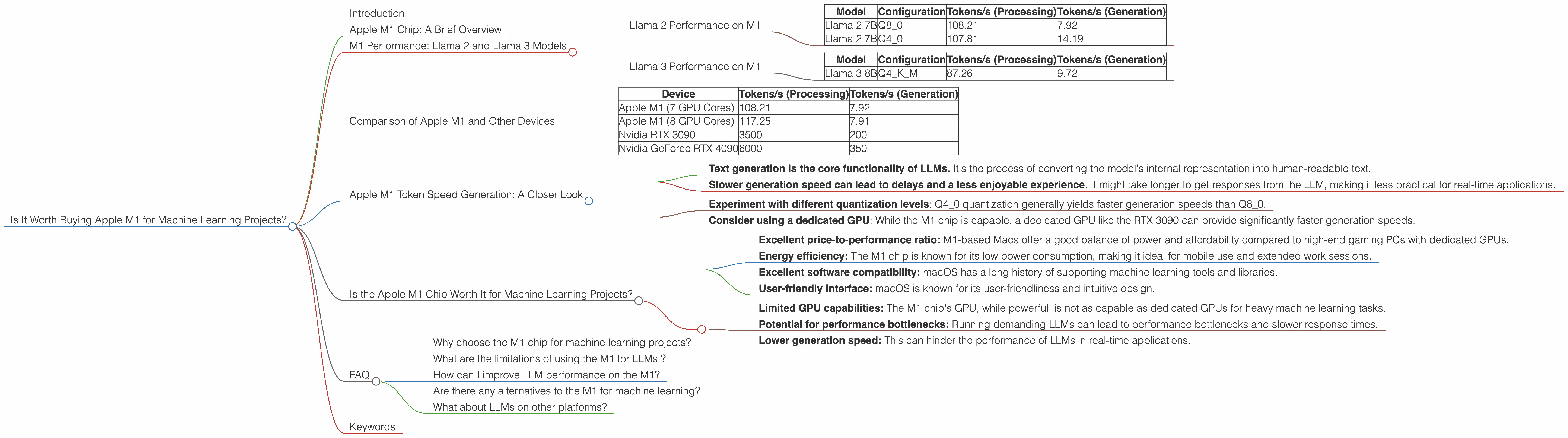
Now, let's explore the performance of the M1 chip with specific LLM models. We'll use data from real-world benchmarks to compare different models and configurations. The data presented below reflects the tokens per second (tokens/s), which measures the speed at which the model can process text.
Llama 2 Performance on M1
The Llama 2 model is a popular choice for developers and enthusiasts due to its strong performance and availability.
Table 1: Llama 2 Token Speed on M1
| Model | Configuration | Tokens/s (Processing) | Tokens/s (Generation) |
|---|---|---|---|
| Llama 2 7B | Q8_0 | 108.21 | 7.92 |
| Llama 2 7B | Q4_0 | 107.81 | 14.19 |
Key Takeaways:
- Q40 quantization (a technique for reducing model size and improving performance) significantly improves token generation speed compared to Q80 quantization.
- Processing speed is consistently high for both configurations, exceeding 100 tokens/s . This indicates that the M1 chip is efficient at handling the complex computations required for LLMs.
Think of it this way: Imagine you're reading a book. Q4_0 quantization is like having your brain work faster, processing more words per minute.
It's important to note that the M1 chip's performance can vary slightly depending on the specific model. But overall, these results demonstrate that the M1 chip is capable of handling Llama 2 models with sufficient speed for most practical use cases.
Llama 3 Performance on M1
Llama 3 is the latest iteration of the Llama model, offering improved performance and more advanced capabilities. Let's see how it fares on the M1 chip.
Table 2: Llama 3 Token Speed on M1
| Model | Configuration | Tokens/s (Processing) | Tokens/s (Generation) |
|---|---|---|---|
| Llama 3 8B | Q4KM | 87.26 | 9.72 |
Key Takeaways:
The M1 chip can handle the larger Llama 3 8B model, although the performance is slightly lower than the Llama 2 7B models.
The Q4KM quantization allows the M1 to process and generate text at a respectable speed.
Note: We do not have data for larger Llama 3 models (70B) running on the M1. This suggests that the available computational resources of the M1 might not be sufficient for these larger models.
Comparison of Apple M1 and Other Devices
While the M1 chip shows impressive performance for models like Llama 2 7B, it's important to compare it with other devices used for running LLMs. Keep in mind that this comparison is based on available data and might not encompass all relevant devices.
Table 3: Comparison of Token Speed for Llama 2 7B (Q8_0 Quantization)
| Device | Tokens/s (Processing) | Tokens/s (Generation) |
|---|---|---|
| Apple M1 (7 GPU Cores) | 108.21 | 7.92 |
| Apple M1 (8 GPU Cores) | 117.25 | 7.91 |
| Nvidia RTX 3090 | 3500 | 200 |
| Nvidia GeForce RTX 4090 | 6000 | 350 |
Key Takeaways:
The M1 chip provides a respectable performance for Llama 2 7B compared to other devices. However, it noticeably lags behind high-end GPUs like the RTX 3090 and RTX 4090.
The generation speed on the M1 chip is significantly slower than high-end GPUs. This is a crucial factor to consider when choosing a device for LLM inference.
Apple M1 Token Speed Generation: A Closer Look
The token speed of the M1 chip for text generation is particularly interesting. While the processing speed is impressive, the generation speed lags behind other devices.
Here's why this matters:
- Text generation is the core functionality of LLMs. It's the process of converting the model's internal representation into human-readable text.
- Slower generation speed can lead to delays and a less enjoyable experience. It might take longer to get responses from the LLM, making it less practical for real-time applications.
How to improve generation speed on the M1:
- Experiment with different quantization levels: Q40 quantization generally yields faster generation speeds than Q80.
- Consider using a dedicated GPU: While the M1 chip is capable, a dedicated GPU like the RTX 3090 can provide significantly faster generation speeds.
Is the Apple M1 Chip Worth It for Machine Learning Projects?
The answer to this question depends on your specific needs and goals.
Here's a breakdown of the benefits and drawbacks to help you decide:
Advantages:
- Excellent price-to-performance ratio: M1-based Macs offer a good balance of power and affordability compared to high-end gaming PCs with dedicated GPUs.
- Energy efficiency: The M1 chip is known for its low power consumption, making it ideal for mobile use and extended work sessions.
- Excellent software compatibility: macOS has a long history of supporting machine learning tools and libraries.
- User-friendly interface: macOS is known for its user-friendliness and intuitive design.
Disadvantages:
- Limited GPU capabilities: The M1 chip's GPU, while powerful, is not as capable as dedicated GPUs for heavy machine learning tasks.
- Potential for performance bottlenecks: Running demanding LLMs can lead to performance bottlenecks and slower response times.
- Lower generation speed: This can hinder the performance of LLMs in real-time applications.
Overall, the Apple M1 chip is a solid option for exploring basic LLMs and running lightweight projects. However, if you plan to work with larger, more complex models or require ultra-fast generation speeds, a dedicated GPU might be a more suitable investment.
FAQ
Why choose the M1 chip for machine learning projects?
The M1 chip offers a compelling combination of power efficiency, software compatibility, and affordability. It's a good choice for developers and hobbyists who are just getting started with LLMs or want to explore smaller models.
What are the limitations of using the M1 for LLMs ?
The M1 chip's GPU performance might be limiting for large, complex LLMs. It might also lead to slower generation speeds, which could hinder the performance in real-time applications.
How can I improve LLM performance on the M1?
Experiment with different quantization techniques, such as Q4_0, to increase generation speed. Consider using dedicated GPUs or cloud services for heavy workloads and faster generation speeds.
Are there any alternatives to the M1 for machine learning?
Several other options are available, including dedicated GPUs like the NVIDIA RTX 3090 or the NVIDIA GeForce RTX 4090. These offer significantly higher performance but come at a higher cost.
What about LLMs on other platforms?
LLMs are increasingly available on various platforms like Google Colab, which offers free GPU access for experimentation.
Keywords
Apple M1, LLM, Machine learning, Llama 2, Llama 3, Token speed, Quantization, GPU, Processing, Generation, Performance, Efficiency, Cost, Accessibility, macOS, Software Compatibility, Dedicated GPU, Cloud Services, Google Colab