Is Apple M2 Ultra Powerful Enough for Llama2 7B?

Introduction
The world of large language models (LLMs) is exploding, offering unprecedented capabilities for natural language processing. Running these models locally, however, poses a challenge, requiring powerful hardware to handle the demanding computations. In this deep dive, we'll explore the performance of the Apple M2 Ultra chip, a powerful processor designed for demanding tasks like machine learning, when running the popular Llama2 7B model. But can the M2 Ultra truly handle the heavy lifting of running Llama2 locally?
Think of LLMs as incredibly smart language assistants, capable of generating human-like text, translating languages, and answering questions with impressive accuracy. While cloud-based LLMs are readily available, running them locally on your own device offers advantages like faster response times, increased privacy, and offline access – but only if your hardware is up to the task!
Let's delve into the technical details and find out if the Apple M2 Ultra is a match for Llama2 7B, uncovering the secrets behind their performance.
Performance Analysis: Token Generation Speed Benchmarks
The key to understanding how well the Apple M2 Ultra performs with Llama2 7B lies in analyzing its token generation speed. This metric measures how many tokens (individual units of text) the model can process per second. Higher token generation speeds indicate faster response times and better overall performance.
Token Generation Speed Benchmarks: Apple M1 and Llama2 7B
We'll be looking at the token generation speed of Llama2 7B running on the M2 Ultra, with different quantization methods:
- F16 (Half Precision): Uses 16 bits to represent each number, sacrificing some accuracy for faster processing. Think of it like the "medium" setting on a graphics card, good for overall performance.
- Q8_0 (8-bit Quantization): Reduces each number down to 8 bits, offering a significant reduction in memory footprint and increased speed. This is like using a "low" setting, prioritising speed over visual detail.
- Q4_0 (4-bit Quantization): Taking it down even further, this method uses just 4 bits per number, achieving remarkable speed but sacrificing some accuracy. This is the "low" setting, prioritizing the fastest possible frame rate for gaming, even at the cost of visual quality.
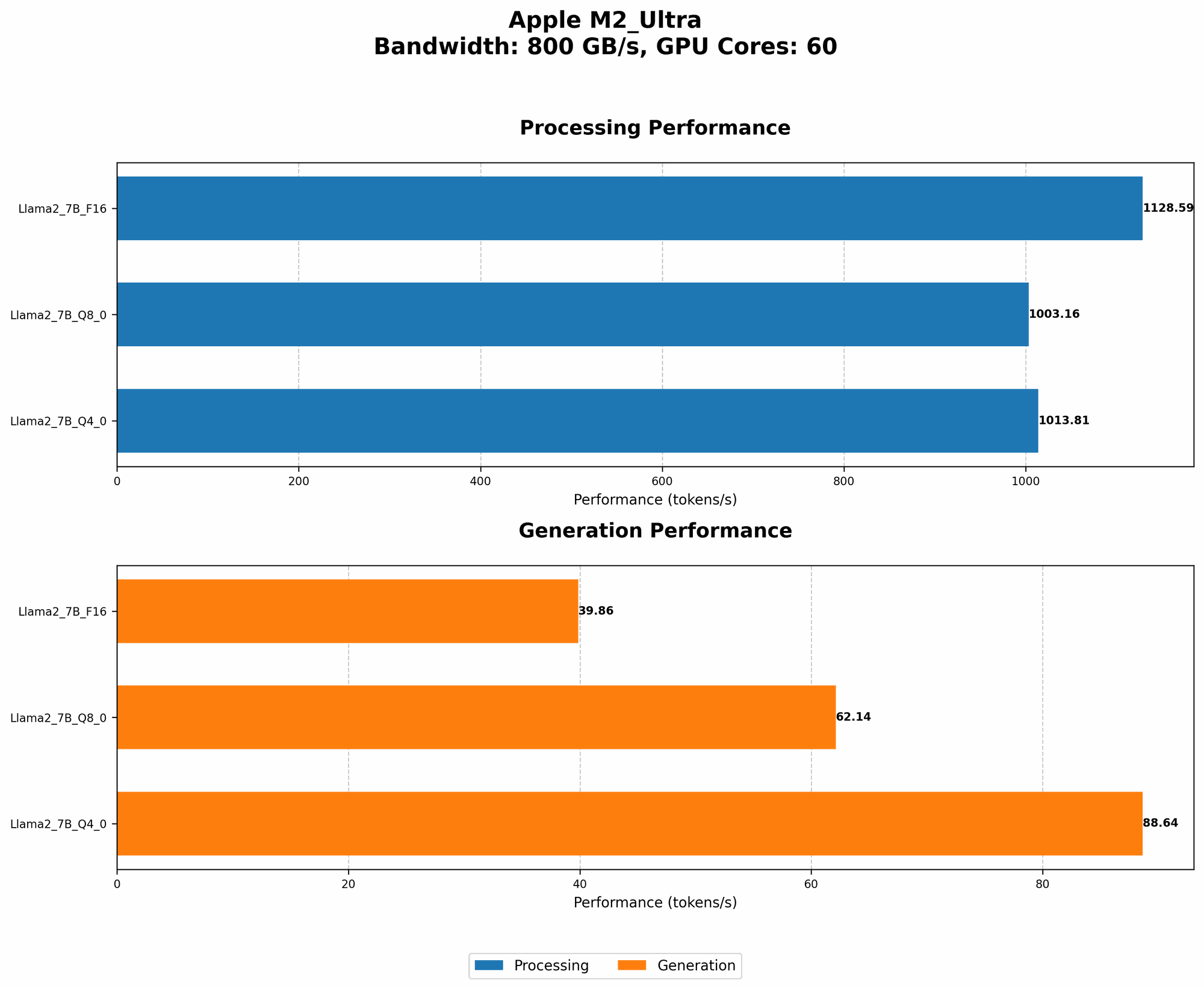
Table 1: Token Generation Speed of Llama2 7B on Apple M2 Ultra
| Quantization | Processing (tokens/s) | Generation (tokens/s) | |
|---|---|---|---|
| F16 | 1128.59 | 39.86 | |
| Q8_0 | 1003.16 | 62.14 | |
| Q4_0 | 1013.81 | 88.64 |
(Source: https://github.com/ggerganov/llama.cpp/discussions/4167)
Observations:
- Processing: the M2 Ultra delivers impressive processing speeds, exceeding 1000 tokens/s across all quantization levels. This means it can handle the computational demands of Llama2 7B effectively.
- Generation: Notably, the generation speed (the rate at which the model actually produces text output) is significantly lower than the processing speed. This is crucial for the user experience.
- Quantization: The use of Q80 and Q40 improves generation speeds compared to F16, showcasing the benefits of quantization in optimizing performance.
Performance Analysis: Model and Device Comparison
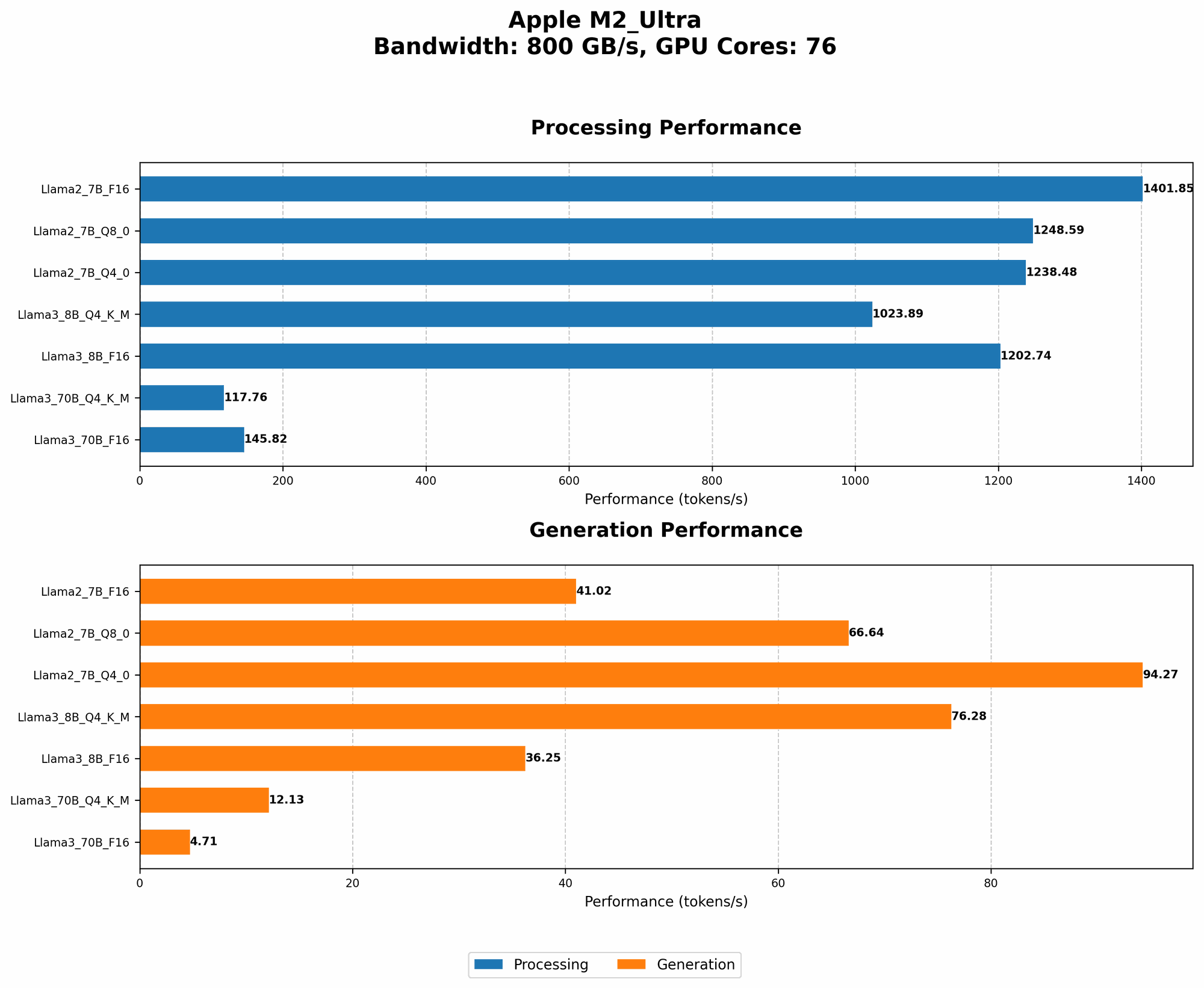
Now, let's compare the M2 Ultra's performance with other devices and model sizes:
Table 2: Model and Device Comparison (Token Generation Speeds)
| Device | GPU Cores | BW | Model | Quantization | Processing (tokens/s) | Generation (tokens/s) |
|---|---|---|---|---|---|---|
| M2 Ultra | 60 | 800 | Llama2 7B | F16 | 1128.59 | 39.86 |
| M2 Ultra | 60 | 800 | Llama2 7B | Q8_0 | 1003.16 | 62.14 |
| M2 Ultra | 60 | 800 | Llama2 7B | Q4_0 | 1013.81 | 88.64 |
| M2 Ultra | 76 | 800 | Llama2 7B | F16 | 1401.85 | 41.02 |
| M2 Ultra | 76 | 800 | Llama2 7B | Q8_0 | 1248.59 | 66.64 |
| M2 Ultra | 76 | 800 | Llama2 7B | Q4_0 | 1238.48 | 94.27 |
| M2 Ultra | 76 | 800 | Llama3 8B | F16 | 1202.74 | 36.25 |
| M2 Ultra | 76 | 800 | Llama3 8B | Q4KM | 1023.89 | 76.28 |
| M2 Ultra | 76 | 800 | Llama3 70B | F16 | 145.82 | 4.71 |
| M2 Ultra | 76 | 800 | Llama3 70B | Q4KM | 117.76 | 12.13 |
(Source: https://github.com/ggerganov/llama.cpp/discussions/4167 & https://github.com/XiongjieDai/GPU-Benchmarks-on-LLM-Inference)
Observations:
- Larger Model Performance: When running the larger Llama3 70B model, the M2 Ultra's performance significantly drops, indicating a resource bottleneck. The performance of the Llama3 8B model, however, is still commendable, showing that the M2 Ultra can handle larger models, but with diminishing returns compared to the Llama2 7B.
- GPU Core Impact: Increasing the GPU cores from 60 to 76 on M2 Ultra leads to a significant boost in processing speed, especially when running smaller models like Llama2 7B. This highlights the importance of GPU cores for performance.
- Quantization for Speed: The use of Q80 and Q40 quantization significantly enhances the generation speed of the Llama2 7B model, making it much more usable for real-time applications.
Practical Recommendations: Use Cases and Workarounds
The M2 Ultra emerges as a capable machine for running the Llama2 7B model locally, but how do these benchmarks translate to practical use cases?
Llama2 7B on Apple M2 Ultra: Use Cases
- Interactive Chatbots: The M2 Ultra's performance with Llama2 7B makes it suitable for building interactive chatbots that can respond quickly and deliver engaging conversations. Think of a personalized assistant or a customer service bot that can provide real-time support.
- Personalized Writing Tools: Writers and creatives can leverage the M2 Ultra's ability to generate text to assist them with brainstorming, drafting content, and polishing their work.
- Local Language Translation: The Llama2 7B model's language capabilities are a game-changer for real-time translation, making it a powerful tool for communication and bridging language barriers.
M2 Ultra and Llama2 7B: Best Practices
- Quantization is Key: Emphasizing quantization (Q80 or Q40) is crucial for maximizing the M2 Ultra's performance with Llama2 7B. This optimization technique allows you to get the most out of the hardware, improving both speed and efficiency.
- Model Selection: For practical purposes, consider the size of the model you intend to run. While the M2 Ultra can handle Llama2 7B very well, larger models like Llama3 70B might require more powerful hardware or cloud-based solutions.
- Fine-Tuning: If you need to adapt the Llama2 7B model to specific tasks, consider "fine-tuning" it on your own dataset. Though fine-tuning can be computationally demanding, it allows the model to learn new patterns and deliver even better performance on your desired domain.
FAQ
Q: What exactly is a large language model (LLM)?
A: An LLM is a type of artificial intelligence (AI) system trained on massive amounts of text data. This training enables them to understand and generate human-like text, performing tasks like translation, summarization, and question answering.
Q: Why is quantization important for LLMs?
A: Quantization involves reducing the precision of numbers used in the LLM, resulting in smaller model files and faster processing times. This is like compressing a video for faster streaming, sacrificing some visual quality for speed.
Q: Can I run Llama2 7B on my laptop with an M1 chip?
A: While the M1 chip is capable of running smaller LLMs, running Llama2 7B might push its limits. You'll likely experience slower response times and potential resource limitations.
Q: What are the advantages of running an LLM locally?
A: Local LLMs offer fast response times, improved privacy (as data is processed locally), and offline access, making them suitable for certain applications.
Q: What are the future trends in local LLM processing?
A: Expect advancements in hardware and software, allowing for even more powerful and efficient local LLM deployment. This includes optimized chip designs, faster memory access, and new software frameworks specifically tailored for LLMs.
Keywords
LLM, large language model, Llama2, Llama2 7B, Apple M2 Ultra, token generation speed, quantization, F16, Q80, Q40, performance, benchmarks, GPU, GPU Cores, processing speed, generation speed, use cases, recommendations, practical applications, chatbots, writing tools, translation, fine-tuning, local processing, hardware, software, AI, artificial intelligence, natural language processing.