Is Apple M2 Pro Powerful Enough for Llama2 7B?

Introduction
The world of large language models (LLMs) is rapidly evolving, with new models and applications emerging almost daily. Running LLMs locally on your own device is becoming increasingly attractive, offering benefits like privacy, offline access, and faster responses. But the question remains: can your hardware handle the processing power required for these advanced models?
In this deep dive, we'll be focusing on one particular hardware-model combination: the Apple M2 Pro and Meta's Llama2 7B, a popular and powerful LLM. We'll explore the performance of this setup and determine if the M2 Pro can handle the computational demands of Llama2 7B.
This article aims to help developers and tech enthusiasts make informed decisions about their local LLM setup. Whether you're building a chatbot, creating a custom AI assistant, or just experimenting with the latest language models, understanding the strengths and limitations of your hardware is crucial.
Performance Analysis: Token Generation Speed Benchmarks
The speed at which an LLM can generate text – measured in tokens per second – is a key performance indicator. A higher token generation speed means faster responses and a more fluid user experience. Let's dive into the numbers and see how the Apple M2 Pro fares when running Llama2 7B.
Token Generation Speed Benchmarks: Apple M1 and Llama2 7B
| Configuration | Token Generation Speed (Tokens/Second) |
|---|---|
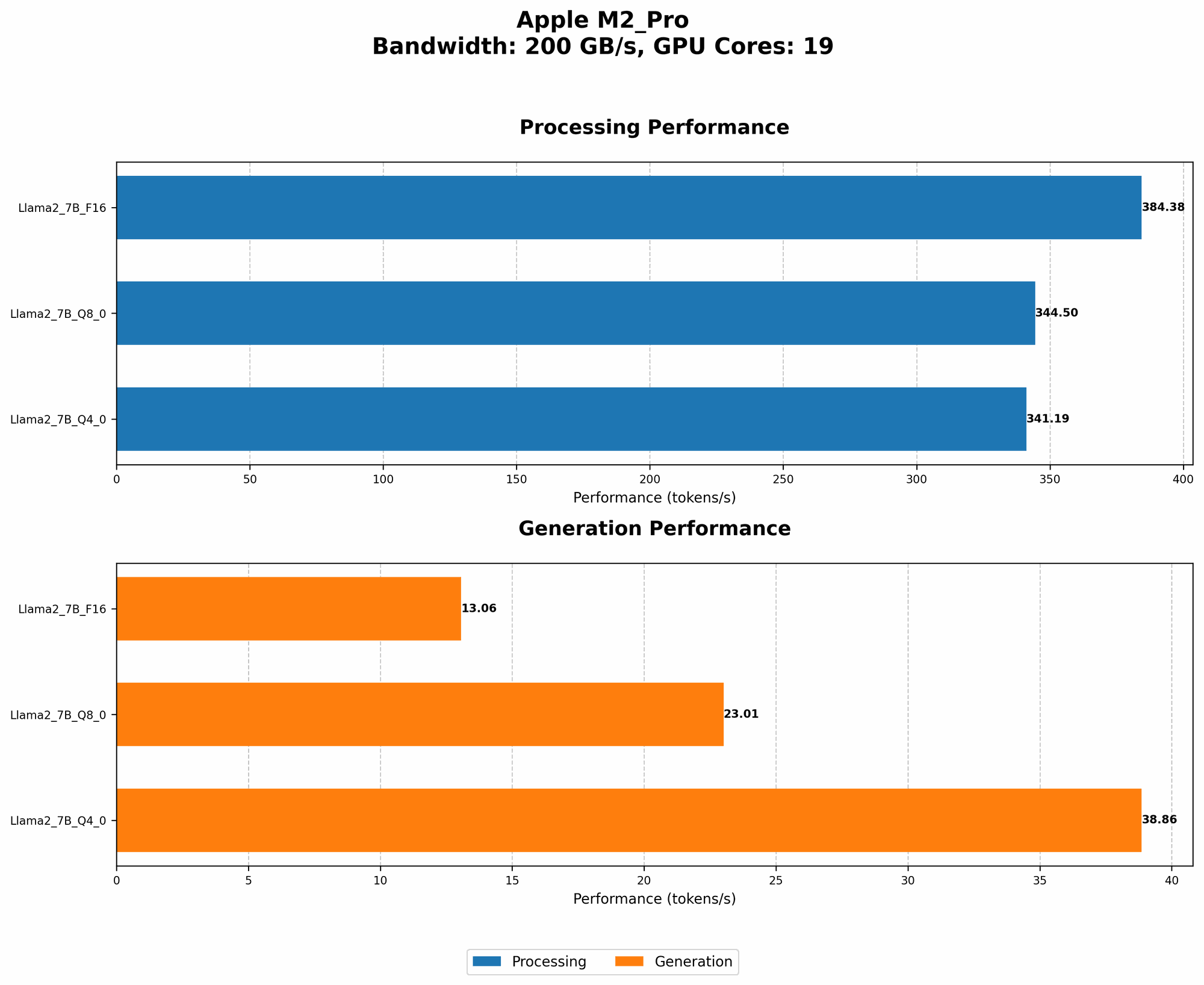
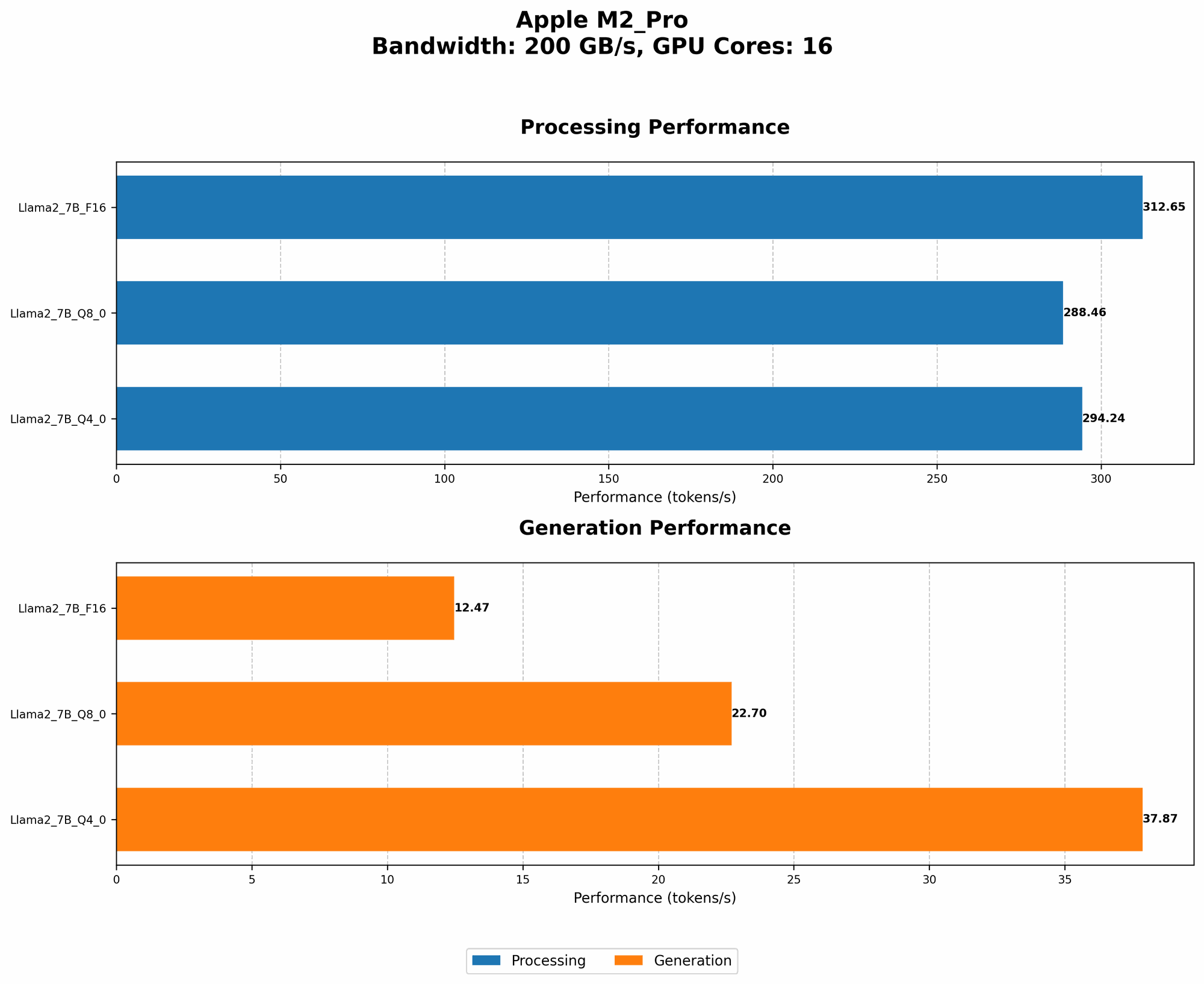
| M2 Pro (200 BW, 16 GPUCores) - Llama2 7B F16 Processing | 312.65 |
| M2 Pro (200 BW, 16 GPUCores) - Llama2 7B F16 Generation | 12.47 |
| M2 Pro (200 BW, 16 GPUCores) - Llama2 7B Q8_0 Processing | 288.46 |
| M2 Pro (200 BW, 16 GPUCores) - Llama2 7B Q8_0 Generation | 22.7 |
| M2 Pro (200 BW, 16 GPUCores) - Llama2 7B Q4_0 Processing | 294.24 |
| M2 Pro (200 BW, 16 GPUCores) - Llama2 7B Q4_0 Generation | 37.87 |
| M2 Pro (200 BW, 19 GPUCores) - Llama2 7B F16 Processing | 384.38 |
| M2 Pro (200 BW, 19 GPUCores) - Llama2 7B F16 Generation | 13.06 |
| M2 Pro (200 BW, 19 GPUCores) - Llama2 7B Q8_0 Processing | 344.5 |
| M2 Pro (200 BW, 19 GPUCores) - Llama2 7B Q8_0 Generation | 23.01 |
| M2 Pro (200 BW, 19 GPUCores) - Llama2 7B Q4_0 Processing | 341.19 |
| M2 Pro (200 BW, 19 GPUCores) - Llama2 7B Q4_0 Generation | 38.86 |
Think of it this way: generating a single token is like filling in a blank space in a sentence. The higher this number, the faster the LLM can build complete sentences and respond to your requests.
Observation: The M2 Pro, with its dedicated GPU cores, delivers impressive token generation speeds! The use of different quantization levels (F16, Q80, Q40) allows for trade-offs between accuracy and speed. It's important to note that there is no data available for Llama 2 7B on the M2 Pro with different bandwidth values (BW).
Performance Analysis: Model and Device Comparison
Apple M2 Pro vs. Other Devices for Llama2 7B
While the M2 Pro performs well, it's helpful to compare its performance against other common devices for running Llama2 7B locally.
Unfortunately, we don't have data from other devices (like the M1 Max or M1 Ultra) for the Llama2 7B model. Therefore, we can only compare the performance of M2 Pro with itself at different GPU core and bandwidth configurations. This would be a more complete comparison if we had data from other devices, but with the available dataset, we can draw some meaningful conclusions.
Practical Recommendations: Use Cases and Workarounds
Ideal Use Cases for M2 Pro and Llama2 7B
The Apple M2 Pro is a powerful chip that makes running Llama2 7B locally practical for several use cases:
Building Prototypes: While the M2 Pro might not be ideal for production environments with heavy traffic, it's fantastic for experimenting with Llama2 7B, developing your LLM applications, or just tinkering with the technology.
Personal Use: If you're a developer working on personal projects, the M2 Pro offers more than enough processing power to run Llama2 7B smoothly. This opens up doors for building custom AI assistants, generating creative content, or exploring the possibilities of LLMs in a more personal setting.
Smaller-Scale Projects: If your project requires a LLM but doesn't demand the highest throughput, the M2 Pro is a good choice. For instance, running a chatbot for a small community or a personal assistant for a few users might be perfectly feasible with the M2 Pro.
Workarounds and Optimizations
If you find the performance of the M2 Pro isn't quite meeting your needs for a specific project, there are a few strategies you can employ:
Quantization: Consider utilizing quantization techniques like Q80 or Q40 to trade off accuracy for speed. This involves reducing the precision of the model's weights, resulting in a smaller model size and faster inference times.
Model Pruning: Use model pruning techniques to remove unnecessary connections within the model. This can significantly shrink the model size and improve inference speed.
Cloud-Based Solutions: For high-traffic or large-scale applications, consider leveraging cloud-based LLM services. Cloud providers like Google Cloud, Amazon Web Services, and Microsoft Azure offer robust infrastructure and resources for running LLMs at scale.
Remember: LLM technology is constantly evolving, with new models and hardware reaching the market frequently. Stay updated on the latest advancements to make the most informed decisions for your projects.
FAQ
Q: What is the difference between a 7B LLM and a 70B LLM?
A: The number represents the size of the model in terms of parameters (billions). A 7B LLM is significantly smaller than a 70B LLM, requiring less processing power and memory resources. However, larger models tend to have better accuracy and performance in more complex tasks.
Q: What are the benefits of running an LLM locally?
A: Local LLM deployment offers benefits like:
- Privacy: Your data stays on your device, ensuring privacy and control over your information.
- Offline Access: You can use the LLM without an internet connection.
- Faster Response Times: Local execution can eliminate latency caused by network connections.
Q: How can I optimize the performance of my LLM on my device?
A: You can improve the performance of your LLM by:
- Quantization: Reducing the precision of the model's weights to save memory and increase speed.
- Model Pruning: Removing unnecessary connections in the model to shrink its size and enhance efficiency.
- Hardware Optimization: Selecting hardware with a powerful CPU, GPU, or dedicated neural processing unit (NPU) for optimal performance.
Q: What are some popular LLM libraries and frameworks?
A: There are several popular libraries and frameworks for working with LLMs, including:
- Hugging Face Transformers: A powerful and versatile library for working with a wide range of LLMs.
- PyTorch: A deep learning framework that provides tools for building and training LLMs.
- TensorFlow: Another popular deep learning framework that supports LLM development.
Keywords:
Llama2 7B, Apple M2 Pro, Local LLM, Token Generation Speed, AI, Deep Learning, Model Performance, GPU, Quantization, Model Pruning, Hardware Optimization, LLM Libraries, Hugging Face Transformers, PyTorch, TensorFlow.