Is Apple M2 Max Good Enough for AI Development?

Introduction
Are you ready to dive into the world of local Large Language Models (LLMs) and unlock their potential on your own machine? This article will explore the capabilities of the Apple M2 Max chip, specifically focusing on its performance for AI development, particularly with Llama 2 models.
Think of LLMs as the brains behind AI applications, capable of generating text, translating languages, and even writing code. However, running these models can be computationally demanding, requiring powerful hardware. This is where the Apple M2 Max, with its impressive processing power and dedicated GPU, comes into play - a contender in the race for local AI development.
Apple M2 Max: Spec Sheet vs. Real-World Performance
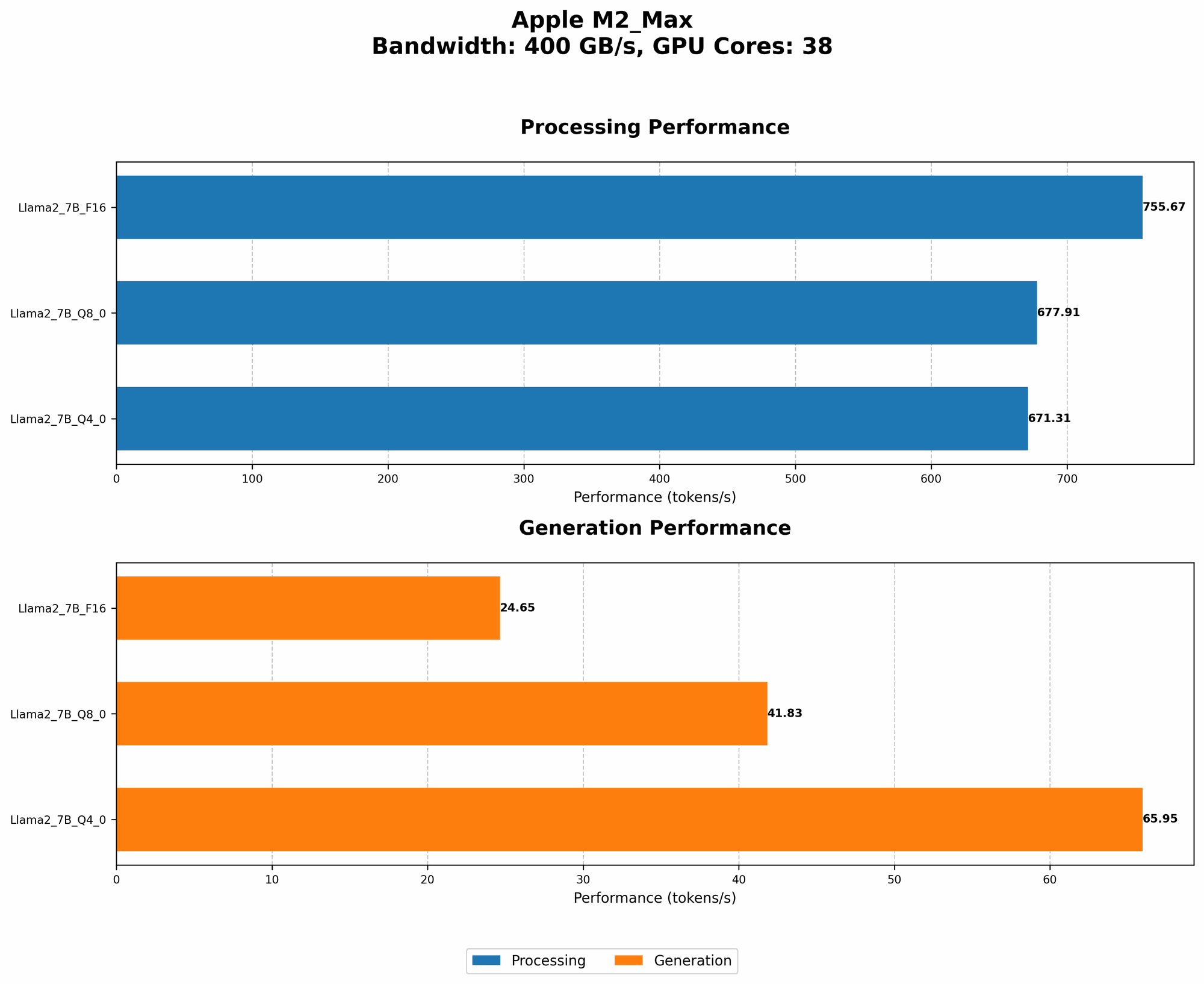
The Apple M2 Max boasts 38 GPU cores and a blazing-fast bandwidth of 400GB/s. While these specs are impressive, let's look at how they translate to real-world performance when running Llama 2 models.
Performance Breakdown: Llama 2 on M2 Max
This is where the real magic happens. Let's analyze the performance of Llama 2 models on the M2 Max, focusing on both processing and generation speed. The results are measured in tokens per second, which represent how many words or units of text the model can process or generate in a second.
Here's a table summarizing the performance for different Llama 2 model variants:
| Model Variant | Processing (tokens/second) | Generation (tokens/second) |
|---|---|---|
| Llama 2 7B (F16) | 755.67 | 24.65 |
| Llama 2 7B (Q8_0) | 677.91 | 41.83 |
| Llama 2 7B (Q4_0) | 671.31 | 65.95 |
What do these numbers tell us?
- F16: This is the standard, full-precision format, using 16 bits to represent each number. The M2 Max achieves a remarkable processing speed of 755.67 tokens per second. However, generation speed is relatively slower, at 24.65 tokens per second.
- Q80: Here we introduce quantization, a technique that allows us to compress the model's size and reduce its memory footprint. Q80 uses 8 bits per number, sacrificing a bit of accuracy but significantly improving performance. Processing speed drops slightly to 677.91 tokens per second, but generation speed jumps to 41.83 tokens per second.
- Q40: Going even further, Q40 uses only 4 bits per number, leading to a further decrease in accuracy but a noticeable increase in speed. We see processing speed at 671.31 tokens per second, and generation speed climbs to 65.95 tokens per second.
What does this mean in plain English?
Imagine each token is a word. With the F16 format, the M2 Max can process 755.67 words a second, but it can only generate 24.65 words a second. Quantization helps speed up generation, enabling the M2 Max to generate 41.83 words per second with Q80 and 65.95 words per second with Q40.
This is significant because it means that, while processing speed is excellent in F16 precision, the M2 Max's ability to generate text is significantly hampered by its relatively slow speed in this format. Quantization allows the M2 Max to bridge this gap, achieving a more balanced and potentially faster experience for AI development.
Apple M2 Max vs. Other Devices: A Quick Look
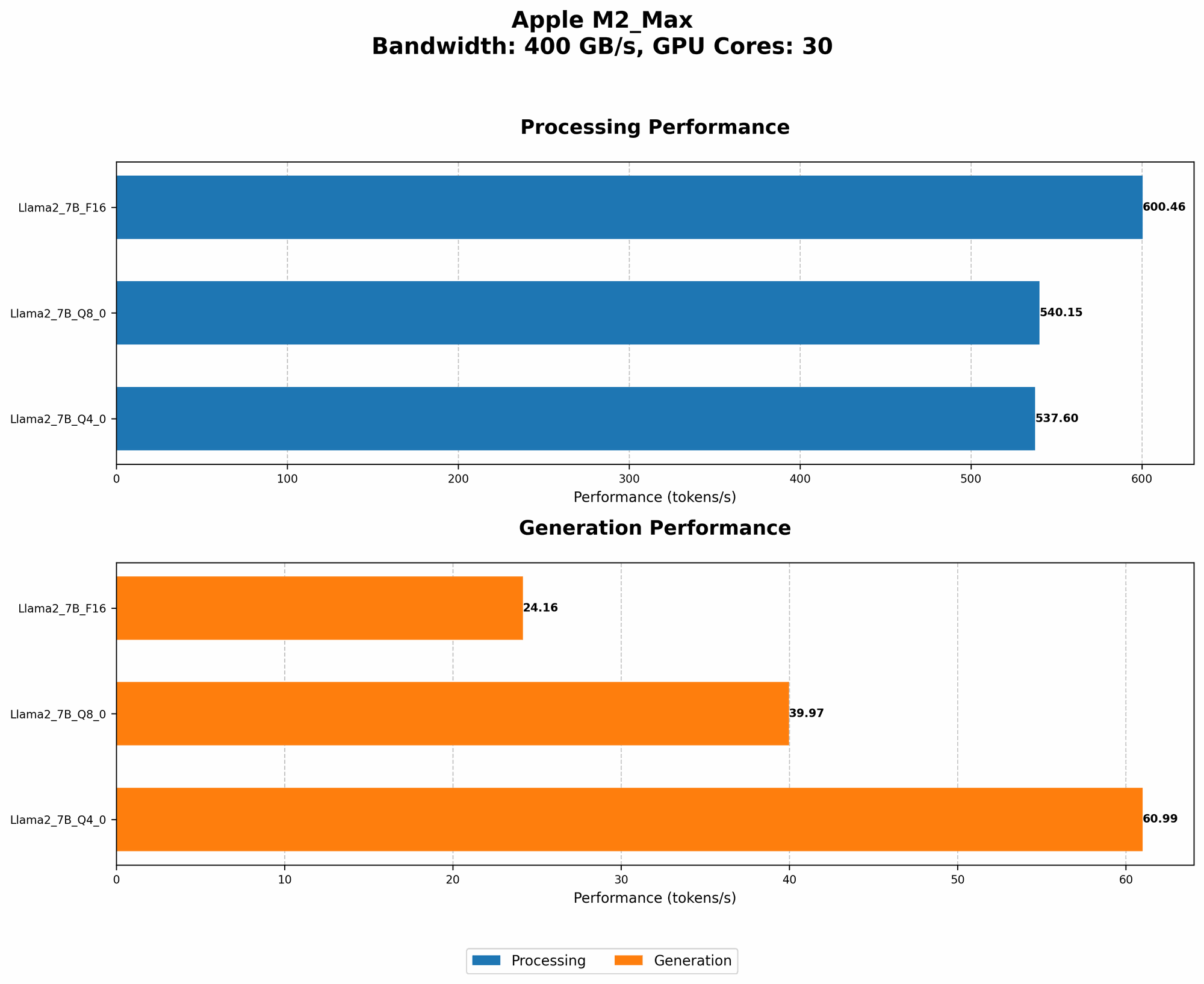
While we are focusing on the Apple M2 Max, there are other devices worthy of mention in the local AI development arena. However, due to the scope of this article, we will only highlight a few key differences, and we will avoid going into detailed performance comparisons.
- NVIDIA GPUs: These giants in the GPU market are a strong competitor, boasting a diverse range of GPUs designed for AI applications. Depending on the chosen GPU, NVIDIA typically offers higher processing and generation speeds for LLMs. But the tradeoff is often cost, with high-end NVIDIA GPUs being significantly pricier than the Apple M2 Max.
- Google's TPU: While not specifically focusing on consumer devices, Google's Tensor Processing Unit (TPU) is optimized for large-scale machine learning and AI applications. TPUs excel in handling massive datasets and can achieve impressive speed gains, especially for training LLMs.
The Future of LLMs and Local Development
The world of LLMs is evolving rapidly, with new models and optimizations emerging regularly. The Apple M2 Max, with its powerful hardware, has the potential to be a strong contender in this landscape, allowing developers to experiment with LLMs locally.
However, there are several challenges to overcome:
- Resource Requirements: Running LLMs locally consumes considerable memory and computational power, which can strain even powerful devices like the M2 Max.
- Model Complexity: As LLMs become more sophisticated, the resources required to run them grow exponentially. This demands increasingly powerful hardware or efficient optimizations to ensure smooth performance.
- Model Optimization: Ongoing research focuses on optimizing LLM performance for specific hardware and applications. This includes techniques like quantization and model compression to reduce memory usage and improve speed.
FAQ: Answering Common Questions
Q: What are the best LLM models for local development on the M2 Max?
A: Llama 2 models, particularly those quantized to Q80 or Q40, perform well on the M2 Max. Remember that performance can vary based on the model size and the specific task you have in mind.
Q: Can the M2 Max run other LLMs besides Llama 2?
A: While Llama 2 is highlighted in this article, the M2 Max can potentially run other LLMs like GPT-3 and Stable Diffusion, though performance may vary depending on the chosen model and its optimization.
Q: Is the M2 Max suitable for training LLMs?
A: While the M2 Max provides impressive processing power, it is more suitable for running and fine-tuning existing LLMs rather than training new models from scratch. Training LLMs requires significantly more resources and is typically done on specialized hardware like TPUs.
Q: How can I benchmark my M2 Max's LLM performance?
A: You can use tools like llama.cpp (https://github.com/ggerganov/llama.cpp) to benchmark the performance of various LLMs on your M2 Max. This allows you to see the actual token-per-second rates for different models and quantization levels.
Keywords
Apple M2 Max, AI development, Large Language Models, LLMs, Llama 2, token per second, quantization, processing speed, generation speed, local AI, performance benchmarks, hardware optimization, GPU, NVIDIA, TPU, Google, model complexity, future of AI, technical challenges, model optimization, resource requirements.