Is Apple M2 Good Enough for AI Development?

Introduction
The world of AI is buzzing with excitement, and large language models (LLMs) are a big part of it. LLMs are essentially computer programs that can understand and generate human-like text, making them incredibly useful for a wide range of applications, from writing creative content to answering complex questions.
But running these powerful models requires computing power, and that's where your hardware comes in. In the ever-evolving world of tech, we're seeing faster processors and more efficient GPUs popping up all the time. Today, we're going to dive into the Apple M2 chip, a powerful contender in the AI development race, and explore if it's up to the task of handling the demanding workload of LLMs.
Apple M2: A Closer Look
The Apple M2 is a powerful system-on-a-chip (SoC) designed by Apple. It’s a significant upgrade from its predecessor, the M1, offering better performance and efficiency. Packed with a powerful GPU and a dedicated neural engine, the M2 boasts excellent performance for tasks like video editing and 3D modeling. But does this translate to AI development success?
M2 Performance: Token Speed for Llama 2
Let's get down to brass tacks. How does the M2 chip stack up against the demands of those hungry LLMs? We'll be focusing on the Llama 2 family of models, specifically the 7B variant.
What are tokens? Imagine language as a sort of building block, like LEGO bricks. Tokens are those individual bricks, representing words, punctuation, or even parts of words. When an LLM processes text, it breaks it down into these tokens, analyzes them, and then puts them back together to generate its own response.
Speed matters: Token speed, measured in tokens per second (tokens/s), is a crucial metric for developers. It tells you how fast your model can process text, directly impacting the speed of your AI applications.
Apple M2 Token Speed
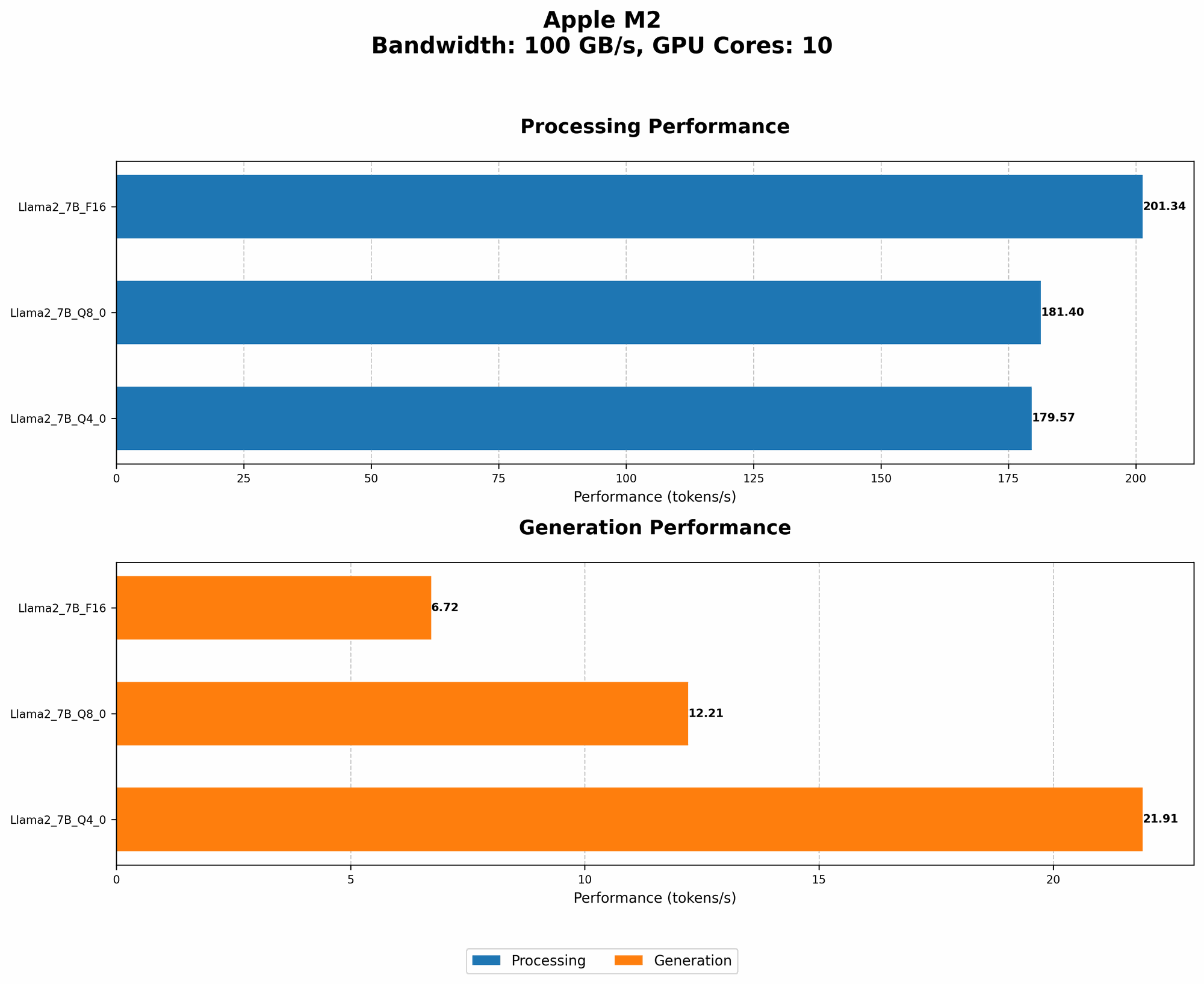
Processing: the M2 chip can process roughly 179-201 tokens per second (tokens/s) depending on the quantization level used, measured while utilizing the Llama 2 7B model.
- Quantization: Think of it as a way to "compress" the model, making it smaller and potentially faster. With Llama 2, there are various levels of quantization, from F16 to Q40, with Q40 being the most compressed and Q8_0 in the middle ground.
Generation: The M2 chip can generate approximately 6.72-21.91 tokens per second when running the Llama 2 7B model.
Table:
| Model (Llama 2 7B) | Processing (tokens/s) | Generation (tokens/s) |
|---|---|---|
| F16 | 201.34 | 6.72 |
| Q8_0 | 181.4 | 12.21 |
| Q4_0 | 179.57 | 21.91 |
M2 Performance: The Bottom Line
These figures highlight the M2 chip's ability to handle LLM processing and generation tasks, especially considering its relatively low power consumption. However, it's important to note that these numbers are just a snapshot. Real-world performance will vary depending on your specific workload, model size, and even the way your code is optimized.
The M2 Advantage: Efficiency and Cost
One of the M2 chip's strong suits is its energy efficiency. It's designed to deliver impressive performance while using less power compared to other high-performance CPUs. This low power consumption translates to less heat generated and potentially longer battery life.
For developers, this efficiency is a huge plus, especially when working with large, computationally demanding models. You can potentially squeeze more processing power out of your machine without cranking up the energy bill, making the M2 a cost-effective option for AI development.
FAQs about LLM Development and Apple M2
What are the differences between F16, Q80, and Q40?
These terms refer to different "quantization" levels for the LLM model. Quantization is like turning a big, detailed image into a smaller, pixelated version. It reduces the size of the model, making it lighter and potentially faster.
- F16: Uses 16-bit precision to represent numbers, offering the best accuracy but the largest model size.
- Q8_0: Uses 8-bit numbers, smaller than F16, resulting in a faster model but with a slight drop in accuracy.
- Q4_0: Uses 4-bit numbers, the smallest and potentially fastest, but with the biggest impact on accuracy.
What about bigger LLMs like Llama 2 70B?
Unfortunately, the numbers for the M2 chip running the Llama 2 70B model are not currently available.
Which LLM model should I choose?
That's a big question! The best LLM depends on your specific needs and project. Consider factors like model size, speed, and accuracy. The smaller models like Llama 2 7B are great for quick experimentation, while larger models like Llama 2 70B offer more powerful capabilities but require more processing power.
Can I run LLMs on a Mac with just the CPU?
You can, but it will be much slower. The GPU and specialized hardware like the dedicated neural engine are optimized to handle the complex calculations required by LLMs.
Can I run LLMs on a Mac with the M2 chip?
Yes, the M2 chip provides a powerful foundation for running LLMs on a Mac, especially smaller models like Llama 2 7B. It's important to consider the model size and your specific development goals to ensure the M2 is a good fit.
What else do I need for AI development?
Besides the hardware, you’ll need a development environment with the right software tools and libraries. Popular choices include Python, TensorFlow, PyTorch, Hugging Face Transformers, and tools like llama.cpp.
Keywords
Apple M2, AI Development, LLM, Large Language Model, Llama 2, Token Speed, Quantization, F16, Q80, Q40, GPU, Processing, Generation, Token/s, Mac, Efficiency, Cost, Development Environment, TensorFlow, PyTorch, Hugging Face Transformers, Llama.cpp