Is Apple M1 Pro Powerful Enough for Llama2 7B?

Introduction
The world of large language models (LLMs) is booming, and the excitement is palpable. These AI-powered marvels can generate text, translate languages, write different kinds of creative content, and answer your questions in an informative way. But running these sophisticated models locally requires a powerful processor. The Apple M1 Pro chip has become a popular choice for developers and enthusiasts, but can it handle the demands of Llama2 7B, a cutting-edge LLM?
In this deep dive, we'll analyze the performance of Llama2 7B on the Apple M1 Pro chip. We'll examine token generation speed benchmarks, compare the performance to other devices, and provide practical recommendations for use case scenarios. So buckle up, fellow geeks, and get ready to dive into the fascinating world of LLMs and their incredible capabilities.
Performance Analysis: Token Generation Speed Benchmarks: Apple M1 Pro and Llama2 7B
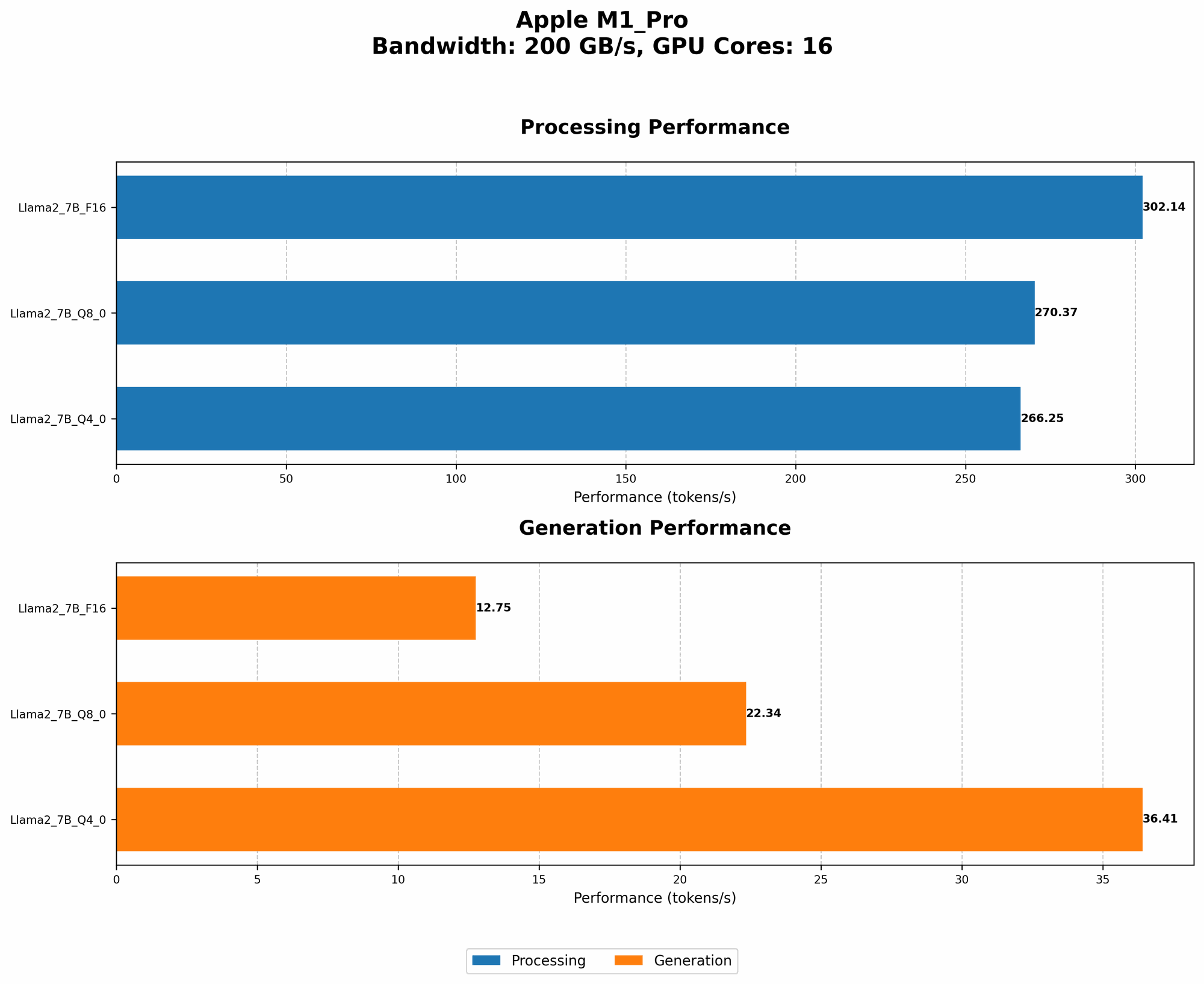
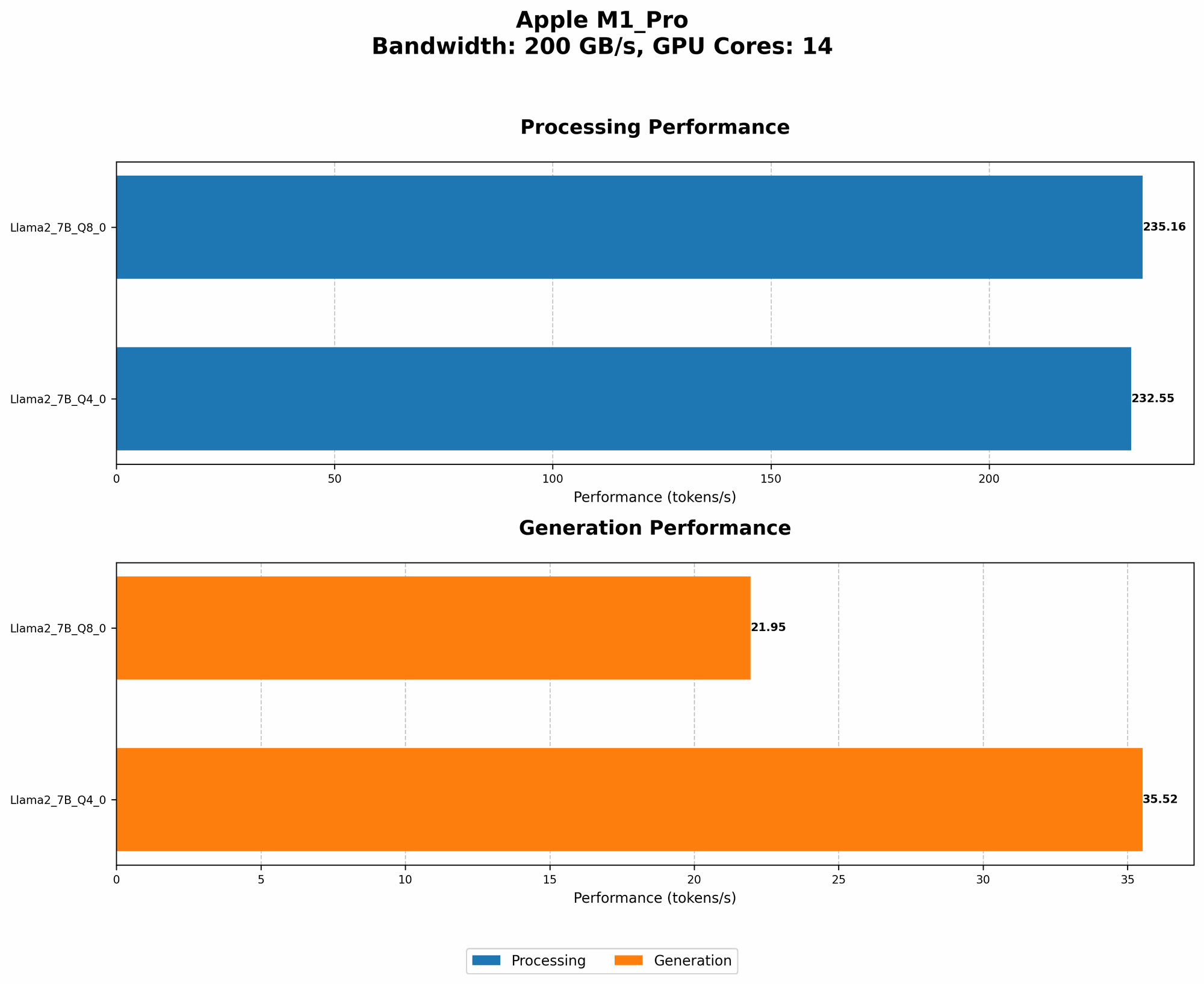
The speed at which an LLM can generate tokens (words or sub-word units) is a critical factor in determining its performance. We'll explore the token generation speed for Llama2 7B on the Apple M1 Pro based on real-world benchmarks.
Apple M1 Pro and Llama2 7B: Quantization and Performance
Let's break down what quantization means and why it's essential. Imagine a map where each color represents a different location. A high-resolution map has a wide range of colors, but it might be too big to fit on your phone. Instead, the app might use a "quantized" version of the map, reducing the number of colors to make it smaller and faster to load. Similarly, quantization in LLMs reduces the size of the model by using fewer bits to represent the numbers. This makes the model smaller and faster to run on devices with limited resources.
Here's a breakdown of the token generation speed benchmarks for the Apple M1 Pro running Llama2 7B with different quantization levels:
| Quantization Level | Processing Speed (Tokens/second) | Generation Speed (Tokens/second) |
|---|---|---|
| F16 (16-bit floating point) | 302.14 (with 16 GPUCores) | 12.75 (with 16 GPUCores) |
| Q8_0 (8-bit quantized) | 270.37 (with 16 GPUCores) | 22.34 (with 16 GPUCores) |
| Q4_0 (4-bit quantized) | 266.25 (with 16 GPUCores) | 36.41 (with 16 GPUCores) |
| Q8_0 (8-bit quantized) | 235.16 (with 14 GPUCores) | 21.95 (with 14 GPUCores) |
| Q4_0 (4-bit quantized) | 232.55 (with 14 GPUCores) | 35.52 (with 14 GPUCores) |
A few things to notice:
- Higher quantization levels result in faster processing speeds: This is because the model requires less computational power to process inputs.
- Generation speed is significantly slower than processing: The "Generation" column represents the rate at which the model generates text output. The difference in speed is because the generation stage involves a complex process of predicting the probability of each word in the sequence.
- Increasing GPU cores improves performance: The M1 Pro with 16 GPUCores generally delivers faster results compared to the version with 14 GPUCores. This is because more GPU cores can handle parallel processing, leading to faster execution times.
Performance Analysis: Model and Device Comparison
To understand the performance of the Apple M1 Pro with Llama2 7B, let's compare it to other devices and models.
Unfortunately, we do not have data for Llama2 7B on other devices:
- We lack data for other devices, such as the M1 Max, M2 Pro, or M2 Max, which could have interesting implications for performance.
- We also lack data for other LLMs, such as GPT-3 or Bloom.
We'll need to rely on broader benchmarks for those comparisons.
Practical Recommendations: Use Cases and Workarounds
Based on the performance figures we have, here are some practical recommendations for using the Apple M1 Pro with Llama2 7B:
- For applications requiring high-speed processing, such as code completion, consider using the F16 or Q8_0 quantization level: This will provide the best processing speed.
- For applications where generation speed is crucial, such as text-based chatbots, explore using the Q4_0 quantization level: While it may have slightly slower processing speeds, it offers a significant boost in generation speed.
- Remember that these results are specific to the Apple M1 Pro and Llama2 7B: Performance may vary significantly across different models and devices.
- For more comprehensive information, explore existing benchmarks and resources: You can refer to GitHub repositories by ggerganov and XiongjieDai and research sites like Hugging Face for performance benchmarks.
FAQ: Frequently Asked Questions
Q: Can I run Llama2 7B on my older Mac with an Intel processor?
A: Running LLMs like Llama2 7B on older Macs with Intel processors will require dedicated hardware, such as a GPU or specialized hardware. It's highly improbable that it will run smoothly on these older devices.
Q: Is Llama2 7B the best LLM for my needs?
A: It depends on your specific requirements. Some LLMs excel in specific areas. For example, some focus on generating creative text, while others specialize in code completion or translation. Research and compare the capabilities of various models to find the optimal one for your use case.
Q: What's the best way to optimize LLM performance?
A: There are several ways to enhance performance. You can explore different quantization levels, experiment with different inference frameworks, and consider using techniques like model parallelism to distribute the workload of the model across multiple devices.
## Keywords: Llama2 7B, Apple M1 Pro, Token Generation Speed, Quantization, F16, Q80, Q40, GPUCores, LLM Performance, AI, Deep Dive, Local LLMs, Performance Analysis, Practical Recommendations, Use Cases, Workarounds.