How Much RAM Do I Need for running LLM on Apple M3?

Introduction
You're a developer or tech enthusiast who's been captivated by the world of Large Language Models (LLMs) and are looking to bring these powerful AI systems to your Apple M3 device. But hold on! Before you dive headfirst into the world of text generation, translation, and summarization, there's one crucial question you need to consider: How much RAM do you really need?
Think of RAM as the short-term memory of your computer, essential for keeping frequently used data readily accessible. LLMs, especially the larger models, are memory-hungry beasts. They need a substantial amount of RAM to store their vast knowledge and efficiently process your requests. This article will guide you through the RAM requirements for running various Llama 2 models on the Apple M3 chip, empowering you to make informed decisions about your LLM setup.
Understanding RAM and LLMs
Let's start with a quick rundown of RAM and its relationship with LLMs.
RAM: Your Computer's Short-Term Memory
Imagine RAM as a temporary storage space for your computer's active operations. It's like a fast-moving conveyor belt where frequently used data is stored and readily available for the CPU to access.
LLMs: Memory-Hungry Brains
LLMs are like super-intelligent brains that have learned to process text and code in incredibly sophisticated ways. These models are so big that they require a lot of RAM to store their weights (the parameters they learned during training) and process your requests smoothly. A larger model requires more RAM to store its massive knowledge base.
RAM Requirements for Llama 2 on Apple M3
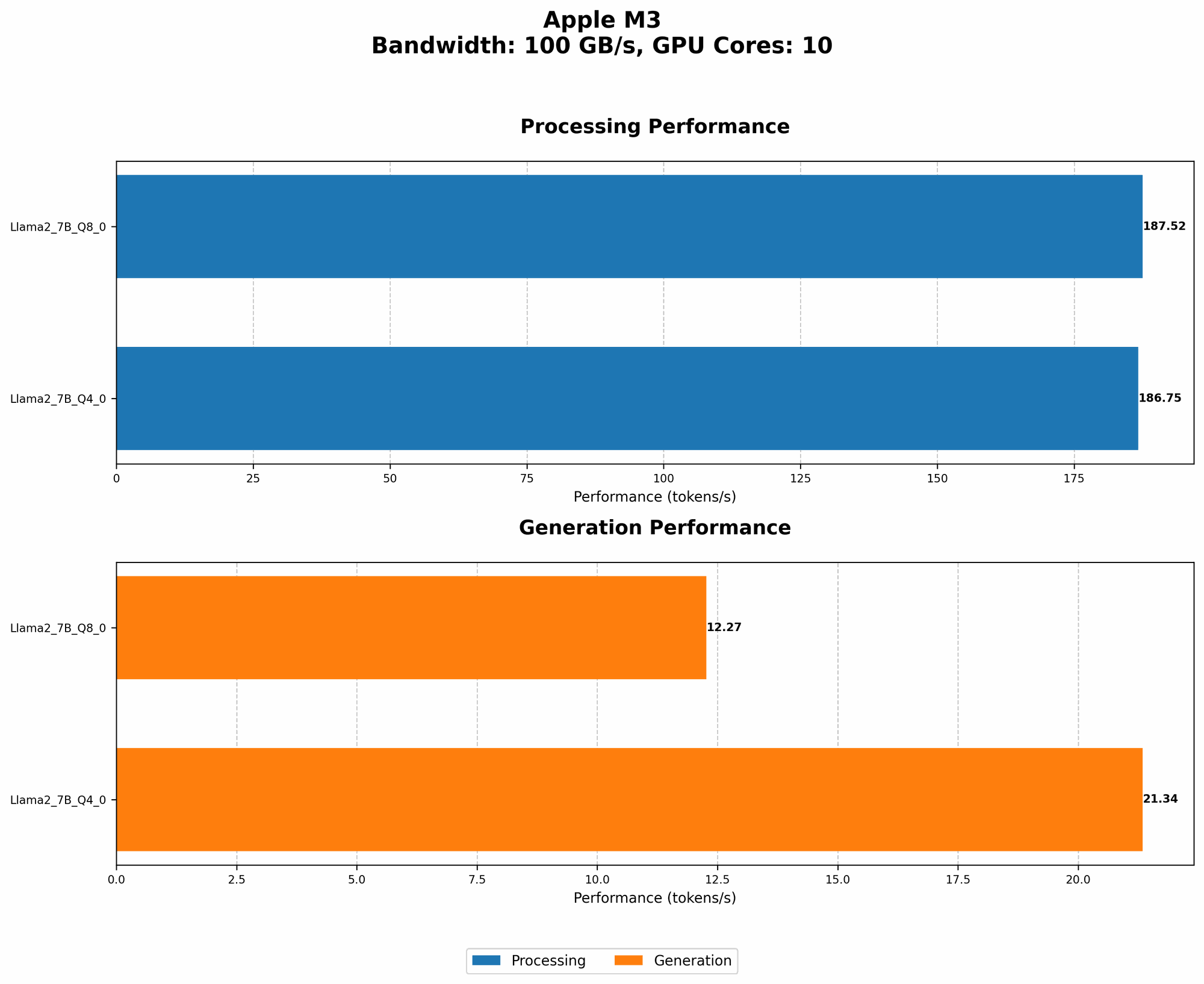
Now, let's dive into the core of the matter: RAM requirements for different Llama 2 models on the Apple M3.
Apple M3 Token Speed Generation
The table below showcases the token speed generation for various Llama 2 models on the Apple M3. Token speed measures how many tokens (basic units of language) the LLM can process per second.
| Model | Token Speed Generation (Tokens/Second) |
|---|---|
| Llama 2 7B Q8_0 | 12.27 |
| Llama 2 7B Q4_0 | 21.34 |
Explanation:
- Q40 and Q80: These refer to the quantization levels of the model. Quantization is a technique used to reduce the memory footprint of LLMs by converting their weights from high-precision floating-point numbers to lower-precision integers. Lower quantization levels like Q80 and Q40 require less memory but may lead to a slight reduction in accuracy.
IMPORTANT: We do not have data for Llama 2 7B F16, so we cannot provide information about RAM usage for that specific configuration. We recommend consulting the resources below for more details.
Determining RAM Needs
Now, let's explore how to determine the optimal RAM configuration for your LLM setup. You can use these factors:
- Model Size: The size of the LLM is a primary factor influencing RAM requirements:
- Smaller models (like Llama 2 7B) are more memory-efficient.
- Larger models (like Llama 2 70B or even 13B) need significantly more RAM.
- Quantization:
- Quantization levels affect the LLM's memory footprint.
- Q80 and Q40 generally use less RAM than F16.
- Application:
- Simple tasks like text generation might need less RAM compared to complex tasks like code completion or translation.
FAQ: RAM Matters for LLM Adventures
1. How Much RAM Do I Need for Llama 2 7B on Apple M3?
That depends on the quantization level you choose! For Llama 2 7B Q80, you could get away with a bit less RAM, but for Q40 you'll need slightly more.
2. Is 16GB of RAM Enough?
That's a good starting point for Llama 2 7B models, especially if you're using Q80. However, consider bumping up to 32GB if you plan on using Q40 or if you anticipate running larger models in the future.
3. Will My LLM be Slower Without Enough RAM?
Yes! If you don't have enough RAM, your LLM might start swapping data between RAM and slower storage drives. This leads to a significant slowdown in processing and generation speed.
4. Why Do Some LLMs Need More RAM on the Same Device?
The size and complexity of the models play a key role. Larger models have more parameters (trained knowledge) and require more RAM to store and process.
5. What Happens If I Don't Have Enough RAM?
Your computer might start behaving sluggishly, and you might encounter errors or crashes. In extreme cases, your system could become unresponsive.
Keywords
LLM, Apple M3, RAM, Llama 2, 7B, Quantization, Token Speed, Memory Footprint, F16, Q80, Q40, Model Size, GPU, Apple Silicon, AI, Machine Learning, Text Generation, Code Completion, Translation, Deep Learning, AI Hardware.