How Much RAM Do I Need for running LLM on Apple M3 Pro?

Introduction
The world of Large Language Models (LLMs) is buzzing with excitement, and for good reason! These powerful AI models can generate text, translate languages, write different kinds of creative content, and answer your questions in an informative way. But before you can unleash the full potential of LLMs, you need to make sure your hardware can handle them. One of the biggest questions for tech enthusiasts looking to run LLMs locally on their devices is: how much RAM do I need?
This article will explore the RAM requirements for running LLMs on the Apple M3Pro chip, a powerful option for anyone looking to get started with LLMs. We'll take a deep dive into the specific RAM demands of different LLM models and explore how various quantization levels impact performance. Get ready to dive into the exciting world of LLMs and learn how to make the most of your Apple M3Pro!
RAM Requirements for LLM on Apple M3_Pro
The amount of RAM you need for running an LLM on an Apple M3_Pro depends on several factors, including:
- Model Size: Larger LLMs, like the 7B and 13B parameter models, require more memory than smaller models.
- Quantization Level: Quantization is a technique that reduces the size of a model by reducing the precision of its weights. This results in a smaller model that requires less memory.
- Number of GPU Cores: The M3_Pro has different GPU core configurations, and having more cores grants you more processing power.
Here's a breakdown of how different configurations of the Apple M3_Pro chip perform with various LLM models and quantization levels.
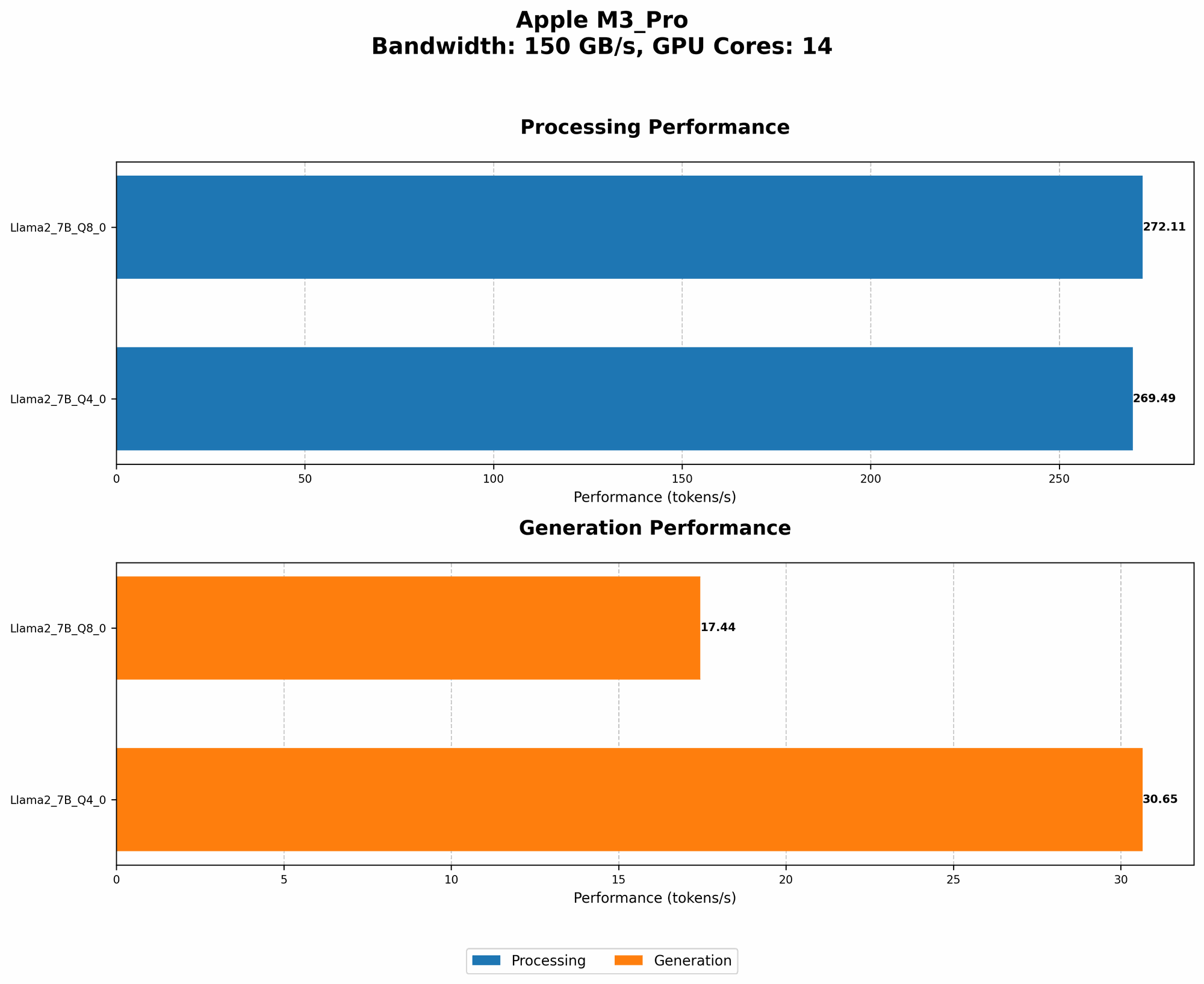
Apple M3_Pro 14 GPU Cores
Important note: No data was found regarding the processing and generation speeds for the Llama2 7B models with F16 quantization on the M3_Pro 14 GPU Cores.
| Model | Quantization | Processing Speed (Tokens/second) | Generation Speed (Tokens/second) |
|---|---|---|---|
| Llama2 7B | Q8_0 | 272.11 | 17.44 |
| Llama2 7B | Q4_0 | 269.49 | 30.65 |
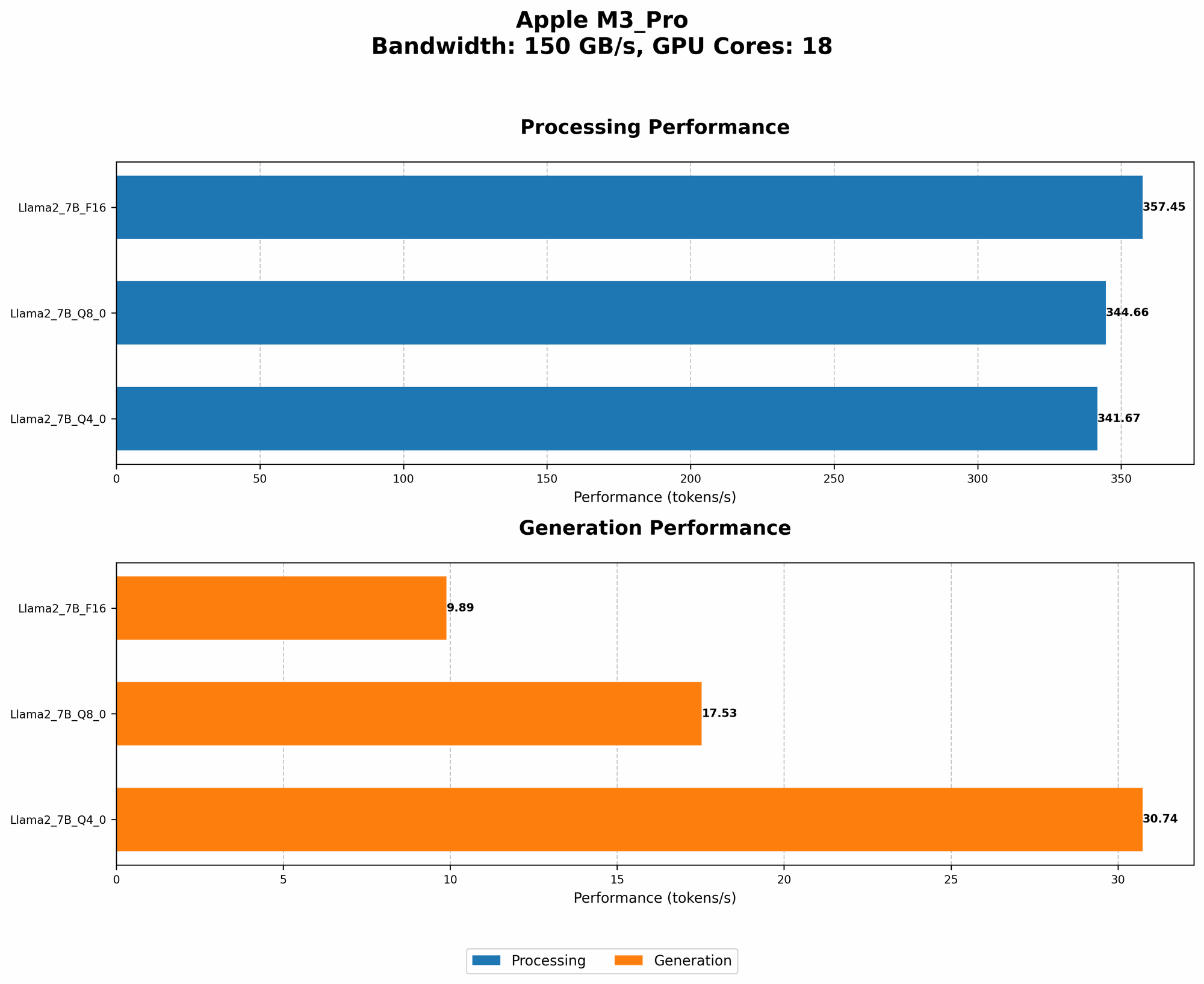
Apple M3_Pro 18 GPU Cores
| Model | Quantization | Processing Speed (Tokens/second) | Generation Speed (Tokens/second) |
|---|---|---|---|
| Llama2 7B | F16 | 357.45 | 9.89 |
| Llama2 7B | Q8_0 | 344.66 | 17.53 |
| Llama2 7B | Q4_0 | 341.67 | 30.74 |
Quantization: Making LLMs More Accessible
Quantization is a technique that reduces the size of an LLM without significantly impacting its performance. Imagine it like this: Instead of using a full-color image for a model, you use a black-and-white version, reducing the amount of information you need to store. This "black-and-white" version of the model is smaller and requires less RAM!
There are different levels of quantization, each with its own trade-offs between performance and memory usage.
- F16 (Float16): This is a common quantization level that uses half the precision of standard 32-bit floating-point numbers. While it keeps a good level of accuracy, F16 models are still quite large.
- Q8_0: This quantization level represents numbers with 8 bits, with 0 bits used for sign. It significantly reduces model size but can slightly impact accuracy.
- Q4_0: This level quantizes numbers with 4 bits, offering the most significant size reduction but potentially impacting accuracy the most.
Choosing the Right LLM Model for Your Apple M3_Pro
Now that we have an understanding of RAM requirements and quantization, let's see how we can choose the right LLM for your M3_Pro. Remember, it's not just about the size of the model, but also about balancing performance with the memory available on your device.
Comparing Llama 7B Models on M3_Pro
Let's compare the Llama 7B model with different quantization levels.
- F16: With the M3_Pro 18 GPU cores, the Llama 7B model with F16 quantization achieves a processing speed of 357.45 tokens per second and a generation speed of 9.89 tokens per second.
- Q80: On the same hardware, the Q80 model offers processing speed of 344.66 tokens/second and a generation speed of 17.53 tokens/second.
- Q4_0: This configuration achieves 341.67 tokens/second for processing and 30.74 tokens/second for generation. While it might offer better performance, the trade-off comes with potentially lower accuracy.
Remember, choosing the right model depends on your specific needs. If you prioritize speed, Q40 might be your best option, especially with the M3Pro 18 GPU core configuration. However, if accuracy is paramount, F16 or Q8_0 might be the better choice.
Factors to Consider When Choosing an LLM
Besides the RAM and quantization levels, several other factors influence your LLM experience:
- Model Accuracy: Different models have varying levels of accuracy. A model with higher accuracy will be more precise in its responses, but may require more resources.
- Model Training Data: The data used to train the model significantly impacts its performance, especially for specific tasks like translation or code generation.
- Software Framework: The framework used to run the model can influence resource utilization. Some frameworks are more efficient than others.
FAQ
Q: Will I need more RAM for larger LLMs?
A: Absolutely! Larger LLMs like the 13B Llama2 model will require more RAM. Remember: the larger the model, the more RAM you will need.
Q: What are the benefits of using quantization?
*A: * Quantization helps save RAM by reducing the size of your LLM. This is especially useful for devices with limited memory, making running LLMs more accessible.
Q: How do I know if my M3_Pro has enough RAM for my chosen LLM?
A: You can typically find the RAM requirements for an LLM in its documentation. You can also use tools like the "top" command in Linux or "Activity Monitor" on macOS to see how much memory your model is using in real-time.
Keywords
Apple M3Pro, RAM, LLM, Large Language Model, Llama 7B, Llama 13B, Quantization, F16, Q80, Q4_0, GPU Cores, Tokens/second, Processing Speed, Generation Speed, Model Accuracy, Model Training Data, Software Framework.