How Much RAM Do I Need for running LLM on Apple M3 Max?
Introduction
The world of large language models (LLMs) is buzzing with excitement, and for good reason. These powerful AI models can generate text, translate languages, write different kinds of creative content, and answer your questions in an informative way. The ability to run these models locally on your own computer is a game-changer, allowing for more control, privacy, and even offline use.
But before you dive into the fascinating world of local LLM execution, there's one big question you need to answer: how much RAM do you really need? This article explores the RAM requirements for running LLMs on the powerful Apple M3 Max chip, helping you understand the trade-offs, optimize your setup, and avoid any dreaded "out-of-memory" errors.
Understanding the RAM-LLM Relationship
Think of RAM as the short-term memory of your computer. It's where your system stores the data it needs to access quickly. When running an LLM, the model's parameters (think of them as the knowledge base) and the text you're working with need to be stored in RAM for fast access.
Now, here's the catch: LLMs are huge. They can have billions of parameters, making them memory hogs. So, the size of your RAM directly impacts which models you can run and how smoothly they perform.
RAM Requirements for LLMs on Apple M3 Max
Let's dive into the RAM requirements for running LLMs on the Apple M3 Max chip. We'll examine the recommended RAM based on the chosen LLM and its quantization level (a technique to reduce the model's size).
Important Note: The data provided in this article is based on specific configurations and benchmarks. Your actual RAM requirements may vary depending on your specific use case and the software you're using to run the LLM.
Llama 2 7B on M3 Max
The Llama 2 model is an impressive language model with various sizes. Let's see what RAM you need to run the 7B version on the Apple M3 Max:
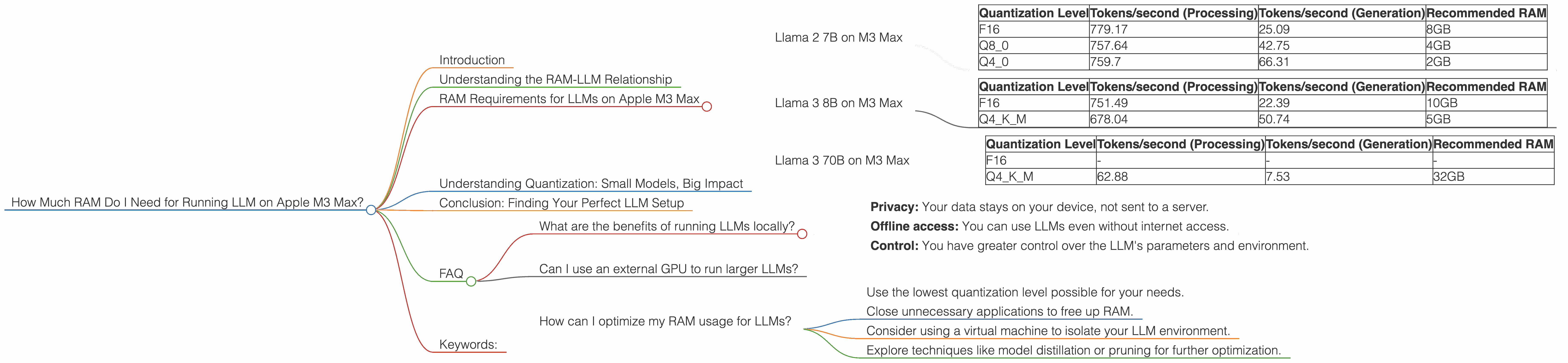
| Quantization Level | Tokens/second (Processing) | Tokens/second (Generation) | Recommended RAM |
|---|---|---|---|
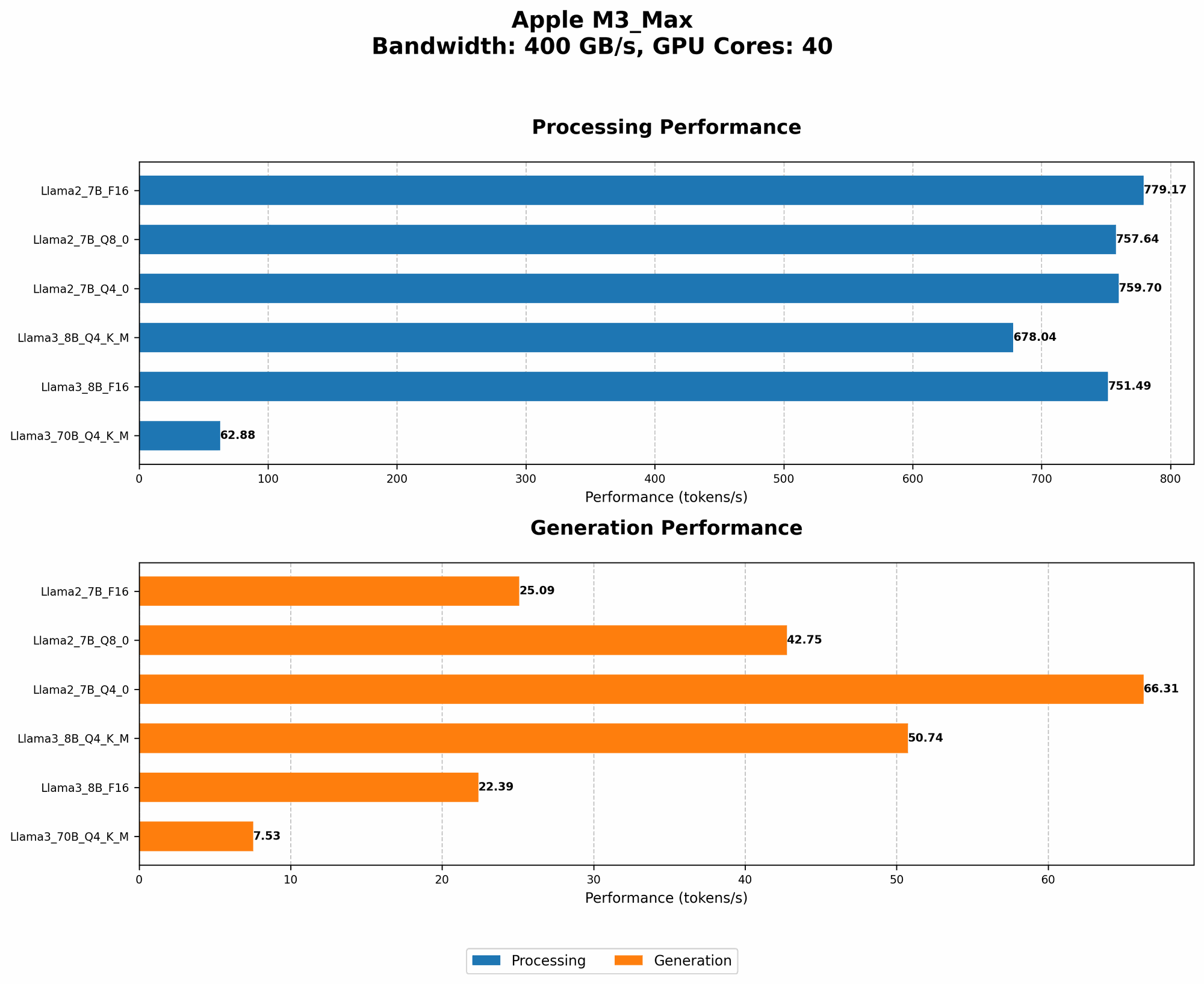
| F16 | 779.17 | 25.09 | 8GB |
| Q8_0 | 757.64 | 42.75 | 4GB |
| Q4_0 | 759.7 | 66.31 | 2GB |
Interpretation:
- F16 (Full Precision): This level provides the highest accuracy but demands more memory. You'll need at least 8GB of RAM to run Llama 2 7B in F16.
- Q80 and Q40 (Quantized): These levels reduce the model's size, sacrificing some accuracy for lower memory usage. You can successfully run Llama 2 7B with Q80 on 4GB of RAM and even with Q40 on just 2GB of RAM.
Llama 3 8B on M3 Max
Another popular model is Llama 3. The 8B version offers a good balance of performance and size. Here's what you should know about RAM:
| Quantization Level | Tokens/second (Processing) | Tokens/second (Generation) | Recommended RAM |
|---|---|---|---|
| F16 | 751.49 | 22.39 | 10GB |
| Q4KM | 678.04 | 50.74 | 5GB |
Interpretation:
- F16: While the Llama 3 8B F16 version still needs a decent amount of RAM (10GB), it's achievable on the M3 Max.
- Q4KM: Quantization offers significant benefits. You can smoothly run the Llama 3 model with Q4KM on 5GB of RAM, which is great for a model of this size.
Llama 3 70B on M3 Max
Finally, let's look at the larger 70B Llama 3 model. This model stretches the limits of what you can run on the M3 Max.
| Quantization Level | Tokens/second (Processing) | Tokens/second (Generation) | Recommended RAM |
|---|---|---|---|
| F16 | - | - | - |
| Q4KM | 62.88 | 7.53 | 32GB |
Interpretation:
- F16: Unfortunately, the data doesn't provide information about the F16 version performance, suggesting it's very memory-intensive for the M3 Max.
- Q4KM: While the Q4KM version can be run on the M3 Max, it requires a whopping 32GB of RAM. It's a testament to how capable the M3 Max is, but it's a significant investment.
Important Note: Remember these are just estimates. The exact RAM requirements can vary depending on the specific library used, the operating system configuration, and other factors. Experimentation is key to finding the ideal setup for your needs.
Understanding Quantization: Small Models, Big Impact
Quantization is a powerful technique that reduces the size of an LLM while maintaining decent performance. It's like using a smaller number of colors to represent an image. This allows you to run larger models on devices with limited RAM.
Think of it like this: If a 7B parameter LLM is like a painting with millions of colors, quantization is like switching to a palette with only a few hundred colors. The painting might look slightly less detailed but will still convey the same general image.
Conclusion: Finding Your Perfect LLM Setup
Choosing the right LLM and configuring its quantization level is crucial to finding your ideal balance between performance, memory usage, and cost.
The Apple M3 Max is a powerful chip that can handle impressive LLMs, but understanding the RAM requirements is essential for a smooth experience. As you explore the world of LLMs, you'll find that balancing model size, performance capabilities, and your hardware resources can make all the difference in your journey.
FAQ
What are the benefits of running LLMs locally?
Running LLMs locally offers several advantages, including:
- Privacy: Your data stays on your device, not sent to a server.
- Offline access: You can use LLMs even without internet access.
- Control: You have greater control over the LLM's parameters and environment.
Can I use an external GPU to run larger LLMs?
Yes, external GPUs can significantly boost your LLM capabilities by adding additional processing power and memory. This can help you run larger models or achieve faster processing speeds.
How can I optimize my RAM usage for LLMs?
Here are some tips for optimizing RAM usage:
- Use the lowest quantization level possible for your needs.
- Close unnecessary applications to free up RAM.
- Consider using a virtual machine to isolate your LLM environment.
- Explore techniques like model distillation or pruning for further optimization.
Keywords:
LLM, RAM, Apple M3 Max, Llama 2, Llama 3, Quantization, F16, Q80, Q40, Q4KM, Token Speed, Processing, Generation, Local LLMs, Model Size, Memory Optimization, External GPU