How Much RAM Do I Need for running LLM on Apple M2 Ultra?

Introduction
The world of Large Language Models (LLMs) is getting bigger and more exciting every day! These powerful AI models can generate text, translate languages, write different kinds of creative content, and even answer your questions in an informative way. But running LLMs locally on your machine can be a bit of a memory challenge.
This article will dive into the RAM requirements for running LLMs on the mighty Apple M2 Ultra chip. We'll explore the impact of different LLM model sizes and quantization levels on RAM usage, providing you with the knowledge you need to make informed decisions about your setup. Let's get started!
RAM Requirements for LLMs on M2 Ultra
The Apple M2 Ultra packs a punch with its whopping 192GB of unified memory, making it an absolute beast for running demanding applications.
Quantization: Your LLM Memory Diet
Quantization is like putting your LLM on a memory diet. Instead of using 32-bit floating-point numbers (F32), which take up a lot of space, we can use smaller numbers like 16-bit (F16) or even 8-bit (Q8). Imagine you're storing a recipe: using F32 is like writing the entire recipe using the full name of each ingredient, while F16 is like using abbreviations, and Q8 is like using only symbols. This way, we can shrink the size of the model without sacrificing too much accuracy.
Token Speed Performance in Tokens Per Second (TPS)
We will be using the token speed (measured in tokens per second or TPS) to measure the performance of the models.
- Processing: This measures how fast the model can process the input text.
- Generation: This measures how fast the model can generate output text.
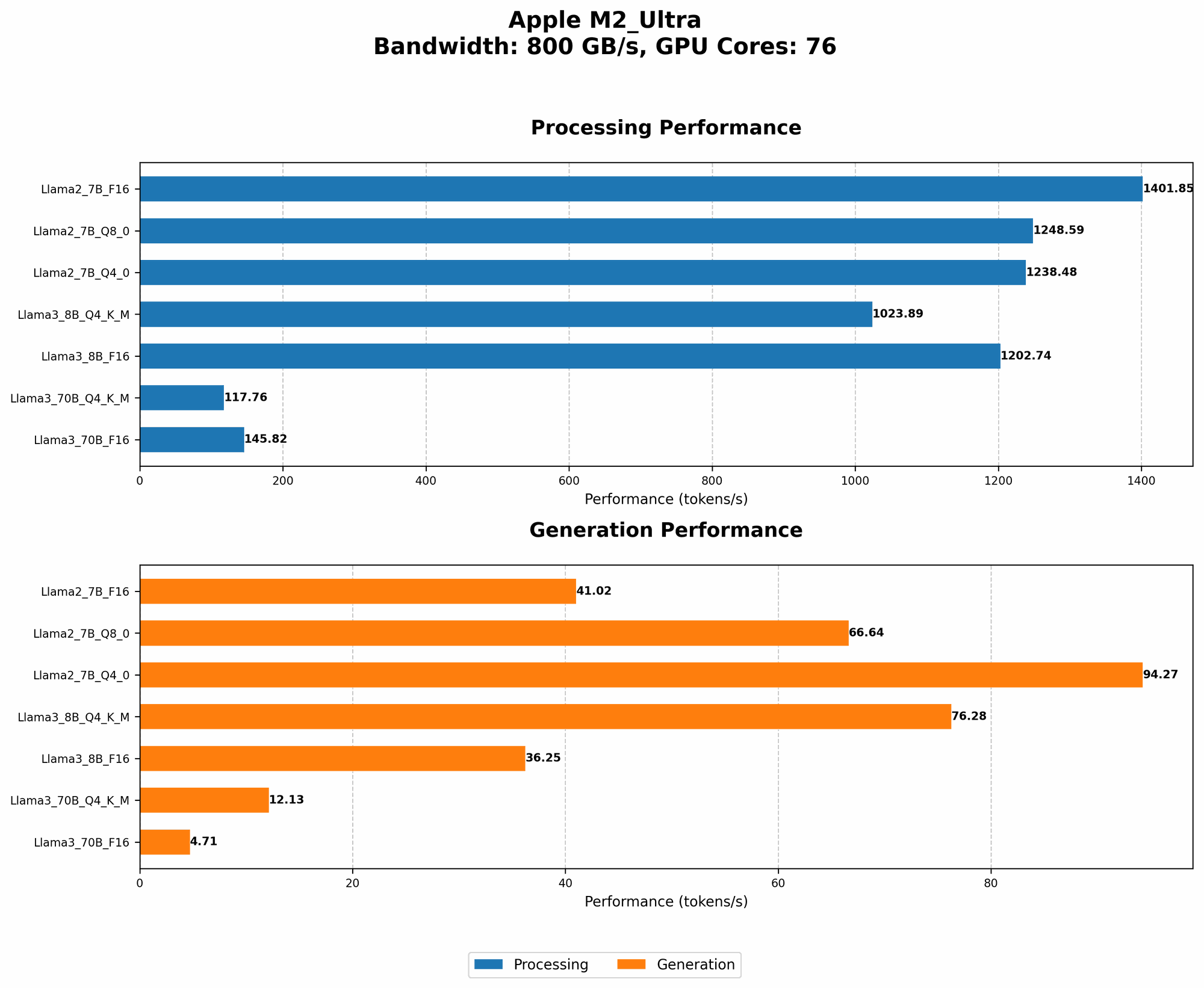
Here's a table summarizing the token speeds for different LLMs on the Apple M2 Ultra:
| Model | Quantization | Processing (TPS) | Generation (TPS) |
|---|---|---|---|
| Llama 2 7B | F16 | 1401.85 | 41.02 |
| Llama 2 7B | Q8_0 | 1248.59 | 66.64 |
| Llama 2 7B | Q4_0 | 1238.48 | 94.27 |
| Llama 3 8B | Q4KM | 1023.89 | 76.28 |
| Llama 3 8B | F16 | 1202.74 | 36.25 |
| Llama 3 70B | Q4KM | 117.76 | 12.13 |
| Llama 3 70B | F16 | 145.82 | 4.71 |
- Note: Data not available for some model/quantization combinations.
Analyzing the Results
Now let's break down what these numbers tell us:
Exploring the Impact of Model Size
As we move from Llama 2 7B to Llama 3 70B, we see that the token speeds for both processing and generation decrease. This is expected, as larger models have more parameters and require more computations.
The Llama 3 70B model is much more demanding than the Llama 2 7B. It struggles to keep up with the smaller models, especially when it comes to generation.
Quantization: A Winning Strategy
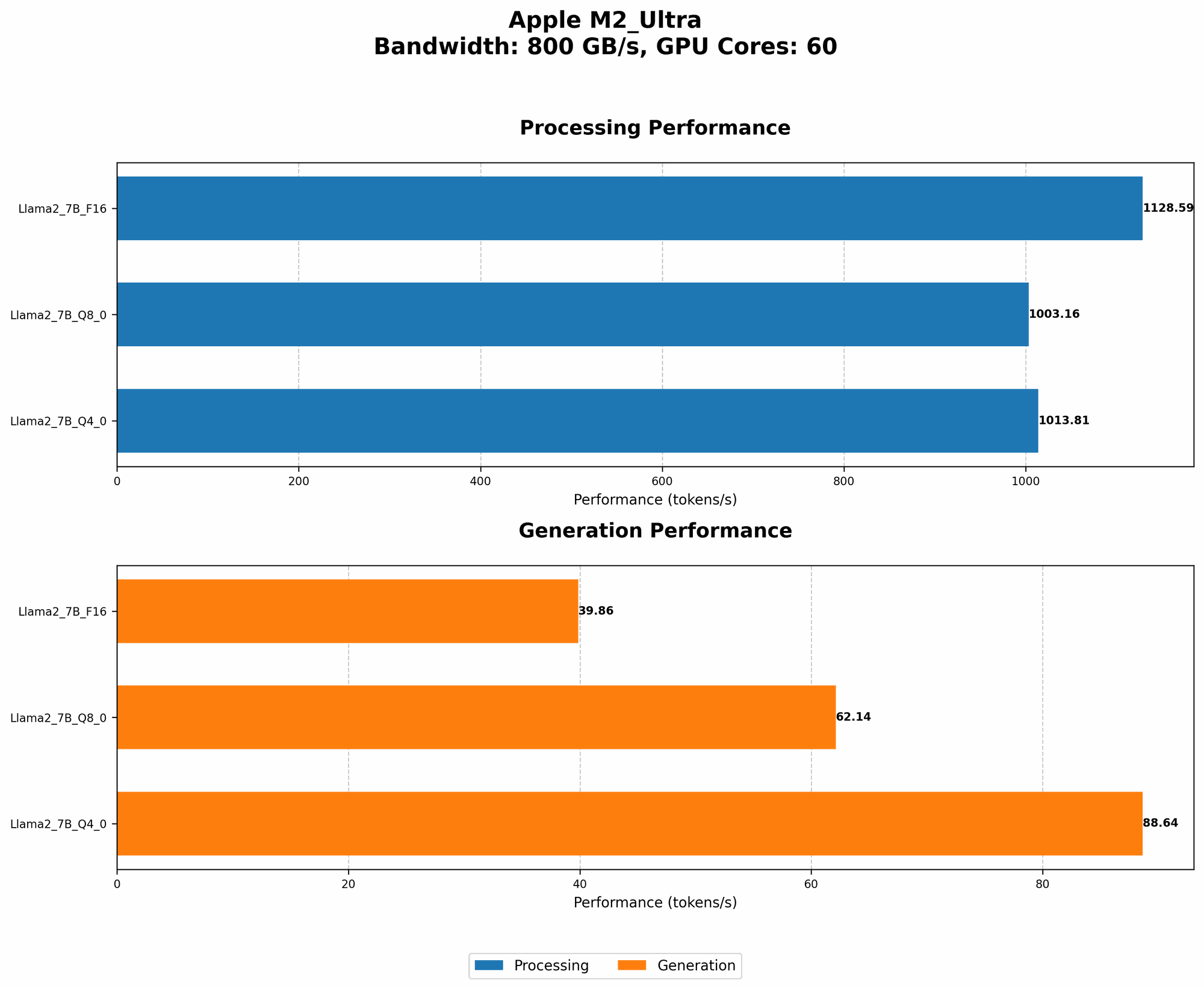
Quantization plays a crucial role in improving performance. Notice how the token speeds increase as we move from F16 to Q80 and then to Q40 for the Llama 2 7B model.
This suggests that using Q40 or even Q80 can significantly boost performance while still maintaining a good balance between accuracy and efficiency.
Balancing Speed and Accuracy
While quantization can help improve performance, it's important to consider the trade-offs. Quantizing a model can sometimes lead to a slight decrease in accuracy, especially when using lower quantization levels.
A good approach is to experiment with different quantization levels and see how they affect the performance of your LLM. You can then choose the level that provides the best balance between speed and accuracy for your specific needs.
Using LLMs on M2 Ultra: Practical Considerations
Now that we have a better understanding of RAM requirements and token speeds, let's put it all together for some real-world scenarios:
Running Llama2 7B on M2 Ultra
If you're interested in using the Llama 2 7B model, the M2 Ultra will handle it effortlessly! Even with F16 quantization, you'll have plenty of RAM available, and the token speeds are very impressive.
You'll be able to process and generate text at lightning-fast speeds, making it a great choice for tasks like text summarization, language translation, and creative writing.
Tackling the 70B Beast: Llama 3 70B on M2 Ultra
The Llama 3 70B model is a different beast. It's a large model with a huge appetite for memory. While the M2 Ultra can still handle it (especially with Q4KM quantization), you'll need to be mindful of your RAM usage.
The 192GB of RAM on the M2 Ultra will give you enough room to work, but you'll notice a significant drop in performance compared to the smaller models.
The Power of Quantization: Optimizing for Speed
Quantization is your best friend when working with larger models like Llama 3 70B. By switching to Q4KM, you can significantly reduce your RAM footprint and improve the speed of your model.
The Future of LLMs and M2 Ultra
The performance of LLMs is constantly improving, and new models are being released all the time. As these models get larger and more complex, the M2 Ultra is well-positioned to become a popular choice for running them locally.
Its powerful GPU and massive amount of RAM make it an excellent platform for developers and researchers who need to experiment with and deploy cutting-edge AI models.
FAQ
What is the best way to choose the right RAM for my LLM?
The best way to choose RAM is to consider the specific model you're using and the quantization level. Start with a lower quantization level like Q40 or Q80. This will help you reduce RAM usage and improve performance. If you need more accuracy, you can experiment with higher quantization levels like F16 or even F32.
Can I run LLMs on a Mac with less RAM than the M2 Ultra?
You can definitely run LLMs on Macs with less RAM, but you'll need to adjust your expectations. If you're working with smaller models like Llama 2 7B, you should be fine with 16GB or even 8GB of RAM.
For larger models like Llama 3 70B, you'll need at least 32GB of RAM, and even then, you may need to use quantization to make sure your model runs smoothly.
What are the best LLM frameworks for running on Apple M2 Ultra?
There are several popular frameworks, each with its own strengths and weaknesses. Some popular choices are:
- llama.cpp: This is a great option if you're looking for a lightweight and easy-to-use framework.
- GPT-NeoX: This is a more powerful framework that can handle larger models.
- Hugging Face Transformers: This is a comprehensive framework that supports a wide range of LLMs and includes several tools for fine-tuning and deploying models.
Experiment with different frameworks to see which one works best for your needs.
How can I improve the performance of my LLM on the M2 Ultra?
Here are a few tips:
- Use quantization: Quantization can significantly improve performance while reducing RAM usage.
- Optimize your code: Make sure your code is well-written and optimized for performance.
- Use a dedicated GPU: If you have a dedicated GPU, use it to process the model. The M2 Ultra already has a powerful GPU, but you can optimize further by changing GPU settings.
Keywords
LLMs, Large Language Models, Apple M2 Ultra, RAM, Memory, Quantization, Llama 2, Llama 3, Token Speed, TPS, Processing, Generation, F16, Q8, Q4, GPU, Performance, Framework, Hugging Face, GPT-NeoX, llama.cpp