How Much RAM Do I Need for running LLM on Apple M2 Pro?

Introduction
Welcome, fellow language model enthusiasts! You've probably heard whispers about the exciting world of Large Language Models (LLMs) and how they're transforming the way we interact with computers. These powerful AI models can do everything from generating creative text to translating languages and even writing code. But with great power comes great... RAM requirements!
If you're thinking about running LLMs locally on your Apple M2 Pro, you're in for a treat. This powerful chip is capable of handling some serious computational workload. However, it's not just about sheer power. You also need to consider the amount of RAM you'll need to effectively run your LLM.
This guide will walk you through the RAM requirements for different LLMs on the M2 Pro. We'll be taking a close look at the popular Llama 2 models, including the 7B and 13B variants, and their various quantization levels. By the end, you'll have a good understanding of how much RAM you need to fuel your LLM adventures.
Understanding RAM Requirements for LLMs
Before we dive into the specifics of the M2 Pro, let's take a moment to understand how RAM impacts LLM performance. Think of RAM as your computer's short-term memory. It's where your LLM model, along with its data, needs to temporarily reside while it's being used.
The amount of RAM needed depends on factors like:
- Model Size: Larger models (like Llama 2 13B) obviously require more RAM than smaller models (like Llama 2 7B). This is because they have more parameters, which translates to more data needing to be stored in memory.
- Quantization Level: Quantization is a technique used to compress the size of an LLM model. It's like putting your model on a diet. Lower quantization levels (like Q4_0) require less RAM but can potentially impact performance.
- Batch Size: The batch size determines how many inputs you process at a time during training or inference. Larger batch sizes generally require more RAM.
The M2 Pro: A Chip with a Big Appetite for LLMs
The Apple M2 Pro chip is a powerhouse! It's packed with tons of cores, a massive amount of fast memory, and impressive multi-core performance. This makes it an excellent choice for running demanding tasks like LLM inference. However, just like any powerful engine, the M2 Pro needs adequate fuel—in this case, RAM.
Llama 2 on Apple M2 Pro: A Deep Dive into RAM Requirements
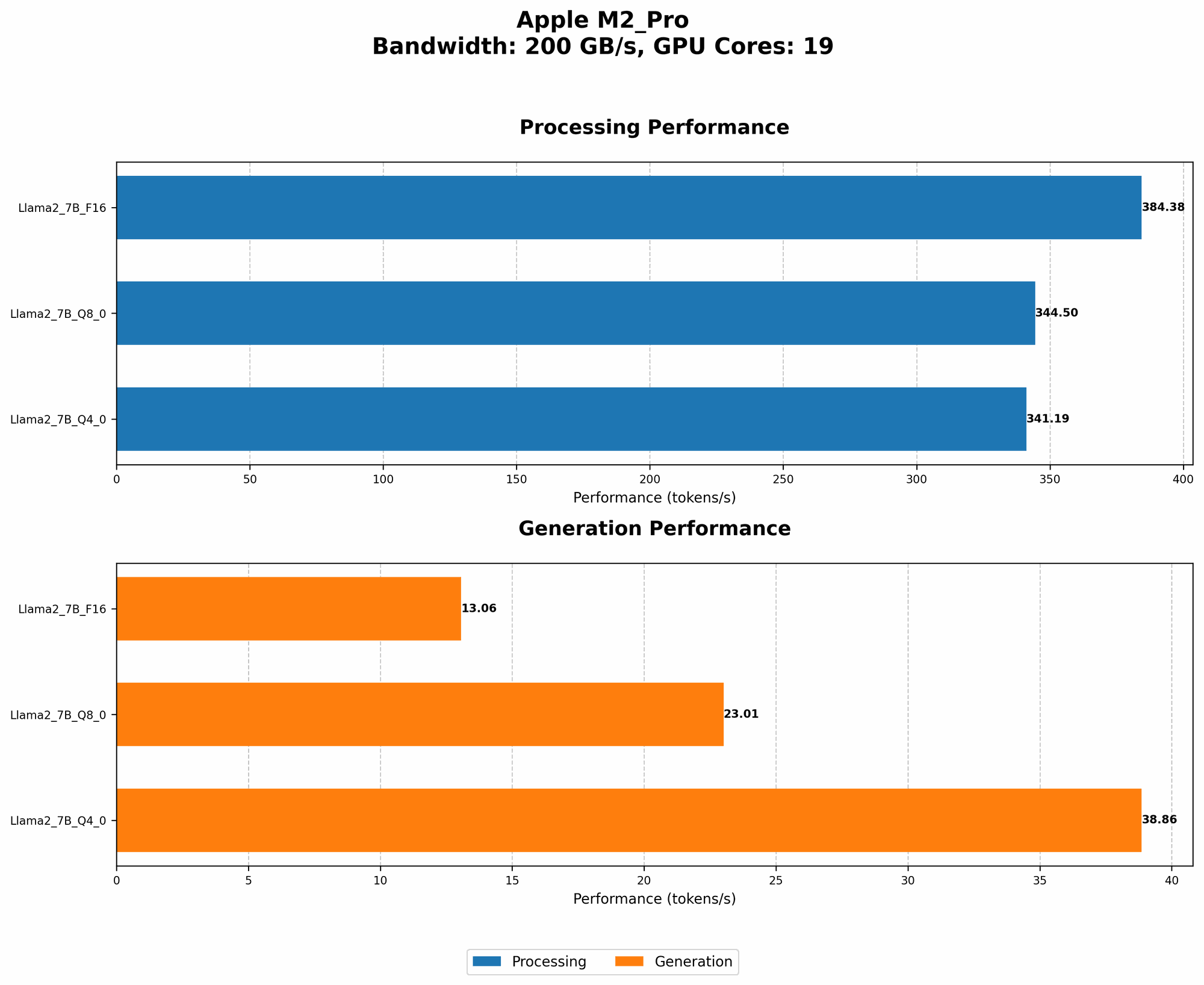
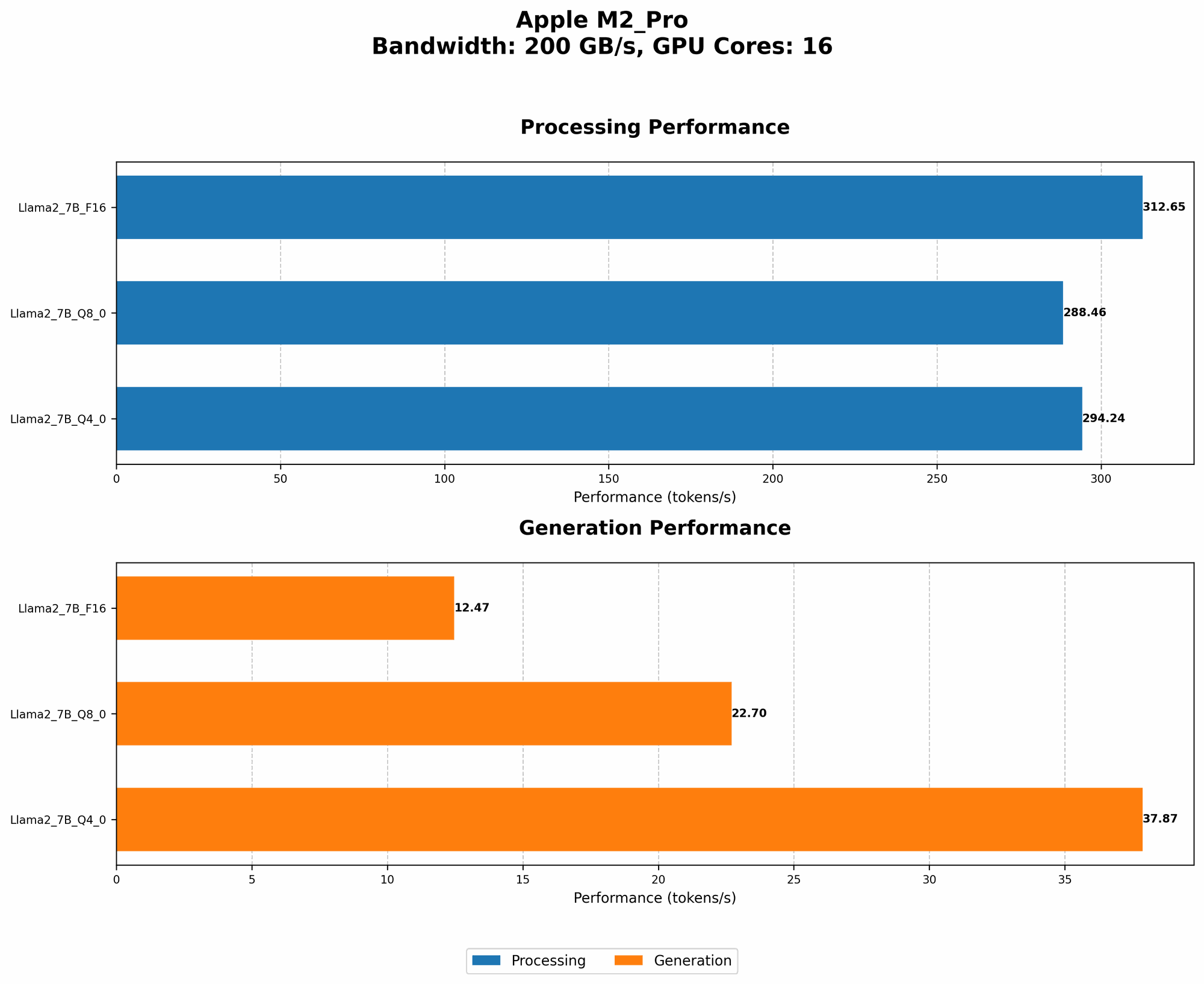
Now let's get down to the nitty-gritty. The table below shows the estimated RAM requirements for running Llama 2 models on the M2 Pro. Remember, these are just estimations, and actual requirements may vary depending on your specific setup and the configuration of Llama.cpp:
| Model | Quantization | RAM (GB) |
|---|---|---|
| Llama 2 7B | F16 | ~14GB |
| Llama 2 7B | Q8_0 | ~8GB |
| Llama 2 7B | Q4_0 | ~5GB |
| Llama 2 13B | F16 | ~26GB |
| Llama 2 13B | Q8_0 | ~15GB |
| Llama 2 13B | Q4_0 | ~10GB |
Important Note: The data for Llama 2 13B models is unavailable as of now. The provided estimates are based on projections derived from the data available for Llama 2 7B.
Explanation:
- F16: This is the default precision for the Llama 2 models. It offers a good balance of accuracy and performance but requires the most RAM.
- Q8_0: This is a quantized representation of the model using 8 bits. It reduces the memory footprint by about 50% compared to F16, but it might slightly impact performance.
- Q4_0: This is a highly quantized representation using only 4 bits. It offers the smallest memory footprint but may have the most significant impact on performance.
How to Optimize RAM Usage
Let's say you're on a tight budget, or you want to explore different model variants with reduced memory requirements. We've got your back!
Here are some tips for optimizing RAM usage when running LLMs on the M2 Pro:
1. Quantization is your friend: As we saw, lower quantization levels (Q40, Q80) can significantly reduce the amount of RAM needed. However, remember that quantization can slightly impact performance. Experiment with different levels to find the sweet spot between RAM usage and performance.
2. Choose your model wisely: If you're aiming for a smaller memory footprint, consider starting with a smaller model like Llama 2 7B and working your way up as your RAM availability allows.
3. Don't be afraid to close other applications: If you're running demanding applications in the background, you might be pushing the limits of your available RAM. Close any unnecessary applications to free up more RAM for your LLM.
4. Consider cloud-based solutions: You can also explore cloud-based LLM platforms like Google Colab or Amazon SageMaker if you need access to large models or don't have enough local RAM.
The M2 Pro: A RAM-Efficient Champion
The M2 Pro is a fantastic choice for running LLMs thanks to its impressive performance and ample RAM. Its ability to handle different model sizes and quantization levels gives you flexibility in optimizing your setup for RAM efficiency.
Conclusion
The M2 Pro is a powerful machine for LLM adventures, but remember that RAM is king when it comes to running these models locally. By understanding the RAM requirements for different LLMs and implementing optimization strategies, you can ensure a smooth and efficient experience.
Remember, the world of LLMs is constantly evolving, so be sure to stay updated on the latest models and their RAM requirements.
FAQ
What is an LLM?
LLMs, or Large Language Models, are AI-powered systems capable of understanding and generating human-like text. They are trained on massive datasets of text and code, allowing them to perform tasks like translation, summarization, and even writing different kinds of creative content.
Is the M2 Pro good for running LLMs?
Absolutely! The M2 Pro is a powerful chip with ample RAM and fast memory, making it an excellent choice for running LLMs. It can handle even large models and quantization scenarios, offering a smooth and efficient experience.
How much RAM do I actually need for Llama 2 7B and 13B models?
This depends on the quantization level you choose. For F16, you'll need approximately 14GB for Llama 2 7B and 26GB for Llama 2 13B. For Q80, you'll need 8GB for Llama 2 7B and 15GB for Llama 2 13B. For Q40, you'll need 5GB for Llama 2 7B and 10GB for Llama 2 13B.
What are the trade-offs between different quantization levels?
Lower quantization levels (Q40, Q80) generally require less RAM but may impact performance. Higher levels (F16) require more RAM but provide better accuracy. Find the sweet spot that balances performance and RAM usage.
Keywords
LLM, Large Language Model, Apple M2 Pro, RAM, Llama 2, Quantization, F16, Q80, Q40, performance, optimization, AI, machine learning, natural language processing, inference, cloud-based solutions