How Much RAM Do I Need for running LLM on Apple M2 Max?

Introduction
The world of Large Language Models (LLMs) is buzzing with excitement, fueled by their ability to generate human-like text, translate languages, write different kinds of creative content, and answer your questions in an informative way. But before you can dive into this exciting world, you need to make sure your hardware is up to the task.
This article focuses on the Apple M2 Max chip, a powerful beast specifically designed for demanding workloads. We'll explore how much RAM you need for running LLMs on this chip, focusing on the popular Llama2 7B model in different quantization levels. We'll unveil the numbers and see what results you can expect from this powerful combination.
Let's break down the RAM requirements and see what juicy insights this powerful hardware can offer!
Apple M2 Max Power
The Apple M2 Max is a heavyweight champion in the world of Macs, offering a massive boost in performance compared to previous generations. It's a powerhouse for creative professionals, gamers, and anyone who needs to handle large datasets and complex calculations.
RAM Requirements: Llama2 7B on Apple M2 Max
The amount of RAM you need for LLM models depends on several factors, like the model's size, the quantization level, and the type of task you're performing (processing vs. generation).
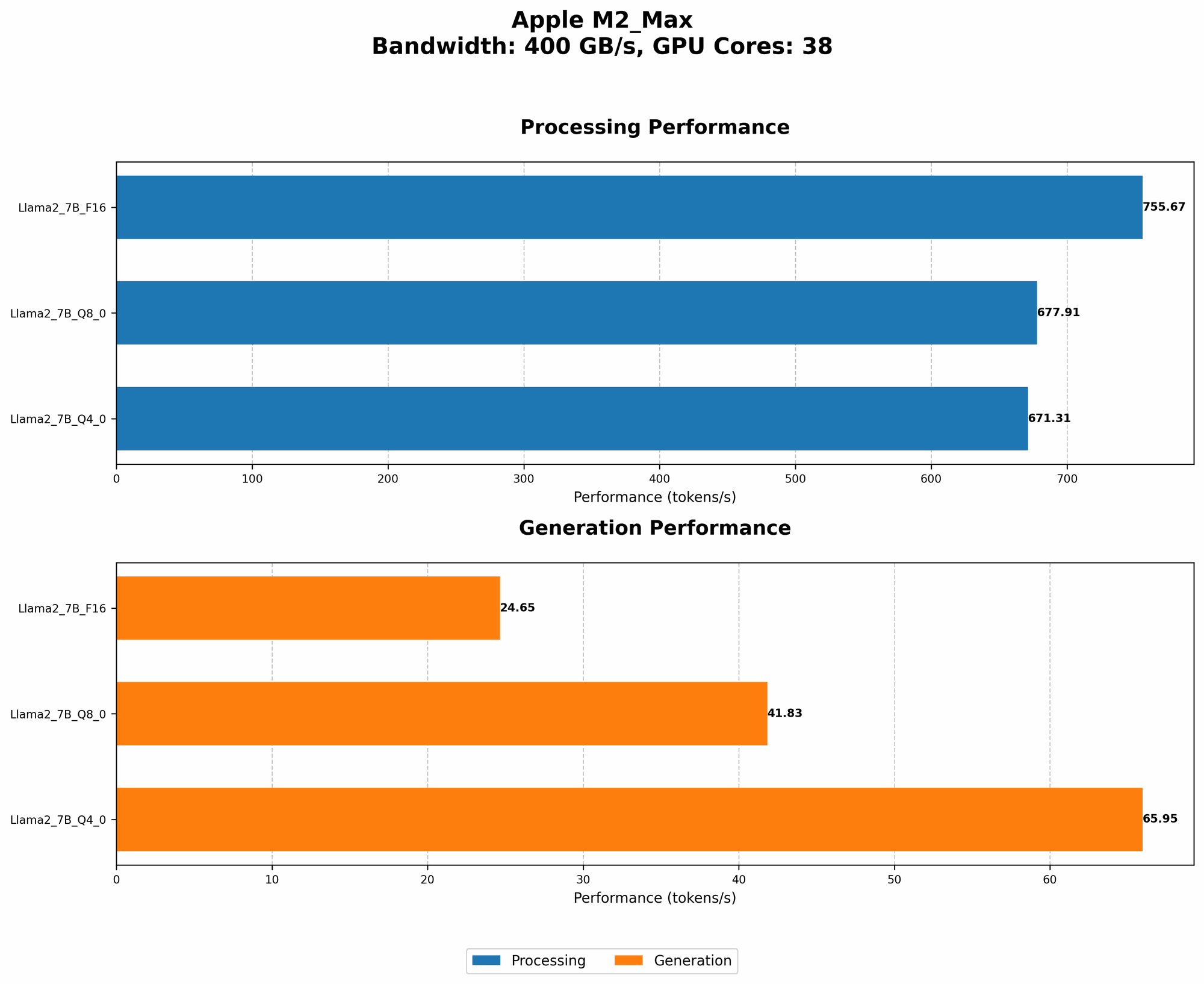
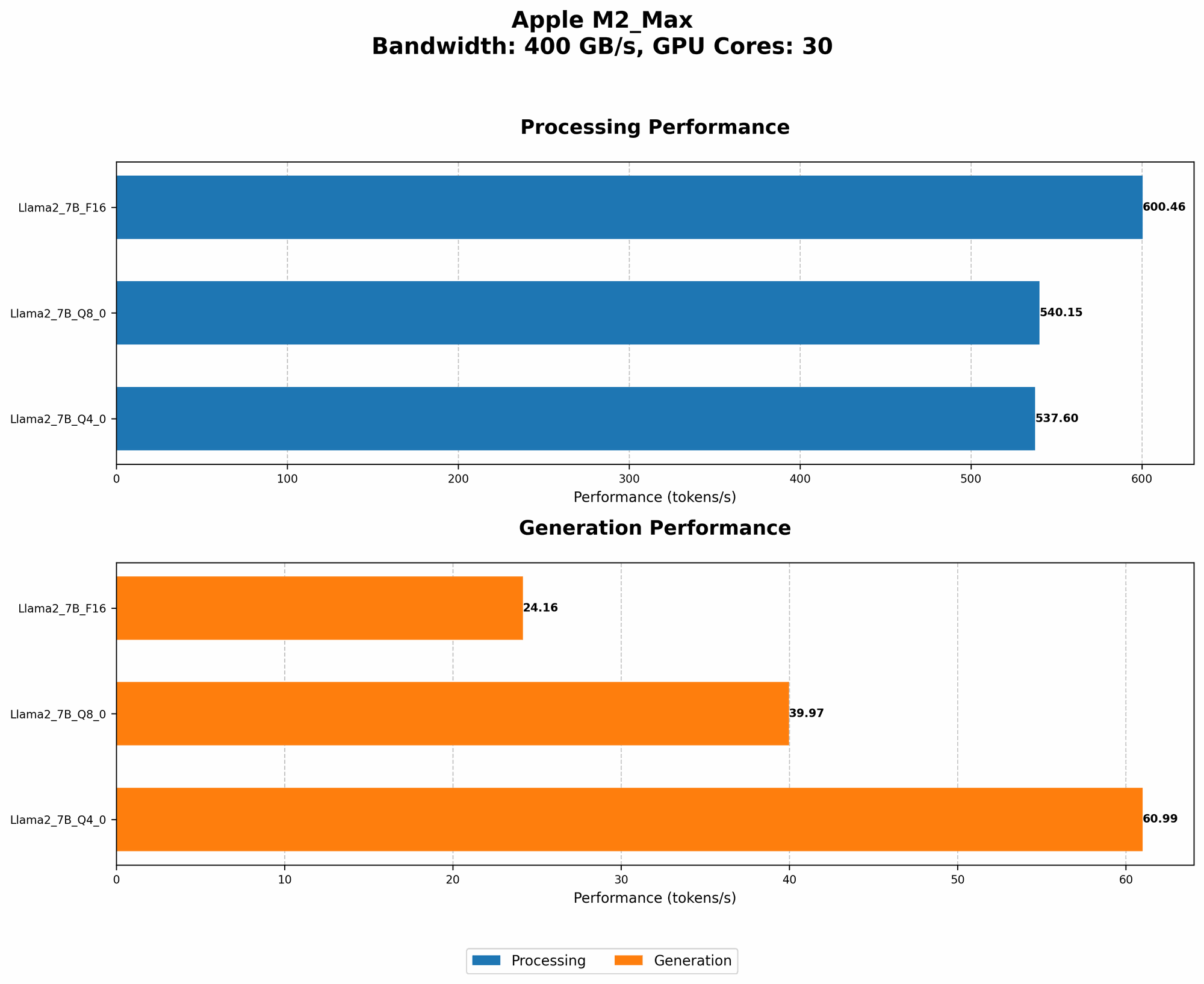
Here's a breakdown of the Llama2 7B model performance on Apple M2 Max, showcasing the impact of different quantization levels on token speeds:
| Model | Processing Tokens (Tokens/s) | Generation Tokens (Tokens/s) |
|---|---|---|
| Llama2 7B F16 | 600.46 | 24.16 |
| Llama2 7B Q8_0 | 540.15 | 39.97 |
| Llama2 7B Q4_0 | 537.6 | 60.99 |
Key Observations:
- F16 (Full Precision) sacrifices speed for accuracy, resulting in the fastest processing but slower generation.
- Q8_0 (Quantized 8-bit) offers a balance between speed and accuracy, providing a good middle ground for processing and generation.
- Q4_0 (Quantized 4-bit) delivers the fastest generation speeds with a slight compromise in accuracy.
Important Note: The provided data focuses solely on the Llama2 7B model, and there is no data available for larger models, like Llama2 70B or Llama2 13B, on Apple M2 Max.
Choosing the Right Quantization Level
Choosing the right quantization level for your LLM model is a balancing act between speed and accuracy. Let's explore how different levels impact your workflow:
- F16: High Accuracy, Lower Speed: If you need the highest level of accuracy, F16 is the way to go. Its full precision allows for the most nuanced results, but it might be slower for generating text.
- Q8_0: Balanced Speed and Accuracy: This level strikes a balance between speed and accuracy, providing a good compromise for most users. It often offers a good blend of fluency and accuracy when generating text.
- Q40: Fastest Speed, Lower Accuracy: If you prioritize speed over everything else, Q40 might be your best bet. Its lower accuracy might result in subtle changes in the generated text, but it can significantly boost generation speeds.
Think of these quantization levels like different levels of a video game:
- F16: Expert Mode (Highest Difficulty, Highest Reward) - Your model will be super accurate, but it might take longer to generate results.
- Q8_0: Normal Mode (Balanced Difficulty, Balanced Reward) - You'll strike a good balance between speed and accuracy.
- Q4_0: Easy Mode (Low Difficulty, Lower Reward) - You'll get your results quickly but might sacrifice some of the details.
Understanding Tokenization
Tokenization is a core concept in LLM processing. Think of it like breaking down a sentence into its individual words, punctuation marks, and other meaningful units. These units are then processed by the LLM model.
How does tokenization impact RAM requirements?
More tokens generally require more RAM. Larger models (like Llama2 70B) have a higher number of tokens, demanding more RAM to run effectively.
RAM Requirements: A Practical Perspective
Let's look at a real-world scenario:
- Imagine you're running a Llama2 7B model with Q8_0 quantization for text generation. You'll need about 10-15 GB of RAM depending on the context you are using (e.g. full or 4-bit for the context).
Important Note: These numbers are approximate and might vary depending on the specific LLM, configuration, and the complexity of your task.
Comparison of Apple M1 and Apple M2 Max for LLMs
Now, let's compare the Apple M1 with the Apple M2 Max to see how they perform with LLMs.
| Model | Device | Processing (Tokens/s) | Generation (Tokens/s) |
|---|---|---|---|
| Llama2 7B Q4_0 | M1 | 437.2 | 41.9 |
| Llama2 7B Q4_0 | M2 Max | 671.31 | 65.95 |
Observations:
- The M2 Max clearly outperforms the M1 in both processing and generation speeds with the Llama2 7B model. This is due to the advancements in the M2 architecture, including a larger number of GPU cores and faster memory bandwidth (BW).
Remember: The M2 Max offers significantly better performance for LLMs, potentially allowing you to work with larger models or achieve faster results.
FAQ (Frequently Asked Questions)
Q: How much RAM do I need for Llama 2 13B on Apple M2 Max?
A: Unfortunately, there is no data available for Llama2 13B on Apple M2 Max. While the M2 Max is powerful, the model's size may present a challenge for local execution.
Q: Can I use a smaller model like Llama 7B if I don't have enough RAM?
A: Yes, smaller models like Llama 7B generally require less RAM. Consider exploring these options if you encounter RAM limitations.
Q: What is quantization and how does it affect performance?
A: Quantization is a technique used to reduce the size of LLM models while maintaining their functionality. It involves converting the model's weights (the values that determine the model's behavior) into integers instead of floating-point numbers. This reduces the memory footprint, allowing you to run larger models with less RAM.
Q: What other factors can impact LLM performance?
A: Factors like the specific LLM framework (e.g., llama.cpp) and your system's overall hardware configuration can significantly affect LLM performance.
Keywords
LLM, Large Language Model, Apple M2 Max, RAM, Llama2, 7B, quantization, F16, Q80, Q40, Tokenization, Processing Speed, Generation Speed, Token/s, Performance, GPU Cores, Bandwidth, Memory, Apple M1, Comparison, Framework, Llama.cpp, Hardware Configuration