How Much RAM Do I Need for running LLM on Apple M1 Ultra?

Introduction
For those diving into the exciting world of local Large Language Model (LLM) deployments, the Apple M1 Ultra chip is a tempting option. This powerful piece of silicon, with its blazing speed and 128GB unified memory, promises to unleash LLMs with impressive performance. But before you embark on this journey, a crucial question arises: just how much RAM do you really need?
This article will explore this question by analyzing specific benchmarks on the Apple M1 Ultra, focusing on the popular Llama2 family. We'll delve into the memory requirements for various model sizes and quantization levels, providing insights that will help you make informed decisions about your local LLM setup.
The Apple M1 Ultra: A Powerhouse for LLMs
The Apple M1 Ultra is a remarkable chip, boasting a staggering 128GB of unified memory, which is far beyond what most laptops offer. This unified memory architecture means that CPU, GPU, and even the neural engine can access the same memory pool seamlessly, minimizing bottlenecks and allowing for incredibly fast data transfer.
But, how does this translate into LLM performance?
Understanding the RAM Considerations
The amount of RAM needed for an LLM depends on several factors:
- Model Size: Larger models require more memory to store the entire model's parameters.
- Quantization: Quantization is a technique that reduces the precision of the model's parameters, resulting in smaller models that are more memory-friendly.
- Context Size: The length of text the model can process (context window) also influences RAM usage.
Let's dive into the specifics with Llama2 models on the Apple M1 Ultra.
Llama2 on Apple M1 Ultra RAM Needs
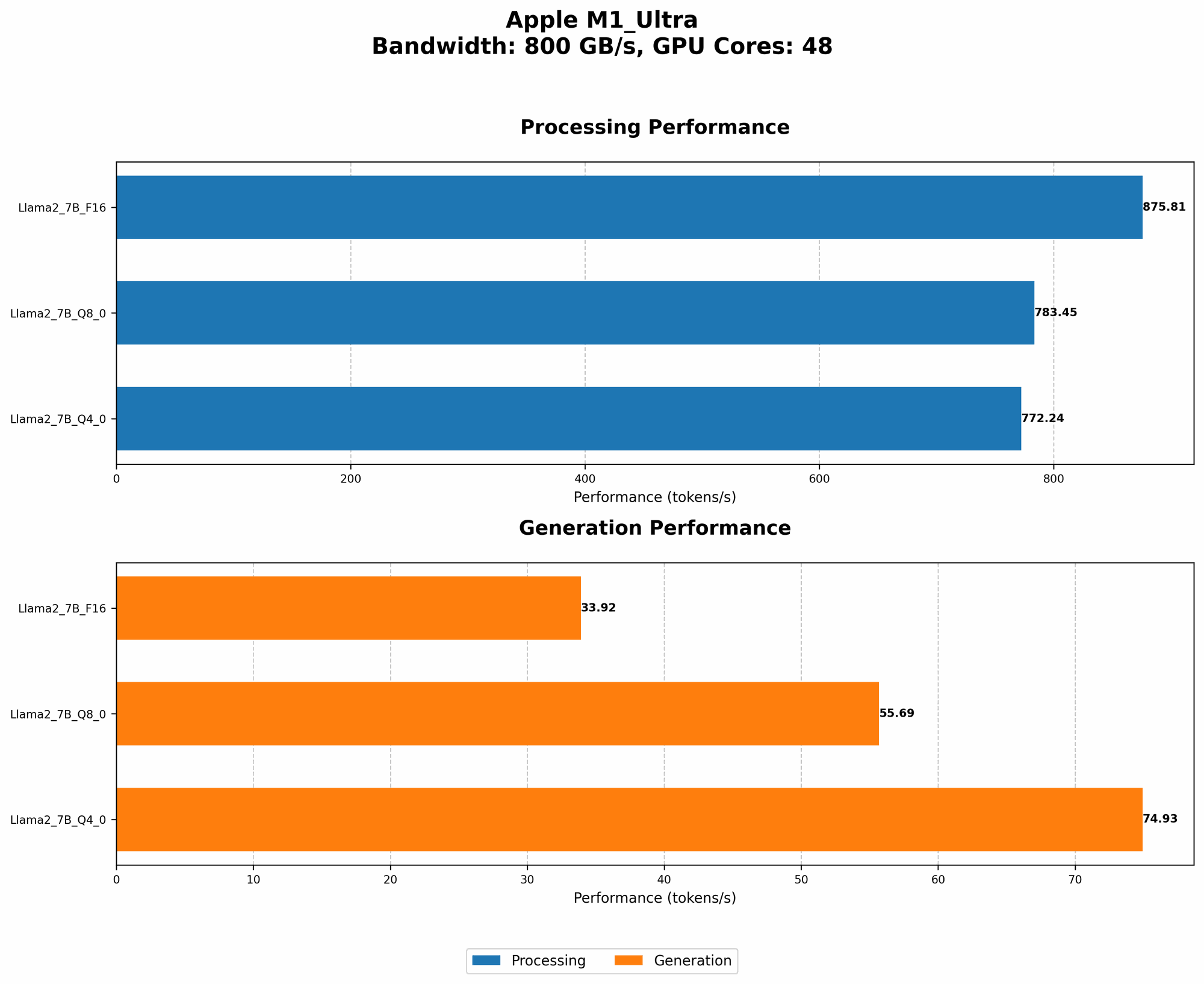
The following table outlines the RAM needs for various Llama2 models with different quantization levels on the Apple M1 Ultra. Please note that the RAM needed will vary based on the specific implementation and context size. These values are just guidelines.
| Llama2 Model | Quantization | Tokens/Second (Processing) | Tokens/Second (Generation) |
|---|---|---|---|
| Llama2 7B | F16 | 875.81 | 33.92 |
| Llama2 7B | Q8_0 | 783.45 | 55.69 |
| Llama2 7B | Q4_0 | 772.24 | 74.93 |
Notes: * F16: Represents the standard 16-bit floating-point representation, offering good precision but higher memory usage. * Q80: This signifies 8-bit quantization, a significant reduction in memory footprint compared to F16 but with some precision loss. * Q40: This is an even more aggressive quantization approach using 4-bit precision.
Interpreting the Results:
As the table illustrates, the Apple M1 Ultra handles the Llama2 7B model comfortably with ample RAM to spare. Even with F16 precision, the memory requirements remain manageable. The choice of quantization level allows you to strike a balance between performance and memory footprint.
Comparison of Apple M1 Ultra with Other Devices
While the M1 Ultra shines in this scenario, it helps to compare it with other popular devices for running LLMs:
- Apple M1 Pro/Max: Compared to the Apple M1 Ultra, the Pro/Max chips have smaller memories (32GB and 64GB respectively) and fewer GPU cores. This can limit the models you can run, especially with larger models or F16 precision.
- Nvidia RTX 4090: This powerful GPU boasts significant memory, allowing for even larger models like Llama2 13B and 70B. However, its specialized architecture might not be as versatile for other tasks compared to the M1 Ultra.
Apple M1 Token Speed Generation
The M1 Ultra doesn't just offer ample RAM, it also boasts phenomenal token generation speed. This means the model can generate text quickly, leading to a more enjoyable user experience.
Let's see how the token generation speed for the Llama2 7B model compares with different quantization levels:
| Quantization | Tokens/Second (Generation) |
|---|---|
| F16 | 33.92 |
| Q8_0 | 55.69 |
| Q4_0 | 74.93 |
Observations:
- As quantization becomes more aggressive (Q80 and Q40), the token generation speed increases. This is because the smaller model size allows for faster processing.
- While the token generation speed is already impressive for F16 precision, the gains with Q80 and Q40 are remarkable.
Conclusion
The Apple M1 Ultra is a powerful platform for running local LLMs, offering a sweet spot between RAM capacity and performance. The Llama2 7B model is a great starting point, and with its impressive token speeds, you can expect smooth and responsive interactions.
Remember that the optimal RAM choice depends on your specific needs and the model you intend to run. By carefully considering model size, quantization, and context size, you can make an informed decision that ensures a seamless LLM experience on your Apple M1 Ultra.
FAQ
What are some factors to consider when choosing an LLM?
The choice of LLM depends on your specific needs and goals:
- Model Size: Larger models offer more capabilities but require more resources (RAM, processing power).
- Purpose: Choose a model tailored for your specific application, whether it's text generation, translation, or summarization.
- Fine-tuning: Consider finetuning a pre-trained model to improve its performance on specific tasks.
Is quantizing a model always better?
Quantization, while reducing memory requirements and increasing speed, can come at the cost of accuracy. The trade-off between precision and memory usage depends on the specific application.
How much RAM is enough for running an LLM?
There is no one-size-fits-all answer. As mentioned earlier, the amount of RAM needed depends on the model size, quantization level, and context size.
What are some other devices suitable for running LLMs?
Consider other powerful alternatives like:
- Nvidia GPUs: Specifically designed for machine learning workloads.
- Google TPUs: Optimized for large-scale deep learning.
Keywords
Apple M1 Ultra, Llama2, RAM, LLM, Quantization, Token Speed, GPU, Memory, Model Size, Context Window, Performance, F16, Q80, Q40, Nvidia RTX 4090, Google TPU, NLP, Natural Language Processing.