How Much RAM Do I Need for running LLM on Apple M1 Pro?

Introduction
The world of Large Language Models (LLMs) is exploding with fascinating new advancements, and the ability to run these models locally is becoming increasingly popular. But for many, a key question remains: how much RAM do I need to run an LLM on my Apple M1 Pro? Especially with the recent release of Llama 2, the need for a dedicated guide becomes even more vital. This article dives deep into the RAM requirements of running LLMs on the M1 Pro, breaking down the data and offering practical insights for developers and geeks alike.
Apple M1 Pro LLM Performance: It's Not Just About RAM!
While RAM is essential for running LLMs, it's not the only factor influencing performance. It's like a complex dance between several key players:
- The LLM Model: Some LLMs are lighter than others, requiring less RAM for operation. Think of it as a small dance party vs. a massive concert - the space needed differs.
- Quantization: This process reduces the precision of model weights, leading to smaller file sizes and lower RAM usage. It's like condensing a musical score into a smaller version, still playable but with slightly less detail.
- GPU Processing Power: The M1 Pro's GPU plays a vital role in accelerating LLM calculations. A powerful GPU is like having a dedicated dance floor with ample space for everyone to move freely!
Quantization: Bringing LLMs Down to Size
Quantization is a game-changer for running LLMs on devices with limited RAM. Think of it as a clever trick that allows you to squeeze more information into a smaller space without losing too much detail. Here's how it works:
- Original Weights: LLMs are trained using large, precise numbers called "weights". These weights are like the exact instructions for each step in the dance.
- Quantization: By using a smaller range of numbers (like 8-bit or even 4-bit), we compress those weights into a smaller package. This is like simplifying the dance steps to make them easier to remember and perform.
Apple M1 Pro Performance: A Deep Dive into the Numbers
Let's dive into the specifics of Apple M1 Pro performance for different Llama 2 configurations.
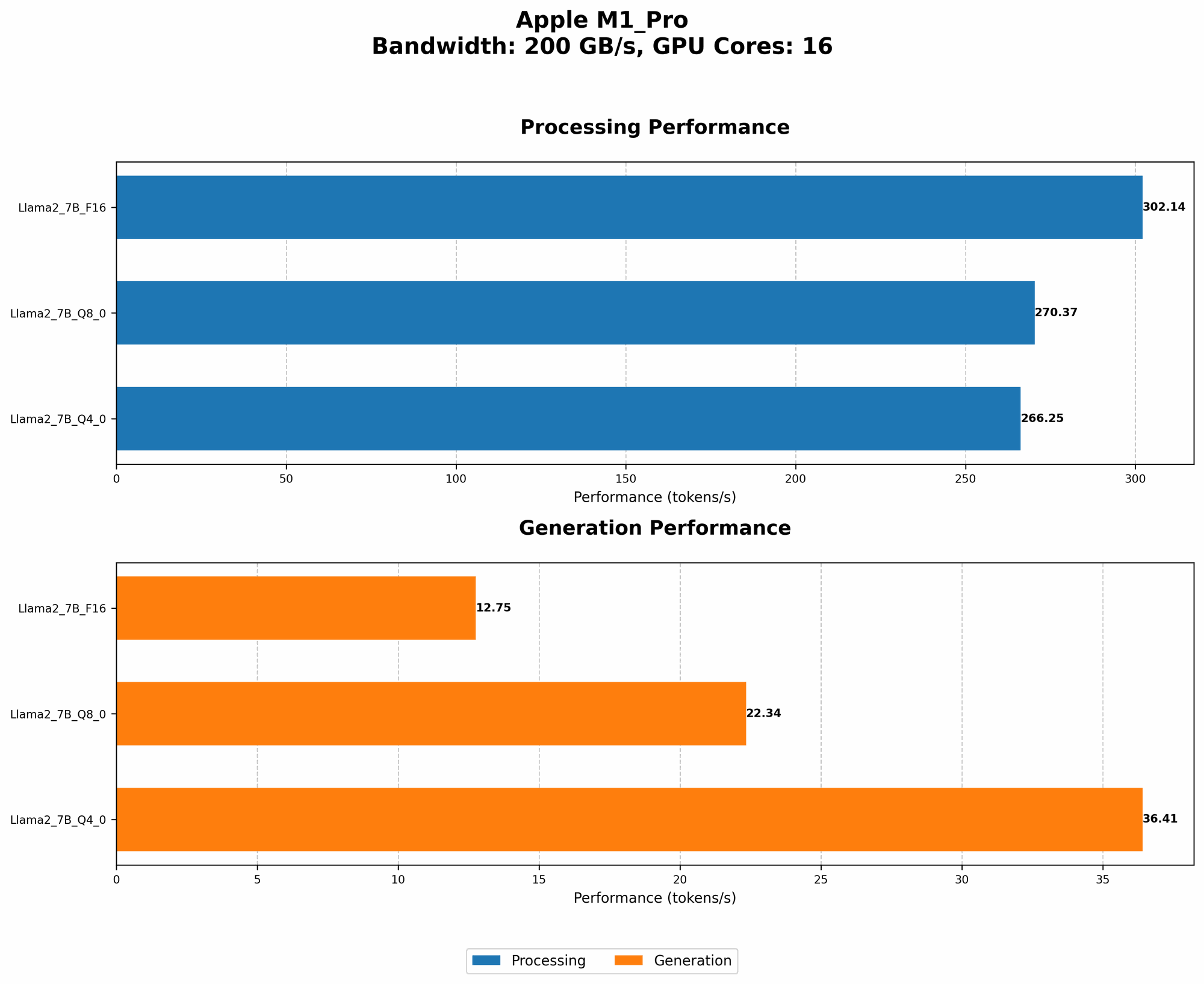
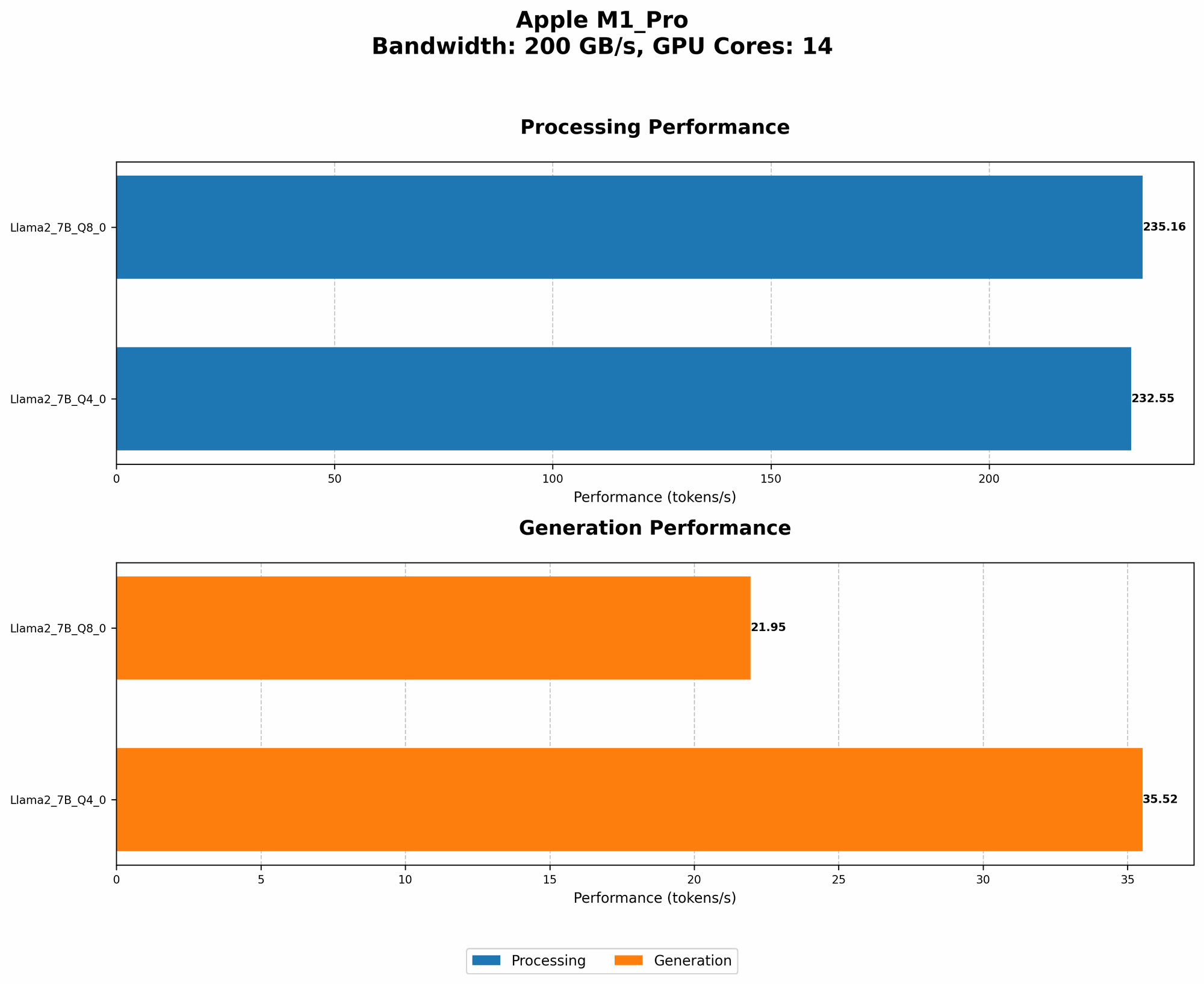
*The data below shows token/second performance for various configurations of Llama 2 on the Apple M1 Pro. *
Note: The data is based on the M1 Pro with 16GB of RAM. We'll explore the impact of RAM on these numbers later.
| Model | Bandwidth (BW) | GPU Cores | Llama 2 7B F16 Processing (tokens/sec) | Llama 2 7B F16 Generation (tokens/sec) | Llama 2 7B Q8_0 Processing (tokens/sec) | Llama 2 7B Q8_0 Generation (tokens/sec) | Llama 2 7B Q4_0 Processing (tokens/sec) | Llama 2 7B Q4_0 Generation (tokens/sec) |
|---|---|---|---|---|---|---|---|---|
| Apple M1 Pro | 200 | 16 | 302. 14 | 12.75 | 270.37 | 22.34 | 266.25 | 36.41 |
Key Takeaways:
- Quantization makes a big difference: Q80 and Q40 configurations offer significantly faster processing speeds compared to F16. This shows that reducing precision can indeed improve performance on devices with limited RAM.
- Token generation is slower: While the M1 Pro excels in processing tokens, it's slower when generating text. This is common for GPUs, as token generation requires more complex computations.
- M1 Pro's Power shines through: Despite not having a dedicated high-end GPU, the M1 Pro delivers impressive performance, especially with quantization.
How Much RAM Do I Really Need?
The recommended RAM for running LLMs on the M1 Pro depends on the model size and desired quantization level. Here's what we can infer based on the data:
- Llama 2 7B - Q8_0: This configuration requires less RAM than the full-precision F16 version, making it a great choice for devices with lower RAM.
- Llama 2 7B - Q40: While using even less RAM, Q40 might compromise accuracy compared to Q8_0. You might need to experiment to find the right balance between performance and accuracy.
General Recommendation: For the Apple M1 Pro, having 16GB of RAM is sufficient to run Llama 2 7B models with quantization. If you want to explore larger models (like Llama 2 13B) or use full precision, you might want to consider 32GB or more.
RAM vs. Performance: A Complex Relationship
Remember, RAM is more than just a number; it's how your computer handles data. It's not just about quantity but also about how efficiently that memory is used. Here's a scenario:
Imagine a dance club with a limited dance floor (RAM) and a lot of dancers (data). If the club has great organization (efficient memory management), dancers can move freely. But if it's poorly organized, dancers will bump into each other, slowing things down.
That's why RAM and efficient software (like a well-written LLM implementation) go hand-in-hand for achieving peak performance.
FAQ: Your Burning LLM Questions Answered
1. Can I run LLMs on older Macs?
Yes, you can, but performance might be limited. Older Macs might not have the same GPU power, leading to slower processing speeds, especially for large models.
2. Does more GPU Cores always mean better performance?
Not always. While more cores can provide parallel processing power, the actual performance also depends on the GPU architecture, memory bandwidth, and software optimizations.
3. Is quantization "lossy"? Will I lose accuracy?
Yes, quantization is a form of lossy compression. You'll lose some precision, which might impact accuracy. However, the impact is often minimal, especially for tasks like language translation where small errors aren't noticeable.
4. What about other LLMs like GPT-3?
GPT-3 is a larger and more complex model than Llama 2. The RAM requirements for GPT-3 will be much higher, and you might need a dedicated GPU for optimal performance.
Keywords
Apple M1 Pro, RAM, LLM, Llama 2, Quantization, GPU, Token Generation, Processing, Bandwidth, GPU Cores, Performance, Accuracy, Efficiency, GPT-3