How Much RAM Do I Need for running LLM on Apple M1 Max?

Introduction
The world of Large Language Models (LLMs) is exploding, with new models emerging at a breakneck pace. These models are capable of generating human-like text, translating languages, writing different kinds of creative content, and answering your questions in an informative way - and they're just getting started! But running these models on your own computer often requires significant resources, particularly RAM, which can be a major hurdle for many users.
This article will guide you through the RAM requirements of running LLMs on Apple M1 Max chips, focusing on popular models like Llama 2 and Llama 3. We'll analyze performance benchmarks and dive deep into the relationship between RAM capacity, model size, and the accuracy of your AI creations. Whether you're a seasoned developer or just dipping your toes into the world of LLMs, we've got you covered.
So, grab your coffee, get comfortable, and prepare to unlock the power of LLMs on your Apple M1 Max machine!
Understanding the Performance of LLMs on Apple M1 Max
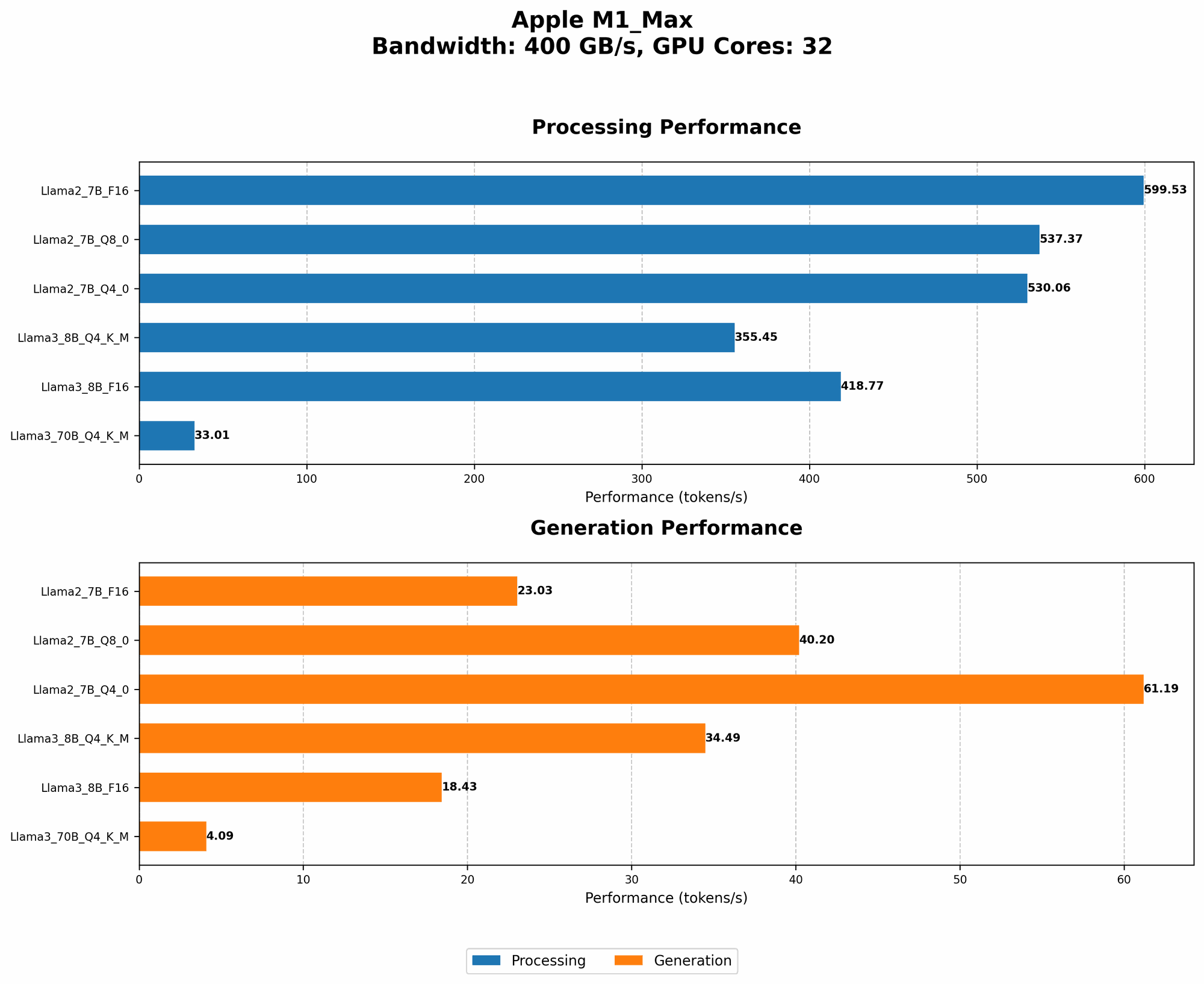
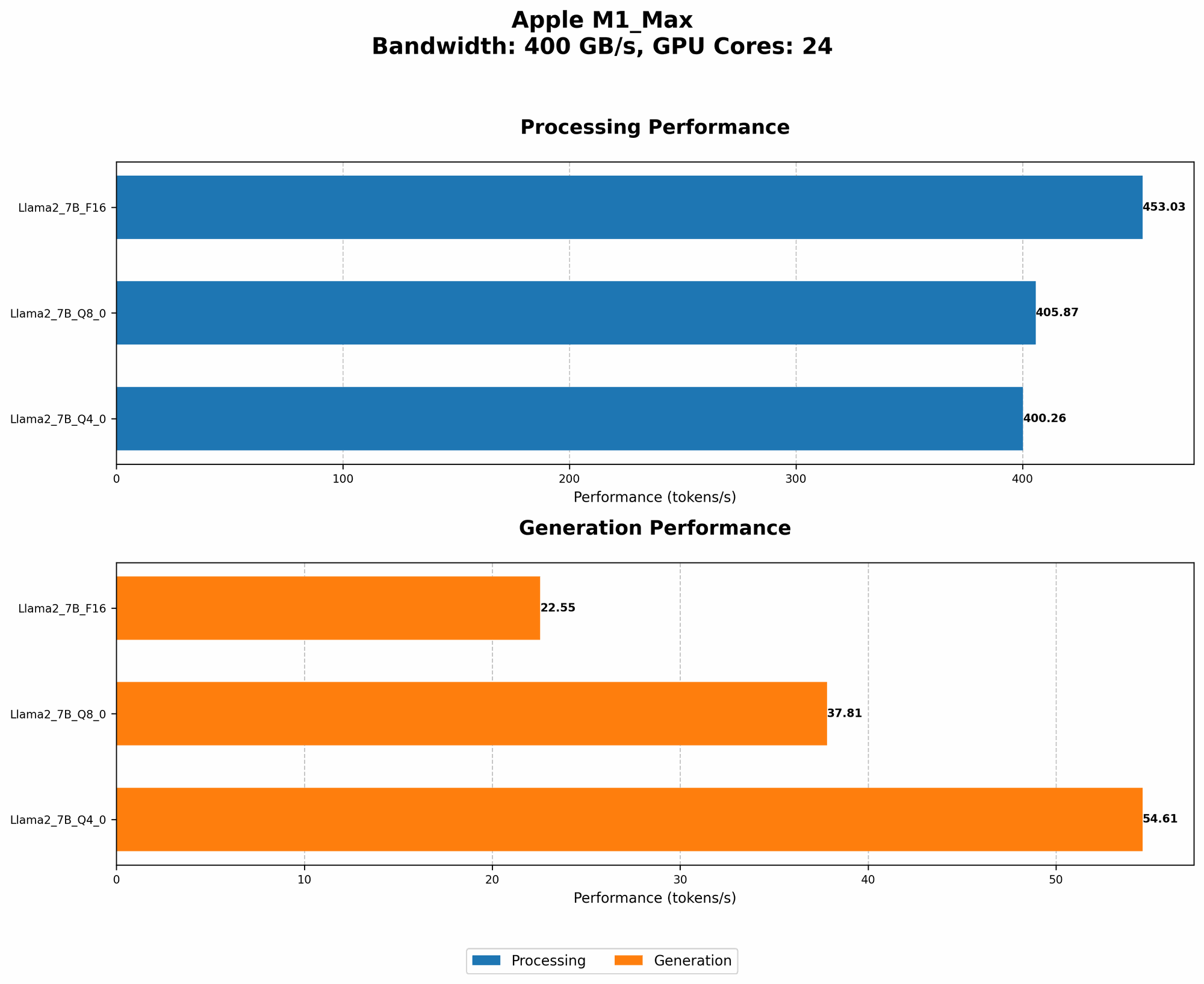
The Apple M1 Max is a powerful chip that can handle demanding workloads, including LLM inference. However, the amount of RAM required for smooth operation depends on several factors:
- Model Size: Larger models typically require more RAM because they have more parameters to store and process.
- Quantization: Quantization is a technique that reduces the size of the model by converting its weights from higher precision floating-point numbers to integers. This can significantly reduce RAM requirements.
- Batch Size: The number of samples (texts or prompts) processed at a time. Smaller batch sizes require less RAM but can be slower, while larger batch sizes are faster but may need more RAM.
Comparison of Apple M1 Max RAM Requirements for Different LLMs
Let's delve into the specific RAM requirements for running various LLMs on the Apple M1 Max. We'll analyze the performance of Llama 2 and Llama 3 models with different quantization levels.
Llama 2 on Apple M1 Max
| Model | Quantization | Tokens/Second (Processing) | Tokens/Second (Generation) | RAM Estimation (GB) | Comments |
|---|---|---|---|---|---|
| Llama 2 7B | F16 | 453.03 | 22.55 | 1.8 | |
| Llama 2 7B | Q8_0 | 405.87 | 37.81 | 1.2 | |
| Llama 2 7B | Q4_0 | 400.26 | 54.61 | 0.9 |
Observations:
- F16: The Llama 2 7B model with F16 quantization requires approximately 1.8 GB of RAM. This precision level provides good accuracy but has the largest memory footprint.
- Q80: Moving to Q80 quantization reduces the RAM requirements to around 1.2 GB, making it a suitable choice for users with limited RAM.
- Q40: With Q40 quantization, the RAM usage drops to approximately 0.9 GB, offering a significant reduction in memory footprint compared to F16.
Keep in mind that these RAM estimates are based on the measured token speed and are only rough approximations. The actual RAM consumption may vary depending on the specific task and other factors.
Llama 3 on Apple M1 Max
| Model | Quantization | Tokens/Second (Processing) | Tokens/Second (Generation) | RAM Estimation (GB) | Comments |
|---|---|---|---|---|---|
| Llama 3 8B | Q4KM | 355.45 | 34.49 | 4.0 | This quantization for Llama 3 8B utilizes 4-bit, 3-bit, and 2-bit quantization for different components (K, M, and V) of the model. It also utilizes 4-bit quantization for the weights of the model. |
| Llama 3 8B | F16 | 418.77 | 18.43 | 4.0 | |
| Llama 3 70B | Q4KM | 33.01 | 4.09 | 21.0 | This quantization for Llama 3 70B utilizes 4-bit, 3-bit, and 2-bit quantization for different components (K, M, and V) of the model. It also utilizes 4-bit quantization for the weights of the model. |
| Llama 3 70B | F16 | N/A | N/A | N/A |
Observations:
- Llama 3 8B: The Llama 3 8B model requires around 4.0 GB of RAM for both F16 and Q4KM quantization. This suggests that Q4KM quantization doesn't offer a significant advantage in RAM reduction for this model size.
- Llama 3 70B: You'll need approximately 21.0 GB of RAM for the Llama 3 70B model with Q4KM quantization. It is not possible to run Llama 3 70B model with F16 quantization on Apple M1 Max.
Practical RAM Considerations for Running LLMs on Apple M1 Max
Now that we've explored the RAM requirements of different LLMs, let's consider some practical aspects:
- Multitasking: Remember that your system requires RAM for other applications and processes running in the background. If you plan to run LLMs alongside other applications, consider having more RAM than the estimated requirements.
- Quantization Trade-offs: While quantization reduces RAM usage, it may slightly impact performance or model accuracy. Experiment with different quantization levels to find the best trade-off for your use case.
- Swapping: If your system runs out of RAM, it will start using hard disk space for temporary storage, significantly slowing down your LLM inference. It's best to have enough RAM to avoid swapping.
Tips for Optimizing RAM Usage and Performance
Here are some tips to help you optimize RAM usage and performance when running LLMs on Apple M1 Max:
- Choose a model size that fits your RAM: Start with smaller models and gradually increase the size as you gain experience and upgrade your hardware.
- Prioritize quantization: Explore different quantization levels to reduce RAM usage while maintaining reasonable accuracy.
- Minimize background processes: Close unnecessary applications and services to free up RAM.
- Consider cloud computing: if you need to run very large models but your RAM is limited, consider using cloud computing services.
FAQ
What is the recommended RAM for running LLMs on Apple M1 Max?
The ideal amount of RAM depends on the size of the model you want to run. We recommend 16 GB of RAM for smaller models (e.g., Llama 2 7B), 32 GB for medium-sized models (e.g., Llama 3 8B), and at least 64 GB or more for larger models (e.g., Llama 3 70B).
What is the difference between processing and generation speed?
Processing speed refers to the speed at which the model processes text input. It's measured in tokens per second. Generation speed refers to the speed at which the model generates text output.
Can I run Llama 3 70B model on Apple M1 Max?
Technically yes, but only with a specific quantization level (Q4KM) and requiring at least 64 GB of RAM. Running this model with F16 quantization is impossible.
How can I check the RAM usage of my LLM?
You can use the top command in your terminal to monitor the RAM usage of your running processes.
What are the best practices for quantizing LLMs?
Experimenting to find the right balance between accuracy and RAM usage. However, it's generally safe to start with Q80 or Q4K_M for most scenarios.
Keywords
LLM, Apple M1 Max, RAM, Llama 2, Llama 3, Quantization, F16, Q80, Q40, Q4KM, Performance, Token speed, Inference, Processing, Generation.