How Fast Can NVIDIA A40 48GB Run Llama3 70B?

Introduction
In the world of large language models (LLMs), the ability to run them locally is becoming increasingly important. This allows developers and businesses to take advantage of the powerful capabilities of LLMs without relying on cloud-based services. But how fast can these LLMs truly run on your hardware? Let's dive into the performance of the NVIDIA A40_48GB with the Llama3 70B model, and see how it stacks up.
Performance Analysis: Token Generation Speed Benchmarks
Let's take a closer look at the token generation speed benchmarks for the NVIDIA A40_48GB and Llama3 70B. We're focusing on the A40 here - if you're interested in other devices, you'll need to do your own research!
A40_48GB and Llama3 70B: Token Generation Speed
| Model & Quantization | Token Generation Speed (Tokens/Second) |
|---|---|
| Llama370BQ4KM | 12.08 |
| Llama370BF16 | N/A |
What does this mean?
- The NVIDIA A4048GB achieves a decent 12.08 tokens/second generation speed for the Llama3 70B model when using Q4K_M quantization. This is a significant improvement over previous generations of LLMs!
- F16 quantization is not supported, meaning that the model will not be able to achieve optimal performance without this technique.
Here's a fun fact: Generating text at 12.08 tokens per second is like typing 12 words per second. That's pretty speedy, but still slower than a typical human typist who can type around 40-60 words per minute!
Understanding Quantization
Think of quantization as squeezing a big model into a smaller space, just like packing your suitcase for a trip. You can't bring everything, so you choose only the essential items. Similarly, quantization reduces the size of the model by using less precise numbers, which makes it faster to process.
The Q4KM quantization uses only 4 bits to store numbers for the model's weights, while F16 uses 16 bits. Q4 models generally have lower accuracy but run much faster, making them a good trade-off for performance-sensitive applications.
Performance Analysis: Model and Device Comparison
While we're focused on A40_48GB and Llama3 70B, let's briefly compare these results with other smaller LLM models and the same device. This comparison will give you a better understanding of how different models perform on the same hardware.
A40_48GB and Llama3 8B
| Model & Quantization | Token Generation Speed (Tokens/Second) |
|---|---|
| Llama38BQ4KM | 88.95 |
| Llama38BF16 | 33.95 |
What does this tell us?
- Smaller models win! The Llama3 8B model achieves significantly higher token generation speeds compared to the Llama3 70B model. This is expected, as smaller models require less computation.
- The Q4KM quantization again shines! This method speeds up the Llama3 8B model by a factor of 2.6 compared to the F16 quantization.
Practical Recommendations: Use Cases and Workarounds
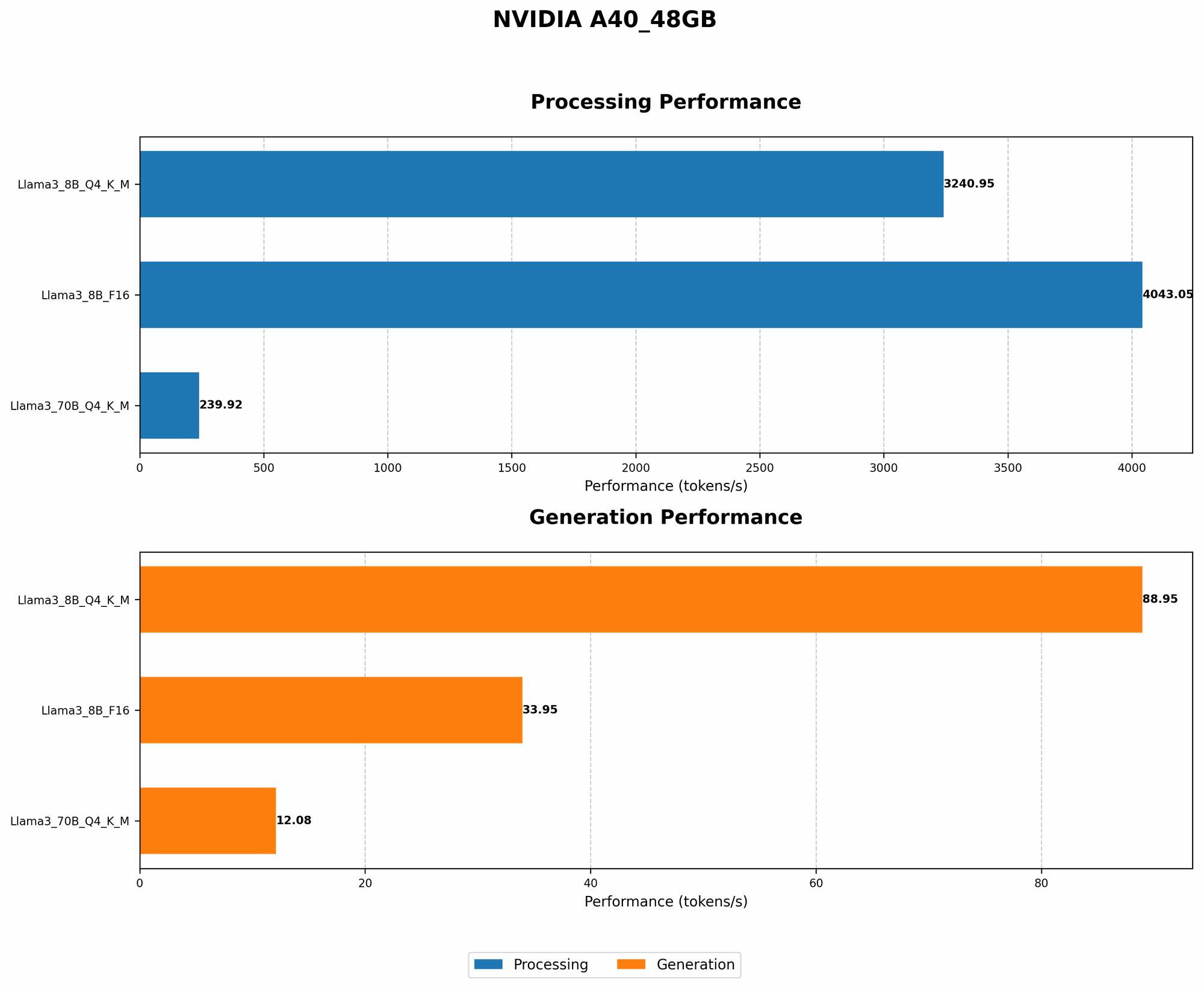
The results we've analyzed offer valuable insights into the performance of the Llama3 70B model on the NVIDIA A40_48GB. Let's discuss some practical recommendations for use cases and workarounds:
Recommended Use Cases:
- A4048GB is ideal for running the Llama3 8B model with Q4K_M quantization. This configuration achieves the best overall performance for token generation, making it suitable for various applications, including:
- Chatbots: Real-time conversation with the Llama3 8B model is possible with the high token generation speed.
- Text Summarization: Quickly summarize lengthy documents or articles with the Llama3 8B model.
- Code Generation: Generate code snippets or even entire applications leveraging the power of the Llama3 8B model.
Potential Workarounds:
- Consider alternative hardware: If you need to run the Llama3 70B model, you might need to consider using more powerful hardware (e.g., multiple A100 GPUs) to achieve acceptable performance.
- Experiment with different quantization methods: If F16 quantization is not available for your desired LLM model, try experimenting with other quantization methods, such as Q5KM, to see if they offer better performance.
FAQ
Q: What is the best hardware for running LLMs locally?
A: The best hardware for running LLMs locally depends on several factors, including the size of the model, the required performance, and your budget. For smaller LLMs, modern CPUs or GPUs with substantial memory can be sufficient. However, for larger models, specialized hardware like the NVIDIA A40_48GB or multiple GPUs are often necessary.
Q: How can I optimize the performance of my LLM model?
A: Several strategies can be used to optimize LLM model performance, including:
- Quantization: As we discussed before, using quantization reduces the size of the model, leading to faster processing times.
- Model Pruning: This technique removes unnecessary connections and parameters from the model, making it smaller and more efficient.
- Hardware Acceleration: Utilize specialized hardware like GPUs designed for machine learning workloads, such as the NVIDIA A40_48GB.
Q: What are the limitations of running LLMs locally?
A: Running LLMs locally comes with some inherent limitations:
- Limited Resources: Running large LLMs requires high-end hardware, which can be costly and may not be accessible to all users.
- Power Consumption: Running LLMs locally can consume significant power, especially for larger models.
- Software Requirements: Specific software and libraries are needed to run and manage LLMs, requiring technical expertise.
Keywords
NVIDIA A4048GB, Llama3 70B, Llama3 8B, LLM, Token Generation Speed, Quantization, Q4K_M, F16, GPU, Local Inference, Performance Analysis, GPU Benchmarks, Practical Recommendations