How Fast Can NVIDIA A100 SXM 80GB Run Llama3 70B?

Introduction
The world of large language models (LLMs) is constantly evolving, with new models and advancements being released seemingly every day. One of the key factors influencing the practical use of LLMs is their performance - how quickly they generate text and process information. Running these powerful models locally can be a challenge, especially when it comes to resource-intensive models like Llama3 70B.
In this deep dive, we'll explore the performance capabilities of the NVIDIA A100SXM80GB, a high-performance GPU, when running Llama3 70B. We'll analyze the token generation speed and compare it to the performance of other models.
Ultimately, we'll arm you with the knowledge and insight to navigate this exciting landscape of local LLMs, helping you make informed decisions about which models and devices best suit your needs.
Performance Analysis: Token Generation Speed Benchmarks
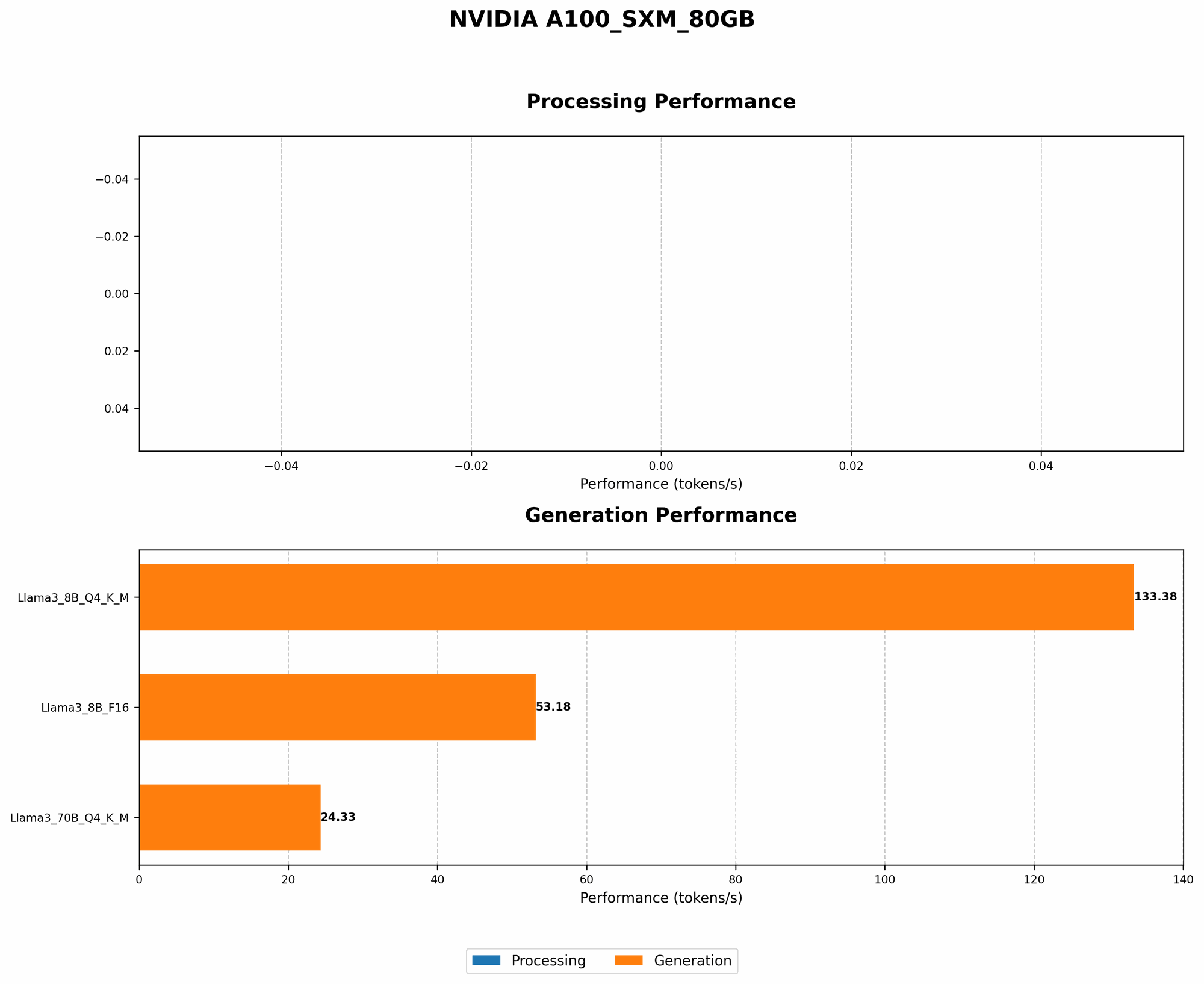
NVIDIA A100SXM80GB and Llama3 70B: A Performance Showdown
Our analysis is focused on the token generation speed of Llama3 70B running on the NVIDIA A100SXM80GB. This specific model and device combination is particularly interesting as both are considered high-end and capable of handling complex tasks.
Let's dive into the numbers:
| Model | Device | Token Generation Speed (tokens/second) |
|---|---|---|
| Llama3 70B - Quantized (Q4KM) | NVIDIA A100SXM80GB | 24.33 |
Key Observation:
- Llama3 70B running on the NVIDIA A100SXM80GB achieves a respectable token generation speed of 24.33 tokens per second when quantized to Q4KM.
What does this mean for you?
It means that this combination can handle complex tasks with a decent amount of speed. However, it's important to note that this is just one data point. The actual performance you experience may vary depending on the specific application, the input prompts, and other factors.
Performance Analysis: Model and Device Comparison
The Impact of Quantization
It's very important to understand the impact of quantization on LLM performance.
Consider this analogy: Imagine you're trying to carry a heavy load (the LLM model) across a bridge (the device). Quantization is like using a smaller, lighter box to pack your load in. This smaller box reduces the overall weight (model size) but might impact the quality (precision) of the data you're carrying.
Similarly, quantization reduces the model's size, making it more efficient for smaller devices. However, it also potentially impacts the model's accuracy.
In our case, we observe a significant difference in token generation speed between the quantized (Q4KM) and non-quantized (F16) versions of Llama3 8B on A100SXM80GB:
| Model | Device | Token Generation Speed (tokens/second) |
|---|---|---|
| Llama3 8B - Quantized (Q4KM) | NVIDIA A100SXM80GB | 133.38 |
| Llama3 8B - Non-Quantized (F16) | NVIDIA A100SXM80GB | 53.18 |
Key Takeaway:
- Quantization significantly boosts the token generation speed, almost tripling the speed in this specific case. However, it's important to carefully weigh the trade-offs between speed and accuracy when choosing between quantized and non-quantized models.
Practical Recommendations: Use Cases and Workarounds
Making the Most of Your LLM Setup
So, how can you use this information to optimize your local LLM setup?
- Consider Quantization: For resource-constrained devices or when speed is a priority, consider using quantized models.
- Prioritize Accuracy: If you're working on tasks that require high accuracy, such as scientific research or creative writing, non-quantized models might be a better choice.
- Experiment: Don't be afraid to experiment with different models and devices to find the combination that best meets your requirements.
- Fine-tuning: Fine-tune your models on your specific data to improve performance for your use cases.
Workarounds for Speed Limitations
If you're facing performance limitations with your current setup, consider these workarounds:
- Cloud-based solutions: Offload your processing to cloud services like Google Colab or Amazon SageMaker.
- Experiment with different architectures: Explore other GPU architectures that might be better suited for LLMs, such as AMD GPUs or Google TPUs.
- Utilize GPU memory optimizations: Explore techniques for optimizing GPU memory usage to improve performance.
- Explore smaller models: Consider using smaller LLM models for tasks that don't require enormous processing power.
FAQ
Q: What is quantization? A: Quantization is a technique used to reduce the size of LLM models by converting the model's weights from high-precision floating-point numbers to lower precision integers. This makes the models more efficient to run on devices with limited memory or processing power.
Q: How can I fine-tune an LLM? A: Fine-tuning involves training an existing LLM on a specific dataset relevant to your task. This can improve the model's performance for your specific needs.
Q: What are some good resources for learning more about LLMs? A: The Hugging Face community is a great place to start, offering resources on various topics related to LLMs, including fine-tuning, deployment, and more.
Q: What are the limitations of running LLMs locally? A: Running LLMs locally can be challenging, especially with the massive size and computational requirements of many models. You might encounter limitations in terms of hardware compatibility, memory, and processing power.
Keywords
LLM, Llama3, NVIDIA A100SXM80GB, Token Generation Speed, Quantization, Q4KM, F16, Performance, Use Cases, Workarounds, Cloud-based solutions, Fine-tuning, Hugging Face