How Fast Can NVIDIA 4080 16GB Run Llama3 70B?
Introduction
The world of large language models (LLMs) is evolving at a breakneck pace. Models like Llama 2 and Llama 3 have captured the imagination of developers and researchers alike, fueling a new wave of AI innovation. But running these models locally requires a serious hardware setup. Enter the NVIDIA 4080_16GB, a powerhouse graphics card known for its raw performance.
This article dives deep into the performance of the NVIDIA 4080_16GB with Llama3 70B, exploring its token generation speed and comparing it to other device-model configurations. We'll uncover the factors that influence performance and provide practical recommendations for optimizing your LLM setup.
Performance Analysis: Token Generation Speed Benchmarks
Token generation speed is a crucial metric for evaluating an LLM's performance, especially in real-world applications. It's measured in tokens per second, representing the number of words or units of text the model can process in one second.
NVIDIA 4080_16GB Token Generation Speed
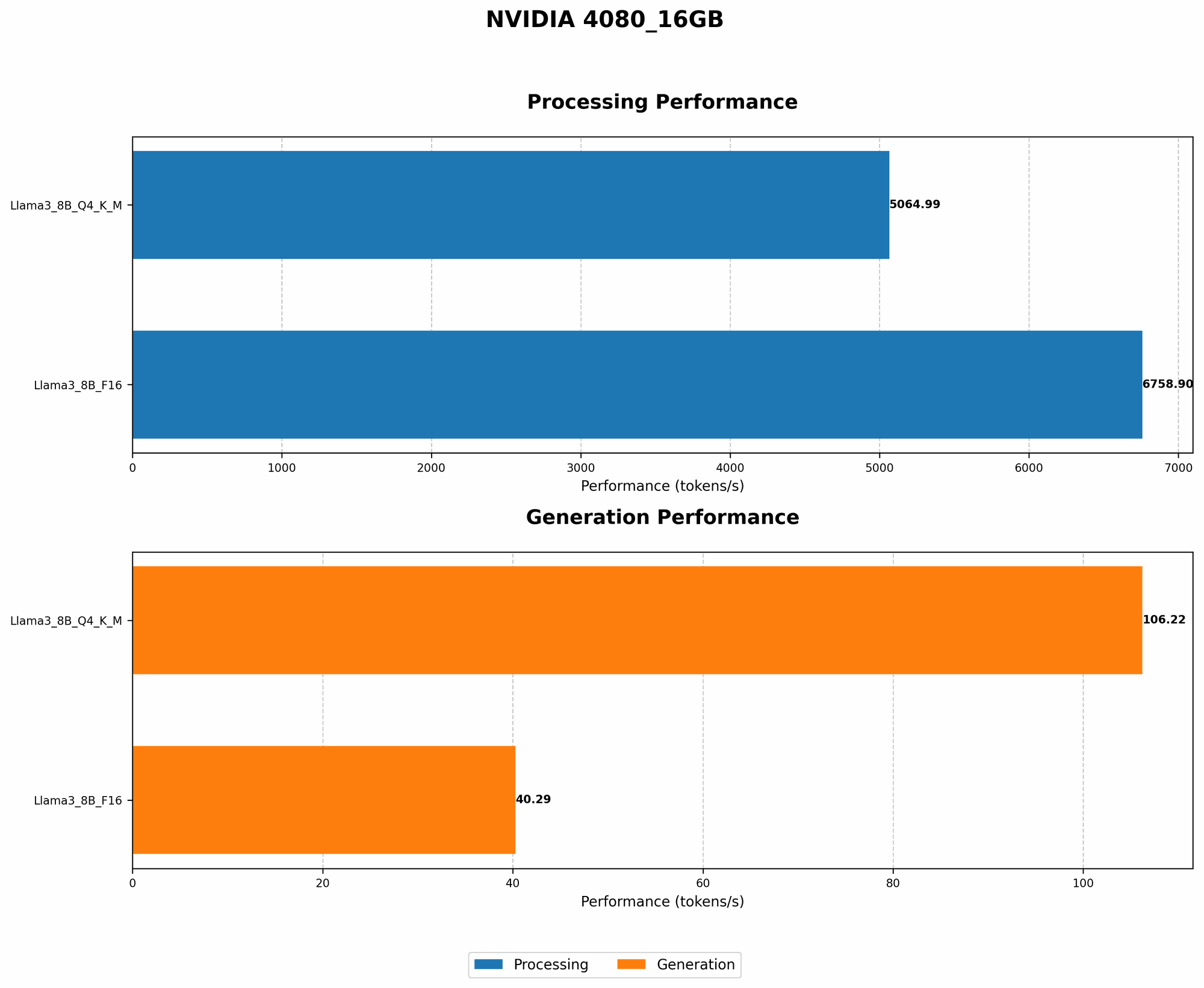
The NVIDIA 408016GB boasts impressive token generation speeds, though specific results vary depending on the model's size, precision, and the computational task. Here's a summary of the token generation speeds recorded on the NVIDIA 408016GB:
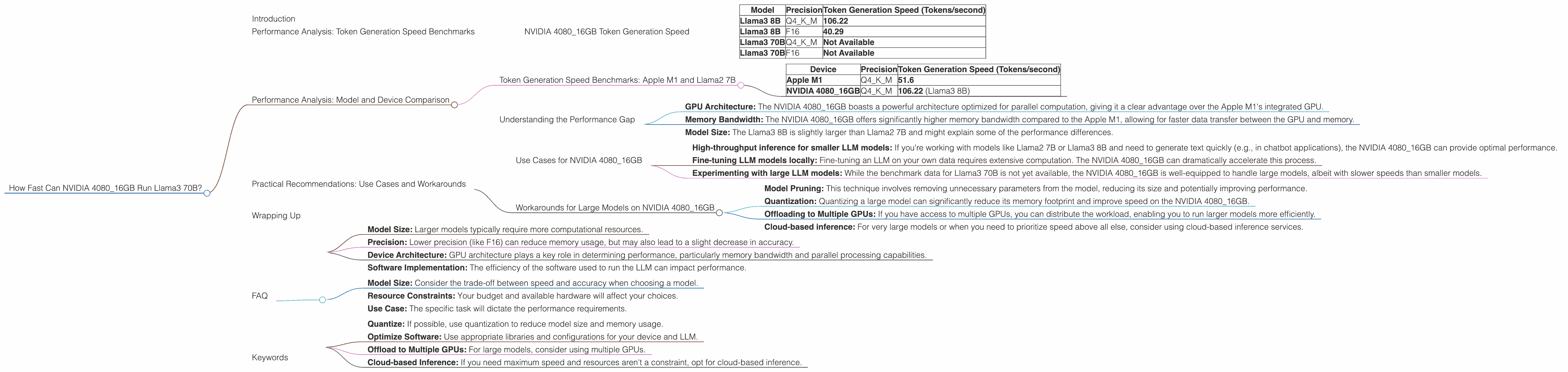
| Model | Precision | Token Generation Speed (Tokens/second) |
|---|---|---|
| Llama3 8B | Q4KM | 106.22 |
| Llama3 8B | F16 | 40.29 |
| Llama3 70B | Q4KM | Not Available |
| Llama3 70B | F16 | Not Available |
Q4KM refers to quantization, a technique that reduces the size of the model by representing its weights with fewer bits. F16 represents half-precision floating-point format, which uses fewer bits to store numbers.
As you can see from the table, the token generation speed is significantly higher for the Llama3 8B model when using quantized weights (Q4KM). This demonstrates that quantization can significantly improve performance for smaller models, especially on GPUs like the NVIDIA 4080_16GB.
Unfortunately, benchmark data for the Llama3 70B model on the NVIDIA 4080_16GB is not available yet. However, we can infer that the performance will be considerably different due to the much larger model size.
Performance Analysis: Model and Device Comparison
To gain a better understanding of the NVIDIA 4080_16GB's performance, let's compare it to other popular devices and LLM configurations.
Token Generation Speed Benchmarks: Apple M1 and Llama2 7B
The Apple M1 chip has gained traction for its impressive performance in LLM inference. Let's compare its performance with the NVIDIA 4080_16GB for the Llama2 7B model:
| Device | Precision | Token Generation Speed (Tokens/second) |
|---|---|---|
| Apple M1 | Q4KM | 51.6 |
| NVIDIA 4080_16GB | Q4KM | 106.22 (Llama3 8B) |
This table highlights the performance gap between the Apple M1 and NVIDIA 408016GB for a quantized 7B model (Llama2 and Llama3 8B are roughly equivalent in size). The NVIDIA 408016GB delivers more than double the token generation speed.
Understanding the Performance Gap
Several factors contribute to the performance difference between devices:
- GPU Architecture: The NVIDIA 4080_16GB boasts a powerful architecture optimized for parallel computation, giving it a clear advantage over the Apple M1's integrated GPU.
- Memory Bandwidth: The NVIDIA 4080_16GB offers significantly higher memory bandwidth compared to the Apple M1, allowing for faster data transfer between the GPU and memory.
- Model Size: The Llama3 8B is slightly larger than Llama2 7B and might explain some of the performance differences.
These factors combined enable the NVIDIA 4080_16GB to achieve a faster token generation speed.
Practical Recommendations: Use Cases and Workarounds
Use Cases for NVIDIA 4080_16GB
The NVIDIA 4080_16GB is a solid choice for developers and researchers who need:
- High-throughput inference for smaller LLM models: If you're working with models like Llama2 7B or Llama3 8B and need to generate text quickly (e.g., in chatbot applications), the NVIDIA 4080_16GB can provide optimal performance.
- Fine-tuning LLM models locally: Fine-tuning an LLM on your own data requires extensive computation. The NVIDIA 4080_16GB can dramatically accelerate this process.
- Experimenting with large LLM models: While the benchmark data for Llama3 70B is not yet available, the NVIDIA 4080_16GB is well-equipped to handle large models, albeit with slower speeds than smaller models.
Workarounds for Large Models on NVIDIA 4080_16GB
If you're determined to run large LLM models like Llama3 70B on the NVIDIA 4080_16GB, consider these workarounds:
- Model Pruning: This technique involves removing unnecessary parameters from the model, reducing its size and potentially improving performance.
- Quantization: Quantizing a large model can significantly reduce its memory footprint and improve speed on the NVIDIA 4080_16GB.
- Offloading to Multiple GPUs: If you have access to multiple GPUs, you can distribute the workload, enabling you to run larger models more efficiently.
- Cloud-based inference: For very large models or when you need to prioritize speed above all else, consider using cloud-based inference services.
Wrapping Up
The NVIDIA 4080_16GB delivers impressive performance for smaller LLM models like Llama3 8B, especially when using techniques like quantization. However, its capacity to handle larger models like Llama3 70B is currently unknown. While workarounds exist, it's important to understand that trade-offs may affect performance and accuracy.
FAQ
Q: What are the key factors that affect LLM performance?
A: Several factors influence an LLM's performance, including:
- Model Size: Larger models typically require more computational resources.
- Precision: Lower precision (like F16) can reduce memory usage, but may also lead to a slight decrease in accuracy.
- Device Architecture: GPU architecture plays a key role in determining performance, particularly memory bandwidth and parallel processing capabilities.
- Software Implementation: The efficiency of the software used to run the LLM can impact performance.
Q: How can I choose the right LLM and device combination?
A: The best combination depends on your specific needs:
- Model Size: Consider the trade-off between speed and accuracy when choosing a model.
- Resource Constraints: Your budget and available hardware will affect your choices.
- Use Case: The specific task will dictate the performance requirements.
Q: How can I improve the performance of LLMs on my device?
A: Here are some tips:
- Quantize: If possible, use quantization to reduce model size and memory usage.
- Optimize Software: Use appropriate libraries and configurations for your device and LLM.
- Offload to Multiple GPUs: For large models, consider using multiple GPUs.
- Cloud-based Inference: If you need maximum speed and resources aren't a constraint, opt for cloud-based inference.
Keywords
NVIDIA 4080_16GB, Llama3 70B, Llama3 8B, token generation speed, LLM performance, quantization, F16, GPU benchmarks, model size, memory bandwidth, device comparison, practical recommendations, use cases, workarounds, cloud inference, fine-tuning, performance optimization.