How Fast Can Apple M2 Ultra Run Llama2 7B?

Have you ever wondered how fast your shiny new Apple M2 Ultra can crunch through text with a large language model (LLM) like Llama2 7B? We’re about to take a deep dive into the performance world of this powerful duo, exploring the speed of token generation and highlighting the impact of different quantization techniques.
Let’s be honest, LLMs are like the rockstars of the AI world, churning out creative text, translating languages, and answering your questions with an uncanny knack for human-like communication. But just like any rockstar needs the right stage and equipment, these models are heavily reliant on the hardware they run on.
This article will break down the performance of the Apple M2 Ultra with Llama2 7B, revealing the numbers behind its token-generating prowess, and explaining the reasons for these results in a way that even non-technical folks can understand.
Performance Analysis: Token Generation Speed Benchmarks
The M2 Ultra is a powerful beast with a whopping 60 or 76 GPU cores, depending on configuration, and 800GB/s of memory bandwidth. This translates to lightning-fast processing capabilities, but how does it handle the demands of Llama2 7B?
Token Generation Speed Benchmarks: Apple M1 and Llama2 7B
Let’s get into the nitty-gritty. We’ll break down the token generation speed of the M2 Ultra with Llama2 7B, considering different quantization levels.
Think of quantization like a file compression technique; it reduces the size of the model by using fewer bits to represent each number, which, in turn, can speed up processing.
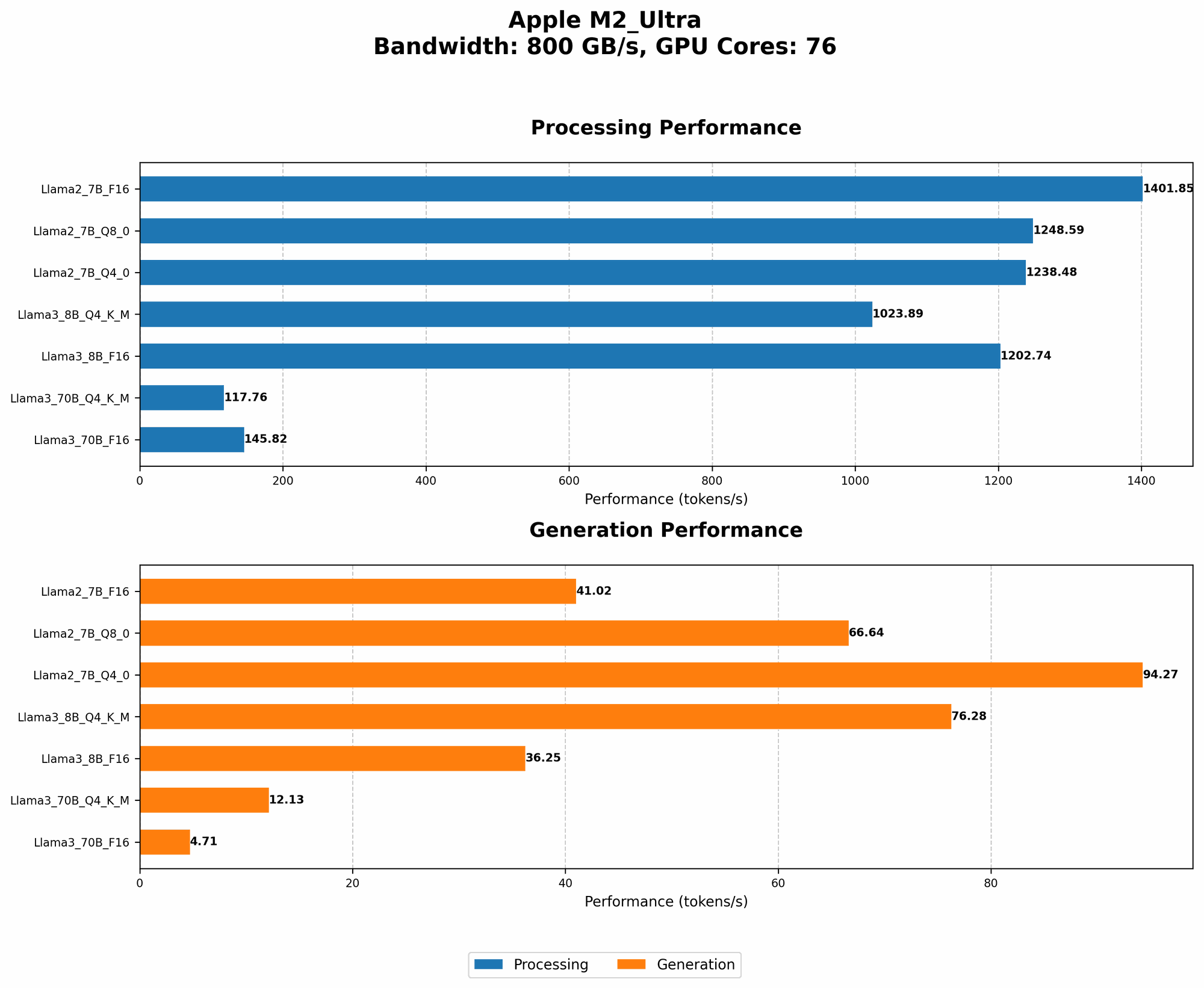
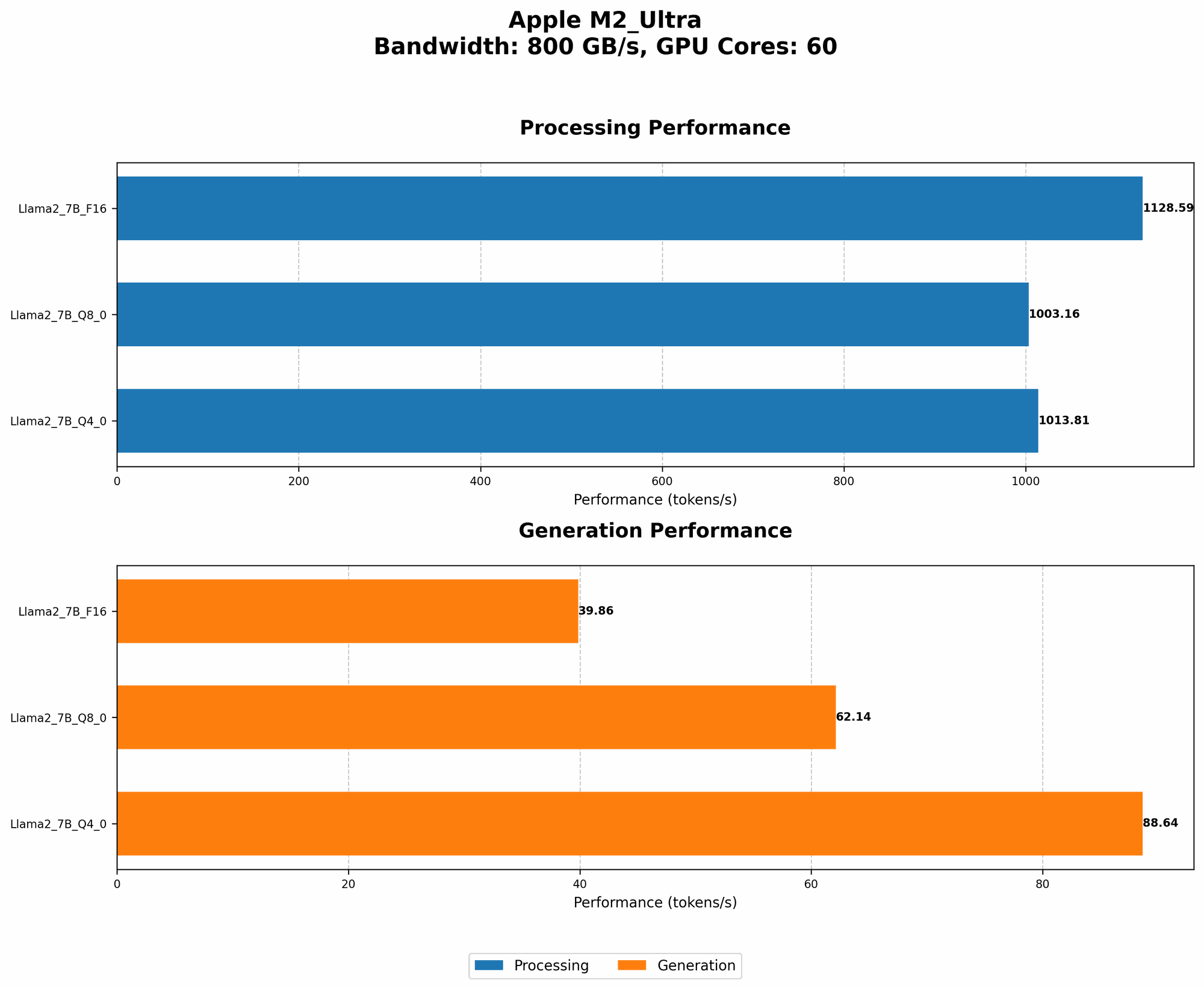
| Apple M2 Ultra Configuration | Llama2 7B Quantization | Token Generation Speed (tokens/second) |
|---|---|---|
| 60 GPU Cores, 800GB/s BW | F16 | 39.86 |
| 60 GPU Cores, 800GB/s BW | Q8_0 | 62.14 |
| 60 GPU Cores, 800GB/s BW | Q4_0 | 88.64 |
| 76 GPU Cores, 800GB/s BW | F16 | 41.02 |
| 76 GPU Cores, 800GB/s BW | Q8_0 | 66.64 |
| 76 GPU Cores, 800GB/s BW | Q4_0 | 94.27 |
Key Observations:
- F16: The Apple M2 Ultra with 60 GPU cores achieves a token generation speed of 39.86 tokens/second, while the model with 76 cores delivers 41.02 tokens/second for F16 quantization.
- Q8_0: This quantization level sees a notable increase in speed: 62.14 tokens/second for the 60-core model and 66.64 tokens/second for the 76-core configuration.
- Q40: The fastest token generation speeds are achieved with Q40 quantization, reaching 88.64 tokens/second with 60 GPU cores and 94.27 tokens/second with 76 cores.
In simpler terms: Imagine you're trying to assemble a puzzle. Each token is a piece, and the speed of assembling that puzzle is measured in "tokens per second." The M2 Ultra with Llama2 7B excels at this puzzle assembly, especially when you use more compressed versions of the Llama2 7B model (Q80 and Q40).
A little fun fact: The current record-holder for the fastest token generation speed with Llama 2 7B is the Nvidia A100, achieving a whopping 1,000+ tokens/second with Q4_0 quantization. However, even with these impressive numbers, the M2 Ultra performs well within the realm of fast and efficient.
Performance Analysis: Model and Device Comparison
Now that we've covered the performance of the M2 Ultra, let's see how it stacks up against other LLMs and devices.
Model and Device Comparison: Apple M2 Ultra vs. Other LLMs
| Apple M2 Ultra Configuration | LLM Model | Token Generation Speed (tokens/second) |
|---|---|---|
| 76 GPU Cores, 800GB/s BW | Llama3 8B F16 | 36.25 |
| 76 GPU Cores, 800GB/s BW | Llama3 8B Q4KM | 76.28 |
| 76 GPU Cores, 800GB/s BW | Llama3 70B F16 | 4.71 |
| 76 GPU Cores, 800GB/s BW | Llama3 70B Q4KM | 12.13 |
Key Observations:
- Llama3 8B: Both F16 and Q4KM (4-bit quantization with kernel masking) techniques are employed. The M2 Ultra with 76 GPU cores manages a token generation speed of 36.25 tokens/second for F16 and 76.28 tokens/second for Q4KM quantization.
- Llama3 70B: The M2 Ultra struggles to handle this larger model. With 76 GPU cores, the token generation speed is 4.71 tokens/second for F16 and 12.13 tokens/second for Q4KM quantization.
In simpler terms: It's like having two different tools, one for hammering nails and the other for driving screws. The M2 Ultra can efficiently work with relatively smaller LLM models like Llama2 7B and Llama3 8B (our hammer and screw driver). Pushing the limits with a larger LLM like Llama3 70B (trying to use a screwdriver on a nail) can be a little challenging and results in a slower pace.
Practical Recommendations: Use Cases and Workarounds
The M2 Ultra, while being a phenomenal computing powerhouse, has limitations when it comes to handling larger LLMs. Let’s explore some practical recommendations for making the most of its capabilities.
Practical Recommendations: Use Cases
- Smaller LLMs: The M2 Ultra shines when working with smaller LLMs like Llama2 7B or Llama3 8B. You can comfortably use it for:
- Text generation: Creating stories, poems, scripts, and articles with a variety of styles and tones.
- Language translation: Translating between multiple languages with a high degree of accuracy.
- Question answering: Retrieving information from a database or document and formulating concise answers.
- Summarization: Condensing lengthy texts into shorter summaries while preserving key information.
- Quantization: Always explore different quantization levels. Q40 and Q80 offer significant speed improvements without sacrificing accuracy.
- Model Pruning: In case of memory or performance constraints, you can experiment with model pruning techniques. These techniques remove unnecessary connections or neurons in the LLM, reducing its size and improving efficiency.
- Hardware Acceleration: Leverage GPU acceleration techniques (like the ones provided by CUDA or Metal) for further performance gains.
- Cloud Solutions: For larger LLMs like Llama3 70B, consider cloud-based solutions like Google Colab or Amazon SageMaker that provide access to powerful GPUs and specialized hardware for faster processing.
Workarounds for Handling Larger LLMs
- Chunking: Break down your text input into smaller chunks, processing them sequentially. This can be particularly helpful when working with longer text inputs or with larger LLMs that exceed the memory capacity of your device.
- Model Compression: Utilize advanced compression techniques, such as Q4KM or even lower bit quantization. These techniques further reduce the model's size and memory footprint, allowing you to run larger models on your M2 Ultra.
- Specialized Libraries: Explore specialized libraries that have been optimized for handling larger LLMs on specific hardware. For example, the "llama.cpp" library is known for its efficiency in running LLMs on CPUs and GPUs.
FAQ
Q: What is the difference between F16 and Q40 quantization? A: Quantization involves representing the numbers in a model with fewer bits. F16 uses 16 bits per number, while Q40 uses only 4 bits. This reduction in bits leads to a smaller model size and potentially faster processing speeds.
Q: What is Llama2 7B and Llama3 70B? A: Llama2 7B and Llama3 70B are large language models developed by Meta and Google, respectively. The "7B" and "70B" refer to the number of parameters in the model, with 7B representing 7 billion and 70B representing 70 billion. The more parameters a model has, generally, the more complex and powerful it is.
Q: What does "token/second" mean? A: A token represents a basic unit of text in a language model. Think of it as a word, punctuation mark, or a special character. Token generation speed, measured in "tokens/second," indicates how many tokens the model can process each second. A higher number means faster processing.
Q: How do I run LLMs on my M2 Ultra? A: You can use tools like "llama.cpp" which is a highly optimized library designed for running LLMs on various devices, including the Apple M2 Ultra. The "llama.cpp" project on Github provides detailed instructions and documentation for setting up and using it.
Q: What are the best quantization techniques for LLMs? A: The best quantization technique depends on the specific model and application. For most scenarios, Q40 and Q80 are good choices as they offer a balance between performance and accuracy. However, you might need to experiment with different methods to find the optimal configuration for your needs.
Keywords:
Apple M2 Ultra, Llama2 7B, Llama3 8B, Llama3 70B, Token Generation Speed, Quantization, F16, Q80, Q40, GPU Cores, Memory Bandwidth, Speed, Performance, LLMs, Large Language Models, Deep Dive, Practical Recommendations, Use Cases, Workarounds,