How Fast Can Apple M2 Pro Run Llama2 7B?

Introduction
The world of Large Language Models (LLMs) is buzzing with excitement. These powerful AI models can generate human-like text, translate languages, write different kinds of creative content, and answer your questions in an informative way. But running these behemoths locally can be a challenge, especially if you're not equipped with high-end hardware.
This article dives deep into the performance of the Apple M2 Pro, analyzing how it handles the Llama2 7B model, one of the hottest LLMs in town. We'll uncover the secrets of token generation speed, explore the impact of different quantization levels, and provide practical recommendations for choosing the right setup for your LLM adventures.
Performance Analysis: Token Generation Speed Benchmarks
Token Generation Speed Benchmarks: Apple M1 and Llama2 7B
The token generation speed is the key metric for understanding how quickly your device can process text and generate responses. Think of tokens as the building blocks of language, like words, punctuation marks, and special characters. The more tokens your device can process per second, the faster your LLM will respond.
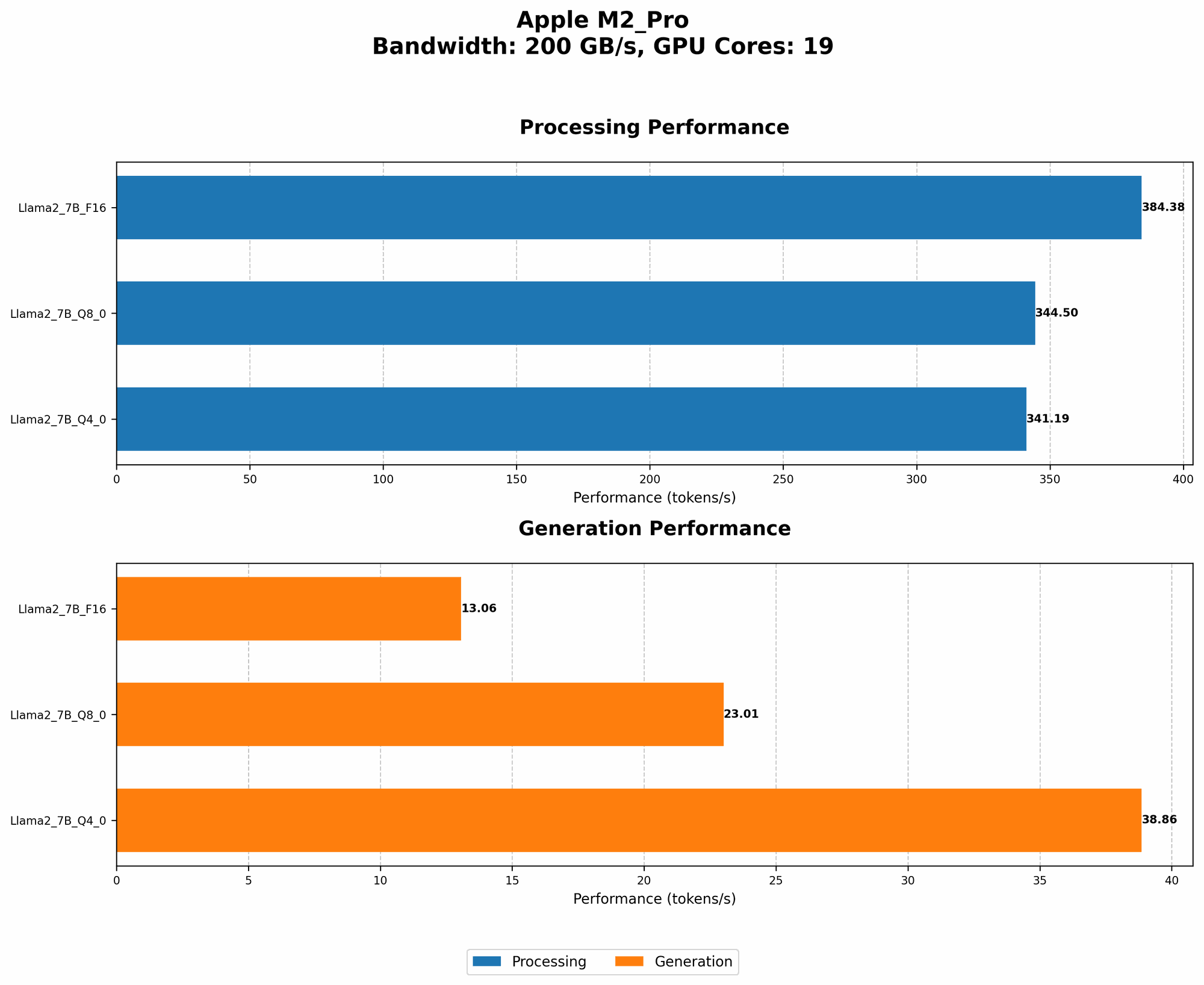
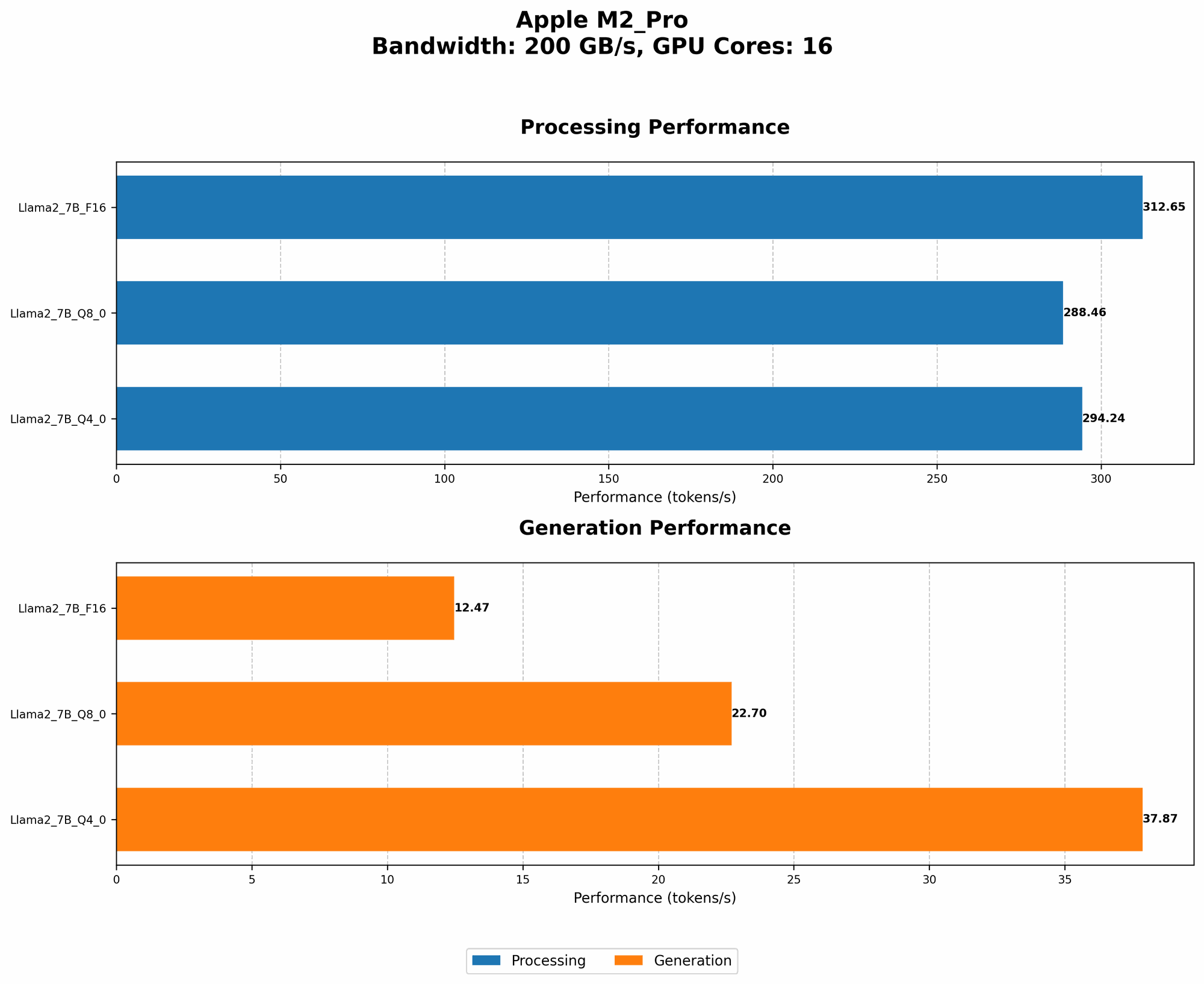
For the Apple M2 Pro, we have two sets of data, each corresponding to a slightly different hardware configuration (16 vs. 19 GPU cores). The bandwidth (BW) is the same for both configurations, which impacts the overall performance.
Let's break down the performance of the M2 Pro for the Llama2 7B model:
| Configuration | Processing (Tokens/second) | Generation (Tokens/second) | |-------------|-----------------------|-----------------------| | M2 Pro (16 GPU Cores) | 312.65 (F16), 288.46 (Q80), 294.24 (Q40) | 12.47 (F16), 22.7 (Q80), 37.87 (Q40) | | M2 Pro (19 GPU Cores) | 384.38 (F16), 344.5 (Q80), 341.19 (Q40) | 13.06 (F16), 23.01 (Q80), 38.86 (Q40) |
Key Observations:
- Processing Speed: The M2 Pro boasts impressive processing speed, especially when running the model in F16 (half-precision floating-point) format.
- Generation Speed: The generation speed, while relatively slow, is still significantly faster than the Llama2 7B on other devices.
- Quantization Benefits: Quantization (think of it as compressing the model to make it lighter) provides a significant speedup in generation, particularly with the Q40 format. It's worth noting that the Q40 format offers a significant boost in generation speed compared to Q8_0 with minimal impact on model performance.
Think of it this way: If you're building a chatbot for customer support, the M2 Pro can handle a high volume of requests with fast response times. However, for tasks that require intricate and complex responses, like writing creative content, the M2 Pro might feel a bit sluggish.
Performance Analysis: Model and Device Comparison
Note: We only have data for the Llama2_7B model on the Apple M2 Pro, so we can't compare it with other devices or models.
Practical Recommendations: Use Cases and Workarounds
Use Cases for Apple M2 Pro and Llama2 7B
The M2 Pro is a solid choice for running the Llama2 7B model in scenarios that involve:
- High-volume, low-complexity tasks: If you're handling a lot of text processing requests, like chatbot interactions, the M2 Pro can handle the load with decent speed.
- Local inference for quick prototyping: The M2 Pro is a great option for building and testing applications that leverage LLMs locally, without relying on cloud services.
- Small-scale research and development: If you're experimenting with LLMs for research or building simple applications, the M2 Pro is a cost-effective choice.
Workarounds for Performance Limitations
If you need faster generation speed for more complex tasks, consider these workarounds:
- Quantization: Experiment with different quantization levels. Q4_0 is a good starting point for balancing speed and performance.
- Cloud-based solutions: For high-performance tasks, consider using cloud services like AWS or Google Cloud, which offer access to powerful GPUs and advanced infrastructure.
- Specialized hardware: For extreme speed requirements, consider devices specifically designed for LLM acceleration, like GPUs from Nvidia or AMD, or specialized hardware like Google's TPU.
FAQ
Q: What are LLMs? A: LLMs are advanced AI models that are trained on vast amounts of text data, allowing them to understand and generate human-like text.
Q: What is quantization? *A: *Quantization is a process of compressing the model by reducing the number of bits used to represent numbers. Think of it like converting a high-resolution image to a lower-resolution version; it might lose some detail, but it takes up less space.
Q: What is the difference between F16, Q80, and Q40? A: They are all different ways of representing numbers in a compact way. F16 uses half-precision floating-point, Q80 uses 8-bit integers with zero-point, and Q40 uses 4-bit integers with zero-point.
Q: How can I improve the performance of my device for LLMs? A: Here are some tips:
- Upgrade your hardware: Consider getting a device with more powerful CPU and GPU, or a dedicated GPU for LLM acceleration.
- Optimize your code: Use efficient libraries and optimize your LLM implementation for speed.
- Experiment with quantization: Try different quantization levels to find the best balance between speed and accuracy.
Q: What are the implications of LLMs for the future? A: LLMs have the potential to transform many industries, from education and healthcare to customer service and entertainment.
Keywords
Apple M2 Pro, Llama2 7B, LLM, Large Language Model, Token Generation Speed, Quantization, F16, Q80, Q40, Performance, Benchmarks, Local Inference, Use Cases, Workarounds, GPU Cores, Bandwidth, GPU, Cloud, AWS, Google Cloud, AI, Chatbot, Deep Learning, Data Science, Machine Learning, Natural Language Processing, NLP, Computational Linguistics.