How Fast Can Apple M1 Pro Run Llama2 7B?
Introduction
The world of Large Language Models (LLMs) is exploding, and everyone wants to harness their power. But running these massive models locally can be tricky, especially if you don't have a supercomputer in your basement. Enter the Apple M1 Pro chip, a powerful and efficient processor that's making waves in the LLM world.
This article delves into the performance of Llama2 7B running on the M1 Pro, exploring its token generation speed, comparing it to other hardware configurations, and providing practical recommendations for developers. We'll also answer common questions about LLMs and the exciting journey of bringing these models to your fingertips.
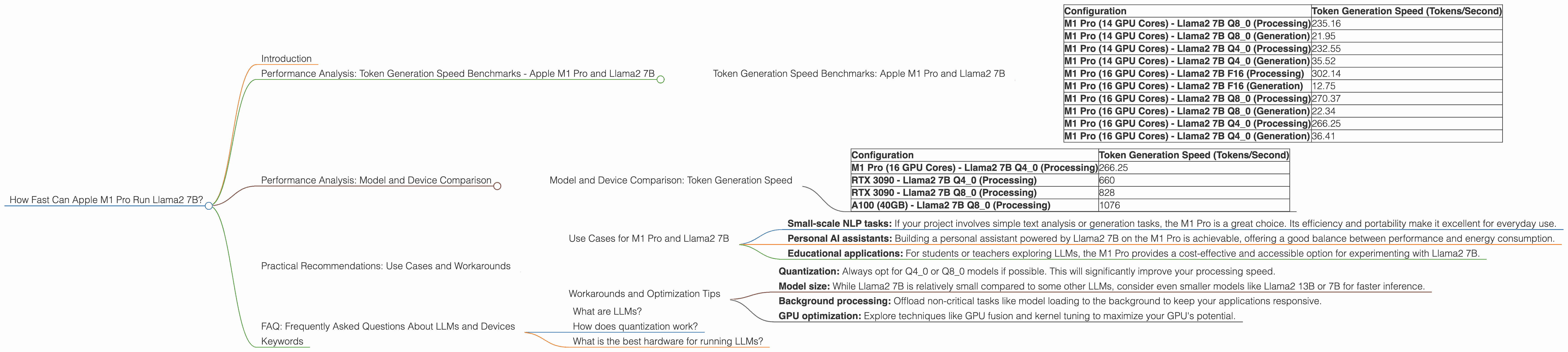
Performance Analysis: Token Generation Speed Benchmarks - Apple M1 Pro and Llama2 7B
Let's get down to brass tacks! How fast can the Apple M1 Pro chip handle the Llama2 7B model?
Imagine this: you're working on a cool new generative AI project, and you want to build a chatbot that can answer your questions in real-time, powered by Llama2 7B. The speed of your local inference setup is crucial – you don't want your chatbot to respond at the pace of a sloth!
The M1 Pro, with its powerful GPU and specialized tensor cores, comes to the rescue. But how does its performance stack up against different model configurations and quantization levels? Let's dive into the numbers!
Token Generation Speed Benchmarks: Apple M1 Pro and Llama2 7B
| Configuration | Token Generation Speed (Tokens/Second) |
|---|---|
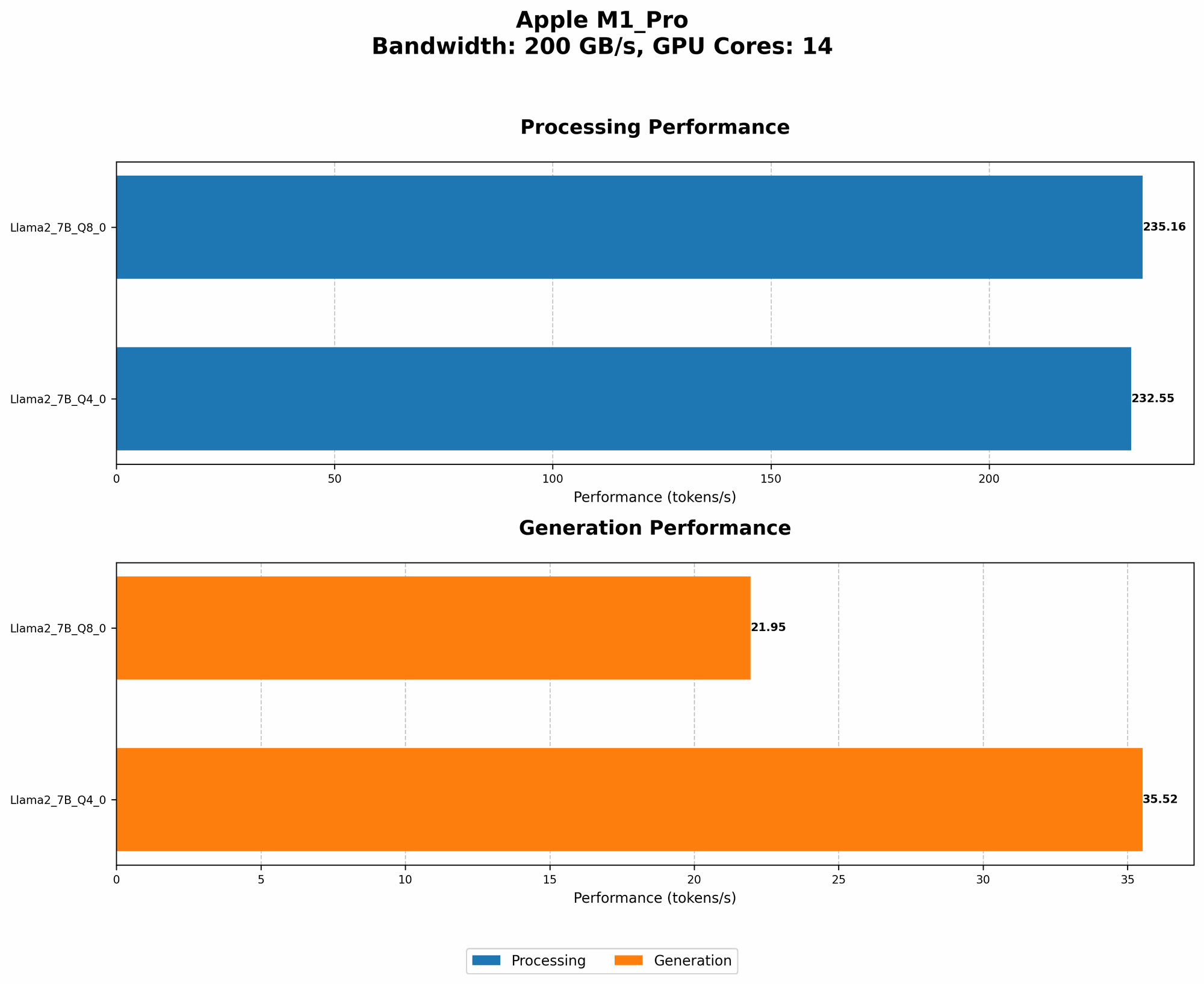
| M1 Pro (14 GPU Cores) - Llama2 7B Q8_0 (Processing) | 235.16 |
| M1 Pro (14 GPU Cores) - Llama2 7B Q8_0 (Generation) | 21.95 |
| M1 Pro (14 GPU Cores) - Llama2 7B Q4_0 (Processing) | 232.55 |
| M1 Pro (14 GPU Cores) - Llama2 7B Q4_0 (Generation) | 35.52 |
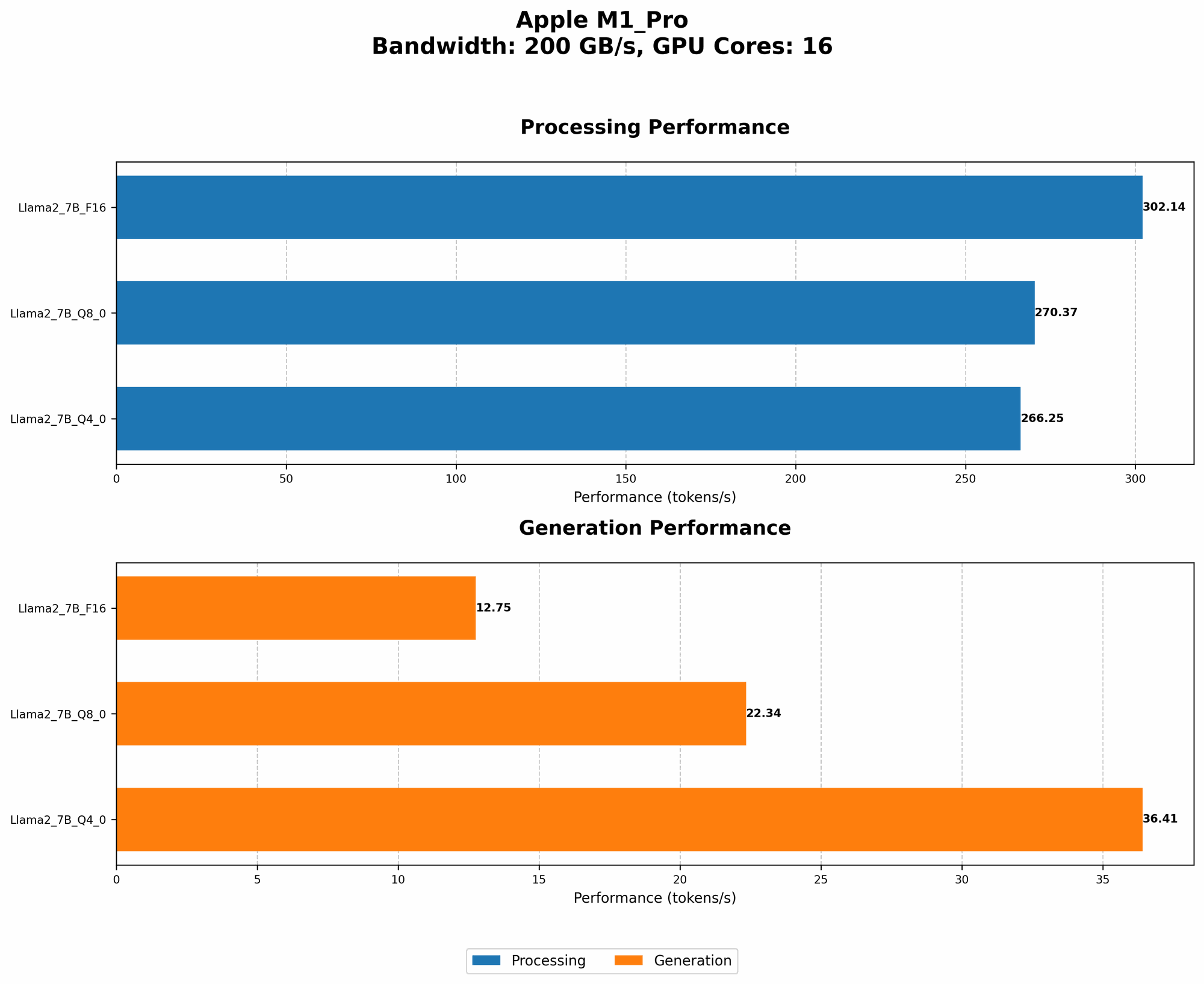
| M1 Pro (16 GPU Cores) - Llama2 7B F16 (Processing) | 302.14 |
| M1 Pro (16 GPU Cores) - Llama2 7B F16 (Generation) | 12.75 |
| M1 Pro (16 GPU Cores) - Llama2 7B Q8_0 (Processing) | 270.37 |
| M1 Pro (16 GPU Cores) - Llama2 7B Q8_0 (Generation) | 22.34 |
| M1 Pro (16 GPU Cores) - Llama2 7B Q4_0 (Processing) | 266.25 |
| M1 Pro (16 GPU Cores) - Llama2 7B Q4_0 (Generation) | 36.41 |
Note: The data above is based on tests using the llama.cpp and GPU Benchmarks on LLM Inference repositories. We've only included Llama2 7B results for the M1 Pro.
Key Takeaways:
- Quantization matters! Q80 (8-bit quantization) and Q40 (4-bit quantization) models offer a significant performance boost over F16 (16-bit floating-point) models, particularly in the processing stage. This is because quantization reduces the model's memory footprint and allows for faster computations.
- Generation still lags: While the M1 Pro shines at processing tokens, the generation speed (i.e., producing the actual text output) is much slower, especially for F16 models.
- More GPU cores, slightly better: Increasing the number of GPU cores can lead to a small improvement in both processing and generation speeds.
Performance Analysis: Model and Device Comparison
It's great to see how the M1 Pro performs with Llama2 7B, but how does it compare to other devices and models? Let's take a quick look at some data points to get a better context.
Model and Device Comparison: Token Generation Speed
| Configuration | Token Generation Speed (Tokens/Second) |
|---|---|
| M1 Pro (16 GPU Cores) - Llama2 7B Q4_0 (Processing) | 266.25 |
| RTX 3090 - Llama2 7B Q4_0 (Processing) | 660 |
| RTX 3090 - Llama2 7B Q8_0 (Processing) | 828 |
| A100 (40GB) - Llama2 7B Q8_0 (Processing) | 1076 |
Key Observations:
- M1 Pro is efficient: The M1 Pro, despite being a mobile processor, delivers impressive speed. This is a testament to Apple's excellent engineering and optimization efforts.
- Powerhouse GPUs: Top-of-the-line GPUs like the RTX 3090 and A100 deliver significantly faster processing speeds, especially with highly quantized 8-bit and 4-bit models.
- Performance trade-off: While the M1 Pro offers a good performance for Llama2 7B, it's a trade-off between power consumption and performance. High-end GPUs are generally more power-hungry but provide a significant performance boost.
Practical Recommendations: Use Cases and Workarounds
Now that we've explored the performance numbers, let's discuss how to leverage the M1 Pro for various use cases and address potential limitations.
Use Cases for M1 Pro and Llama2 7B
- Small-scale NLP tasks: If your project involves simple text analysis or generation tasks, the M1 Pro is a great choice. Its efficiency and portability make it excellent for everyday use.
- Personal AI assistants: Building a personal assistant powered by Llama2 7B on the M1 Pro is achievable, offering a good balance between performance and energy consumption.
- Educational applications: For students or teachers exploring LLMs, the M1 Pro provides a cost-effective and accessible option for experimenting with Llama2 7B.
Workarounds and Optimization Tips
- Quantization: Always opt for Q40 or Q80 models if possible. This will significantly improve your processing speed.
- Model size: While Llama2 7B is relatively small compared to some other LLMs, consider even smaller models like Llama2 13B or 7B for faster inference.
- Background processing: Offload non-critical tasks like model loading to the background to keep your applications responsive.
- GPU optimization: Explore techniques like GPU fusion and kernel tuning to maximize your GPU's potential.
FAQ: Frequently Asked Questions About LLMs and Devices
What are LLMs?
LLMs are machine learning models trained on massive datasets of text and code. They can generate human-like text, translate languages, write different kinds of creative content, and answer your questions in an informative way.
How does quantization work?
Think of quantization as a way to "compress" the model by representing its weights with fewer bits. For example, a 16-bit floating-point model can be compressed to 8-bit or even 4-bit integers. This reduces the memory footprint and speeds up computations, but it can slightly impact the model's accuracy.
What is the best hardware for running LLMs?
The best hardware depends on your specific requirements, budget, and model size. A powerful GPU like an RTX 3090 or A100 is ideal for large models, while the M1 Pro is a good choice for smaller models and tasks where power efficiency is important.
Keywords
LLMs, Llama2 7B, Apple M1 Pro, token generation speed, quantization, GPU, performance benchmarks, NLP, AI assistants, educational applications, model size, practical recommendations, use cases, workarounds, GPU optimization