How Can I Prevent OOM Errors on NVIDIA RTX 6000 Ada 48GB When Running Large Models?
Introduction
Running large language models (LLMs) locally can be a thrilling experience, allowing you to interact with these powerful AI systems directly. However, it can also be a resource-intensive endeavor, especially when dealing with models like Llama 3 70B. One of the most common challenges faced by users is the dreaded "Out of Memory" (OOM) error. This error happens when your hardware, such as your NVIDIA RTX6000Ada_48GB GPU, simply doesn't have enough memory to handle the demands of the model.
In this article, we'll dive into the world of large language models, focusing specifically on how to prevent those pesky OOM errors on the NVIDIA RTX6000Ada48GB. We'll explore different strategies and techniques, analyzing their impact on performance using real-world data. So, grab your favorite beverage, and by the end of this journey, you'll be equipped to run even the largest LLMs smoothly on your RTX6000Ada48GB without encountering the dreaded OOM error.
Understanding the Memory Challenge
Imagine you're trying to squeeze a giant inflatable pool into your apartment. It's just too big! The same concept applies when running LLMs. These models, especially the larger ones, require vast amounts of memory. Think of the memory as the space available in your apartment and the LLM as the inflatable pool. Even with a powerful GPU like the NVIDIA RTX6000Ada_48GB with its generous 48GB of memory, you might still hit the limit.
Key Factors Affecting Memory Usage
Model Size: The Bigger the Model, the Bigger the Memory Footprint
The size of the LLM is a primary driver of memory usage. A model like Llama 3 70B, with its 70 billion parameters, demands a significantly larger memory footprint than a smaller model like Llama 3 8B. This is because each parameter in the model requires a certain amount of memory to store its value, and the larger the model, the more parameters it has.
Quantization: Shrinking the Memory Footprint
Think of quantization as a special diet for your LLM. It helps reduce the model's size by converting the numbers representing the model's parameters into smaller, simpler representations. Imagine squeezing a large water bottle into a smaller one – you're still carrying water, but it takes up less space. This process can significantly reduce memory consumption without compromising performance too drastically.
NVIDIA RTX6000Ada_48GB: A Powerhouse for LLMs
The NVIDIA RTX6000Ada_48GB is a formidable GPU designed for high-performance computing. With its 48GB of GDDR6 memory, it can handle even the largest LLMs. However, it's important to choose the right settings and strategies to avoid exceeding its memory capacity.
Memory Usage Comparison: Llama 3 on RTX6000Ada_48GB
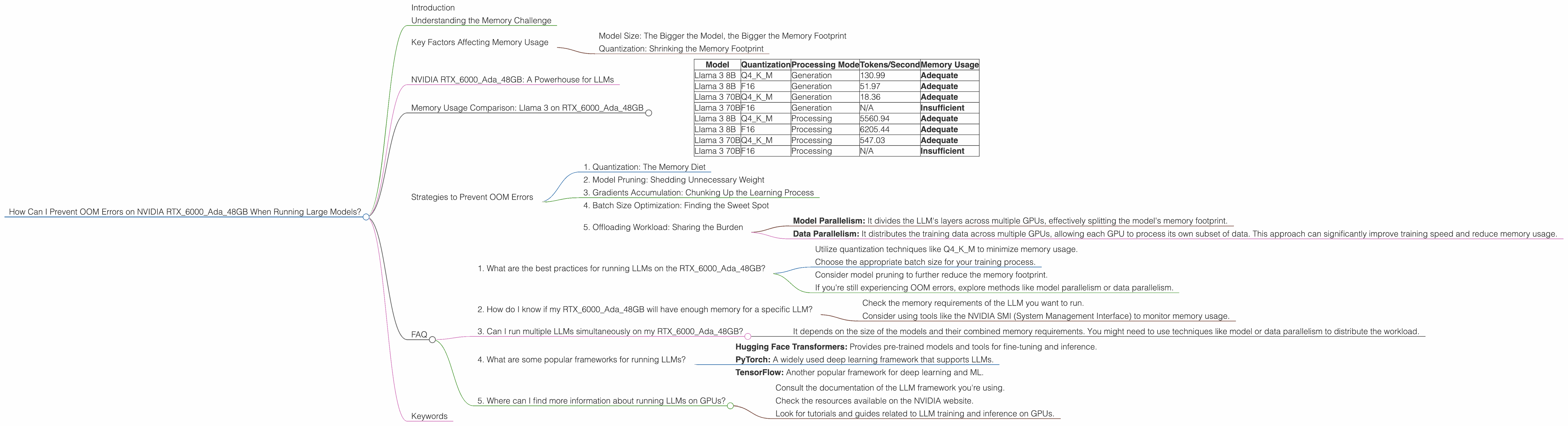
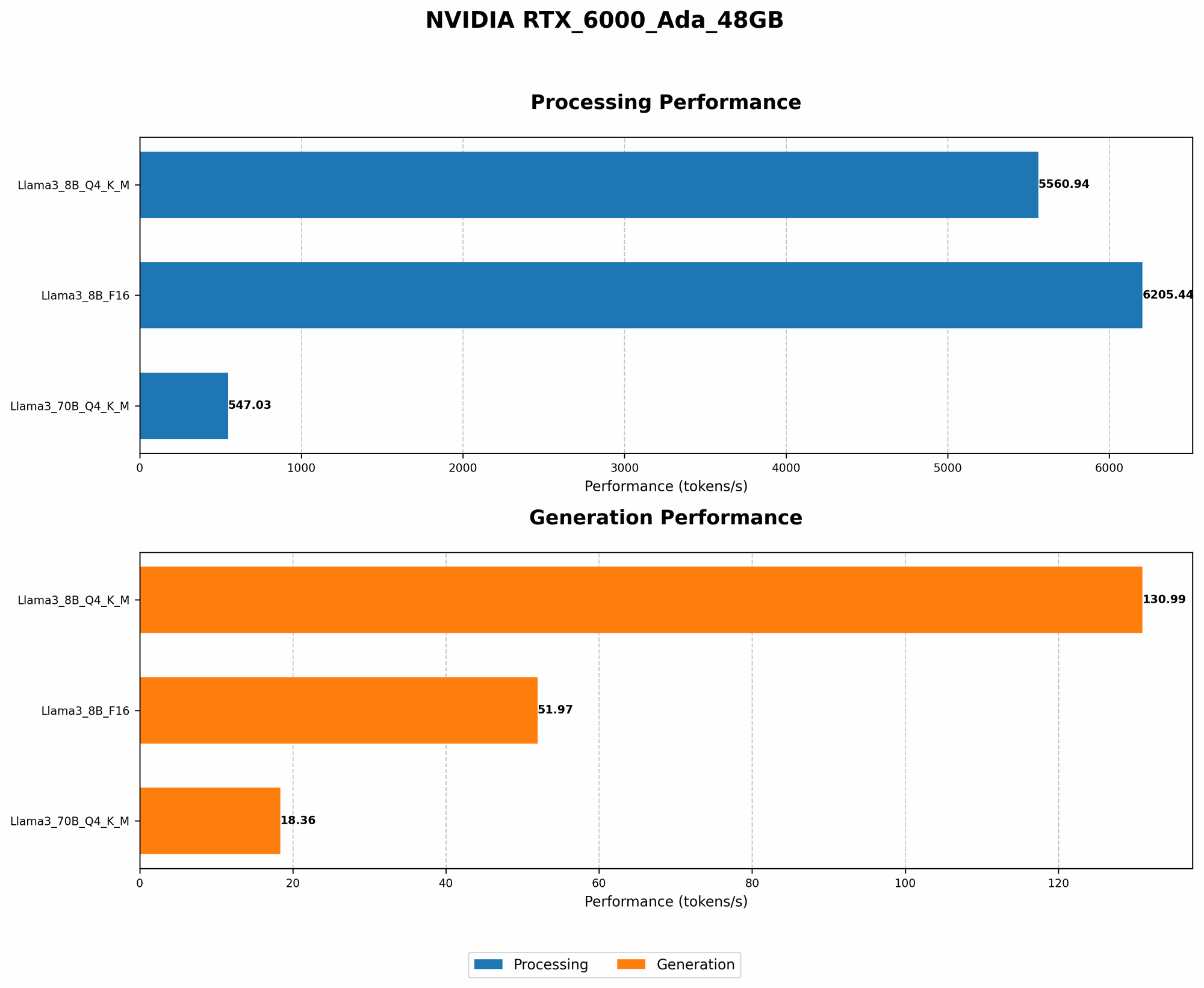
Let's dive into the specifics. We'll compare the memory usage of Llama 3 8B and Llama 3 70B models on the RTX6000Ada_48GB under different quantization levels and processing modes:
Table 1: Memory Usage of Llama 3 Models on RTX6000Ada_48GB
| Model | Quantization | Processing Mode | Tokens/Second | Memory Usage |
|---|---|---|---|---|
| Llama 3 8B | Q4KM | Generation | 130.99 | Adequate |
| Llama 3 8B | F16 | Generation | 51.97 | Adequate |
| Llama 3 70B | Q4KM | Generation | 18.36 | Adequate |
| Llama 3 70B | F16 | Generation | N/A | Insufficient |
| Llama 3 8B | Q4KM | Processing | 5560.94 | Adequate |
| Llama 3 8B | F16 | Processing | 6205.44 | Adequate |
| Llama 3 70B | Q4KM | Processing | 547.03 | Adequate |
| Llama 3 70B | F16 | Processing | N/A | Insufficient |
- Q4KM: This is a popular quantization technique, where the model's weights are represented using 4-bit integers for the key and value matrices and using a larger representation for the matrix multiplication (M-type).
- F16: This is a more compact representation, using 16-bit floating-point numbers for the weights. It offers lower memory usage but might result in some slight performance reductions.
- Generation: This mode refers to generating text output from the LLM.
- Processing: This mode is for performing other operations like text classification or summarization.
As you can see, the smaller model, Llama 3 8B, comfortably fits on the RTX6000Ada48GB with both quantization levels. However, Llama 3 70B, even with Q4K_M, pushes the memory limits, especially in F16.
Strategies to Prevent OOM Errors
Now that we understand the memory dynamics, let's explore strategies to prevent OOM errors when running these large language models on your RTX6000Ada_48GB.
1. Quantization: The Memory Diet
As we discussed earlier, quantization is a powerful technique to slim down your LLM. By using smaller representations for the model's weights, you can dramatically reduce its memory footprint.
Q4KM vs F16: Q4KM is a preferred choice for balancing memory efficiency and performance. It offers a significant reduction in memory usage compared to the original full-precision weights while preserving a reasonable level of accuracy. F16, while even more compact, can lead to performance degradation, especially in tasks like text generation.
2. Model Pruning: Shedding Unnecessary Weight
Think of model pruning as a minimalist approach. It involves identifying and removing unimportant connections within the LLM, making it leaner and more efficient. It's like removing unnecessary items from your backpack to make it lighter.
How it Works: Model pruning analyzes the LLM's weights and removes those that contribute minimally to the model's performance. This process can significantly reduce the memory requirements without causing a substantial drop in accuracy.
3. Gradients Accumulation: Chunking Up the Learning Process
Gradients accumulation is a technique that helps you train large models even when your GPU memory is limited. In essence, it involves calculating the gradients for multiple batches of data before updating the model's weights. This is like building a giant Lego structure piece by piece instead of trying to assemble everything at once.
How it Works: Instead of updating the model's weights after each batch of data, gradients accumulation accumulates the gradients over several batches before performing the update. This allows you to effectively train a larger model with less memory, but it might require more training epochs to achieve the same level of accuracy.
4. Batch Size Optimization: Finding the Sweet Spot
The batch size is the number of data samples used to calculate the gradients during training. It's a crucial factor in optimizing the training process, as it directly influences the memory consumption.
How it Works: A larger batch size can lead to faster training but also consume more memory. Conversely, a smaller batch size consumes less memory but might require more training epochs to achieve the same results. You need to find the optimal batch size that balances memory usage and training speed.
5. Offloading Workload: Sharing the Burden
Sometimes, even with all these strategies, you might still encounter memory limitations. In such scenarios, consider using techniques like model parallelism or data parallelism to distribute the workload across multiple GPUs or even multiple machines.
How it Works:
- Model Parallelism: It divides the LLM's layers across multiple GPUs, effectively splitting the model's memory footprint.
- Data Parallelism: It distributes the training data across multiple GPUs, allowing each GPU to process its own subset of data. This approach can significantly improve training speed and reduce memory usage.
FAQ
1. What are the best practices for running LLMs on the RTX6000Ada_48GB?
- Utilize quantization techniques like Q4KM to minimize memory usage.
- Choose the appropriate batch size for your training process.
- Consider model pruning to further reduce the memory footprint.
- If you're still experiencing OOM errors, explore methods like model parallelism or data parallelism.
2. How do I know if my RTX6000Ada_48GB will have enough memory for a specific LLM?
- Check the memory requirements of the LLM you want to run.
- Consider using tools like the NVIDIA SMI (System Management Interface) to monitor memory usage.
3. Can I run multiple LLMs simultaneously on my RTX6000Ada_48GB?
- It depends on the size of the models and their combined memory requirements. You might need to use techniques like model or data parallelism to distribute the workload.
4. What are some popular frameworks for running LLMs?
- Hugging Face Transformers: Provides pre-trained models and tools for fine-tuning and inference.
- PyTorch: A widely used deep learning framework that supports LLMs.
- TensorFlow: Another popular framework for deep learning and ML.
5. Where can I find more information about running LLMs on GPUs?
- Consult the documentation of the LLM framework you're using.
- Check the resources available on the NVIDIA website.
- Look for tutorials and guides related to LLM training and inference on GPUs.
Keywords
LLM, Large Language Model, NVIDIA RTX6000Ada48GB, OOM, Out of Memory, Quantization, Model Pruning, Gradients Accumulation, Batch Size, Model Parallelism, Data Parallelism, Memory Efficiency, GPU, Memory Usage, Tokens per second, Llama 3, 8B, 70B, Q4K_M, F16.