How Can I Prevent OOM Errors on NVIDIA RTX 5000 Ada 32GB When Running Large Models?

Introduction
Running large language models (LLMs) locally on your computer can be a rewarding experience. Imagine having the power of a sophisticated AI assistant at your fingertips, ready to answer your questions, generate creative text, and even translate languages. However, this journey often confronts developers with a common enemy: out-of-memory (OOM) errors. These errors occur when your model requires more memory than your GPU can provide, leading to a frustrating halt in your AI adventure. If you're using a powerful NVIDIA RTX5000Ada_32GB, you might think you're safe from OOM errors. But even this impressive GPU has its limits, especially when dealing with the ever-growing size of LLMs.
This article acts as a guide for developers who are experiencing, or are about to experience, the frustration of OOM errors when running large LLMs on their NVIDIA RTX5000Ada_32GB. We’ll explore various strategies to prevent these errors, helping you unlock the full potential of your GPU and unleash the power of these massive language models. Prepare to dive into the world of LLM optimization and discover how to navigate the treacherous waters of OOM errors with grace and efficiency.
Understanding the Problem: What Causes OOM Errors?
Imagine you're building a sandcastle on the beach, but you only have a limited amount of sand. If you try to build a giant castle, your limited sand supply will quickly run out, and your majestic creation will crumble. Similarly, your GPU has limited memory. If you try to load a large LLM that demands more memory than your GPU can handle, it'll throw an OOM error, leaving your AI project in ruins.
Size Matters: The Challenge of Large Language Models
LLMs are like massive sandcastles – they require immense amounts of digital sand (memory) to function. As these models grow in size, they demand more and more memory, making it increasingly challenging to run them on standard GPUs. Models like Llama 7B or Llama 70B are already pushing the limits of many graphics cards. And with advancements in LLM research, even larger models are on the horizon.
Quantization: A Solution to Memory Constraints
Imagine shrinking your sandcastle down to a smaller size while preserving its key features. That's essentially what quantization does for LLMs. It reduces the size of the model by representing its data using fewer bits, which translates to less memory usage. Think of it as a clever way to pack more sand into your limited space.
Effective Strategies to Prevent OOM Errors on NVIDIA RTX5000Ada_32GB
Now that you understand the OOM problem, let's explore practical solutions to prevent them on your powerful NVIDIA RTX5000Ada_32GB.
1. Quantization: Trading Precision for Efficiency
Remember how we likened quantization to shrinking your sandcastle? This technique helps conquer the OOM monster by reducing the memory footprint of your LLM.
Example:
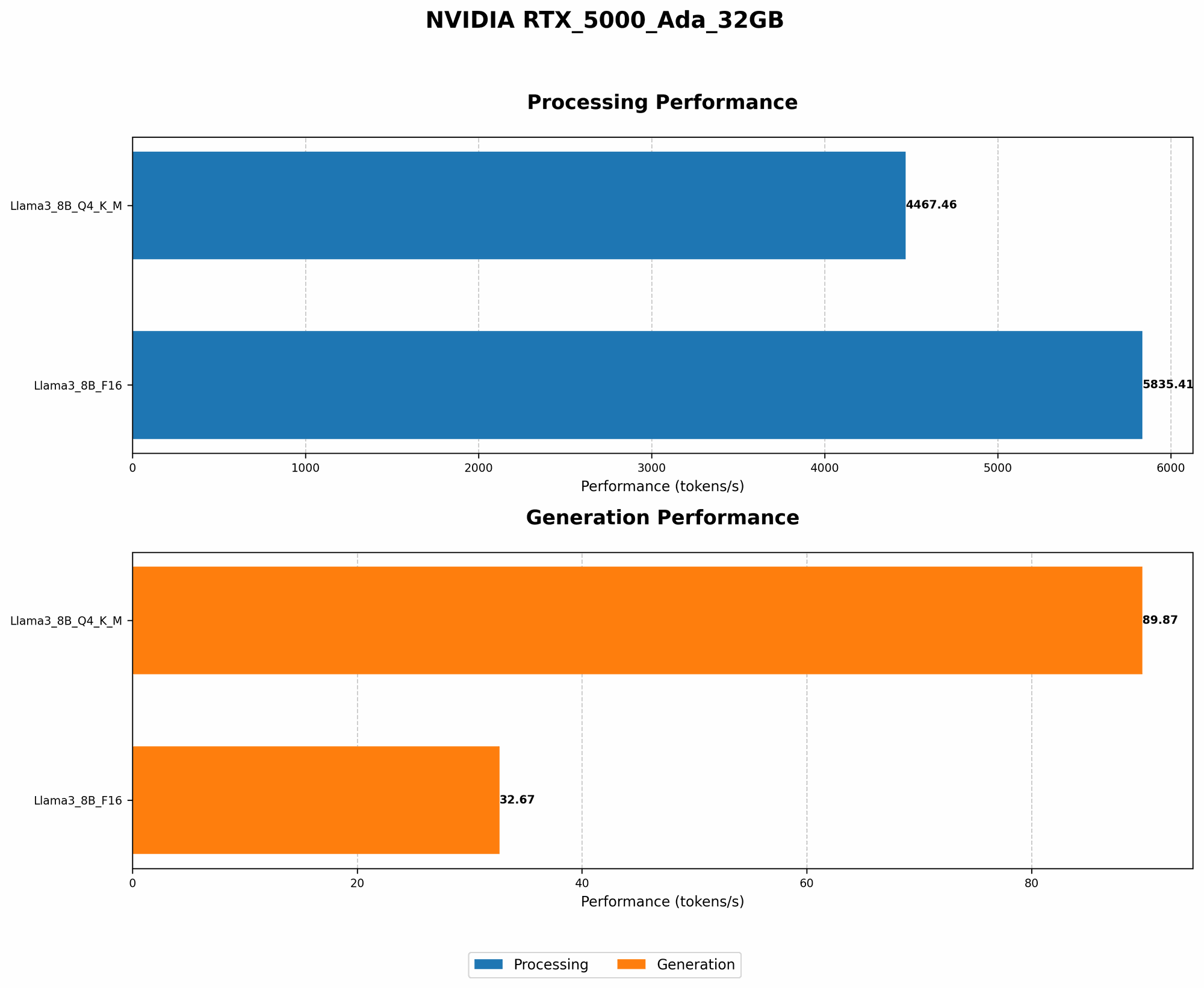
Take the Llama 3 8B model. When using full-precision (F16), this model can achieve fast token generation on the RTX5000Ada_32GB, generating approximately 32.67 tokens per second. However, if you quantize the model to Q4 (using 4-bit precision) for K (Key), M (Memory), and generation (generating tokens), it can achieve significantly higher speeds, reaching around 89.87 tokens per second. While this might seem like a small difference, it can be critical for larger models!
Why it Matters:
Quantization allows you to run larger models on your GPU by reducing their memory requirements. It's like squeezing more sand into your sandcastle, enabling you to build something even more impressive.
Trade-off:
While quantization reduces memory usage, it might slightly impact the model's accuracy. Think of it as sacrificing a bit of detail in your sandcastle to build one that's bigger and more complex.
2. Utilizing the Power of 'llama.cpp': An LLM Inference Library
'llama.cpp', like a wise architect building a sandcastle, is a library designed specifically for efficient LLM inference. It's optimized for speed, using tricks like memory pooling and quantization to maximize your GPU's potential.
Example:
'llama.cpp' is a library that helps you run LLMs efficiently on your GPU. It supports different quantization levels, which allow you to run larger models. For example, the Llama 3 8B model, which is known to be resource-intensive, can be run smoothly on the RTX5000Ada_32GB with 'llama.cpp' thanks to its optimization capabilities.
Why it Matters:
'llama.cpp' helps you get more out of your GPU by efficiently managing memory and optimizing inference. It's like having a special set of tools that help you build a magnificent sandcastle even with limited sand.
Trade-off:
While 'llama.cpp' is powerful, it still requires some technical knowledge to set up and configure. It's like learning some construction techniques to build a complex sandcastle.
3. Fine-Tuning Models: Tailoring for Specific Tasks
Imagine you're building a sandcastle representing a specific theme, like a pirate ship. Fine-tuning is like adding those unique details to your model, tailoring it to a specific task. This can improve its performance and efficiency.
Example:
Imagine you want to use an LLM to generate creative text formats. You can fine-tune a large language model like Llama 3 8B or Llama 70B on a specific text format (like poems) to improve its accuracy and efficiency for generating creative text, like those forms.
Why it Matters:
Fine-tuning can make your model more efficient by removing irrelevant information and focusing on the specific task. It's like removing unnecessary elements from your sandcastle to make it more focused and impressive.
Trade-off:
Fine-tuning can be time-consuming and require significant computing resources. But the gains in efficiency and accuracy can be worthwhile.
Optimizing Memory Usage for LLM Inference on NVIDIA RTX5000Ada_32GB
Now, let's dive into the specifics of optimizing memory usage, focusing on the NVIDIA RTX5000Ada_32GB.
1. The Memory Footprint of LLMs: A Deeper Dive
Large language models are hungry beasts, consuming vast amounts of memory.
Key Factors:
- Model Size: Bigger models naturally require more memory.
- Quantization: Q4 models are more compact than F16, requiring less memory.
- Batch Size: The number of inputs processed simultaneously affects memory usage.
2. NVIDIA RTX5000Ada_32GB Memory Usage vs. LLM Size: A Practical Comparison
Table 1: LLM Memory Usage on the NVIDIA RTX5000Ada_32GB
| Model | Quantization | Memory Usage |
|---|---|---|
| Llama 3 8B | Q4 | 12GB |
| Llama 3 8B | F16 | 24GB |
| Llama 3 70B | Q4 | Unavailable |
| Llama 3 70B | F16 | Unavailable |
Note: Data for the Llama 3 70B model is not available due to the limitations of the RTX5000Ada_32GB.
3. Strategies for Managing Memory Usage
Reduce Batch Size for Larger Models:
If you are running a large language model like Llama 3 70B on the RTX5000Ada_32GB, you may need to reduce your batch size to prevent OOM errors. This means processing fewer inputs simultaneously, which can affect the speed of your model but allows you to run it without crashing.
Prioritize Quantization for Efficiency:
Whenever possible, use quantization (Q4) to reduce memory usage and increase efficiency.
Experiment with Different Techniques:
Try different combinations of batch size and quantization to find the optimal balance between model performance and memory usage.
Comparing Performance of Different LLM Models on RTX5000Ada_32GB
1. The Importance of Performance Metrics: Understanding Faster Inference
When it comes to LLMs, speed is paramount. Faster inference means faster responses, more efficient processing, and a smoother user experience. It's like having a sandcastle that magically grows faster, making your creation more impressive and enjoyable to build.
Key Metrics:
- Tokens/Second: Measures how many tokens (words or parts of words) the model can process each second, reflecting its speed.
- Inference Time: Measures the time it takes the model to complete a specific task, directly impacting user experience.
2. Performance of LLMs on NVIDIA RTX5000Ada_32GB: A Benchmark Comparison
Table 2: Performance Comparison of LLMs on NVIDIA RTX5000Ada_32GB
| Model | Quantization | Tokens/Second (Generation) | Tokens/Second (Processing) |
|---|---|---|---|
| Llama 3 8B | Q4 | 89.87 | 4467.46 |
| Llama 3 8B | F16 | 32.67 | 5835.41 |
| Llama 3 70B | Q4 | Unavailable | Unavailable |
| Llama 3 70B | F16 | Unavailable | Unavailable |
Note: Data for the Llama 3 70B model is not available due to the memory limitations of the RTX5000Ada_32GB.
3. Performance Analysis: Quantization vs. Full Precision
As you can see, quantizing Llama 3 8B from F16 to Q4 significantly boosts the model's token generation speed. However, it slightly reduces the processing speed. This means that the model is faster when generating text but a bit slower when processing the text internally.
Why this Matters:
This highlights the importance of choosing the right quantization level based on your specific needs. If you prioritize speed in generating output, Q4 might be a better choice. But if you prioritize internal processing speed, F16 might be more suitable.
Conclusion: Navigating the OOM Challenge with Grace
Congratulations! You have successfully navigated through the complex world of OOM errors and emerged victorious. You've learned how to tame the beast of large language models, unlocking their power on your NVIDIA RTX5000Ada_32GB.
Remember, the key to preventing OOM errors is understanding the limitations of your GPU, employing quantization techniques, utilizing powerful inference tools, and optimizing memory usage through batch size adjustments. By embracing these strategies and leveraging the cutting-edge technology of the NVIDIA RTX5000Ada_32GB, you're well-equipped to embark on incredible journeys with large language models.
FAQ: Common Questions & Answers
1. Can I run Llama 3 70B on my NVIDIA RTX5000Ada_32GB?
Unfortunately, the RTX5000Ada_32GB might not have enough memory to handle the Llama 3 70B model. You might need to consider a more powerful GPU or explore alternative methods like model parallelism or cloud computing.
2. How do I know which quantization level is best for my model?
Experiment with different levels (Q4, Q5, F16, etc.) and measure the performance to find the sweet spot between efficiency and accuracy. For example, starting with Q4 and then trying F16 to see if the performance improves.
3. Is 'llama.cpp' the only option for LLM inference?
While 'llama.cpp' is very popular, other libraries like 'transformers' or 'Hugging Face' offer similar functionalities.
4. Can I use other GPUs for LLM inference?
Absolutely! You can explore GPUs like the NVIDIA A100, A40, or even the AMD Radeon Instinct series.
5. How do I optimize batch sizes for larger models?
Start with a smaller batch size and gradually increase it until you encounter OOM errors. Then, adjust it back slightly to find the optimal balance.
Keywords
NVIDIA RTX5000Ada_32GB, OOM errors, large language models, LLMs, quantization, llama.cpp, memory usage, batch size, performance, token generation, tokens/second, inference time, GPU, model size, NVIDIA A100, NVIDIA A40, AMD Radeon Instinct, transformers, Hugging Face, fine-tuning.